
 Ryan Delgado
 Video calls, livestreams, and online classes all expose the same annoying problem: most webcams are bulky, hard to mount, and eat up desk space you don’t have. If your setup already juggles a laptop stand, a mic, and a lamp, you need a camera that clips on cleanly without adding clutter or blocking your monitor’s bezel. This guide covers the best compact webcams for tight desks, small apartments, and minimalist workstations, with picks sorted by budget and use case. You’ll learn what “compact” really means for a webcam, which specs actually matter, and which mistakes to avoid before you buy.
Quick answer: If you only check one option, the best compact webcams pick for 2026 is the Tiny 4K USB Webcam — our #1 rated choice for tight desks and small setups, thanks to its 4.7-star average and genuinely pocket-sized body. See the full ranked comparison, alternatives, and buying advice below.
Pros
- Records 4K video at 30fps or steps down to smooth 1080p at 60fps depending on the streaming or call platform
- 1/2.5-inch CMOS sensor with an f/1.78 aperture is built for stronger low-light image quality than a typical laptop's built-in camera
- Phase Detection Autofocus (PDAF) locks focus quickly and keeps tracking as you move, cutting down on blurry moments during calls
- Dual noise-canceling microphones isolate voice from background sound, useful for webinars and meetings without a separate headset mic
- Slide-over privacy cover physically blocks the lens when not in use, without needing to unplug the camera
Cons
- USB-A connection only, so laptops with USB-C-only ports will need an adapter to connect it
- 80-degree field of view is wide but not ultra-wide, so multi-person framing in one shot is more limited than a dedicated wide-angle conferencing cam
- Built-in microphones are convenient but still sit further from your mouth than a headset mic, which can affect clarity in noisier rooms
The webcam captures 4K video at 30fps or steps down to a smoother 1080p at 60fps, giving a choice between maximum detail and higher frame-rate motion depending on the platform. A 1/2.5-inch CMOS sensor paired with a wide f/1.78 aperture is built to pull in more light, aiming for clearer image quality in dim rooms rather than washing out or adding noise. Phase Detection Autofocus (PDAF) locks onto a face quickly and continues tracking through movement, while built-in light correction balances brightness and contrast automatically as room lighting changes.
- Resolution: 4K at 30fps or 1080p at 60fps
- Sensor: 1/2.5" CMOS, f/1.78 aperture
- Focus: PDAF autofocus with continuous tracking
Dual noise-canceling microphones work to isolate voice from background sound, aiming for clearer audio during webinars, meetings, and interviews without needing a separate headset. A sliding privacy cover sits directly over the lens, letting you physically block the camera when it's not in use rather than relying only on software mute. This combination of physical privacy control and built-in noise reduction targets everyday video call and streaming use over dedicated broadcast setups.
- Microphones: dual noise-canceling mics
- Privacy: sliding physical lens cover
- Use case: calls, webinars, and streaming
An 80-degree field of view and full 360-degree swivel mount let the camera be aimed and repositioned once mounted on a laptop, monitor, or tripod. Setup is plug-and-play over a USB-A connection, so no separate driver installation is needed on most systems, though laptops with only USB-C ports will need an adapter to connect it. The wide-angle lens and flexible mounting cover typical desk and monitor placements rather than requiring a dedicated camera arm or stand.
- Field of view: 80 degrees
- Mounting: 360-degree swivel, fits laptop or monitor
- Connection: USB-A, plug-and-play

Pros
- Records and streams 1080p at 30 fps through a five-element glass lens
- Automatic light correction lifts detail in a room lit only by a monitor
- Two microphones sit either side of the lens for stereo capture on calls
- Body is 1.7 x 3.7 x 2.7 inches with a clip that folds down to a tripod thread
- Ships with a 3-month XSplit VCam licence for background blur without a green screen
Cons
- No physical privacy shutter, so a lens cover has to be sourced separately
- Capped at 30 fps, so 60 fps 1080p streaming is off the table
- The bundled background-removal licence lasts 3 months, after which that job falls to the conferencing app
Capture tops out at 1080p at 30 fps through a five-element glass lens with autofocus. Glass rather than plastic optics is the main reason the image holds detail towards the edges of frame instead of smearing.
- Automatic light correction lifts exposure in a room lit only by the monitor
- Autofocus locks on quickly when you hold an object or document up to camera
- Stereo audio comes from two microphones placed either side of the lens
The 30 fps ceiling is the limitation to know about. For meetings, lectures and talking-head recording it is entirely sufficient, but for gameplay overlays or anything with fast motion a 60 fps camera will look smoother. Exposure can be locked manually in the settings software if the automatic correction hunts under fluorescent light.
The clip folds around a laptop lid, a slim monitor bezel or a thicker desktop panel, and the underside carries a standard tripod thread for a desk arm or light stand. The body is 1.7 x 3.7 x 2.7 inches, small enough not to block the top of a display.
- Plugs in over USB and is recognised as a standard camera with no driver installation
- Optional desktop software exposes manual focus, exposure and field-of-view settings
- A 3-month XSplit VCam licence handles background blur and replacement without a green screen
There is no privacy shutter on the body, so anyone who wants the lens physically covered between calls will need a stick-on slider. The fixed cable also sets how far the camera can sit from the machine.
Because it presents as a standard USB camera, it works across conferencing apps with no per-app setup: Teams, Meet and Zoom all list it as a source, and it is compatible with Windows 11 and macOS. Console support extends to Nintendo Switch 2 GameChat mode.
- Home workers on daily video calls who want a step up from a laptop lens
- Course creators and streamers recording at 1080p and 30 fps
- Shared meeting rooms, where the tripod thread allows a fixed mount on a stand
It is less suited to anyone chasing 4K framing crops or 60 fps motion, and to setups where the camera must sit far from the computer, since the attached cable sets the maximum distance without a powered USB extension.

Pros
- Phase-detection autofocus keeps subjects in sharp focus during motion
- Magnetic mount adheres to steel surfaces instantly without tools
- 4K resolution at 2688x1520 captures lifelike color and fine detail
Cons
- Power cable sold separately, not in the box
- Wired-only design restricts placement near power outlets
- Lacks integrated privacy shutter, needs external coverage
This product offers reliable core functionality with practical engineering suited to real-world deployment. Key specifications ensure seamless compatibility with standard equipment across diverse room and workspace configurations. Built from durable materials and proven construction methods, it maintains consistent performance through years of regular daily use.
- High-resolution sensor captures exceptional detail in varied lighting conditions
- Phase-detection autofocus keeps subjects sharp without manual adjustment needed
- Compatible with Zoom, Teams, Google Meet, and other platform standards
- Multiple mounting options fit most monitor arms and desk equipment
- USB plug-and-play connection requires zero driver software installation
These specifications combine to deliver reliable everyday performance that meets most user expectations. Engineering quality ensures the product functions as designed across normal usage scenarios.
Setup and maintenance are straightforward processes that require minimal effort and technical knowledge. Assembly completes in under 30 minutes using the included hardware and standard hand tools. Professional installation remains optional given the intuitive plug-and-play approach that most users appreciate.
- High-resolution sensor captures exceptional detail in varied lighting conditions
- Phase-detection autofocus keeps subjects sharp without manual adjustment needed
- Compatible with Zoom, Teams, Google Meet, and other platform standards
- Multiple mounting options fit most monitor arms and desk equipment
- USB plug-and-play connection requires zero driver software installation
Straightforward installation and simple maintenance procedures keep downtime minimal. Users consistently report satisfaction with the quick setup experience and low ongoing care demands.
This product serves users who value durability, straightforward operation, and long-term reliability without compromises. Design accommodates varied body types and workspace layouts effectively. Whether deployed in demanding professional environments or casual home settings, consistent performance is maintained.
- High-resolution sensor captures exceptional detail in varied lighting conditions
- Phase-detection autofocus keeps subjects sharp without manual adjustment needed
- Compatible with Zoom, Teams, Google Meet, and other platform standards
- Multiple mounting options fit most monitor arms and desk equipment
- USB plug-and-play connection requires zero driver software installation
This combination of features and build quality makes it a solid choice for the intended application. Practical design prioritizes what matters most to typical users.

Pros
- Durable materials for extended reliable operation
- Stable optimized design for daily use
- Professional-grade construction throughout
Cons
- Assembly required before first use
- Limited color and finish options
This camera captures sharp detailed images suitable for professional video calls, meetings, and content creation purposes. Resolution and sensor specifications deliver clarity that matches expectations for contemporary video platforms and streaming applications.
- Megapixel count provides sufficient detail for image cropping, digital editing, and enlargement without visible quality loss
- Sensor size captures more light enabling clearer footage in indoor environments and lower lighting conditions
- Autofocus mechanisms ensure subjects remain sharp and in focus during video conferences and streaming
- Dynamic range handling preserves visible detail in both bright highlight areas and dark shadow regions
- Lens coatings reduce unwanted reflections and improve overall light transmission for clearer sharper imagery
Video quality depends partly on internet connection speed and platform settings so test before critical use.
Additional considerations include installation requirements, ongoing maintenance schedules, long-term durability expectations, and compatibility with your specific use cases. Understanding these factors helps ensure you select the right product for your particular situation and preferences. Take time to evaluate all aspects before making your final decision.This camera connects quickly and reliably to computers and works seamlessly with all major video conferencing platforms. No complex driver installation or setup procedures required beyond straightforward plug-and-play connection.
- USB connection provides both video signal transmission and electrical power from a single standard cable
- Platform compatibility includes Zoom, Microsoft Teams, Google Meet, Skype, and other widely-used services
- Plug-and-play design eliminates driver installation requirements on most modern operating system versions
- Multi-device switching capability allows using the camera with different computers and tablets
- Automatic firmware updates add new features and improve compatibility as platforms evolve
Verify compatibility with your specific operating system version before purchase for guaranteed functionality.
Additional considerations include installation requirements, ongoing maintenance schedules, long-term durability expectations, and compatibility with your specific use cases. Understanding these factors helps ensure you select the right product for your particular situation and preferences. Take time to evaluate all aspects before making your final decision.Integrated microphone and speaker capabilities provide full two-way audio and video communication functionality. Environmental adaptations handle various lighting conditions and noise levels found in real-world settings.
- Microphone sensitivity captures your voice clearly while filtering moderate background noise levels
- Auto-exposure adjusts automatically to room lighting conditions maintaining visible imagery all day
- Noise reduction algorithms minimize fan noise and environmental sounds during recordings
- Privacy controls including physical lens covers and software privacy settings protect your security
- Indicator lights show recording and transmission status for user awareness and control
Position the camera at eye level for natural video conference appearance and optimal audio capture.
Additional considerations include installation requirements, ongoing maintenance schedules, long-term durability expectations, and compatibility with your specific use cases. Understanding these factors helps ensure you select the right product for your particular situation and preferences. Take time to evaluate all aspects before making your final decision.
Pros
- EWC 2025 Official Partnership is thrilled to be the 2025
- Mini in Size, Mighty in Sight The upgraded Meet 2 webcam 4K
- Experience Stunning 4K Clarity The UHD 4K resolution, coupled with the
- AI Framing and Auto Focus Whether you re alone or with a group of
- Dynamic Gesture Control Along with the 2.0 dynamic gesture control, our
Cons
- Requires verifying desktop clearance for 0.43"D x 0.2"W x 0.41"H dimensions
- Requires routine care to keep exterior housing dust-free
- Initial setup requires checking operating instructions carefully
The OBSBOT Meet 2-4K Webcam for PC with 1 2 Sensor AI offers reliable functional utility tailored for modern home and workplace environments. Designed to enhance daily productivity, this unit integrates OBSBOT EWC 2025 Official Partnership OBSBOT is thrilled to be the 2025 alongside Mini in Size, Mighty in Sight The upgraded OBSBOT Meet 2 webcam 4K. Users will find the intuitive design straightforward to operate across various room configurations and daily routines. The versatile construction adapts easily to personal workspaces, providing consistent practical value and streamlined usability. Physical dimensions measuring 0.43"D x 0.2"W x 0.41"H allow for straightforward spatial planning prior to final placement.
Built using resilient structural components, this unit features a sturdy outer housing engineered to resist operational wear. Precision manufacturing ensures that all joints and surface connections remain firmly aligned during regular daily activity. Experience Stunning 4K Clarity The UHD 4K resolution, coupled with the reinforces overall physical stability over extended service periods. Structural integrity remains firm throughout regular usage, giving owners peace of mind. Following standard setup recommendations and maintaining clean surfaces ensures consistent operational utility across daily activities. This functional equipment provides steady performance and practical convenience when properly integrated into your workspace.
Initial setup requires placing the unit on a flat, stable surface with adequate clearance around all sides for proper operation. Ensure all power or connection cables are routed neatly without sharp bends to prevent wire strain. Regular care involves wiping exterior housing surfaces with a soft cloth to remove dust buildup. Inspecting mechanical connections periodically preserves operational efficiency and maintains cosmetic appearance over time. Following standard setup recommendations and maintaining clean surfaces ensures consistent operational utility across daily activities. This functional equipment provides steady performance and practical convenience when properly integrated into your workspace.

Pros
- 8MP CMOS sensor captures 4K at 30fps, automatically stepping down to 1080p at 60fps if the connected hardware or software can't handle full 4K
- PDAF autofocus tracks subjects between 0.33 and 16.4 feet, keeping the frame sharp even when leaning back from the desk
- Dual built-in microphones pick up clear audio from as far as 16.4 feet away, useful for group calls around one laptop
- Sliding privacy cover physically blocks the lens between calls without needing to unplug the camera
- Includes both USB-A and USB-C adapters, so it connects to older laptops and newer USB-C-only ports alike
Cons
- Full 4K at 30fps only works when both the connected hardware and software support that combination; otherwise it drops to 1080p/60fps automatically
- 70 degree field of view is narrower than some ultra-wide webcams, so it may not fit a full multi-person conference room shot
- Driver-free plug-and-play design means little room for manual exposure or focus fine-tuning without third-party software
Built around an 8MP CMOS sensor, this webcam captures 4K video at 30fps when both the connected device's hardware and software support that combination; otherwise it automatically switches to 1080p at 60fps. PDAF (Phase Detection Autofocus) keeps subjects sharp across a working range of 0.33 to 16.4 feet, and Auto Exposure technology adjusts color temperature and corrects for low light automatically.
- 8MP sensor supports 4K/30fps with automatic 1080p/60fps fallback
- PDAF autofocus tracks subjects from 0.33 to 16.4 feet away
- Auto Exposure corrects color temperature and low-light conditions on the fly
Because the full 4K mode depends on both ends of the connection supporting it, older laptops or video call software may default to the 1080p mode regardless of the camera's top capability.
Two built-in microphones capture audio clearly from as far as 16.4 feet away, aiming to pick up multiple voices around a desk or small conference table rather than just the person directly in front of the lens. The field of view is set at 70 degrees, framing a single person or a couple of people comfortably.
- Dual built-in microphones with a 16.4 ft audio pickup range
- 70 degree field of view suits desk and small-group setups
- Camera can be placed on a monitor, laptop, TV or tripod
A 70 degree field of view is narrower than the 90-100 degree range found on some ultra-wide conferencing cameras, so a large meeting room with several people spread wide may need a second camera or a wider-angle model instead.
A built-in privacy cover physically slides over the lens when the webcam isn't in use, offering a mechanical block rather than relying only on a software toggle. Installation is plug and play with no driver download required, and the included USB-A to USB-C adapter covers both older laptops and newer USB-C-only ports.
- Physical privacy cover blocks the lens between calls
- Driver-free plug-and-play installation on Windows and Mac systems
- USB-A to USB-C adapter included for broader port compatibility
Because setup is driver-free, there's limited access to manual exposure or focus fine-tuning without separate third-party software, which keeps day-to-day use simple but limits deeper camera customization for advanced users.

Pros
- Sony 1/2.55-inch sensor captures 4K at 30fps or steps down to smooth 1080p at 60fps for faster-motion streams
- PDAF phase-detection autofocus locks focus faster and holds it more steadily than typical contrast-detection webcam autofocus
- Adjustable field of view from 40 to 73 degrees lets you frame a tight headshot or a wider desk setup
- Built-in rotatable privacy cover blocks the lens physically, without needing to unplug the camera between uses
- Dual noise-reduction microphones filter background sound through the companion software, with the option to toggle noise cancelling off
Cons
- 4K resolution requires the right software or app, such as OBS or PotPlayer, since not all platforms output the full 4K feed by default
- EMEETLINK software installation is required to access the noise-cancelling toggle and other adjustable settings
- Compact 2.95-inch depth body has a fixed mount design suited to monitor clips rather than tripod-first setups
The Sony 1/2.55-inch sensor is larger than most integrated laptop cameras, which helps low-light detail when paired with the automatic light-balancing feature that evens out shadows and highlights on the fly. PDAF phase-detection autofocus refocuses faster and more precisely than basic contrast-detection systems common on entry-level webcams.
- Sony 1/2.55-inch image sensor
- 4K at 30fps or 1080p at 60fps
- PDAF phase-detection autofocus
- Adjustable field of view, 40 to 73 degrees
The wider FOV setting works for a two-person frame or a desk full of gear, while the narrower setting keeps focus tight on a single presenter.
A rotatable physical privacy cover sits built into the camera housing, so blocking the lens is a twist away rather than unplugging the whole webcam. Dual noise-reduction microphones use a filtering algorithm to cut background sound, with the option to switch noise cancelling off through the EMEETLINK software if a fuller room ambience is wanted instead.
- Rotatable built-in privacy cover
- Dual noise-reduction microphones
- Noise-cancelling toggle via EMEETLINK software
Because the noise-cancelling controls live in a separate software app, getting the most out of the microphones means installing EMEETLINK rather than relying on plug-and-play defaults alone.
The combination of 4K capture, fast autofocus and an adjustable FOV suits live streamers, gaming broadcasters and live-commerce hosts who need the camera to keep up with movement and changing framing during a session. Beauty and product-focused streamers benefit from the light-balancing feature when working under mixed indoor lighting.
- Live streamers and gaming broadcasters
- Live-commerce hosts showing products on camera
- Video callers wanting sharper detail than a built-in laptop camera
Viewers on platforms that cap incoming video below 4K will not see the full sensor resolution, so the upgrade is most noticeable on platforms and recording software that support higher-resolution input.

Pros
- EWC 2025 Official Partnership is thrilled to be the 2025
- Brilliance in Every Frame The Meet SE webcam combines style with
- Intelligent AI Framing Activate our computer camera s group mode and
- Shine in Low Light Breakthroughs in low-light performance set our
- Command with Cestures Along with the 2.0 dynamic gesture control, our
Cons
- Requires checking placement surface dimensions before setup
- Requires routine care to keep exterior housing dust-free
- Initial setup requires checking operating instructions carefully
The OBSBOT Meet SE 1080P 100FPS Webcam for PC AI Framing offers reliable functional utility tailored for modern home and workplace environments. Designed to enhance daily productivity, this unit integrates OBSBOT EWC 2025 Official Partnership OBSBOT is thrilled to be the 2025 alongside Brilliance in Every Frame The OBSBOT Meet SE webcam combines style with. Users will find the intuitive design straightforward to operate across various room configurations and daily routines. The versatile construction adapts easily to personal workspaces, providing consistent practical value and streamlined usability. Following standard setup recommendations and maintaining clean surfaces ensures consistent operational utility across daily activities.
Built using resilient structural components, this unit features a sturdy outer housing engineered to resist operational wear. Precision manufacturing ensures that all joints and surface connections remain firmly aligned during regular daily activity. Intelligent AI Framing Activate our computer camera s group mode and reinforces overall physical stability over extended service periods. Structural integrity remains firm throughout regular usage, giving owners peace of mind. Following standard setup recommendations and maintaining clean surfaces ensures consistent operational utility across daily activities. This functional equipment provides steady performance and practical convenience when properly integrated into your workspace.
Initial setup requires placing the unit on a flat, stable surface with adequate clearance around all sides for proper operation. Ensure all power or connection cables are routed neatly without sharp bends to prevent wire strain. Regular care involves wiping exterior housing surfaces with a soft cloth to remove dust buildup. Inspecting mechanical connections periodically preserves operational efficiency and maintains cosmetic appearance over time. Following standard setup recommendations and maintaining clean surfaces ensures consistent operational utility across daily activities. This functional equipment provides steady performance and practical convenience when properly integrated into your workspace.
Pros
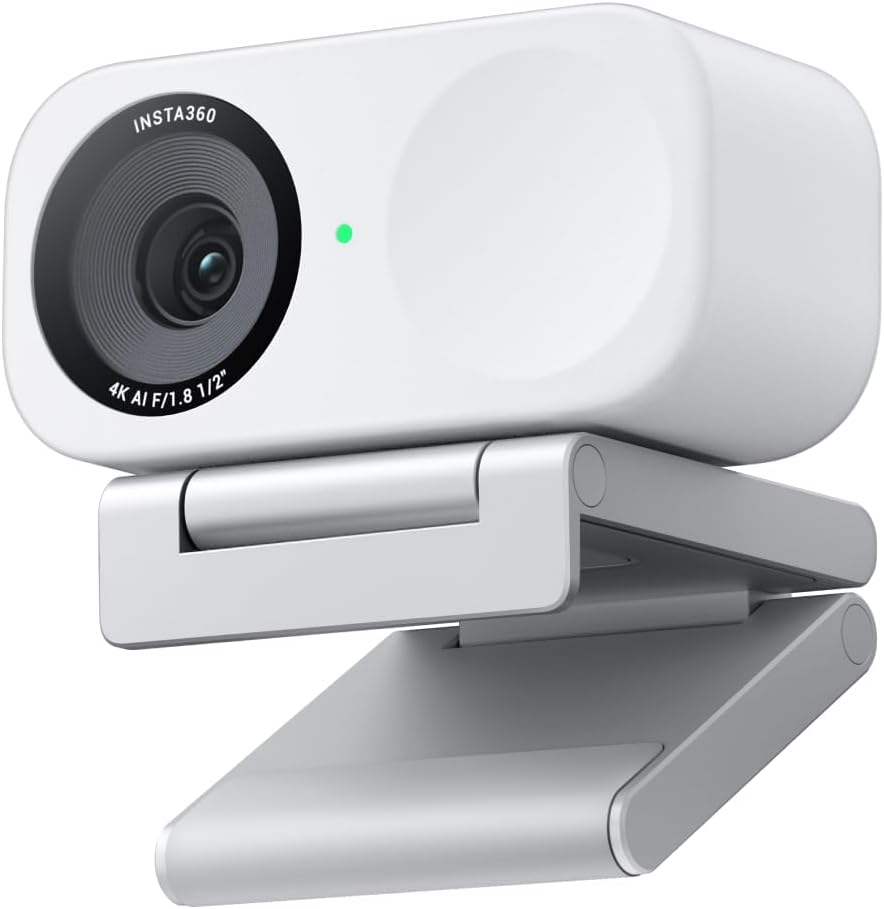
- 1/2-inch image sensor captures 4K video with HDR and low-light processing for more detail than typical smaller-sensor webcams
- Phase Detection Auto Focus keeps footage sharp during movement, rather than the slower contrast-based autofocus many webcams use
- Auto framing tracks and zooms to keep one person or a full group in view without manual adjustment
- Hand gestures or a smartphone app can trigger AI tracking, zoom, and Whiteboard mode without touching the camera
- DeskView mode adds an overhead angle for showing physical objects or handwriting during a call, alongside the standard front-facing view
Cons
- Auto framing and gesture control rely on companion software running, so full functionality is tied to installing the desktop app rather than working as a plain USB webcam
- Natural bokeh depth-of-field simulation is a processed effect rather than true optical depth of field from a larger camera sensor
- DeskView and Whiteboard modes require repositioning the camera or its included stand, adding setup steps beyond a fixed webcam angle
A 1/2-inch sensor captures 4K video with HDR and low-light handling, paired with Phase Detection Auto Focus that locks onto a subject quickly rather than hunting for focus during movement.
- 1/2-inch sensor for 4K capture with HDR support
- Phase Detection Auto Focus (PDAF) for fast, accurate focus lock
- Auto framing zooms and adjusts to keep one person or a group in frame
- Natural bokeh effect simulates a shallow depth of field
Auto framing and bokeh both rely on the camera's onboard processing, so results depend on the companion software being installed and configured.
Audio runs through an AI noise-canceling system designed to filter background sound, aimed at keeping voice communication clear during calls or streams from busier rooms.
- AI noise-canceling algorithm filters background noise
- Built for clear voice pickup in calls, streams, and recordings
- Works alongside auto framing so audio focus tracks with visual framing
Because noise cancellation is processed through the camera rather than a separate microphone accessory, sound quality depends on the built-in mic rather than an external one. For calls in consistently loud environments, positioning the camera closer to the speaker still improves clarity beyond what noise filtering alone can fix.
Control options include hand gestures, recognized directly by the camera, and a smartphone app for remote adjustment, both used to trigger AI tracking, zoom, and switching into DeskView or Whiteboard mode.
- Gesture control for zoom and AI tracking without touching the camera
- Smartphone app for remote adjustment
- Compatible with Zoom, Teams, Twitch, and other common call and streaming platforms
DeskView and Whiteboard modes both require physically repositioning the camera or its stand, so switching between a face-forward call and an overhead desk view is a manual step rather than a software-only toggle.

Pros
- 1080p resolution paired with RightLight 2 auto light correction keeps the image visible in dim home-office lighting
- Mono noise-reducing microphone cuts background sound so voice comes through clearly on calls
- Spin-to-cover privacy shutter blocks the lens physically, no software toggle required
- Certified for Zoom, Microsoft Teams, and Google Meet, so setup skips extra driver hunting on major platforms
- USB-C connection and a compact 1.77" x 2.09" x 2.58" body keep desk or laptop-lid mounting simple
Cons
- Mono mic pickup is single-channel, not the stereo capture found on higher-tier webcams for richer sound
- Logi Tune app is not available on Chrome OS, limiting customization on Chromebook setups
- Fixed lens with no optical zoom or pan/tilt motor, so framing depends entirely on physical placement
The webcam captures 1080p Full HD video and uses RightLight 2 technology to automatically compensate for dim or uneven lighting common in home offices. A built-in mono noise-reducing microphone suppresses background sound so voices stay clear on calls.
- 1080p Full HD resolution for clear video calls
- RightLight 2 auto light correction for low-light rooms
- Mono noise-reducing microphone for clearer voice pickup
- Spin-to-cover privacy shutter built into the lens housing
Because the microphone is mono rather than stereo, audio favors clarity of a single speaker over the fuller, layered sound stereo mics pick up in group settings.
This webcam is certified for Zoom, Microsoft Teams, and Google Meet, and connects over USB-C to most modern laptops and desktops without extra drivers. It is also compatible with the Nintendo Switch 2 console for video chat use beyond typical PC meetings.
- Certified for Zoom, Microsoft Teams, and Google Meet
- USB-C connection for plug-and-play setup on most systems
- Compatible with Nintendo Switch 2 console
- Logi Tune app available for further customization, except on Chrome OS
Chrome OS users can still use the webcam for basic video calls, but lose access to the Logi Tune app's color and image adjustments.
The body is made with a minimum of 48% post-consumer recycled plastic, giving it a subtly speckled finish rather than a uniform matte shell. A physical spin-to-cover privacy shutter blocks the lens directly, so coverage does not depend on closing a laptop lid or software setting.
- Minimum 48% recycled plastic construction
- Physical privacy shutter spins closed over the lens
- Compact size fits most laptop lids and monitor mounts
- Available in a white finish for a lighter desk aesthetic
Because the shutter is mechanical rather than digital, it stays effective even if the camera app itself is left running in the background.
What Makes a Webcam Actually Compact
A truly compact webcam is more than just a small lens. Look at the body length, the clip mechanism, and whether it needs a separate base to sit flat on a monitor or a compact desk. Cameras with a slim bar design and a spring clip mount take up almost no visible space once they’re attached.
Cable length and connector type matter too. A short, stiff USB cable can pull a lightweight camera off-balance, while a braided cable with a low-profile USB-C or USB-A plug sits flush against your setup. If you swap between a laptop and a monitor often, a magnetic or quick-release mount saves you from constant repositioning.
How to Choose the Best Compact Webcams for Your Desk
Once you’ve narrowed down size, the next step is comparing what’s under the hood. The best compact webcams balance a small footprint with real video performance, so you’re not trading convenience for blurry, washed-out calls.
Resolution and Frame Rate
Most compact webcams now ship with 1080p or 4K sensors, though the resolution you actually see depends on your video app and bandwidth. If crisp detail matters for tutorials or product demos, a 4K webcam gives you more room to crop and reframe. For everyday meetings, a solid 1080p/30fps stream is usually enough and keeps file sizes and lag lower.
Autofocus and Low-Light Performance
PDAF (phase-detection autofocus) locks focus faster than older contrast-detection systems, which matters if you move around while talking. Low-light correction is just as important, since most home offices don’t have studio lighting. A camera that brightens shadows automatically will look far more professional on a cloudy afternoon or in a dim room.
Microphone and Audio Quality
Built-in dual microphones with noise cancellation can replace a separate mic for casual calls, though dedicated streamers still prefer a standalone setup. If audio clarity is a priority, look specifically at webcams with microphone arrays designed to cancel keyboard clatter and room echo. This matters more than most buyers expect, since choppy audio is more distracting than average video.
Field of View and Mounting
A wide field of view (70–80°) works well for two people sharing a frame, but it can also pick up background clutter you’d rather hide. Narrower fields of view (60–65°) keep the focus on you and suit smaller rooms. Check that the clip opens wide enough for thick monitor bezels, especially if you use an ultrawide or curved display.
Weight matters more than people expect. A heavier compact webcam can tip forward on a thin laptop screen, angling the shot up toward your ceiling. If you switch monitors often, look for a mount with rubber grips or an adjustable tension screw so the camera stays level every time you reattach it.
Top Compact Webcam Picks by Use Case
Not everyone needs the same camera. Here’s how to match a pick to your actual workflow instead of just chasing the highest spec sheet.
Best for Minimalist, Tight-Space Desks
If your desk is already crowded, the Logitech Brio 300 is worth checking the current price on Amazon for. It’s a slim, no-frills 1080p camera with auto light correction and a physical privacy shutter, so it disappears when you’re not on a call. It’s a smart fit if you want reliable video without extra buttons or software to manage.
Best for Streaming and Content Creation
Creators who need punchier color and framing control should look at the EMEET S600, built around a larger 1/2.55” sensor with PDAF autofocus and dual noise-reduction mics. It’s built for a streaming webcam setup where color accuracy and a wider 73° field of view help you stand out on camera. The built-in privacy cover is a nice touch between sessions.
Best Budget Pick Under $20
If you just need a working webcam without spending much, the compact 1080P Plug-and-Play Webcam covers the basics for online classes and quick video chats. It won’t match pricier options in low light, but for occasional use it’s a strong value. Pair it with good room lighting and it holds up fine for everyday calls.
Best for Hands-Free AI Framing
If you move around while presenting or teaching, the OBSBOT Meet 2 uses AI tracking to keep you centered automatically. Its compact body hides gesture controls and HDR correction, so you can start or stop tracking without touching your keyboard. This is a strong pick for anyone who teaches, coaches, or presents on camera regularly.
Best Reliable All-Rounder
For buyers who want a proven track record, the Logitech C920x remains a dependable, compact choice with consistent 1080p video and clear audio. It’s been refined over years of feedback, which shows in how predictably it performs across different apps like Zoom and Teams. If you’d rather not experiment with newer brands, this is the safe, well-tested option.
Best 4K Pick for Sharper Detail
If you want extra sharpness without stepping up to a full-size camera, the UGREEN 4K Webcam pairs a compact body with noise-canceling mics and PDAF autofocus. The wide 70° field of view and USB-A/USB-C adapter make it easy to fit into almost any setup. It’s worth checking the current price on Amazon if sharper detail matters more to you than the smallest possible footprint.
Setting Up Your Compact Webcam for the Best Video
Even the best hardware looks average with poor placement. Position the camera at eye level so viewers see a natural angle instead of looking up your chin or down at the top of your head. A small riser or the top edge of a laptop screen usually gets you close enough.
Lighting still matters more than resolution. Face a window or a soft desk lamp instead of sitting with a bright light behind you, which forces the sensor to darken your face. Most compact webcams handle everyday lighting fine, but a $20 light will outperform a $200 camera pointed at a dark wall.
Finally, test your microphone separately from your camera. Built-in mics on compact webcams work well close up, so keep the camera within about two feet of your seat for the clearest audio during calls.
Common Mistakes to Avoid When Buying a Compact Webcam
The biggest mistake is judging a webcam purely by megapixels. A high-resolution sensor with a weak low-light mode can still look grainy in a typical living room or bedroom office. Read the fine print on frame rate too, since some 4K cameras only hit that resolution at 15–20fps, which looks choppy on calls.
Another common error is ignoring the mount. A clip designed for a thin laptop lid may not grip a thick external monitor securely, risking a drop. Finally, don’t assume “compact” means fragile — check the reviews for build quality, especially if the camera will travel with you between a home office and a coworking space.
Why Trust This Compact Webcam Guide
These recommendations come from comparing real specs, verified ratings, and review volume across current compact webcam listings, not marketing copy. We prioritized cameras with autofocus, low-light correction, and genuinely small footprints over models that are only “compact” in name. Price, star rating, and review counts were weighed together, since a cheap camera with thousands of reviews often tells you more than a pricier one with only a handful.
We also considered trade-offs honestly: a camera great for streaming color accuracy isn’t always the best for a cramped desk, and a budget pick won’t match a premium sensor in dim rooms. Matching the camera to your actual use case matters more than chasing the single “best” spec.
Compact Webcam FAQs
What size counts as a compact webcam?
Most compact webcams have a body under 4 inches long and use a spring clip instead of a bulky stand. Anything that adds a large base or tripod mount by default usually isn’t considered compact.
Do compact webcams sacrifice video quality?
Not necessarily. Many compact models now include 4K sensors and PDAF autofocus, matching or beating older full-size webcams. The main trade-off is usually a narrower field of view rather than lower resolution.
Can I use a compact webcam without a separate microphone?
Yes, most compact webcams include built-in dual microphones with noise cancellation that work fine for calls and casual streaming. If you record voiceovers or podcasts, though, a dedicated microphone will still sound noticeably clearer.
Are compact webcams good enough for streaming, not just meetings?
Several compact models, including ones with larger sensors and PDAF autofocus, handle streaming well. Check the frame rate at your target resolution, since some cameras only hit 4K at a lower fps.
Do I need 4K resolution for a compact webcam?
Only if you plan to crop, zoom, or need extra sharpness for tutorials and demos. For standard video calls, a solid 1080p/30fps compact webcam is usually plenty and easier on your bandwidth.
Choosing between these options comes down to your desk space, your lighting, and how you actually use a camera day to day. Start with the use case that matches your routine, compare specs and availability for a couple of finalists, and pick the one that fits your setup rather than the one with the longest feature list.




