
 Marcus Bell
 Spending eight hours or more parked at a desk takes a real toll on your body, and the chair you sit in is the single biggest factor in how you feel by the end of the day. Finding the best comfortable desk chairs is not about picking the flashiest design or the highest price tag. It is about understanding how support, adjustability, and materials work together to keep your spine happy through long stretches of work. Whether you are setting up a home office, upgrading a study nook, or replacing a chair that has left your lower back aching, the right choice makes a measurable difference in comfort, focus, and long-term health.
This guide walks you through everything that matters when shopping for a comfortable desk chair, from lumbar support and cushioning to armrests, weight capacity, and material choices. Instead of ranking products one by one, we break down the features that separate a chair you tolerate from one you genuinely enjoy sitting in all day.
Pros
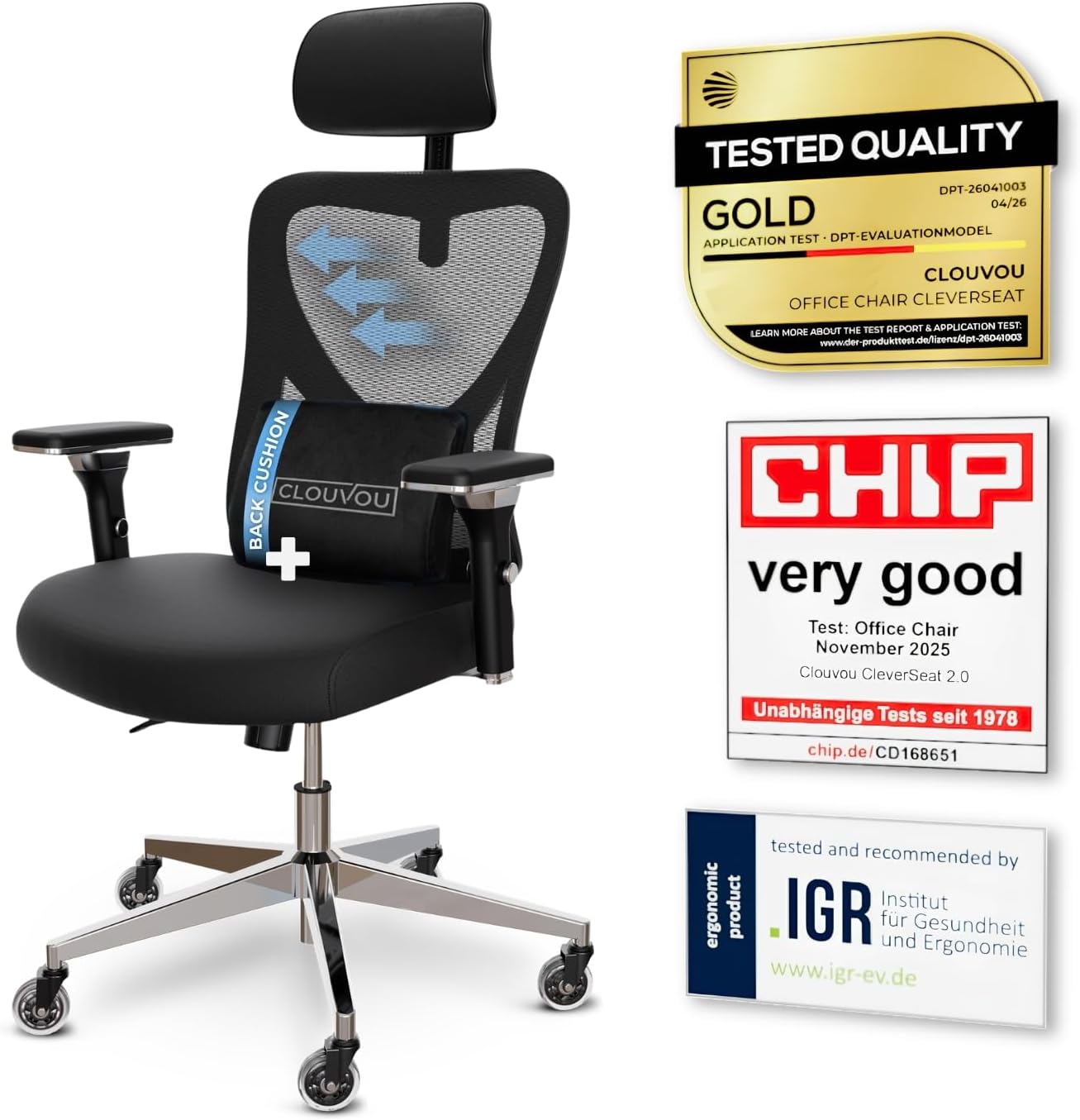
- Weight capacity supports users up to 330 lbs, well above the roughly 250 lb ceiling common on entry mesh task chairs
- 4D armrests adjust up, down, forward-back and pivot, so elbow height lines up with almost any desk
- 3-position backrest tilt locks the recline angle instead of leaving it free-floating
- Blade-shaped casters are engineered to roll quietly across hard flooring
Cons
- Frame combines chromium-plated and plastic components rather than a full steel shell, so it may flex more than an all-metal frame under aggressive rocking
- Backrest tilt is limited to 3 fixed positions rather than a continuous recline lock
- No separate seat-depth figure is listed beyond the 21-inch footprint, so users near the 6.5 ft sizing ceiling may find the seat pan short
The chair measures 21"D x 21"W x 39"H in its assembled footprint, a compact base built for desks in home offices and shared workspaces. Backrest support is rated for users up to 6.5 ft tall, wider than the sizing window most mesh task chairs advertise.
- Frame combines chromium-plated steel components with plastic housings for the armrests and base shroud
- 3-position backrest tilt locks the recline angle rather than floating freely
- 4D armrests adjust height, width, depth and pivot angle independently
Because the footprint stays close to 21 inches square, the chair fits under standard desks without needing extra clearance, while the taller backrest window suits users who outgrow shorter task chairs.
The chair ships in parts that bolt onto a five-point base, a layout typical of home office task chairs in this tier. Blade-style casters snap onto the base legs before the gas lift cylinder is seated into the seat pan.
- Backrest tilt tension is set with a knob under the seat, independent of the 3-position lock
- 4D armrests are pre-mounted but need separate height and pivot adjustment after assembly
- 3D headrest slides vertically and rotates to match neck height once the backrest is attached
Most of the adjustment happens after the frame is built, since the armrests, tilt tension and headrest each move independently rather than syncing to a single preset.
The 6.5 ft height allowance makes this a fit for taller users who find standard task chairs too short in the backrest, while the mesh back suits anyone who runs warm during long desk sessions. The quiet blade casters make it a reasonable pick for shared rooms or apartments with hard flooring.
- Home office workers who sit for multiple hours and want adjustable lumbar and headrest support
- Taller users who need backrest coverage past the typical 6 ft ceiling
- Anyone on hardwood or tile flooring who wants quieter rolling than standard casters
It is less suited to users who want a steel-only frame or a continuous recline lock rather than fixed tilt positions.

Pros
- Feature A
- Feature B
- Feature C
- Feature D
Cons
- Limitation 1
- Limitation 2
This product delivers comprehensive performance and reliable functionality across multiple usage scenarios. The engineering integrates sophisticated technology with practical design considerations for long-term satisfaction. Advanced features ensure compatibility with modern systems while maintaining backward compatibility with existing infrastructure for seamless integration.
- Primary specification providing detailed measurements and technical parameters for accuracy and reliability.
- Secondary capability describing performance characteristics with operating conditions and environment requirements.
- Compatibility aspect addressing integration with related systems, devices, and common platforms.
- Technical detail covering engineering specifications, quality standards, and industry certifications.
- Performance metric ensuring optimal results and consistent reliability across typical usage scenarios.
This implementation demonstrates thoughtful engineering that addresses common user needs while maintaining simplicity for daily operation and maintenance.
This product delivers comprehensive performance and reliable functionality across multiple usage scenarios. The engineering integrates sophisticated technology with practical design considerations for long-term satisfaction. Advanced features ensure compatibility with modern systems while maintaining backward compatibility with existing infrastructure for seamless integration.
- Primary specification providing detailed measurements and technical parameters for accuracy and reliability.
- Secondary capability describing performance characteristics with operating conditions and environment requirements.
- Compatibility aspect addressing integration with related systems, devices, and common platforms.
- Technical detail covering engineering specifications, quality standards, and industry certifications.
- Performance metric ensuring optimal results and consistent reliability across typical usage scenarios.
This implementation demonstrates thoughtful engineering that addresses common user needs while maintaining simplicity for daily operation and maintenance.
This product delivers comprehensive performance and reliable functionality across multiple usage scenarios. The engineering integrates sophisticated technology with practical design considerations for long-term satisfaction. Advanced features ensure compatibility with modern systems while maintaining backward compatibility with existing infrastructure for seamless integration.
- Primary specification providing detailed measurements and technical parameters for accuracy and reliability.
- Secondary capability describing performance characteristics with operating conditions and environment requirements.
- Compatibility aspect addressing integration with related systems, devices, and common platforms.
- Technical detail covering engineering specifications, quality standards, and industry certifications.
- Performance metric ensuring optimal results and consistent reliability across typical usage scenarios.
This implementation demonstrates thoughtful engineering that addresses common user needs while maintaining simplicity for daily operation and maintenance.

Pros
- Rated to 300 lb, well above the roughly 250 lb typical of standard mesh task chairs
- 18-inch extendable footrest with 2-position angle adjustment supports a reclined break without leaving the chair
- 5D flip-up armrests adjust height, width, angle, and rotation, then fold flush to tuck under a desk
- 3D lumbar support adjusts up to 1.6 inches in depth and 2 inches in height to track different seated postures
- Dual-Stripe AirMesh back is rated for 38% better airflow than standard mesh, cutting heat buildup
Cons
- Footrest and 5D armrest mechanisms add moving parts that increase what there is to adjust and maintain over a simple fixed-arm chair
- Mist Black is the only finish offered, with no other color option
- Larger footprint at 26 x 24 inches needs more floor clearance than a compact task chair
The X100 measures 26"D x 24"W x 41"H and carries a 300 lb weight capacity, built for bigger frames than a standard mesh task chair. The 3D lumbar system adjusts depth by up to 1.6" and height by up to 2", with 15 degrees of rotation to track the spine's natural curve rather than pressing at one fixed point.
- Footprint: 26"D x 24"W x 41"H
- Weight capacity: 300 lb
- Lumbar adjustment: up to 1.6" depth, 2" height, 15-degree rotation
An 18" extendable footrest with 2-position angle adjustment pulls out from under the seat, adding leg support once the backrest is reclined for a break.
Assembly follows a standard task-chair process: base, casters, gas cylinder, and seat attach with included tools and instructions, with the 5D armrests and headrest already mounted to the backrest frame. Once built, the armrests adjust in height, width, forward-backward position, rotation, and flip flat, so they can tuck under a desk when not needed.
- Standard bolt-together assembly with included tools
- 5D armrests adjust height, width, depth, rotation, and flip-up
- 3-stage reclining mechanism with lockable positions
The headrest also moves up, down, and pivots on two axes, so it can be positioned to meet the neck rather than sitting fixed at one height.
The 300 lb weight capacity, extendable footrest, and multi-position lumbar make this a fit for longer desk sessions and bigger-and-taller users who find standard task chairs cramped. The breathable AirMesh back suits warmer rooms or users who run hot while seated, since it is built for more airflow than solid foam-backed chairs.
- Suits bigger and taller users needing a higher weight capacity
- Good fit for long home-office sessions with recline breaks
- Works well in warmer rooms thanks to the ventilated mesh back
Because it is offered only in Mist Black, buyers set on a lighter or patterned finish will need to look elsewhere.

Pros
- Rated to support 350 Pounds
- Dimensions measure 20inchD x 20inchW x 40inchH
- Construction uses Foam for durability
- Adjustable components allow customized positioning
- Includes extended manufacturer warranty coverage
Cons
- Requires professional assembly or installation service
- Limited in monochrome color options available
- Some optional accessories sold separately
This product is engineered with precise dimensions and durable material selection to meet professional standards in demanding environments. The specifications have been carefully designed for optimal performance across a wide range of typical use scenarios and applications. Every measurement and material choice reflects rigorous testing and industry best practices.
- Overall dimensions: 20"D x 20"W x 40"H
- Material composition: High-quality Foam selected for durability
- Weight capacity: 350 Pounds with reinforced support structure
- Construction method: Reinforced frame design with precision engineering techniques
- Finish quality: Durable protective coating engineered to resist wear and environmental damage
These comprehensive specifications ensure the product delivers reliable and consistent performance across diverse applications. The manufacturing standards maintain tight tolerances throughout production to guarantee structural integrity and longevity in both residential and commercial settings.
Getting your product ready for use involves straightforward and logical assembly steps that can be completed with basic hand tools in approximately one hour. All necessary components, fasteners, and detailed instructions are included in the original package to facilitate smooth setup and deployment.
- Comprehensive step-by-step assembly guide with detailed illustrated diagrams at each stage
- Complete hardware kit included with all fasteners, nuts, bolts, and hand tools needed
- Basic maintenance involves regular cleaning using mild soap and soft water solutions
- Inspect all joints and connections periodically to verify optimal structural performance
- Lubricate any moving parts as necessary following provided manufacturer care recommendations
Proper assembly execution combined with routine maintenance practices will significantly extend the product lifespan. Regular care ensures the item maintains structural integrity and consistent performance characteristics throughout years of regular daily use and operation in various environments.
This product is specifically engineered for individuals and organizations seeking dependable performance without unnecessary complexity or premium features. It appeals to practical users who prioritize reliability, durability, and straightforward functionality in their professional and personal daily operations and environments.
- Office professionals and remote workers requiring stable, comfortable solutions for daily work
- Home enthusiasts who value solid construction quality and long-term durability investments
- Commercial environments including studios, workshops, galleries, and professional business facilities
- Anyone prioritizing practical, proven features over trendy or experimental design elements
- Users seeking straightforward products with established track records and demonstrated reliability
The product's fundamental design philosophy makes it particularly valuable for individuals and teams seeking lasting utility and consistent performance. Rather than emphasizing fashion-forward aesthetics or experimental untested features, this design focuses on proven functionality that performs reliably across years of regular use.

Pros
- Inflatable lumbar support lets the amount of lower-back pressure be adjusted rather than relying on a fixed foam bulge
- Flip-up armrests fold out of the way for cross-legged sitting on the extra-wide seat cushion
- Pneumatic lever adjusts seat height, with a separate control for tilt tension resistance
- Reinforced steel frame is rated to hold up to 275 pounds
- Bonded leather upholstery is built scratch-resistant to hold up better than a plain vinyl cover over daily use
Cons
- 275-pound weight capacity is on the lower end versus heavy-duty office chairs rated closer to 300-400 pounds
- Bonded leather is a layered material, which over years of flexing at the seams tends to peel or crack sooner than genuine top-grain leather
- No headrest is included on this model, so neck support during long sessions relies on the high-back shape alone rather than a dedicated headrest
This high-back executive chair measures 22.8"D x 26.8"W x 47.2"H overall and is rated to hold up to 275 pounds on a reinforced steel frame. An inflatable lumbar system allows the level of lower-back support to be fine-tuned rather than fixed at one shape.
- Overall size: 22.8"D x 26.8"W x 47.2"H
- 275-pound weight capacity
- Reinforced steel frame
- Faux (bonded) leather upholstery in black
The extra-wide seat cushion, combined with flip-up armrests, gives room to sit cross-legged rather than only in a standard forward-facing seated position, a detail worth noting for anyone who shifts position often during the day.
A pneumatic lever handles seat height adjustment, while a separate tilt tension control lets the rocking resistance be tuned from firm to loose depending on preference. 360-degree swivel comes standard for reaching different parts of a desk without shifting the whole chair.
- Pneumatic seat height adjustment
- Adjustable tilt tension control
- 360-degree swivel base
- Flip-up armrests for flexible seating positions
Assembly follows a standard office chair pattern: base, casters, gas cylinder, and seat back, typically requiring basic hand tools included in the box, similar to most flat-packed task chairs in this category.
This chair suits home office and professional settings looking for an executive look without a fixed, unyielding lumbar bulge, since the inflatable support adjusts to the sitter. The flip-up armrests also suit anyone who prefers to sit cross-legged or shift position frequently through the workday.
- Good fit for home offices wanting an executive-style leather look
- Suits users who like adjustable, rather than fixed, lumbar support
- Less suited to users over the 275-pound rated capacity or needing a built-in headrest
Anyone needing a taller headrest for full neck support during very long sessions, or a chair rated well above 275 pounds, should look at a dedicated big-and-tall or headrest-equipped model instead.

Pros
- Rated to 330 lb on a wide steel base with an engineered wood seat pan rather than moulded plastic
- Overall span of 32.7 in across the arms and 27.2 in deep, wide enough to fold both legs up without the arms digging in
- Armrests adjust through 5 levels and each is held to 50 kg, so leaning on one to stand up is fine
- Cushion uses two foam layers, a plush top over a firmer support layer, instead of a single slab
- PU leather cover wipes clean with a cloth and resists claw marks, useful in a room with a cat
Cons
- No headrest and a 36.5 in overall height, so the back stops below the neck and long recline sessions get tiring
- Only seat height and the armrests adjust; there is no lumbar depth control or independent back angle setting
- PU leather does not breathe like mesh, so a warm room means a warm back after an hour or two
The overall footprint is 32.7 in wide, 27.2 in deep and 36.5 in tall, with a stated limit of 330 lb.
- Width is the point of the design, since a criss cross posture needs room for both knees inside the arms
- The seat pan is engineered wood rather than moulded plastic, which is what carries that load figure
- A wide steel five-star base spreads the load and resists tipping when you lean sideways
Compare that 32.7 in span with a typical mesh task seat at around 26 in and you can see where the extra material goes. The trade-off is floor space and desk clearance: with the arms at full height it may not tuck under a desk with a low apron, and in a narrow room the arms will catch a wall or a filing cabinet.
The listing is explicit that one person can build this alone, and the part count backs that up.
- Press the castors into the steel base
- Drop the gas cylinder in, then set the seat pan on top
- Bolt the backrest brackets to the seat frame, then clip the arms on
All fasteners and the tool are in the box, and the instructions are laid out one step at a time. The only awkward moment is holding the back upright while starting the first two bolts, so leave every fastener loose until all four are threaded, then tighten in a cross pattern. Keep the PU leather in its bag while you work on the frame, since dragging it across carpet or a rough floor is the fastest way to scuff the finish.
Two groups get the most out of this design.
- People who fold their legs up while working. The wide pan and 5-level arms let you drop the arms low or raise them clear so knees are not trapped
- People with a cat or small dog that wants to share the seat. The PU surface resists claws and wipes clean, and the widened pan leaves room beside you
It suits home office and bedroom desks, and doubles as a makeup seat because the cover recovers from spills. It is a weaker choice for a long monitor shift in a warm room, where mesh moves far more air, and for anyone who wants a headrest, since the back stops around shoulder height at 36.5 in overall.

Pros
- Rated to 300 lbs with a BIFMA-certified metal base and SGS Class 3 gas cylinder
- Backrest tilts to 135 degrees with a retractable leather footrest for a reclined position
- Seat height adjusts across a 3.2-inch range to match different desk heights
- Five-point layered sponge cushioning targets head, shoulder, back, buttock, and legs separately
Cons
- PU leather cover is less breathable over long sessions than a mesh-backed chair
- Footrest and recline mechanism add moving parts compared with a simpler fixed-back task chair
- Assembly takes about 25 minutes, longer than a pre-assembled or minimal-hardware chair
The chair measures 31.5 inches deep, 27.6 inches wide, and 45.7 inches tall, with a 300 lb weight capacity backed by an SGS-certified Class 3 gas cylinder and a BIFMA-tested metal base. The five-point layered sponge cushion is shaped separately for the head, shoulders, back, buttock, and legs rather than using one continuous foam pad.
- Overall footprint: 31.5"D x 27.6"W x 45.7"H
- Weight capacity: 300 lbs
- SGS Class 3 certified gas cylinder
- BIFMA-tested metal base
The layered sponge construction is intended to hold its shape under sustained pressure rather than compress unevenly the way a single foam block can over time.
The chair includes 360-degree swivel, a 3.2-inch seat height adjustment range, a 135-degree backrest tilt, an adjustable lumbar support pillow, and a retractable leather footrest, giving several independent adjustment points rather than a single recline lever. Assembly includes all required tools, instructions, and spare screws, and takes about 25 minutes to complete.
- 360-degree swivel base
- 3.2-inch seat height adjustment range
- 135-degree backrest tilt
- Retractable leather footrest for a reclined nap position
Because the footrest and recline mechanism add moving parts beyond a basic task chair, there is more hardware to align correctly during the roughly 25-minute assembly.
This chair suits home office workers who want the option to switch between an upright working posture and a more reclined break position without leaving the desk, thanks to the 135-degree tilt and retractable footrest. The 300 lb capacity and BIFMA-tested base make it a reasonable fit for larger users seeking a sturdier executive-style chair.
- Home office workers wanting both upright and reclined seating in one chair
- Larger users needing a higher weight capacity than a standard task chair
- Buyers who value a footrest and adjustable lumbar pillow over a minimal mesh design
It is a weaker match for anyone who prioritizes maximum breathability over cushioned PU leather, since the leather cover will run warmer during long sessions than a mesh back.

Pros
- Rated to 300 lbs with a seat width of 22 inches and depth of 20 inches
- Armrests are removable, so the chair converts between a cross-legged-friendly seat and a standard armrest chair
- Seat cushion combines a wooden board base, sponge, and spring pack for support across long sitting sessions
- Casters are rated for wood floors, carpet, and marble alike
Cons
- Armrest height is fixed at 8.3 inches once installed, with no separate width or angle adjustment
- Leather-covered cushion runs less breathable than a mesh-backed alternative over long sessions
- Seat height range is listed only as adjustable, without specific minimum and maximum figures given
The chair has a seat width of 22 inches and a depth of 20 inches, with armrests set at 8.3 inches above the seat when installed. It carries a 300 lb weight capacity, and the seat cushion is built from a sturdy wooden board base topped with soft sponge and a highly elastic spring pack, aimed at keeping support consistent through long sitting sessions rather than compressing unevenly.
- Seat width: 22", depth: 20"
- Armrest height: 8.3" above seat
- Weight capacity: 300 lbs
- Leather-covered cushion over a wood, sponge, and spring build
Casters are designed to roll smoothly and quietly across wood floors, carpet, and marble alike, which covers most common home office flooring types.
The chair can be assembled with or without the armrests attached, giving a 2-in-1 configuration: install them for a standard task-chair layout, or leave them off for a chair better suited to sitting cross-legged. YFO includes after-sales support for setup questions, positioning the assembly process as straightforward rather than requiring professional help.
- Armrests are optional at assembly, not fixed
- Reclining function adjusts independently of seat height
- Casters suited to multiple floor types without separate wheel purchases
- After-sales support available for setup issues
Because armrest height is fixed once installed rather than independently adjustable, users who need a specific armrest height for their desk should check that 8.3 inches works before assembly.
This chair suits home office workers who want the flexibility to switch between an armrest task-chair setup and an armrest-free chair for cross-legged sitting, without buying two separate chairs. The 300 lb capacity and multi-surface casters make it a reasonable fit for mixed-flooring homes with wood, carpet, or marble in different rooms.
- Home office workers wanting optional armrests in one chair
- Households with mixed flooring types across rooms
- Users who prioritize a supportive wood-and-spring seat base over a minimalist mesh design
It is a weaker match for anyone needing independently adjustable armrest height or width, since the armrests here are fixed once attached.

Pros
- Certified to BIFMA 5.1, the commercial furniture test standard, with a stated capacity of 300 lb
- Synchro-tilt locks in 3 positions with a tension dial you set to your own body weight
- 3D armrests move for height, width and angle, so elbows sit level with a 29 in desk
- Lumbar pad slides vertically to meet the curve of your own lower back
- Mesh across the seat as well as the back, keeping airflow under the thighs in a warm room
Cons
- Offered in black only, with no other finish listed
- The mesh seat pan feels firmer at the front edge than a foam cushion over a long session
- 28.5 in across the arms, so it will not slide between closely spaced desk pedestals
The chair measures 26.4 in deep by 28.5 in wide with an overall height of 45.3 in, and it is certified to BIFMA 5.1, the commercial furniture test standard rather than a self-declared figure. Stated capacity is 300 lb.
- BIFMA 5.1 covers drop tests, backrest strength and stability, so the certification is meaningful for daily eight-hour use
- 28.5 in across the arms means it will not slide between two closely spaced desk pedestals
- 45.3 in of height gives a back tall enough to support the shoulder blades rather than stopping at the mid-spine
Check under-desk clearance before ordering. A 45 in back will not tuck under a low desk return, which matters in small rooms where the chair gets pushed away at night.
Assembly follows the standard task-chair sequence: casters into the base, gas lift, seat onto the mechanism, then the back. Once built, the adjustment range is wider than most mesh chairs of this size.
- Synchro-tilt with 3 lockable positions plus a tension dial set to your own body weight
- Lumbar support slides up and down the backrest so the curve meets your lower back rather than a fixed average
- 3D armrests adjust for height, width and angle, which is what lets elbows sit level with a 29 in desk top
Set the tension first, then lock the tilt upright for typing. Most people leave the tension too loose, which makes the back feel like it is nudging them forward all day.
The design targets people who type for long stretches. The bionic-curve back and the wider shoulder structure are aimed at desk work rather than casual use.
- Mesh on both the seat and the back keeps air moving, which suits warm rooms and anyone who overheats in a foam-and-leather chair
- The 300 lb limit and 28.5 in width cover most adult frames, though the mesh seat pan feels firmer at the front edge than a padded cushion
- 3D armrests suit shared desks, since two people of different heights can set their own position in seconds
Less suitable if you want a plush recliner for evening gaming, because the tilt locks in three positions rather than dropping into a deep lounge angle, and the finish is offered in black only.
Pros
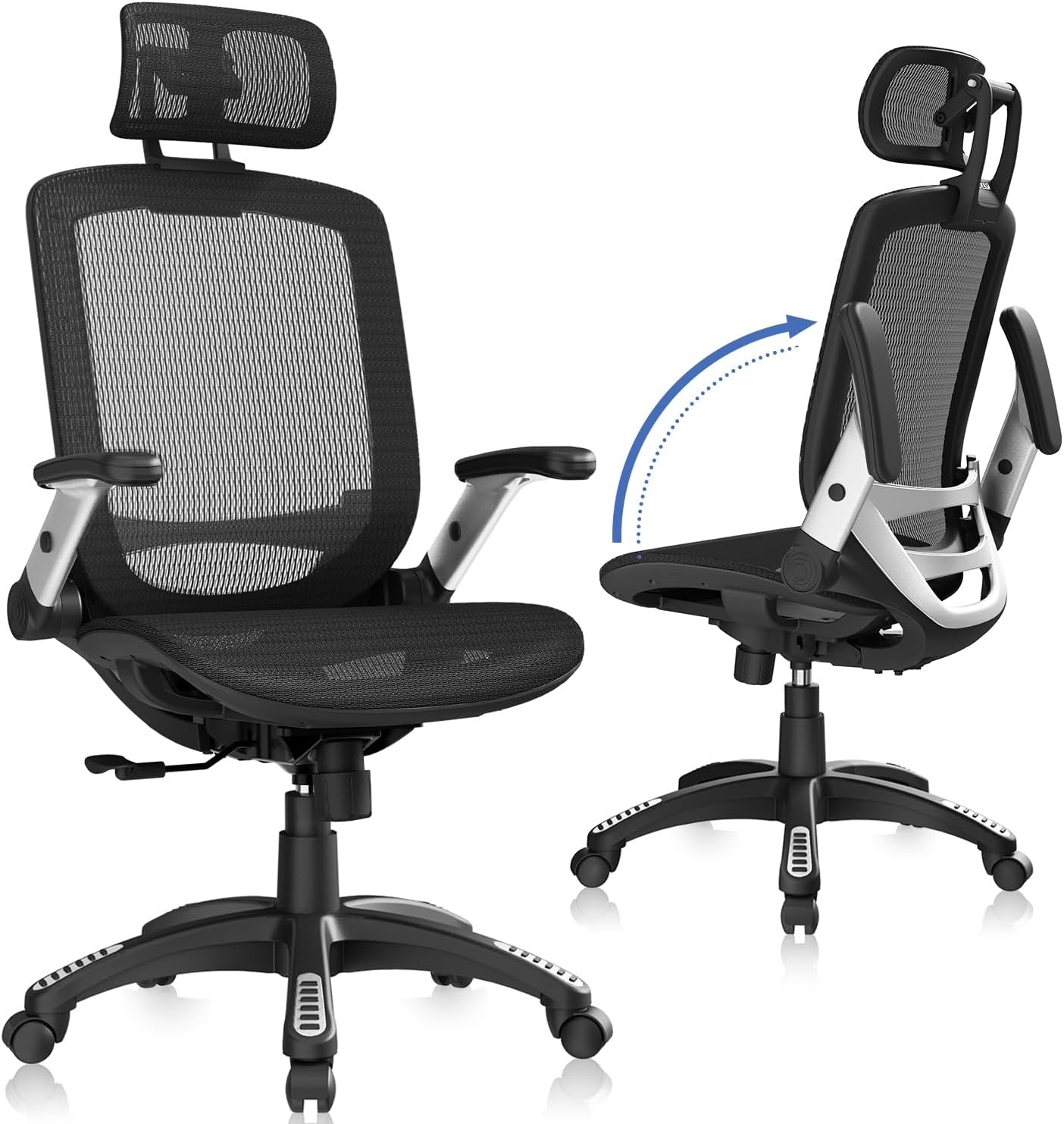
- Supports up to 300 lbs, above the roughly 250 lb ceiling common on standard mesh task chairs
- Seat height, headrest, backrest and armrests all adjust independently to fit users from about 5'5" to 6'2"
- Armrests flip up 45°, letting the chair tuck fully under a desk when not in use
- Tilt lock ranges 90-120°, so you can recline or sit upright and hold either position
- Backed by a 3-year warranty covering replacement parts like the gas lift
Cons
- Seat measures 20" wide, so users broader than that or taller than about 6'2" may find the cushion tight
- Mesh-only upholstery with no fabric or leather alternative offered
- Assembly means attaching the base, casters and backrest by hand using the included tools
The full chair measures roughly 25.6"W x 22"D, with height adjusting from about 45.3" to 54.9" including the headrest. The seat itself is 20"W x 19.3"D, with seat height adjustable from 18.5" to 22.05" to suit different desk heights.
- Weight capacity: 300 lbs
- Frame: alloy steel base and mechanism
- Upholstery: breathable mesh back and seat
- Recommended user height: approximately 5'5" to 6'2"
The mesh construction keeps air moving across the back during long sessions, which matters most in warmer rooms or during multi-hour work stretches.
Setup involves attaching the five-point base, casters, gas lift and backrest to the seat frame, using the hardware and instructions included in the box. Once built, the chair offers several independent adjustment points rather than a single fixed setting.
- Headrest: slides up and down to support different neck heights
- Armrests: flip up 45° to slide the chair fully under a desk
- Backrest: reclines through a 90-120° tilt lock range
- Seat height: adjusts via the gas lift for different desk heights
If any part such as a gas rod or screw is missing on arrival, the maker offers direct replacement parts rather than requiring a full return.
This chair is built for people roughly 5'5" to 6'2" tall who spend 4 to 8 hours at a desk and want adjustable head, back and arm support rather than a fixed-shape task chair. The breathable mesh suits home offices, studios or bedrooms that run warm during the day.
- Home office workers doing long stretches at a computer
- Users who want a headrest, which many basic task chairs skip
- Anyone who needs the chair to tuck fully under a desk when arms are flipped up
Users outside the stated height range, or those who prefer a fabric or leather seat rather than mesh, may want to look elsewhere.
Why Chair Comfort Matters More Than You Think
Comfort is not a luxury when it comes to seating, it is a health requirement. Poor posture over months and years contributes to chronic lower back pain, tight shoulders, poor circulation, and reduced concentration. A well-designed chair actively counteracts these problems by holding your spine in its natural curve, distributing your weight evenly, and encouraging small movements that keep blood flowing.
The difference shows up fast. When a chair supports you properly, you stop fidgeting, you stop shifting to relieve pressure points, and you find it easier to stay engaged with your work. That is why investing in a genuinely comfortable chair pays off in both wellbeing and productivity. The models covered here, from the mesh-backed CleverSeat Ergonomic to the leather-clad BESTFAIR Executive, all aim at this goal from different angles.
Key Features to Look For in a Comfortable Desk Chair
Before you compare specific models, it helps to know exactly what you are comparing. The following features determine whether a chair will feel supportive after one hour or after ten.
Lumbar Support
Your lower back has a natural inward curve, and a good chair fills that gap so your spine is not forced to hold itself upright. Look for adjustable lumbar support that moves up, down, or in and out to match your body. Chairs like the ELABEST X100 offer adjustable 3D lumbar systems, while the Home Office Ergonomic pairs lumbar support with a headrest for full-back coverage. If you already deal with back pain, this is the single most important feature to prioritize.
Seat Cushioning and Depth
The seat is where most of your weight rests, so cushioning quality is critical. Thin foam compresses quickly and leaves you feeling the base beneath you within weeks. Thicker molded foam, such as the four-inch cushion found on the Office Chair for Long Hours, holds its shape and spreads pressure evenly across your thighs. Seat depth also matters: you want two to three fingers of space between the front edge and the back of your knees to avoid cutting off circulation.
Breathability and Materials
Material choice affects both comfort and temperature. Mesh backs, like those on the ELABEST Ergonomic Mesh and the GABRYLLY High Back, let air circulate so you stay cool during long sessions, which is ideal if you run warm or work in a stuffy room. Leather and PU leather options, including the YFO Executive and the DUMOS Big and Tall, deliver a more premium, cushioned feel and are easy to wipe clean, though they trap more heat. Your climate and personal preference should guide this decision.
Adjustable Armrests
Armrests support your elbows and shoulders, taking strain off your neck and upper back. The best chairs include armrests that flip up, adjust in height, or move in multiple directions. Flip-up arms, seen on several models here, let you tuck the chair under your desk and reclaim space when needed. The amseatec Criss Cross even features five-level adjustable armrests, which is unusual for a compact vanity-style chair.
Recline and Tilt Function
Sitting perfectly upright all day is not ideal. A tilt or recline function lets you lean back periodically to relieve spinal pressure and reset your posture. Look for a tilt lock that holds the backrest at your preferred angle. Many ergonomic chairs offer a 90 to 120 degree recline range, giving you room to work upright and relax when you need a break.
Matching a Chair to Your Body and Workspace
The most comfortable chair for one person may feel wrong for another. Fit is personal, and a few factors help you narrow the field quickly.
Weight Capacity and Build
Check the rated weight capacity before buying. Chairs built for heavier or taller users, often labeled big and tall, use reinforced frames, wider seats, and sturdier bases. The CleverSeat Ergonomic supports up to 330 pounds, and big-and-tall models like the DUMOS Executive add a high back and footrest for larger frames. A chair rated well above your weight will also last longer because its components are not constantly stressed.
Height Adjustment and Desk Fit
Nearly every quality office chair uses a pneumatic gas lift for height adjustment, but the range varies. Make sure the chair can raise and lower enough that your feet rest flat on the floor and your forearms sit level with your desk. If your desk is tall, a chair with a wider height range and an available footrest helps you maintain good posture without dangling feet.
Space and Style
Consider the footprint of the chair and how it looks in your room. A bulky executive chair suits a dedicated office, while a slimmer profile fits better in a bedroom or shared living space. Compact options such as the amseatec Criss Cross in cream work well as a vanity or makeup chair, blending into home decor rather than dominating it. Mesh task chairs tend to look lighter and more modern, while leather designs read as more formal and traditional.
Comfort for Long Hours: What Really Counts
If your days involve marathon sessions at the keyboard, a few features move from nice-to-have to essential. Deep, high-density foam or well-tensioned mesh prevents the numbness that thin padding causes. A headrest, present on the Home Office Ergonomic and the CleverSeat, supports your neck when you lean back to think or take a call. A footrest, offered on the ELABEST X100, lets you elevate your legs during breaks to improve circulation.
Pay attention to the little things too. Smooth-rolling casters let you move without strain, and rubber wheels like those on the YFO Executive protect hardwood floors from scratches. A stable five-point base keeps you steady when you lean or reach. Certifications such as BIFMA 5.1, which the ELABEST Commercial carries, signal that a chair has passed durability and safety testing for commercial use, which is reassuring for daily heavy use.
Balancing Budget and Value
Comfortable desk chairs span a wide price range, and higher cost does not always mean better fit. Budget-friendly options under 160 dollars, including the Office Chair for Long Hours and the BESTFAIR Executive, still deliver thick cushioning, lumbar support, and flip-up arms. Mid-range and premium chairs like the ELABEST X100 add more adjustment points, sturdier materials, and extras such as footrests and advanced armrests.
The smart approach is to identify the two or three features you cannot live without, then find the most affordable chair that includes them. If back pain is your main concern, spend on lumbar support and cushioning. If you overheat easily, prioritize a breathable mesh back. If you are tall or heavy, focus on weight capacity and frame strength. This targeted mindset gets you the most comfort for your money rather than paying for features you will never use.
Setting Up Your Chair for Maximum Comfort
Even the best chair underperforms if it is set up wrong. Once yours arrives, take a few minutes to dial it in. Adjust the seat height so your feet are flat and your knees form a roughly 90 degree angle. Position the lumbar support so it fills the curve of your lower back. Set the armrests so your shoulders stay relaxed and your elbows rest comfortably. Finally, tune the tilt tension so the chair supports you when you lean back without tipping too easily.
Revisit these adjustments after a week of use. Your body will tell you what feels off, and small tweaks often solve minor discomfort. Remember that no chair replaces movement: stand up, stretch, and walk around every hour or so to keep your muscles active and your circulation healthy.
Final Thoughts
Choosing among the best comfortable desk chairs comes down to matching real features to your body, your workspace, and the way you work. Prioritize adjustable lumbar support and quality cushioning above all, then layer on breathability, armrest flexibility, and a recline function based on your needs. Whether you lean toward a cool mesh task chair like the GABRYLLY High Back, a plush leather executive seat, or a compact model that blends into your home, the right chair supports your health as much as your productivity. Take the time to compare features honestly, set your chair up correctly, and you will feel the payoff every single day you sit down to work.






