
 Priya Raghavan
 Shopping for the best black mouse means balancing looks with real ergonomics, sensor accuracy, and battery life — not just grabbing whatever looks sleek on your desk. Whether you’re outfitting a minimalist workspace, chasing quicker response times in games, or replacing a mouse that died at the worst possible moment, a matte or glossy black finish blends into almost any setup. This guide breaks down what actually matters when you compare wired and wireless options, then points you toward the 10 models worth your money based on how you actually use your computer.
Quick answer: For most people in 2026, the best black mouse is the Logitech G305 Lightspeed — our #1 rated choice thanks to its precise sensor, long battery life, and clean matte-black shell that works equally well for office tasks and gaming. See the full ranked comparison, alternatives, and buying advice below.

Pros
- Up to 18 months of runtime from a single AA battery, minimizing battery swaps
- Contoured shape with textured rubber grips stays comfortable through long browsing and work sessions
- Ambidextrous design works equally for left- and right-handed use
- Compatible with Windows, Mac OS X 10.5+, Linux Kernel 2.6+, and Chrome OS via one receiver
Cons
- Requires a free USB port for the Unifying receiver, so laptops without a spare port need an adapter
- Uses 2.4GHz RF with a proprietary receiver rather than Bluetooth, so it cannot pair directly to phones or tablets
- Only three buttons and a scroll wheel, with no side buttons for extra shortcut assignments
The M325 uses advanced optical tracking for point-and-click precision on most desk surfaces, paired with a micro-precise scroll wheel tuned for web browsing, shopping pages, and long documents rather than pixel-level design work. Tilting the mouse side to side moves back and forward through browser history, adding a shortcut that many entry-level mice skip.
Three buttons plus the scroll wheel keep the control layout simple, which suits general office and browsing use but leaves no room for programmable side buttons the way higher-tier productivity mice offer. Users who rely on extra thumb buttons for shortcuts will want to look further up the lineup.
A single AA battery powers the mouse for up to 18 months under typical use, which cuts down how often batteries need replacing compared with mice that run on a rechargeable internal cell needing weekly top-ups. Actual runtime varies with how often the mouse is used and the surface it tracks on, so heavy daily use will land toward the lower end of that estimate.
Connection runs through a compact Unifying receiver plugged into a USB port, using a 2.4GHz wireless signal rather than Bluetooth. That means it will not pair directly with phones or tablets that lack a USB-A port, and losing the receiver means the mouse cannot connect until a replacement is obtained.
The M325 works across Windows Vista and later, Mac OS X 10.5 and later, Linux Kernel 2.6 and later, and Chrome OS, covering most desktop and laptop setups without extra driver installs beyond plugging in the receiver. Its contoured shape and textured rubber sides are built to suit both left- and right-handed users equally, rather than favoring one grip style.
Because it is a general browsing and office mouse rather than a gaming or precision design tool, it suits everyday email, document, and web use well but is not built for high-DPI creative work or competitive gaming, where a wired or higher-polling-rate mouse would serve better.

Pros
- HERO optical sensor tracks from 200 to 12,000 DPI at up to 400 IPS
- The Lightspeed link reports at 1 ms, matching a wired connection in feel
- 99 g total weight including the AA cell
- Up to 250 hours of continuous play, or roughly 9 months in endurance mode
- The nano receiver stores in a bay inside the shell, so nothing rattles loose in a laptop bag
Cons
- Runs on a disposable AA cell rather than an internal rechargeable battery
- No wired fallback mode, so a flat cell stops play until a fresh AA goes in
- At 99 g it is heavy against the sub-60 g shells built for competitive play
The HERO optical sensor is the core of this mouse: 200 to 12,000 DPI in fine steps, tracking to 400 IPS, with no smoothing or acceleration applied in firmware. That matters most to low-sensitivity players who make large arm sweeps, where a lesser sensor starts to drift or cap out mid-flick.
- Sensitivity steps are stored in onboard memory, so they survive on a machine without the software installed.
- The report rate is 1 ms over the Lightspeed link.
- Six programmable buttons, including the sensitivity shift below the wheel.
HERO was also designed around power efficiency, which is why a mouse that reports every millisecond still runs for weeks on a single cell. The sensor and the battery story are the same engineering decision viewed from two directions.
A single AA drives up to 250 hours of continuous play in performance mode. Switching to endurance mode in the G HUB software lowers the report rate but pushes usable life toward 9 months, which suits a mouse that mostly does desktop work with gaming in between.
- The nano receiver clips into a bay inside the shell, under the battery door, for travel.
- Removing the cell is also the quickest way to cut weight if you prefer a lighter feel to long runtime.
- An indicator warns when the cell is running low.
The compromise is that there is no cable to fall back on. This model has no wired mode at all, so an empty cell means finding a fresh AA rather than plugging in and carrying on, and that is worth planning for before a long session.
At 99 g with the cell fitted, this sits in the middle of the modern weight range: far lighter than the wireless mice of a decade ago, noticeably heavier than the shells built for competitive play. The body is a compact ambidextrous shape with both thumb buttons on the left flank.
- The compact length favours claw and fingertip grips; large hands using a full palm grip will find it small.
- The receiver stows internally, so nothing loose ends up in a bag.
- Plain plastic flanks mean no rubber grips to peel or go tacky over years of use.
Because the mass comes largely from the AA cell sitting centrally, balance stays neutral rather than tail-heavy, which is why it feels lighter in motion than the figure on paper suggests.

Pros
- SilentTouch technology cuts click noise by more than 90% compared to standard mechanical mouse switches
- Rated for 18 months of battery life on a single AA battery, with auto-sleep mode extending that further
- Wireless range reaches up to 33 feet (10 meters) with 128-bit encryption between the mouse and USB-A receiver
- Plug-and-play USB-A nano receiver works across Windows, macOS, ChromeOS and Linux without extra drivers
- Plastic housing includes 76% certified post-consumer recycled content in the black finish
Cons
- Shaped for right-handed use only, so left-handed users lose the contoured grip benefit
- 1000 DPI optical tracking is modest next to gaming mice that offer several times that sensitivity
- Runs on a single included AA battery rather than a built-in rechargeable cell, so batteries need periodic replacement
The M330 is built around Logitech's SilentTouch technology, which reduces clicking sound by more than 90% compared to a standard mechanical mouse switch, based on independent lab testing against Logitech's own M170 model. Comfort details:
- Contoured plastic grip shaped for right-handed users
- Full-size mouse body rather than a compact travel shape
- Precision scroll wheel with tactile, line-by-line feel
- Plastic glide feet designed to reduce surface drag
The reduced click noise mainly benefits shared spaces such as open offices, libraries or a room where someone else is sleeping nearby, while the full-size contoured shape is built for extended desk sessions rather than being carried loose in a bag as a compact travel mouse.
Power comes from a single AA battery, included in the box, rated for roughly 18 months of use thanks to an auto-sleep mode that powers down the mouse during idle periods. Connectivity specs:
- 18-month rated battery life on one AA battery
- Auto-sleep power-saving mode
- Wireless range up to 33 feet (10 meters)
- 128-bit encryption between the mouse and USB-A nano receiver
The 10-meter range is generous for a desktop mouse, giving flexibility to present from across a room or move the mouse while a laptop stays docked, though as with any AA-powered device, the battery is a replaceable consumable rather than a rechargeable built-in cell.
The bundled USB-A nano receiver handles pairing automatically, and the mouse runs across the major desktop platforms without extra software. Supported systems:
- Windows
- macOS
- ChromeOS
- Linux
Because the receiver is plug-and-play, no driver installation is required on any of the supported systems, and the receiver ships either inside the mouse's battery compartment or alongside it, so it's easy to keep track of when the mouse travels between a laptop bag and a desk. Optical tracking is rated at 1000 DPI, which suits general productivity and browsing use rather than high-precision creative or competitive gaming tasks that typically call for adjustable, higher-DPI sensors.

Pros
- HERO 25K sensor tracks from 100 to 25,600 DPI with zero smoothing or filtering
- 11 programmable buttons plus onboard memory store custom profiles for use away from a desktop
- Compatible with a separately sold wireless charging pad for passive charging during play
- Adjustable weight system lets users fine-tune the mouse's balance and total weight
- Hyper-fast scroll wheel speeds through long pages and menus versus a standard ratcheted wheel
Cons
- Wireless charging pad compatibility requires a separately sold accessory, not included in the box
- Onboard memory profiles still need companion software for initial customization
- RGB lighting and extra buttons add battery draw compared with simpler wired gaming mice
The HERO 25K sensor tracks from 100 up to 25,600 DPI with 1:1 tracking, over 400 inches per second of speed, and no added smoothing, filtering, or acceleration. This level of tracking accuracy is aimed at competitive play where consistent cursor movement matters at high speeds.
- DPI range spans from precise low-speed tracking up to very high sensitivity settings
- 1:1 tracking avoids artificial smoothing that can affect aim precision
- 400+ inches per second tracking speed keeps up with fast mouse movements
Because DPI and tracking settings are adjustable across such a wide range, the sensor can be tuned differently for slower precision tasks versus fast-paced gameplay.
Eleven programmable buttons can be mapped to custom macros or shortcuts through companion configuration software, with onboard memory storing profiles directly on the mouse. This allows saved settings to travel with the mouse to a different computer without reinstalling software first.
- 11 buttons cover more custom bindings than most standard gaming mice
- Onboard memory keeps saved profiles even when using a computer without the software installed
- Adjustable weight system allows fine-tuning the mouse's overall feel
Because initial button mapping and profile creation still happen through the companion software, first-time setup requires installing it even though profiles later work standalone.
The mouse uses a low-latency wireless connection aimed at competitive play, along with a USB receiver that stores inside or alongside the mouse. It is compatible with a separately sold wireless charging pad for passive charging during use.
- Low-latency wireless connection is built for minimal input lag versus standard wireless
- Optional charging pad, sold separately, allows charging without pausing to plug in a cable
- RGB lighting and always-on wireless tracking add to overall battery draw versus a wired mouse
Because the charging pad is an additional purchase, out-of-the-box charging otherwise depends on a standard USB cable connection.

Pros
- COMFORTABLE DESIGN Contoured, wireless optical mouse with 3-button
- multi-OS (1), multi-device optical mouse and gives you the freedom to
- WIRELESS CONVENIENCE Go cordless with 2.4 GHz USB-A connectivity that
- USB nano receiver stores inside the mouse for easy portability
- MULTI-SURFACE PERFORMANCE Be ready for anything with LED multi-surface
Cons
- Requires checking placement surface dimensions before setup
- Requires routine care to keep exterior housing dust-free
- Initial setup requires checking operating instructions carefully
The HP X3000 G3 Wireless Mouse - Black 15-Month Battery Side offers reliable functional utility tailored for modern home and workplace environments. Designed to enhance daily productivity, this unit integrates COMFORTABLE DESIGN Contoured, wireless optical mouse with 3-button alongside multi-OS (1), multi-device optical mouse and gives you the freedom to. Users will find the intuitive design straightforward to operate across various room configurations and daily routines. The versatile construction adapts easily to personal workspaces, providing consistent practical value and streamlined usability. Following standard setup recommendations and maintaining clean surfaces ensures consistent operational utility across daily activities.
Built using resilient structural components, this unit features a sturdy outer housing engineered to resist operational wear. Precision manufacturing ensures that all joints and surface connections remain firmly aligned during regular daily activity. WIRELESS CONVENIENCE Go cordless with 2.4 GHz USB-A connectivity that reinforces overall physical stability over extended service periods. Structural integrity remains firm throughout regular usage, giving owners peace of mind. Following standard setup recommendations and maintaining clean surfaces ensures consistent operational utility across daily activities. This functional equipment provides steady performance and practical convenience when properly integrated into your workspace.
Initial setup requires placing the unit on a flat, stable surface with adequate clearance around all sides for proper operation. Ensure all power or connection cables are routed neatly without sharp bends to prevent wire strain. Regular care involves wiping exterior housing surfaces with a soft cloth to remove dust buildup. Inspecting mechanical connections periodically preserves operational efficiency and maintains cosmetic appearance over time. Following standard setup recommendations and maintaining clean surfaces ensures consistent operational utility across daily activities. This functional equipment provides steady performance and practical convenience when properly integrated into your workspace.

Pros
- 2.4GHz wireless connection via USB-A receiver needs no software drivers to start working
- Rechargeable battery with an onboard visual display shows remaining charge at a glance
- 4 adjustable DPI levels (800 to 2400) let sensitivity match different tasks and screen sizes
- Ergonomic contoured shape is shaped to fit the palm for extended use
- Compatible with Windows, Mac, and Linux without additional driver installation
Cons
- DPI adjustment tops out at 2400, below the higher sensitivity ranges offered by dedicated gaming mice
- Connection relies on a single 2.4GHz USB-A receiver, with no Bluetooth pairing option listed
- Battery display shows charge level but the listing does not state total battery capacity or runtime per charge
The mouse connects over a 2.4GHz wireless link through a USB-A receiver, working without extra driver downloads on Windows, Mac, and Linux. Pairing is plug-and-play: inserting the receiver is enough to get a working connection without pairing steps.
- 2.4GHz USB-A wireless receiver
- No driver installation required
- Compatible with Windows, Mac, and Linux
Because the connection is USB-A only, laptops and tablets with just USB-C ports will need an adapter, and there is no Bluetooth mode listed as a backup connection method if the receiver is misplaced.
Four selectable DPI levels — 800, 1200, 1600, and 2400 — let the cursor sensitivity be tuned for different tasks, from detailed photo editing at lower DPI to faster cursor movement across large monitors at the top setting. Switching levels is handled through a button on the mouse body.
- 4 DPI levels: 800 / 1200 / 1600 / 2400
- On-mouse button for quick switching
- Ergonomic shape contoured to the palm
The 2400 DPI ceiling covers general productivity and browsing use comfortably, though gamers who prefer very high sensitivity settings may find the top level lower than what dedicated gaming mice offer.
A built-in rechargeable battery removes the need to buy and swap disposable batteries, and an onboard visual battery display shows the current charge level so it is clear when a recharge is needed. The body is shaped with an ergonomic contour intended to support a natural hand position during extended use.
- Rechargeable battery with charge-level display
- Ergonomic contoured grip
- Backed by a one-year replacement service
Because exact battery capacity and runtime per charge are not listed, users doing all-day work may want to keep the included charging cable nearby rather than assuming multi-week battery life between charges.

Pros
- Tri-mode Wireless Connectivity Experience seamless connectivity with
- Ergonomic Design for Comfort eliminating fatigue and discomfort. It
- Rechargeable Mouse with Battery Level Indicator Our wireless mouse has
- Adjustable DPI Our mouse offers four adjustable DPI levels
- Wide Compatibility Worry free service Compatible with Windows 11 10 8 7
Cons
- Requires checking placement surface dimensions before setup
- Requires routine care to keep exterior housing dust-free
- Initial setup requires checking operating instructions carefully
The Uineer Wireless Bluetooth Mouse Rechargeable Computer offers reliable functional utility tailored for modern home and workplace environments. Designed to enhance daily productivity, this unit integrates Tri-mode Wireless Connectivity Experience seamless connectivity with alongside Ergonomic Design for Comfort eliminating fatigue and discomfort. It. Users will find the intuitive design straightforward to operate across various room configurations and daily routines. The versatile construction adapts easily to personal workspaces, providing consistent practical value and streamlined usability. Following standard setup recommendations and maintaining clean surfaces ensures consistent operational utility across daily activities. This functional equipment provides steady performance and practical convenience when properly integrated into your workspace.
Built using resilient structural components, this unit features a sturdy outer housing engineered to resist operational wear. Precision manufacturing ensures that all joints and surface connections remain firmly aligned during regular daily activity. Rechargeable Mouse with Battery Level Indicator Our wireless mouse has reinforces overall physical stability over extended service periods. Structural integrity remains firm throughout regular usage, giving owners peace of mind. Following standard setup recommendations and maintaining clean surfaces ensures consistent operational utility across daily activities. This functional equipment provides steady performance and practical convenience when properly integrated into your workspace.
Initial setup requires placing the unit on a flat, stable surface with adequate clearance around all sides for proper operation. Ensure all power or connection cables are routed neatly without sharp bends to prevent wire strain. Regular care involves wiping exterior housing surfaces with a soft cloth to remove dust buildup. Inspecting mechanical connections periodically preserves operational efficiency and maintains cosmetic appearance over time. Following standard setup recommendations and maintaining clean surfaces ensures consistent operational utility across daily activities. This functional equipment provides steady performance and practical convenience when properly integrated into your workspace.

Pros
- SmartWheel switches between line-by-line precision scrolling and fast free-spin scrolling with a flick
- Rated for up to 24 months of use on a single AA battery
- SilentTouch technology cuts click noise by about 90% compared with a standard mouse
- Connects via Bluetooth Low Energy or the included Logi Bolt USB receiver
- Full-size shape with rubber side grips is built specifically for larger hands
Cons
- Full L size is designed for larger hands, so users with smaller hands may find it oversized to grip comfortably
- Runs on a single replaceable AA battery rather than a rechargeable built-in cell, adding a battery to keep on hand
- Requires either a Bluetooth connection or the specific Logi Bolt receiver, so a lost receiver limits it to Bluetooth-only pairing
The M550 L is a full-size mouse shaped specifically for larger hands, with a contoured body, a soft thumb area and rubber side grips designed to keep the hand in place during long sessions. Logitech also offers a smaller M550 sizing for those with smaller-to-medium hands.
- Full-size body for larger hands
- Contoured shape with soft thumb area
- Rubber side grips
Choosing the wrong size relative to hand size can undercut the ergonomic benefit, so checking Logitech's sizing guide before buying is worth the extra minute.
A SmartWheel scroll wheel switches automatically between line-by-line precision, useful for scrolling through spreadsheets or documents, and a fast free-spin mode for flying through long web pages, activated with a flick of the finger. SilentTouch technology on the clicks is built to cut click noise by around 90% versus a standard mouse.
- SmartWheel dual scroll modes
- Automatic mode switching on a flick
- SilentTouch quiet clicks, about 90% less noise
That reduced click noise is aimed at shared workspaces or late-night use where a loud clicking mouse would otherwise be disruptive.
A single AA battery, included in the box, is rated to power the mouse for up to 24 months, reducing how often a battery swap is needed compared with many rechargeable mice that need charging every few weeks. Connectivity runs through Bluetooth Low Energy or the included Logi Bolt USB receiver.
- Up to 24 months on one AA battery
- Bluetooth Low Energy or Logi Bolt receiver
- Compatible with Windows, macOS, Linux, Chrome OS, iPadOS and Android
Because it supports both connection types, the mouse can pair to one device over Bluetooth while still using the receiver with another, useful for switching between a laptop and a desktop.

Pros
- Shell measures 4.09 x 2.68 x 1.49 in, sized for small to medium hands and slim enough to slide into a laptop sleeve pocket
- Five DPI steps at 800, 1200, 1600, 2000 and 2600 let you drop to 800 for pixel work in photo editors
- Rubber side grips give the thumb a fixed ledge, which stops the slow slide that builds up over a long spreadsheet session
- Quoted at up to 24 months on AAA cells thanks to a sleep mode plus a physical on/off switch underneath
- 2.4 GHz nano receiver reaches about 49 feet and needs no driver on Windows, macOS, Chrome OS or Linux
Cons
- USB-A receiver only, so a laptop with nothing but USB-C ports needs an adapter or hub
- Side buttons do not work under macOS, leaving Mac users with three functioning inputs
- AAA cells are not supplied, and the optical sensor will not track on bare glass without a pad
The shell measures 4.09 x 2.68 x 1.49 in, which puts it firmly in the compact class rather than full size. The maker aims it at small to medium hands, and that shows in the low 1.49 in spine.
- Palm grip works well if your hand runs roughly 6.5 to 7.5 in from wrist crease to middle fingertip
- Larger hands will settle into a claw grip, with the heel of the palm resting on the desk instead of the shell
- Rubber side grips sit under the thumb and ring finger, giving a fixed ledge to lift from during repositioning
- The footprint slides into a laptop sleeve pocket, and the receiver clips into a bay on the underside so it travels with the mouse rather than loose in a bag
If you currently use a full-size desktop mouse, expect a noticeably smaller object under the hand.
Five sensitivity steps cycle from a button behind the scroll wheel: 800, 1200, 1600, 2000 and 2600 DPI. That spread is aimed at office work rather than competitive gaming, where sensors run several times higher.
- 800 DPI suits pixel-level selection in photo editors and CAD drawings
- 1200 to 1600 DPI is the comfortable middle for a single 1080p or 1440p display
- 2600 DPI covers a dual-monitor or 4K desktop without repeated lifting and repositioning
The optical sensor reads most desk finishes, cloth pads and bare wood, but glass is explicitly excluded, so a clear or gloss-topped desk needs a pad underneath. There is no on-board profile memory and no configuration software, so the DPI step returns to the default whenever the mouse is switched off and on again.
Power comes from AAA cells that are not supplied, so add a pack to the order. In exchange, the quoted figure is up to 24 months of use, helped by a sleep mode and a physical on/off switch on the underside for long trips.
- 2.4 GHz link through a USB-A nano receiver, quoted to roughly 49 feet of range
- No Bluetooth mode, so a tablet or a laptop without a spare USB-A port is out of scope
- Plug and play on Windows, macOS, Chrome OS and Linux with no driver install
- Side buttons do not function under macOS, leaving Mac users with three working inputs
Because the link depends on a physical dongle, that storage bay matters: lose the receiver and there is no alternative way to pair the mouse to a machine.
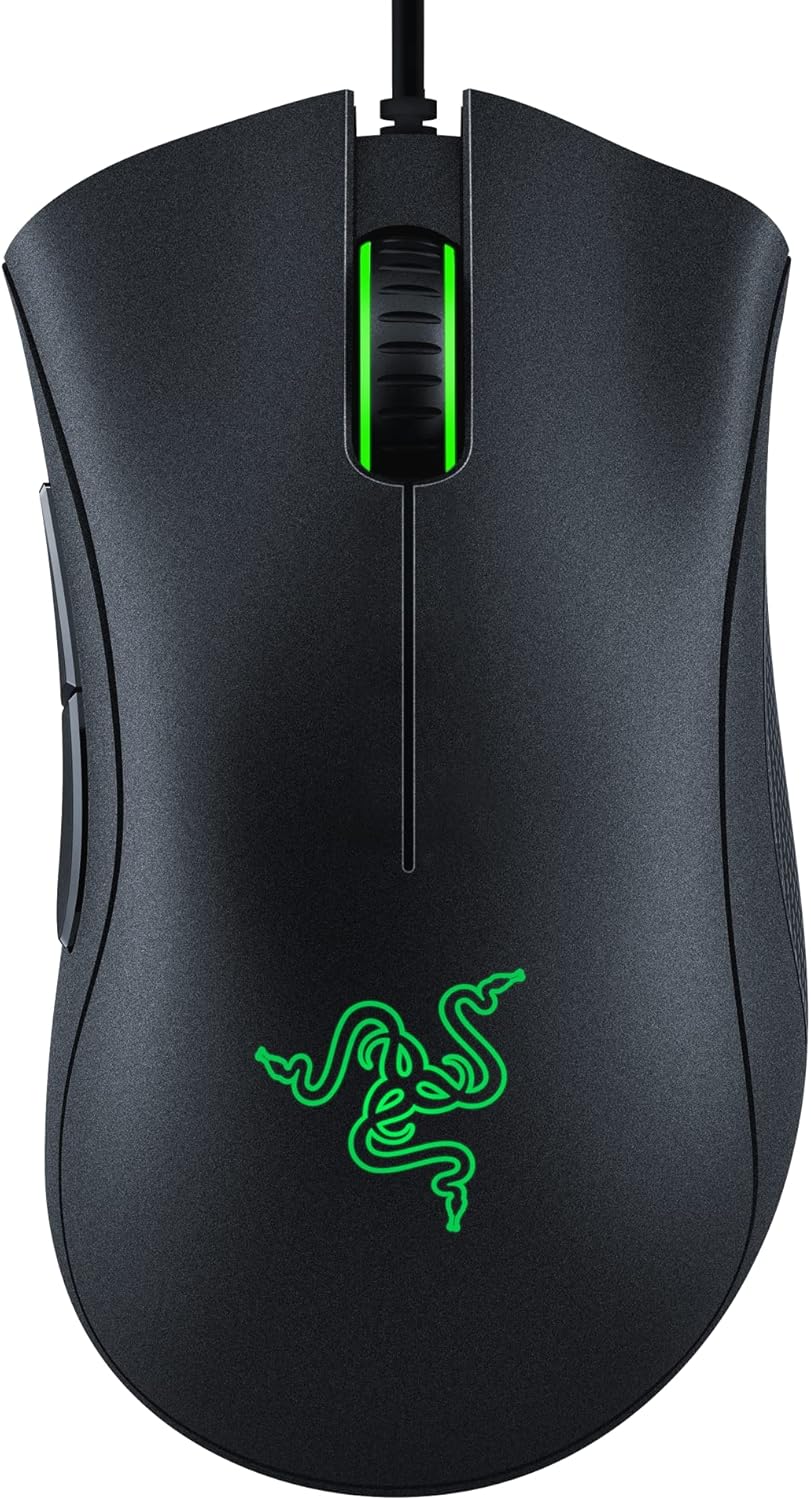
Pros
- Optical sensor tops out at 6400 DPI with on-the-fly sensitivity switching via dedicated buttons
- Mechanical switches are rated for 10 million clicks, backed by a 2-year warranty
- 5 programmable buttons support macro assignment through dedicated companion software
- Ridged rubberized scroll wheel adds grip for controlled scrolling under fast input
- Rubber side grips maintain hold during long sessions without a separate grip tape purchase
Cons
- Wired-only connection, so there is no wireless or Bluetooth option on this model
- Companion software is required for remapping buttons, adding a setup step beyond plug-and-play
- Fixed right-handed ergonomic shape is not suited to left-handed use
The optical sensor tops out at 6400 DPI, with dedicated on-mouse buttons cycling through sensitivity presets on the fly instead of requiring a software menu mid-game. That range covers everything from precise low-DPI aiming to fast high-DPI sweeps across a large monitor or multi-monitor setup.
Underneath the sensor, mechanical switches are rated for 10 million clicks, backed by a 2-year warranty, which is built to hold up under the repetitive clicking of both competitive gaming and everyday desktop use without the switches developing a mushy or inconsistent feel over time.
Five programmable buttons cover the two primary clicks, the DPI switch, and two thumb buttons, all of which can be remapped or assigned macro functions through the companion software. That software layer is where sensitivity presets, button assignments, and macros all get configured and saved to the mouse.
A ridged, rubberized scroll wheel adds small tactile bumps for more controlled scrolling in fast-paced situations, rather than a smooth wheel that can overshoot. Setup itself is plug-and-play for basic use, with the software only required once custom button mapping or macros are wanted.
The ergonomic shape follows the classic DeathAdder form factor, with rubber side grips positioned for a right-handed palm or claw grip through long sessions. That fixed shape is comfortable for right-handed users but is not mirrored or adjustable for left-handed players.
Build quality centers on the 10 million click figure for the mechanical switches, which is the main durability spec backing extended daily use. Because the mouse connects over a wired-only USB cable, there is no battery to manage and no wireless dropout risk, at the cost of not offering a cordless option for anyone preferring one.
How to Choose the Best Black Mouse for Your Setup
Before you compare specific models, it helps to know which specs actually change how a mouse feels day to day. A black finish is just paint or coating — the sensor, shape, and connection type determine whether you’ll enjoy using it eight hours from now.
Wired vs. Wireless Connections
Wired mice still offer the lowest possible input lag and never need charging, which is why some competitive gamers stick with them. Wireless models have closed most of that gap with fast polling rates, so unless you’re chasing every last millisecond, a wireless black mouse gives you a tidier desk without a real performance penalty.
Sensor Type and DPI Range
DPI (dots per inch) controls how far the cursor moves per inch of physical movement. Office work rarely needs more than 1600 DPI, while gaming mice often offer adjustable ranges up to 12,000 DPI or higher. Higher isn’t automatically better — you want a sensor that tracks accurately at the sensitivity you’ll actually use, not just a big number on the box.
Size, Shape, and Grip Style
Your grip style matters more than most buyers expect. Palm grip users tend to prefer larger, fuller mice, claw grip users like a shorter hump with accessible side buttons, and fingertip grip users usually want something light and low profile. Picking the wrong shape is the fastest way to end up with wrist strain, no matter how good the sensor inside a black mouse happens to be.
Best Black Mouse Picks by Use Case
When people search for the best black mouse, they’re rarely looking for one universal winner — they want the option that fits how they actually work or play. Here’s where each option in our list earns its spot.
Best for Everyday Office Use
If you mostly browse, type, and click through spreadsheets, you don’t need a gaming-grade sensor. The Logitech M325 covers the basics reliably at a low price point, with a rounded shape that suits most hand sizes and a scroll wheel that feels precise for everyday navigation. Pair it with one of our best black keyboards picks for a matching, clutter-free desk look.
Best for Quiet, Shared Offices
Open-plan offices and shared desks make loud clicking noises more noticeable than most people expect. The Logitech M330 Silent Plus trims click noise dramatically compared to a standard switch while keeping accurate 1000 DPI optical tracking, which makes it one of the more considerate choices if you sit near coworkers or use your computer late at night without waking anyone up.
Best for Competitive and Everyday Gaming
For faster-paced play, the Logitech G502 Lightspeed brings adjustable weights and eleven programmable buttons, which is handy if you like remapping abilities or macros in different titles. If you’d rather stay wired for the lowest latency, the Razer DeathAdder Essential is a dependable, budget-friendly option with a shape that’s stayed popular for years. For a deeper breakdown of sensor performance across categories, our best mouse for gaming guide goes further into the specs that matter most.
Best for Travel and Small Bags
Traveling with a laptop calls for something compact that won’t chew through batteries between charges. The HP X3000 G3 is small enough to toss in a laptop sleeve and rated for well over a year of use on a single battery, so you’re not packing a charging cable as a backup plan.
Best for Larger Hands
Not every black mouse is built for bigger hands, and using an undersized one all day can leave your fingers cramped by the afternoon. The Logitech Signature M550 L is sized specifically for larger palms, with a silent click mechanism that’s worth considering in shared offices or late-night sessions. If you’re building out a full wireless desk setup, our best wireless mouse roundup covers more sizing options across brands.
Ergonomics and Comfort for All-Day Use
Picking the best black mouse for looks is easy; picking one that still feels good after a full workday takes a bit more thought. A few habits and settings make a bigger difference than most people assume.
Wrist Comfort and Cable Management
If you go wired, route the cable so it doesn’t drag against the edge of your desk, since that light resistance adds up over hours of movement. For wireless setups, keep the USB receiver in a spot with a clear line of sight to reduce dropped signal, especially around metal desk frames or other wireless devices nearby.
Multi-Device Pairing
Several models on this list, including the Logitech options, support Bluetooth or multi-device switching so you can hop between a laptop and a desktop without unplugging anything. That’s a small detail, but it matters if you regularly move between a home office and a second workstation.
Common Mistakes to Avoid When Buying a Black Mouse
A sleek color shouldn’t be the only reason a mouse ends up in your cart. Here are the mistakes we see most often when people shop for a black mouse without a clear plan.
- Choosing looks over fit: A mouse that photographs well but doesn’t match your grip style will feel wrong within a week, regardless of color.
- Ignoring battery type: Some wireless mice use replaceable AA batteries while others use built-in rechargeable cells — know which one you’re getting before you buy.
- Overpaying for DPI you won’t use: A high maximum DPI sounds impressive, but it means little if you’ll run the mouse at 800–1600 DPI anyway.
- Skipping the return window: Grip comfort is personal, so always compare specs and availability before committing, and confirm the return policy in case the shape isn’t right for your hand.
- Forgetting about surface compatibility: Glossy or glass desks can confuse some optical sensors, so check the recommended surface type before you assume any black mouse will track well on yours.
Living With a Black Mouse: What to Know Before You Buy
Matte black finishes look clean out of the box, but they show oil and fingerprints more readily than lighter gray or white shells. That’s a fair trade-off for most desks, though if you eat lunch at your keyboard or have particularly sweaty hands, a quick wipe-down every so often keeps it looking new. Glossy black coatings show smudges even faster, so a matte texture is usually the safer pick if appearance matters to you long-term.
Budget wireless options like the Uineer Wireless Mouse and its Bluetooth-equipped sibling are worth a look if you want visible battery levels and adjustable DPI without spending on gaming-branded extras. They won’t out-track a dedicated gaming sensor, but for general productivity they hold up well against pricier alternatives.
One trade-off worth knowing: ultra-light gaming mice sacrifice some durability for weight savings, so if you’re rough on hardware or share a workstation, a slightly heavier build with reinforced switches may hold up longer. There’s no single best black mouse for every situation — the right pick depends on whether you value low weight, maximum battery life, or a larger palm rest more.
Frequently Asked Questions
Does a black mouse track worse on light-colored desks?
No — mouse color has no effect on sensor tracking. What matters is the surface underneath and whether the sensor is optical or laser, not the shell’s finish.
What DPI should I look for in a black mouse?
For office use, 800–1600 DPI is plenty. Gamers often prefer sensors that adjust from 400 up to several thousand DPI so they can fine-tune sensitivity per game.
Is a wired or wireless black mouse better for gaming?
Both can perform at a competitive level today. Wired mice remove any charging concerns, while modern wireless sensors offer response times that are close enough for the vast majority of players.
How long do batteries last in a wireless black mouse?
It varies by model, but many wireless mice on this list run anywhere from several months to well over a year per charge or battery set, depending on usage and whether a light or dongle stays active.
Will a matte black mouse show scratches over time?
Matte coatings tend to hide light scratches better than glossy finishes, though heavy daily use can eventually dull any coating. Wiping it down occasionally helps it keep its finish longer.
Whatever you land on, match the mouse to your grip, your desk setup, and how many hours you’ll actually spend using it each day. Compare specs and availability across a few finalists before deciding, since the right shape and sensor combination will matter far more over time than the color of the shell. In the end, the best black mouse for your desk might not be the best black mouse for a coworker’s — and that’s exactly why matching use case to spec sheet beats chasing a single “winner.”






