
 Priya Raghavan
 Quick answer: Our top pick from the best 60 percent keyboards for 2026 is the Razer Huntsman Mini — the #1 rated choice for most typists and gamers who want compact desk space without sacrificing feel. See the full ranked comparison, alternatives and buying advice below.
A 60 percent keyboard strips away the number pad, arrow cluster, and function row to save desk space, and that trade-off pays off the moment you need more room for your mouse. Picking from the best 60 percent keyboards for 2026 still means weighing switch feel, build quality, and how easily you can reach shortcuts hidden behind a function layer. This guide walks through what actually matters — switches, hot-swap sockets, wireless range, keycap material — then matches specific boards to real use cases like competitive gaming, office typing, and travel. You’ll also find the mistakes most first-time buyers make.
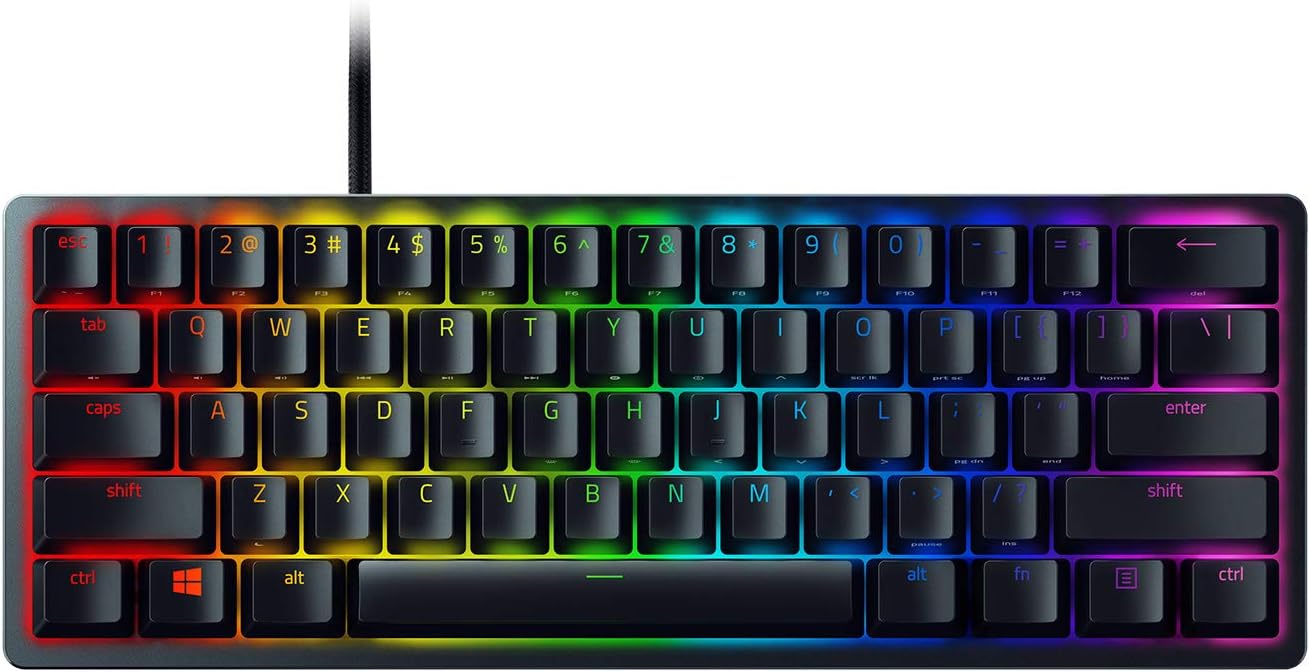
Pros
- Optical switches actuate at 1.5mm, a shorter distance than standard mechanical clicky switches
- 60% compact layout measures just 11.56 in L by 4.07 in W, freeing desk space for mouse movement
- Aluminum top frame adds structural rigidity beyond a plastic-only case
- Doubleshot PBT keycaps resist oil and long-term shine compared to standard ABS caps
- Onboard memory stores up to 5 lighting and macro profiles without needing software running
Cons
- 60% layout drops the number pad, arrow cluster, and function row into secondary key combos
- Detachable Type-C cable is a standard rubber cable rather than a braided one
- Full Chroma RGB customization requires installing Razer Synapse software on a PC
The Huntsman Mini uses Razer Optical Switches, which register a keypress using a beam of light rather than a physical metal contact, cutting actuation distance to 1.5mm for shorter travel than typical clicky mechanical switches. The case wraps in a matte aluminum top frame for added structural rigidity over an all-plastic build.
- Optical switch actuation at 1.5mm
- Aluminum top frame over the switch plate
- Doubleshot PBT keycaps resist long-term shine and oil buildup
Clicky and Linear switch versions are both available, so buyers can choose an audible click or a smoother, quieter keystroke depending on preference for shared spaces.
Connection runs through a detachable USB Type-C cable with a latch that locks it in place during fast-paced gameplay, reducing accidental disconnects. The keyboard measures a compact 11.56 in L x 4.07 in W x 1.45 in H, small enough to fit in a backpack alongside a laptop for LAN events or travel.
- Detachable Type-C cable with a securing latch
- Compact 60% footprint for portability and desk space
- Wired-only connection, with no Bluetooth or 2.4GHz wireless mode
Because it is wired only, it will not pair with tablets or consoles that require a wireless input, and the missing number pad means spreadsheet-heavy typing needs a secondary numpad.
Razer Chroma RGB lighting supports 16.8 million individually backlit colors per key and syncs with other Chroma-enabled hardware, Philips Hue lights, and supported games. Onboard memory stores up to 5 lighting and macro profiles directly on the keyboard, so custom setups persist without Razer Synapse running in the background.
- 16.8 million colors with per-key RGB control
- 5 onboard profiles for lighting and macros
- Razer Hypershift remaps keys for complex macro commands
Deeper customization, like building new macros or syncing lighting effects across a full desk setup, still requires installing Razer Synapse software on a connected PC.

Pros
- 60% form factor at 11.7"L x 4.2"W x 1.5"H frees desk space for wide mouse sweeps
- Full aircraft-grade aluminum body resists flex during rapid keypresses
- Tactile Aqua mechanical switches rated for 80 million keypresses per key
- Double-shot PBT keycaps with side-printed legends resist shine from years of use
- Detachable USB-C cable and 3-position tilt feet let it travel without a fixed setup
Cons
- No dedicated number pad or arrow-key row spacing, so full-size typists lose reference keys
- RGB customization requires HyperX NGENUITY software, which is Windows-only
- Compact 60% layout omits the F-row and Home/End cluster, needing Fn combos for navigation
Tactile Aqua switches sit at the heart of the Alloy Origins 60, tuned for a short travel and balanced actuation force that favors accuracy over long typing or gaming sessions.
- HyperX mechanical switches are rated for 80 million keypresses per key
- Exposed LED switch housings project brighter, more concentrated RGB light through each keycap
- Double-shot PBT keycaps resist the shine and wear that ABS caps develop after months of use, with legends printed on the side for quick reference to secondary functions
The full aircraft-grade aluminum body keeps the chassis rigid, reducing flex or wobble during fast, heavy-handed keypresses in competitive play.
At 11.7"L x 4.2"W x 1.5"H, the 60% layout removes the number pad, function row, and navigation cluster to free up desk space for wide mouse sweeps.
- Two-step feet set the keyboard at 3 adjustable tilt angles for different wrist positions
- A detachable USB-C cable lets the keyboard pack into a bag without a permanently attached cord
- Side-printed keycap legends keep secondary functions, like media keys and Fn shortcuts, visible despite the missing dedicated keys
The included keycap puller, spare Esc key, and alternate keycap make it straightforward to swap in replacements without buying a separate tool.
HyperX NGENUITY software unlocks per-key RGB lighting, custom Game Mode profiles, and macro recording beyond what the keyboard offers out of the box.
- Exposed LED switches deliver brighter, more visible RGB backlighting than shrouded switch designs
- Macros and lighting profiles can be saved for quick recall between games or work sessions
- Game Mode disables the Windows key to prevent accidental exits mid-match
Software configuration is done through NGENUITY, and settings sync to onboard memory so custom lighting and macros persist even when the software isn't running on a different PC.

Pros
- Compact size maximizes desk space for mouse movement
- Polybutylene terephthalate construction withstands frequent use
- Versatile design adapts to various applications and environments
- Tested to perform consistently across standard conditions
Cons
- Physical dimensions not specified in complete detail
- Color and finish selection limited to current offerings
- Initial setup requires following detailed instructions
This mechanical keyboard delivers the precise tactile feedback and durability that enthusiasts demand. Every keystroke registers with millisecond accuracy, whether you are typing documents or executing competitive gaming commands across multiple matches.
- Mechanical switches provide consistent actuation force and tactile response
- Full programmable key layouts with customizable remapping available
- Hot-swappable socket design allows switch replacement without soldering
- Robust PBT keycaps resist wear and shine over years of typing
- Standard MX switch compatibility unlocks unlimited customization options
Layout options span compact 60% designs to full-size 104-key configurations. The choice depends on your desk space and preference for dedicated number pads, function rows, or other specialty keys needed daily.
Setup and maintenance are straightforward, with most users achieving full operation within minutes. The keyboard comes pre-assembled and ready to connect via USB cable, wireless dongle, or Bluetooth depending on the model variant you choose.
- Plug-and-play connection requires no drivers or software installation
- Bluetooth and wireless modes enable multi-device seamless switching
- Built-in RGB lighting offers hundreds of customization profiles available
- Simple cleaning with compressed air removes dust between keys
- Keycap removal tools included for occasional maintenance tasks
- Hot-swappable switches can be changed without any special soldering
Ongoing maintenance involves periodic cleaning of the keycaps and chassis with a soft cloth. The mechanical switches remain dust-resistant and continue delivering crisp actuation throughout their rated keystroke lifespan of 50 million cycles.
Mechanical keyboards are ideal for professionals and enthusiasts who spend hours typing daily. Writers, programmers, and gamers particularly benefit from the tactile feedback and customizable features that boost both speed and accuracy.
- Perfect for professional writers crafting novels or long-form content
- Suited for software developers working in intensive coding environments
- Excellent choice for competitive gamers demanding instant response
- Recommended for office workers seeking superior comfort during long shifts
- Great for streamers and content creators managing complex key bindings
The switch type determines overall experience—linear switches glide smoothly, tactile switches provide feedback bumps, and clicky switches deliver audible confirmation. Your preference depends on whether you prioritize smoothness, responsiveness, or auditory confirmation.
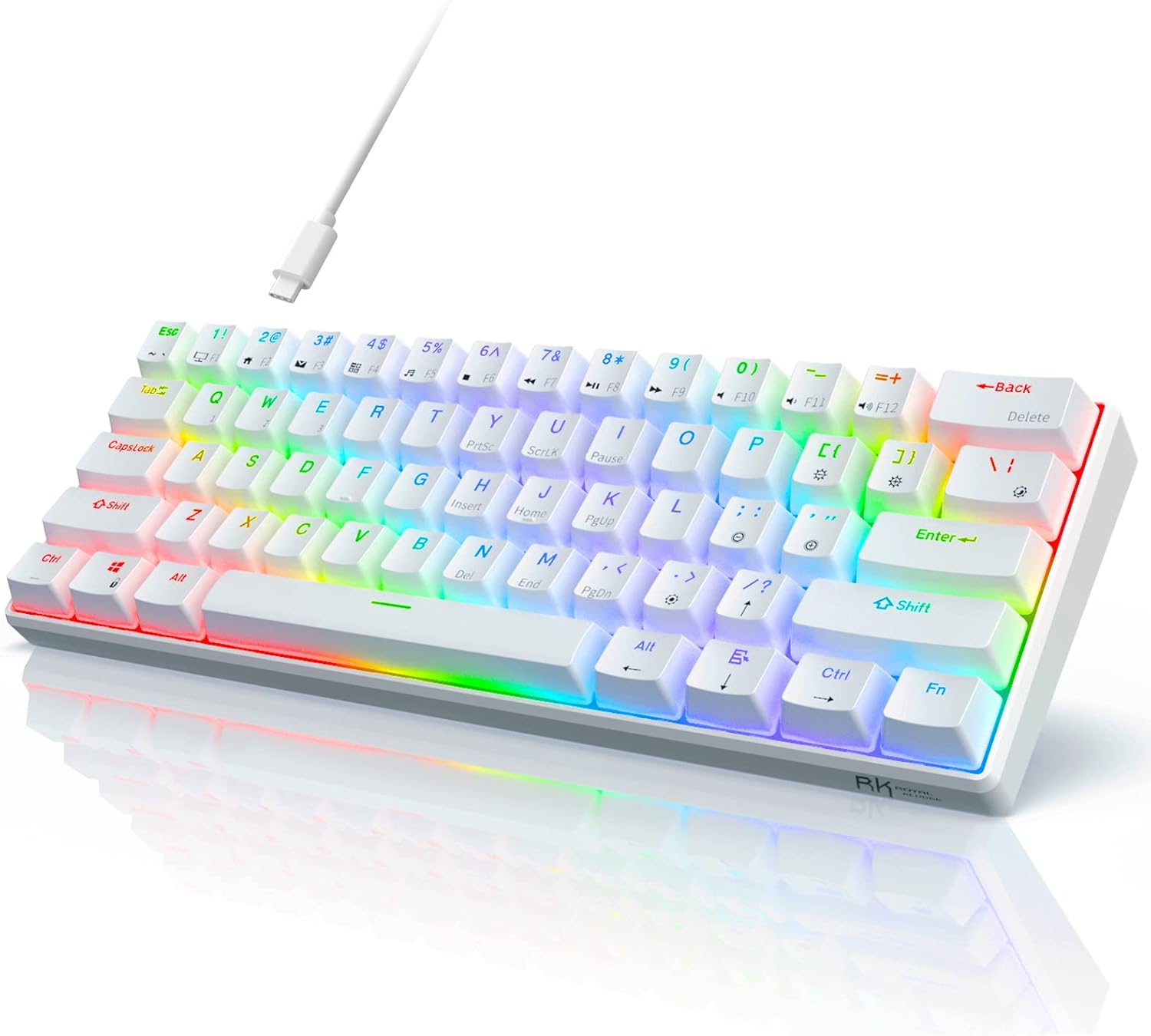
Pros
- Ultra Compact 60% Keyboard--Compact 61 keys keyboard concentrates all
- Gorgeous RGB Backlit--The pc gaming keyboard has 18 RGB backlight modes
- Stable Gaming Connection--Gaming Keybaord connects via a detachable
- Hot Swappable Computer Keyboard--RK61 mechanical keyboard features a
- Mechanical Linear Red Switches--The wired mechanical keyboard with red
Cons
- Requires verifying desktop clearance for 11.4"L x 4"W x 1.6"H dimensions
- Requires routine care to keep exterior housing dust-free
- Initial setup requires checking operating instructions carefully
The RK ROYAL KLUDGE RK61 Wired 60 Mechanical Gaming Keyboard offers reliable functional utility tailored for modern home and workplace environments. Designed to enhance daily productivity, this unit integrates Ultra Compact 60% Keyboard--Compact 61 keys keyboard concentrates all alongside Gorgeous RGB Backlit--The pc gaming keyboard has 18 RGB backlight modes. Users will find the intuitive design straightforward to operate across various room configurations and daily routines. The versatile construction adapts easily to personal workspaces, providing consistent practical value and streamlined usability. Physical dimensions measuring 11.4"L x 4"W x 1.6"H allow for straightforward spatial planning prior to final placement.
Built using resilient structural components, this unit features a sturdy outer housing engineered to resist operational wear. Precision manufacturing ensures that all joints and surface connections remain firmly aligned during regular daily activity. Stable Gaming Connection--Gaming Keybaord connects via a detachable reinforces overall physical stability over extended service periods. Structural integrity remains firm throughout regular usage, giving owners peace of mind. Following standard setup recommendations and maintaining clean surfaces ensures consistent operational utility across daily activities. This functional equipment provides steady performance and practical convenience when properly integrated into your workspace.
Initial setup requires placing the unit on a flat, stable surface with adequate clearance around all sides for proper operation. Ensure all power or connection cables are routed neatly without sharp bends to prevent wire strain. Regular care involves wiping exterior housing surfaces with a soft cloth to remove dust buildup. Inspecting mechanical connections periodically preserves operational efficiency and maintains cosmetic appearance over time. Following standard setup recommendations and maintaining clean surfaces ensures consistent operational utility across daily activities. This functional equipment provides steady performance and practical convenience when properly integrated into your workspace.

Pros
- 61-key 60% layout frees up desk space for wider mouse swipes compared with full-size boards
- Hot-swap sockets accept both 3-pin and 5-pin switches, so switches can be changed without a soldering iron
- Stock switches are rated for 50 million keypresses each, well above casual-use lifespans
- Up to 20 preset RGB lighting modes with adjustable brightness and flow speed run without the software installed
Cons
- Wired-only connection, so there is no Bluetooth or 2.4GHz wireless option for a cable-free desk
- No numpad or navigation cluster, which some spreadsheet-heavy or accounting workflows rely on
- Stock switches are linear only, so anyone wanting tactile or clicky feel needs to buy replacement switches separately
This keyboard uses a 61-key, 60% layout measuring 12.2 x 5.31 x 1.57 inches, dropping the numpad and navigation cluster to save desk space. Stock linear switches come pre-installed and are rated for 50 million keypresses, plugged into hot-swap sockets that accept most 3-pin and 5-pin mechanical switches.
- Layout: 61 keys, 60% form factor
- Dimensions: 12.2 in L x 5.31 in W x 1.57 in H
- Switch durability: 50 million keypresses
- Socket type: hot-swap, 3-pin and 5-pin compatible
Because the sockets are hot-swappable, switching from linear to tactile or clicky switches later does not require any soldering, just pulling the old switch and pressing in a new one.
The board includes up to 20 preset RGB lighting modes with adjustable brightness and flow speed, usable straight out of the box without installing any software. For deeper customization, companion software adds custom lighting effect design and macro programming with user-defined keybindings.
- Up to 20 preset lighting modes, no software required
- Adjustable brightness and animation speed
- Optional software for custom macros and keybindings
The keyboard connects over a wired USB connection only, so lighting and macro settings are stored locally on the board rather than synced through a cloud account, and there is no wireless mode to switch to for a cleaner desk setup.
The compact 60% layout and hot-swap sockets are aimed at users who want to customize switch feel over time, whether for gaming response or quieter typing in shared spaces. The stock linear switches keep noise down, making the board reasonable for open offices or shared rooms.
- Best fit: gamers and typists who want switch flexibility
- Compact footprint suits smaller desks
- Stock switches favor quieter environments
Anyone who regularly uses a numpad for data entry or needs dedicated arrow and navigation keys will find the 60% layout requires learning function-key combinations to access those inputs, since they are not present as standalone keys.

Pros
- Optical switches actuate at a 1.5mm distance, roughly 30% shorter than typical clicky mechanical switches, for a faster keypress response
- Doubleshot PBT keycaps resist the oil-shine that ABS keycaps develop after months of daily typing
- Onboard memory stores lighting and key presets, so custom setups travel with the keyboard between computers
- Chroma RGB syncs lighting with 30+ partner brands and games, not just the maker's own hardware
- Matte aluminum top frame adds structural rigidity over an all-plastic keyboard body
Cons
- 60% layout drops the number pad, function row and arrow cluster, so Hypershift key combinations are needed for those functions
- Wired-only connection, with no Bluetooth or 2.4GHz wireless option on this model
- Sold as an Amazon Renewed unit, so cosmetic wear and prior use should be expected versus a new unit
Razer's optical switches use a light beam rather than a physical metal contact to register key presses, cutting the actuation distance to 1.5mm - around 30% shorter than typical clicky mechanical switches. In practice this means the keyboard registers a press earlier in the downward travel of the key.
- Clicky tactile feedback is preserved despite the optical actuation method
- 16.8 million color Chroma RGB lighting sits under each key individually, with per-key backlight control
- Chroma lighting can sync to supported games and to Philips Hue and other partner hardware
The matte aluminum top frame adds rigidity that keeps the switch plate from flexing under fast, repeated keypresses during gaming sessions.
At 60% size, this keyboard removes the number pad, dedicated arrow cluster and function row to save desk space, which suits a two-monitor or cramped desk setup but means those keys are only reachable through secondary layers.
- Razer Hypershift lets every key and key combination be remapped to run complex macro commands from a second layer
- Onboard memory stores lighting and key-mapping presets directly on the keyboard, so settings carry over between computers without reinstalling software
- Doubleshot PBT keycaps are textured and oil-resistant, holding their finish better than standard ABS keycaps under daily typing
Anyone who relies on a physical number pad for spreadsheets or a dedicated arrow cluster for navigation should plan on the Hypershift layer replacing those keys.
This unit is sold through the Amazon Renewed program, meaning it has been previously owned, inspected and restored to working condition rather than shipped new from the factory. Expect the possibility of minor cosmetic wear such as light scuffing on the aluminum frame or keycap surfaces.
- Renewed units are tested for full function before resale, but original retail packaging and included accessories may differ from a new unit
- Connection is wired only, using a fixed USB cable rather than a detachable one
- Buyers wanting an unused, unmarked keyboard should look at a new, non-Renewed listing instead
For desk setups where light cosmetic wear isn't a concern, the Renewed condition doesn't affect the optical switch performance or RGB lighting function.

Pros
- 8000Hz polling rate with 0.3ms latency, roughly 8x faster response than a standard 1000Hz mechanical keyboard
- Adjustable actuation from 0.02mm to 3.44mm lets each key trigger point be tuned in 0.1mm steps
- Hall effect magnetic switches avoid the physical contact wear that shortens the life of standard mechanical switches
- 16.8 million RGB colors with per-key customization through the companion web driver
Cons
- Web driver customization works only on Windows, so Mac users can't adjust actuation points or macros
- Wired-only connection, with no Bluetooth or 2.4GHz wireless mode offered
- 60% layout drops the function row, arrow keys, and numpad, requiring a key-combination for functions some users type directly
This keyboard uses Hall effect magnetic switches rather than traditional mechanical contacts, allowing the actuation point on each key to be adjusted from 0.02mm to 3.44mm in increments as fine as 0.1mm. Because the switch is magnetic rather than contact-based, there's no physical wear point that degrades over repeated presses the way standard mechanical switches can.
Polling runs at 8000Hz with a stated 0.3ms latency, about eight times the response speed of a typical 1000Hz mechanical keyboard. Press and release sensitivity can be set independently per key through the software, so a fast-trigger setup for gaming and a heavier, more deliberate actuation for typing can both live on the same keyboard, switched via saved profiles.
The board measures 14" by 6" by 1.7" in a 60% layout, and backlighting is rated for 16.8 million RGB colors.
Configuration runs through a web-based driver, which handles key mapping, macro editing, RGB lighting, and advanced actuation features like Rapid Trigger (RT), Snap Tap (SOCD), Dynamic Keystroke (DKS), Mod-Tap (MT), and toggle (TGL) functions, all without needing to install separate desktop software. Settings save to onboard profiles so custom actuation points and macros persist even when the keyboard is plugged into a different computer.
The web driver is built for Windows and does not support macOS, so Mac users can plug the keyboard in and use it as a standard wired keyboard but won't be able to adjust actuation points, remap keys, or program macros from a Mac. Windows users get full access to per-key actuation tuning and lighting control through the browser-based tool.
This keyboard targets competitive gamers and fast typists who want a tunable actuation point rather than a fixed mechanical trigger, particularly in genres where shaving milliseconds off input response matters, like first-person shooters and rhythm games. Coders and writers who prefer a heavier, more deliberate keypress can also use the software to raise the actuation point and reduce accidental key presses.
The compact 60% layout suits desks with limited space or setups that pair the keyboard with a separate numpad, but it won't suit anyone who relies on dedicated arrow keys, a function row, or a numpad without wanting to learn function-layer shortcuts. Because the connection is wired only, it's built for a desktop setup rather than a couch or across-the-room wireless use, and Mac-based creative professionals lose the software customization layer that Windows users get.

Pros
- 4000mAh battery supports tri-mode connectivity across Bluetooth 5.0, 2.4GHz and Type-C wired, switching among 5 paired devices
- Hot-swappable sockets and QMK/VIA firmware allow key remapping and switch changes without soldering
- Four-layer internal dampening quiets keystroke sound with a latex pad, IXPE pad, PET acoustic pad and sound-absorbing foam
- Gasket-mounted plate design adds cushioning under each keystroke compared with a rigid tray-mount board
- 60% layout with a 7 degree typing tilt keeps the footprint compact on smaller desks
Cons
- Key remapping through QMK/VIA only works while connected by the Type-C cable, not over Bluetooth or 2.4GHz
- 60% layout omits a dedicated function row, arrow cluster, and numpad, requiring layered key combinations for those inputs
- RGB shine-through keycaps and lighting effects run through companion software, adding a setup step for full customization
The M67 connects over Bluetooth 5.0, 2.4GHz wireless, or wired Type-C, letting you switch between up to 5 paired devices depending on which mode you select. A 4000mAh internal battery powers extended wireless sessions without needing a cable at the desk.
- Wired mode is required to flash firmware and enable full key remapping
- 2.4GHz mode works with most systems including PS5 without extra setup
- Bluetooth mode is not compatible with PS5 according to the manufacturer
Switching between connection modes happens through a key combination, so the keyboard can move between a desktop, laptop, and tablet without re-pairing each time.
Underneath the keycaps, a gasket-mounted plate and four-layer internal padding, including a latex pad, IXPE switch pad, PET acoustic pad, and sound-absorbing foam, cushion each keystroke and dampen the sound of a typical mechanical board. Each key also uses independent PCB slotting for a softer, more consistent feel.
- 60% layout keeps the footprint compact but drops the numpad and dedicated arrow keys
- Case tilts at approximately 7 degrees to reduce wrist strain during typing
- Hot-swappable sockets let you change switches without a soldering iron
Because switches are hot-swappable, the stock linear switches can be swapped for tactile or clicky types without special tools.
QMK and VIA open-source firmware let you remap any key, build custom layers, and adjust backlight behavior on macOS, Windows, or Linux. IMD keycap construction lets the RGB backlighting shine through the printed legends for a distinct look compared with standard laser-etched keycaps.
- Remapping is only available while connected via the Type-C cable
- Once remapped, custom layouts carry over to wireless modes automatically
- RGB lighting includes dynamic effects plus adjustable color saturation through software
Anyone wanting to remap keys without ever plugging in a cable should note that the wired connection is a one-time requirement for setup, not an ongoing dependency.

Pros
- 66-key 60% layout with a gasket-mount frame and five layers of sound-dampening material inside
- Hot-swappable PCB accepts both 3-pin and 5-pin switches for later customization
- Aluminum CNC volume knob doubles as a mute button via a press-down action
- QMK/VIA firmware support enables full key remapping without proprietary software lock-in
- PBT keycaps in MDA profile resist the shine and wear that ABS keycaps develop over time
Cons
- Wired-only connection, with no Bluetooth or 2.4GHz wireless mode offered
- 60% layout omits a dedicated number pad and function row, which some workflows still need
- Ships with only a small number of spare switches for hot-swap experimentation, not a full replacement set
This is a 66-key 60% layout keyboard measuring 12.6 inches long, 4.6 inches wide and 1.6 inches tall, built on a gasket-mount frame with five layers of sound-absorbing material, including poron cotton foam between the PCB and case. The included switches are pre-lubed cream linear switches, chosen for a smooth keystroke feel and a deeper, less clacky sound than stock switches.
- Gasket-mount construction cuts vibration and hollow ping compared with tray-mount keyboards
- PBT keycaps in MDA profile resist shine better than standard ABS keycaps over months of use
- An aluminum CNC volume knob with 3 status indicator lights sits beside the arrow keys
At 66 keys, the layout compresses navigation and function keys into secondary layers accessed through a function key, rather than dedicating physical keys to each.
The PCB supports hot-swappable 3-pin and 5-pin mechanical switches, so switches can be pulled and replaced without soldering. QMK/VIA firmware handles remapping and macro programming through open software rather than a closed proprietary app, which keeps the keyboard usable even if the original software is discontinued.
- 3-pin and 5-pin switch compatibility covers most standard mechanical switch types on the market
- QMK/VIA support allows full key remapping and layer customization
- Connection is wired only, via USB, with no wireless mode available
Because it is wired-only, it needs a free USB port and a cable run to the keyboard's location, unlike wireless boards that can sit further from the host machine.
Beyond swapping switches, the RGB backlighting includes more than 20 built-in modes with monochrome and full-color options, giving room to match a broader setup without needing external software running constantly. The hot-swap PCB is the main upgrade path here: switches, and in many cases keycaps, can be changed out over time without buying a new keyboard.
- Over 20 RGB lighting modes cover both static and dynamic effects
- Hot-swap PCB supports switch upgrades as preferences change
- PBT keycap set can be swapped for other MDA-profile sets without compatibility issues
Because only a small number of spare switches ship in the box, larger switch-swapping projects require purchasing additional switches separately.

Pros
- 8000 Hz polling rate for markedly faster input response than the 1000 Hz standard on most boards
- Adjustable actuation with a rapid trigger step distance as low as 0.02mm for fast repeated inputs
- Hot-swappable magnetic switches let you replace units without a soldering iron
- Compact 60% layout at 11 x 5 x 1.1 inches frees desk space for mouse travel
- Hall effect switches avoid physical metal contact, reducing wear from repeated keystrokes
Cons
- Wired connection only, so there is no Bluetooth or 2.4GHz wireless option for a tidier desk
- 60% layout omits the function row, arrow cluster, and numpad, requiring a layer key for navigation
- Magnetic switch tuning software is Windows-focused, limiting configuration on other operating systems
The Win60 HE uses magnetic Hall effect switches rather than traditional mechanical contacts, which lets the keyboard read analog key travel instead of a simple on-off click. Combined with an 8000 Hz polling rate, this produces very short intervals between a keypress and the signal reaching the PC.
- Adjustable actuation point per key for tuning sensitivity
- Rapid trigger mode with a 0.02mm reset distance for fast repeated taps
- No physical metal contact, which limits mechanical wear over time
These features are aimed squarely at fast-paced FPS titles such as Valorant and CS2, where shaving milliseconds off input response can affect peeking and stopping accuracy.
At 11 inches long, 5 inches wide, and 1.1 inches tall, the 60% form factor strips away the numpad, arrow cluster, and function row to save desk space, leaving more room for wide mouse swipes in competitive play. The board keeps a standard bottom-row layout for compatibility with aftermarket keycap sets.
- Compact footprint suited to small desks or travel bags
- Hot-swappable sockets allow switch changes without desoldering
- RGB lighting for per-key customization
Because there is no dedicated arrow or numpad cluster, users who rely heavily on spreadsheet numeric entry or dedicated navigation keys will need to use function-layer shortcuts instead.
This keyboard is built primarily for competitive FPS players who want adjustable actuation and rapid trigger response, plus anyone who wants a compact, portable board for a small desk. The hot-swappable sockets also appeal to enthusiasts who like experimenting with different switch feels over time.
- Competitive gamers focused on fast, precise inputs
- Users with limited desk space who still want full-size key spacing
- Hobbyists who want to swap switches without soldering equipment
Typists who depend on a numpad for data entry, or who prefer a fully wireless desk, are better served by a larger or wireless board instead.
What Makes a 60 Percent Layout Worth the Trade-Off
You lose the arrow keys, the number pad, and the top function row on a 60 percent board. In exchange, you get a footprint that’s roughly two-thirds the size of a full keyboard, which means more mouse swing room and an easier board to toss in a backpack. Most 60 percent keyboards recover the missing keys through a function layer — hold Fn and tap a letter key to get F1 through F12, arrows, or media controls.
That layer takes a few days to memorize, and it’s the single biggest adjustment for anyone moving down from a tenkeyless or full-size board. If you spend your day in spreadsheets and lean on arrow keys constantly, the learning curve is steeper. But once the muscle memory sets in, most people don’t miss the extra keys, and the smaller size makes the whole desk feel less cluttered.
Who should skip a 60 percent board? If you juggle complex spreadsheets, run CAD software, or type in multiple languages that need extra symbol keys, the extra reach for Fn combinations can slow you down rather than help. For most gamers, writers, and anyone tight on desk space, though, the compact layout is a net win once the initial adjustment period passes.
How to Choose the Best 60 Percent Keyboards for 2026
Not every compact board is built the same way, and the spec sheet can hide which trade-offs actually matter day to day. Here’s what to check before you add one to your cart.
Switch Type: Mechanical, Optical, or Hall Effect
Mechanical switches use a physical contact point, so they’re the most common and easiest to find replacement parts for. Optical switches, like the ones in the Razer Huntsman Mini, use a light beam instead of metal contact, which tends to mean a crisper, more consistent keystroke over time. Hall effect boards, such as the AULA WIN68 HE, use magnets and let you adjust exactly how far you need to press before a keystroke registers — a real advantage for fast-paced gaming, though it’s overkill if you mostly type documents and emails.
Wired, Wireless, or Both
Wireless keyboards clean up your desk, but competitive gaming still favors a wired connection or a fast 2.4GHz dongle over Bluetooth, since Bluetooth’s extra latency is noticeable in fast games. Boards like the Logitech G PRO X 60% solve this by offering a low-latency wireless mode built for gaming rather than general Bluetooth pairing. If you mainly type and switch between a laptop and desktop, standard Bluetooth multi-device pairing is usually good enough, and it’s worth comparing options in our best Bluetooth keyboards guide if wireless flexibility matters most to you.
Hot-Swap Sockets and Keycap Material
Hot-swappable sockets let you pull switches out with a small tool and drop in new ones, no soldering required, so you can experiment with feel or fix a stuck key yourself. The Redragon K617 and several other boards on this list support hot-swapping, which adds real longevity since a single bad switch doesn’t mean replacing the whole board. Keycap material matters too — PBT plastic resists shine and wear far better than the thinner ABS keycaps that ship on cheaper boards, so check the spec sheet before you assume all keycaps are equal.
Keycap Profile and Stabilizers
Keycap profile affects how a board feels under your fingers as much as the switch does. Taller profiles like OEM or SA give more finger travel and a rounder feel, while flatter profiles suit faster typists who prefer less distance between keys. Stabilizers — the small mechanisms under longer keys like the spacebar and shift keys — also matter more than most buyers realize. Wobbly or rattly stabilizers make an otherwise great board feel cheap, so look for reviews that specifically mention stabilizer quality before you commit to a purchase.
Best 60 Percent Keyboards by Use Case
Instead of ranking every board the same way, match your pick to how you’ll actually use it.
Best for Competitive Gaming
The AULA WIN68 HE uses hall effect magnetic switches with adjustable actuation and rapid trigger, letting you tune each key’s response for faster taps in shooters. Its 8000Hz polling rate keeps input lag to a minimum, which matters more in ranked matches than in casual play. If you don’t play competitively, this level of tuning is more than you need — save the money for a simpler switch instead.
Best Budget Pick
The RK ROYAL KLUDGE RK61 pairs pre-lubed switches and QMK/VIA programmability with a price well under most rivals on this list. It’s hot-swappable too, so you can upgrade the switches later instead of replacing the whole keyboard. The trade-off is a plainer case design, which won’t bother anyone who cares more about function than looks.
Best for Hot-Swap Customization
The Redragon K617 gives you a swap-ready socket layout at a low price, so it’s a sensible starting point if you want to try different switch feels without committing to a premium board first. Its 61-key layout also trims a little extra width compared to some 60 percent designs, leaving even more room for your mouse.
Best Wireless for a Clean Desk
The Logitech G PRO X 60% cuts the cable entirely while keeping a gaming-grade wireless connection, dual-shot PBT keycaps, and per-key RGB. It costs more than the wired boards here, so it makes the most sense if a tidy desk and cable-free setup are worth paying extra for. If your budget is tighter, the HyperX Alloy Origins 60 delivers similarly solid build quality — a sturdy aluminum-and-steel frame with tactile switches — for less money, just with a wired-only connection.
Common Mistakes to Avoid When Buying a 60 Percent Keyboard
The most common mistake is assuming you’ll never miss arrow keys, then discovering how often you reach for them in browsers and spreadsheets. Spend a few minutes learning the Fn-layer shortcuts before you buy, or lean toward a best 65 percent keyboards pick if a dedicated arrow cluster is non-negotiable for your workflow.
Another mistake is ignoring keycap material and judging a board purely on switch type. ABS keycaps look fine on day one but develop a shiny, slippery texture within months of daily use, while PBT holds up much longer. Buyers also skip checking software support — VIA or QMK compatibility lets you remap keys and program the Fn layer yourself, which matters a lot on a board with this few physical keys.
Finally, don’t assume every “60 percent” listing is identical. Some, like the RK ROYAL KLUDGE R65, add a volume knob and a couple of extra keys, which blurs the line with 65 percent layouts. If you want that extra convenience without jumping to a full 75 percent board, it’s worth comparing both our best 75 percent keyboards guide and this list side by side before deciding.
A final oversight is buying based on looks alone and skipping the return window. Test the board for a few days on real tasks — typing an email, playing a quick match, formatting a document — before the return period closes, since keyboard feel is hard to judge from photos or specs alone.
Frequently Asked Questions
What does 60 percent mean on a keyboard?
It refers to the layout covering roughly 60% of the keys found on a full-size keyboard. That usually means no number pad, no arrow cluster, and no dedicated function row, with those functions moved to a secondary Fn layer.
Do 60 percent keyboards have arrow keys?
Most don’t have a dedicated arrow cluster, but nearly every board maps arrow keys to a Fn-plus-letter combination. A few models, like the RK ROYAL KLUDGE R65 above, add extra keys that blur toward a 65 percent layout.
Are 60 percent keyboards good for gaming?
Yes, especially for shooters, since the missing keys free up desk space for wider mouse movements. Competitive players often prefer hot-swappable or hall effect boards so they can fine-tune switch feel and actuation.
Can I use a 60 percent keyboard for spreadsheets and coding?
You can, though it takes an adjustment period to learn the Fn-layer shortcuts for arrows and function keys. If you rely on the number pad daily for data entry, a tenkeyless or full-size board may suit you better.
What switch type should I choose on a 60 percent board?
Tactile or clicky mechanical switches suit typing-heavy work, optical switches offer a slightly faster response for gaming, and hall effect switches let you fine-tune actuation distance for competitive play. Try a few switch types in person if you can before settling on one.
The right board on this list comes down to how you’ll use it more than which one has the flashiest spec sheet. Match the switch type and connectivity to your actual daily habits, check the current price on Amazon for whichever model fits, and you’ll end up with a compact keyboard you’ll still be happy with months from now.






