
 Marcus Bell
Shopping for 32GB RAM gets confusing fast once you start comparing DDR4 against DDR5, clock speeds, and CAS latency numbers that all claim to be the fastest. You just want memory that keeps your games, browser tabs, and creative apps running smoothly without becoming the bottleneck in your build. This guide breaks down what actually matters when picking a 32GB kit, walks through picks for different budgets and platforms, and flags the mistakes that trip up first-time buyers.
Quick answer: For most people in 2026, the best 32GB RAM is the Corsair Vengeance LPX 32GB — our #1 rated choice. See the full ranked comparison, alternatives and buying advice below.

Pros
- 32 GB supplied as two 16 GB modules, leaving two slots free on a four-slot board for a later step to 64 GB
- 3200 MT/s at CL16-20-20-38 on 1.35 V, loaded from a single stored profile
- 34 mm module height clears most 120 mm and 140 mm tower coolers and fits small-form-factor cases
- Solid aluminium heatspreader over an eight-layer PCB to move heat into the case airflow path
- Hand-sorted ICs and a matched pair, so both sticks are validated to run the same timings
Cons
- DDR4 notch only, so it will not seat in an AM5 or DDR5-only board even where the chipset name looks similar
- Boots at the JEDEC default near 2133 MT/s until the stored profile is switched on in BIOS
- Black heatspreaders with no lighting, so it will not match an RGB-themed build
The kit is 32 GB as two 16 GB DDR4 modules, specified at 3200 MT/s with timings of CL16-20-20-38 at 1.35 V.
- CL16 at 3200 sits at the tight end of mainstream DDR4, which matters most on Ryzen systems where the memory clock ties to the fabric clock
- 1.35 V is the standard overclocked DDR4 voltage, well inside what any consumer board supplies
- ICs are hand-sorted before assembly, and the pair is matched and sold together so both sticks are validated at identical settings
- An eight-layer PCB underneath handles signal integrity when pushing past the stored profile
Two 16 GB modules rather than four 8 GB ones is the right shape for a four-slot board: two slots stay free for a later step to 64 GB, and a two-DIMM load is easier on the memory controller than a fully populated board.
Module height is 34 mm, which is the entire reason the LPX line exists. Taller heatspreaders and most RGB kits stand 44 mm or more and collide with wide tower coolers sitting over the first DIMM slot.
- 34 mm clears the fan on most 120 mm and 140 mm tower coolers without shifting that fan up the heatsink
- It also fits low-profile ITX cases where the side panel sits close to the board
- The heatspreader is solid aluminium, bonded across the ICs to move heat into the case airflow path
- This is DDR4 with a DDR4 notch position, so it will not physically seat in an AM5 board or a DDR5-only LGA1700 board
Confirm the motherboard is a DDR4 model before ordering. Several 12th and 13th generation Intel chipsets shipped as both DDR4 and DDR5 board variants under near-identical model names.

Pros
- 32GB supplied as two 16GB modules at 3200MHz with CL16-20-20-38 timings
- Runs at 1.35V, the standard profile voltage for DDR4-3200 on both Intel and AMD boards
- Ten individually addressable RGB LEDs per module produce gradients rather than visible hot spots
- Wire-free lighting draws power through the DIMM slot, so no header cable crosses the board
- Screened ICs on a custom performance PCB aimed at manual timing and frequency tuning
Cons
- Module height of around 51mm can foul large tower air coolers whose fan overhangs the first DIMM slot
- Lighting control depends on a Windows application, so a Linux machine shows a default pattern you cannot change
- DDR4 only, so the kit cannot be carried onto an AM5 or LGA1700 DDR5 board later
The kit is 32GB as two 16GB modules running at 3200MHz with CL16-20-20-38 timings at 1.35V. Those numbers sit at the practical sweet spot for DDR4 on both Ryzen and Intel platforms: fast enough to feed the interconnect at a matched ratio, tight enough that latency stays low.
- Two modules rather than four keeps the memory controller lightly loaded and makes higher clocks easier to hold
- A custom performance PCB is used for signal integrity at speed
- ICs are screened for headroom, which helps if you intend to tune timings by hand
Loading the profile is a BIOS toggle. Enable XMP, or the equivalent DOCP entry on many AMD boards, and the kit applies the full advertised speed. Left at default it runs at the slower JEDEC base clock, which is the usual reason a new kit appears to underperform.

Pros
- 32GB kit (2x16GB) runs at 3600MHz with CL18 timings for responsive multitasking
- Low-profile 34mm height clears most tower coolers in small-form-factor builds
- Aluminum heatspreader dissipates heat to help sustain clock speeds under load
- Intel XMP 2.0 support means one BIOS toggle applies the rated speed and timings
- Hand-sorted memory chips are matched across both modules for consistent dual-channel operation
Cons
- 1.35V operating voltage and 3600MHz speed require a motherboard that supports XMP profiles
- No RGB lighting, so it won't match build themes that rely on synced lighting
- Fixed 32GB kit size means adding capacity later requires matching modules separately
This kit provides 32GB (2x16GB) of DDR4 memory clocked at 3600MHz with CL18-22-22-42 timings at 1.35V. The dual-module kit is designed to run in dual-channel mode, which improves memory bandwidth over a single stick of equivalent total capacity.
- Capacity: 32GB across two 16GB modules
- Speed: 3600MHz with CL18-22-22-42 timings
- Voltage: 1.35V, standard for DDR4 modules
A low-profile height of 34mm keeps the modules clear of large tower CPU coolers, which matters in compact builds where taller heatspreaders can physically collide with cooler fins near the socket.
The 34mm low-profile height makes this kit a practical upgrade for compact builds where a taller memory module would interfere with air coolers, while the 3600MHz speed represents a meaningful step up from stock 2133-3200MHz modules bundled with many prebuilt systems.
- Low-profile design avoids clearance conflicts with tall CPU air coolers
- 3600MHz speed exceeds baseline JEDEC DDR4 defaults on most platforms
- Hand-sorted, matched chips support stable dual-channel operation
Builders starting from a single stick or lower-capacity kit can add a second matched kit later for 64GB total, though mixing kits from different production runs can occasionally introduce compatibility quirks, so matching part numbers is the safer upgrade route.

Pros
- 32GB across two 16GB modules, leaving the second slot pair free on a four-slot board
- Ships with both a JEDEC default profile and an Intel XMP overclock profile
- 288-pin non-ECC U-DIMM sticks binned and tested as a matched pair
- The manufacturer publishes a qualified vendor list and a configurator tool for checking a specific board first
Cons
- Boots at the slower JEDEC profile until XMP is enabled manually in BIOS
- Non-ECC, so it is unsuitable for workstations and servers that need error correction
- DDR4 only, so it will not carry over to a DDR5 motherboard, and the heatspreader height can clash with a large tower cooler overhanging the first slot
This is a 32GB kit made of two 16GB modules, rated for DDR4-3200 at CL16-18-18-38 on 1.35V.
- CL16 at 3200 MT/s is a tighter latency than the CL18 and CL22 bins common on general-purpose DDR4
- Two modules rather than four leaves the second slot pair free and places less strain on the memory controller
- Non-ECC 288-pin U-DIMM in the desktop form factor, under a black heatspreader
DDR4-3200 is the sweet spot on Ryzen platforms, where the memory clock and the internal fabric clock stay synchronised at that speed. On Intel builds the same kit gives comfortable headroom over the JEDEC baseline. Both modules are binned and tested as a matched pair, which is precisely why mixing two separate kits is discouraged.

Pros
- 32GB kit (2x16GB) runs at 6000MHz with CL36 timings for overclocked DDR5 performance
- Supports both Intel XMP 3.0 and AMD EXPO profiles, so one kit works across Intel and AMD builds
- Aluminum heat spreaders are designed to dissipate heat during sustained, memory-intensive gaming sessions
- Backed by Micron's component- and module-level testing across the Crucial Pro Series line
Cons
- Full 6000MHz speed depends on XMP/EXPO support and stability on the specific motherboard, which is not guaranteed on every board
- Officially listed compatibility centers on 12th-14th Gen Intel Core and Ryzen 7000-series-or-newer CPUs, so older platforms may not run it at rated speed
- Two-module kit fills only 2 of the 4 DIMM slots on most desktop boards, leaving expansion headroom but not a full 4-stick set out of the box
This Crucial Pro kit provides 32GB of DDR5 memory across two 16GB modules, running at 6000MHz with CL36-38-38-80 timings tuned for overclocked performance. Aluminum heat spreaders, designed with an Origami-inspired folded structure, are built to dissipate heat during extended gaming or multitasking sessions.
- 32GB total (2x16GB modules)
- 6000MHz speed at CL36-38-38-80 timings
- Aluminum heat spreaders for thermal dissipation
Micron backs the kit with component- and module-level testing, aimed at ensuring consistent performance across units rather than relying on binning alone.
At 32GB across two modules, this kit leaves open DIMM slots on most consumer motherboards for adding another 32GB later if a build's needs grow, without replacing the existing modules. The 6000MHz CL36 spec also gives meaningful headroom over baseline DDR5 speeds for gaming and multitasking workloads.
- Two free DIMM slots remain open on most 4-slot boards
- 6000MHz CL36 offers a step up from baseline DDR5 kits
- Suited to AAA gaming and multitasking-heavy workloads
Anyone planning a future upgrade to 64GB should confirm their motherboard and CPU memory controller support running four modules at the same rated speed before buying a matching second kit.
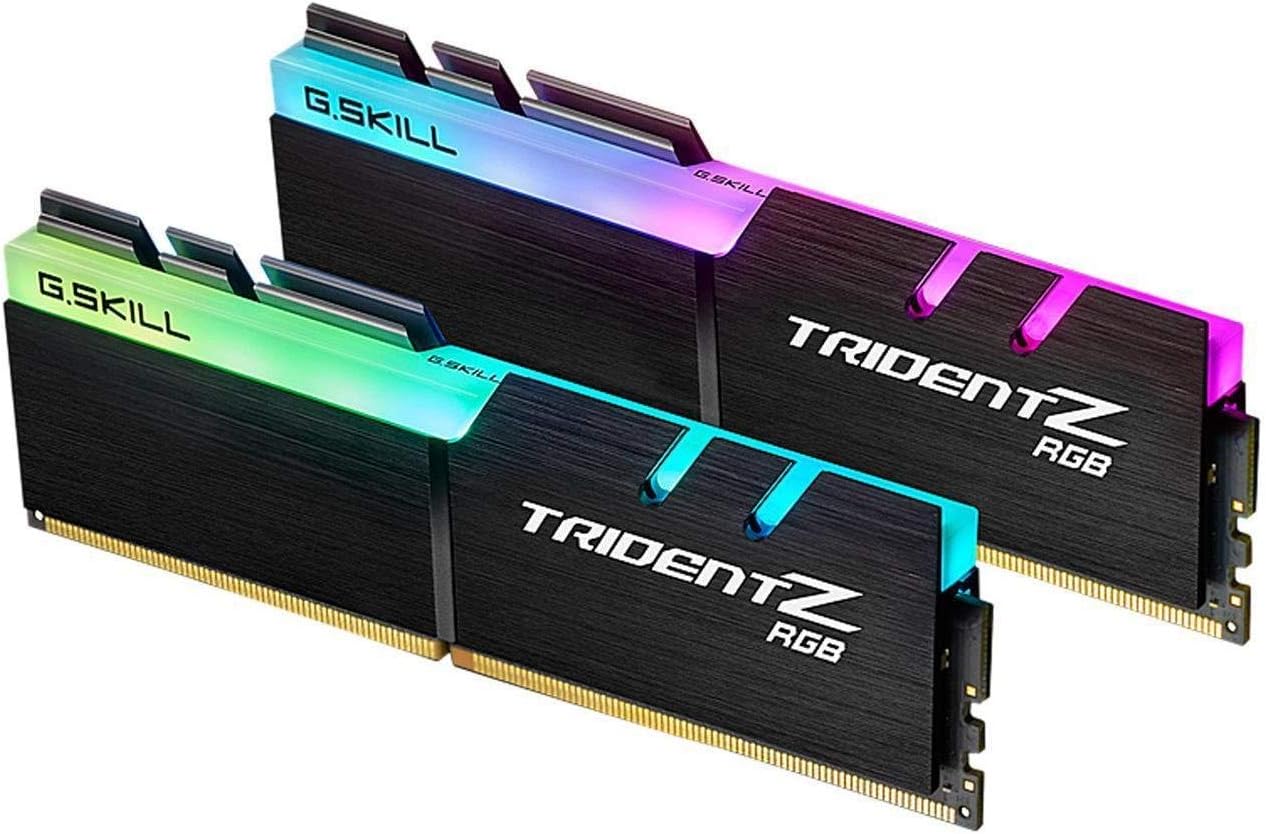
Pros
- 32GB kit split across 2x16GB modules leaves DIMM slots free on quad-slot boards for a future capacity upgrade
- Rated 3200MT/s with CL16-18-18-38 timings at 1.35V under the included Intel XMP profile
- Built on a 10-layer PCB with hand-screened memory ICs, aimed at more consistent module-to-module quality than basic PCB designs
- 288-pin non-ECC U-DIMM format is standard for both current Intel and AMD desktop platforms
- Per-module RGB lighting is customizable through software, syncing with other RGB components
Cons
- Rated speed and timings only apply once XMP is manually enabled in BIOS; at default JEDEC settings it runs slower
- The manufacturer warns against mixing modules from different kits, so future capacity increases should use another matched kit, not single sticks
- Actual XMP overclock stability still depends on motherboard and CPU memory controller compatibility, not the RAM alone
This kit provides 32GB of DDR4 memory split across two 16GB modules, rated to run at 3200MT/s with CL16-18-18-38 timings at 1.35V once the included Intel XMP profile is enabled. Without XMP enabled, the kit defaults to the standard JEDEC profile, which runs at a lower, more conservative speed until you switch it on manually in BIOS.
- 32GB total (2x16GB modules)
- Rated speed: DDR4-3200
- Timings: CL16-18-18-38 at 1.35V
- 288-pin non-ECC U-DIMM format
The heatspreaders use a hairline-finished aluminum design over hand-screened memory ICs on a custom 10-layer PCB, positioned as a build-quality step up from simpler 4- or 6-layer PCB designs. Per-module RGB lighting can be customized through supported software for color and effect syncing with other RGB parts in the build.
Because this is sold as a matched 2x16GB kit, adding capacity later means buying a second identical or explicitly compatible kit rather than a single mismatched module, since mixing kits from different batches can cause stability issues. On a 4-DIMM motherboard, this leaves two slots open for exactly that kind of future expansion.
- 32GB now, with 2 DIMM slots free on quad-slot boards
- Expansion requires a matched kit, not a single stick
- Same 10-layer PCB and heatspreader design across the line for visual matching
For builders planning to go beyond 32GB down the line, checking the Qualified Vendor List for a confirmed-compatible second kit before buying avoids timing or voltage mismatches between the original and new modules. As a first build or single upgrade, 32GB at DDR4-3200 covers current gaming and most productivity workloads without needing to fill every slot immediately.

Pros
- Boosts System Performance 32GB DDR5 RAM laptop memory kit (2x16GB) that
- Accelerated gaming performance Every millisecond gained in fast-paced
- Optimized DDR5 compatibility Best for 12th Gen Intel Core and AMD Ryzen
- Trusted Micron Quality Backed by 42 years of memory expertise, this
- ECC Type Non-ECC, Form Factor SODIMM, Pin Count 262-Pin, PC Speed
Pros
- 32GB kit ships as two matched 16GB modules, built for DDR4-3600 speeds at CL18-22-22-42 timings
- Runs at 1.35V, within the standard voltage range most DDR4 motherboards support without a BIOS voltage override
- Includes both a JEDEC default profile and an Intel XMP profile, so the kit boots safely at default speed before any overclock is enabled
- Aluminium heatspreaders with an RGB light diffuser only add height and lighting; the module PCB itself is a standard 288-pin U-DIMM footprint
Cons
- Reaching the 3600MT/s speed requires manually enabling the XMP profile in BIOS; at default settings, the kit runs at the slower JEDEC speed
- Modules are matched as a kit and are not intended to be mixed with other kits or single modules, limiting later capacity upgrades to identical kits
- RGB lighting and full effect customization depend on separate software support tied to the motherboard, which is not included with the memory itself
This kit provides 32GB of total capacity across two matched 16GB modules, built for DDR4-3600MT/s at CL18-22-22-42 timings and 1.35V. It is a non-ECC, 288-pin U-DIMM design intended for desktop motherboards rather than server ECC platforms. Two profiles are stored on the modules: a conservative JEDEC default speed that the system boots at automatically, and an Intel XMP profile carrying the full 3600MT/s speed and timings.
The aluminium heatspreader uses a hairline-finish design with a light diffuser strip running along the top for the RGB lighting effects, sitting on top of hand-screened memory ICs mounted to a 10-layer PCB. The taller heatspreader height compared to low-profile memory kits is worth checking against CPU cooler clearance before installing.

Pros
- G.SKILL Trident Z RGB Series DDR4 U-DIMM Memory Kit, Model
- 32GB total capacity kit containing 2x16GB modules, rated for up to
- Non-ECC, DDR4 U-DIMM, 288-pin, for Desktop PC Gaming
- Includes JEDEC default profile, and Intel XMP memory overclock profile
- Do not mix memory kits. Memory kits are sold in matched kits that are
Cons
- Requires verifying desktop clearance for 6.3 x 5.4 x 0.59 inches dimensions

Pros
- Kit ships as 2x16GB modules running up to 6400MHz, well above the 4800MHz DDR5 baseline speed
- Ten individually addressable RGB LEDs per module allow per-zone lighting control through iCUE rather than a single fixed color
- Onboard voltage regulation supports more stable overclocking than boards relying on motherboard-only control
- Intel XMP 3.0 profiles can be saved and swapped per application, rather than locked to one tuned setting
- Custom PCB is built specifically for signal stability on Intel DDR5 platforms
Cons
- Rated 6400MHz speed requires overclocking or BIOS adjustment; it will not run at that speed automatically out of the box
- DDR5 is not backward compatible with DDR4 or DDR3 motherboards, so it only works on newer 600-series or later Intel and equivalent AMD platforms
- RGB lighting and profile customization both depend on installing CORSAIR's iCUE software rather than working through firmware alone
This kit pairs two 16GB DDR5 modules for a 32GB total, rated to run at up to 6400MHz with CL36-48-48-104 timings at 1.35V. Reaching that peak rated speed depends on enabling Intel XMP 3.0 in the system BIOS, since DDR5 modules boot at a lower base JEDEC speed by default.
- Capacity: 32GB (2x16GB)
- Rated speed: up to 6400MHz
- Timings: CL36-48-48-104
- Voltage: 1.35V
- Profile support: Intel XMP 3.0
Actual achieved speed depends on the motherboard and CPU memory controller, since maximum speed requires overclocking or BIOS adjustment according to the manufacturer's own disclaimer. A custom PCB is designed specifically to maintain signal integrity at these higher DDR5 frequencies on Intel platforms.
How to Choose the Best 32GB RAM Kit for Your Build
Before you look at any specific product, it helps to understand the handful of specs that actually change your day-to-day experience. Most 32GB kits are sold as two 16GB sticks rather than one large module, which lets your motherboard run them in dual-channel mode for meaningfully better bandwidth than a single stick of the same total capacity. Buying a matched kit instead of pairing two separate sticks avoids compatibility headaches down the road, since manufacturers bin and test the pair together at the factory.
Beyond capacity, pay attention to how tall the heat spreaders are if you’re running a large air cooler, and double-check your motherboard’s QVL (qualified vendor list) if you want a guarantee the exact kit has been validated on your board. It’s a small extra step that saves you a troubleshooting session later.
DDR4 or DDR5: Which Should You Buy?
Your CPU and motherboard generation decide this for you — DDR4 and DDR5 use physically different slots, so they are not interchangeable. Check your board’s specs before adding anything to your cart. DDR4 kits are cheaper and still plenty fast for gaming and everyday multitasking, which is why several of the top-reviewed kits in this roundup are still DDR4. DDR5 costs more but delivers higher bandwidth, which matters more for video editing, 3D rendering, and newer platforms built around it from the ground up.
Speed, CAS Latency, and Voltage Explained
Speed is measured in MHz or MT/s, and higher numbers move more data per second between your RAM and CPU. CAS latency (the CL number) measures the delay before a module responds to a request — lower is technically faster, but the real-world difference is small for most people. Voltage matters for stability: 1.35V is standard for DDR4 kits running an XMP or EXPO profile, and pushing outside spec can cause boot loops or random crashes on some boards, especially with four sticks installed instead of two.
Best 32GB RAM for Gaming Builds
If gaming is your priority, you don’t need the fastest or most expensive kit on the shelf — modern games respond more to having enough capacity than to squeezing out the last few percent of bandwidth. The Corsair Vengeance LPX 32GB pairs a 3200MHz speed with a CL16 latency rating that plays well with most Intel and AMD gaming platforms, and its low-profile heat spreaders clear tall CPU coolers without a fight. It also has the most reviews of any kit on this list, which says a lot about how many builds it has gone into without issue.
If you want to trim a few dollars off your build cost without giving up much performance, the G.Skill RipjawsV 32GB offers nearly identical specs at a similar price point with a more understated look, which suits builds that skip RGB entirely. For a deeper dive into rigs built specifically around frame rates, our best RAM for gaming guide compares more kits side by side, including higher-speed options for competitive setups.
Best 32GB RAM for Content Creators and Multitasking
Video editors, streamers, and anyone running several demanding apps at once benefit more from DDR5’s extra bandwidth than gamers typically do. The Crucial Pro 32GB DDR5 runs at 6000MHz with XMP 3.0 support, which helps timelines scrub more smoothly and exports finish sooner on compatible platforms. It costs noticeably more than the DDR4 options here, so it makes the most sense if your motherboard already supports DDR5 and your workload genuinely uses the extra throughput rather than just sitting idle in the background.
Not sure whether DDR4 or DDR5 fits your workflow better? Our best DDR5 RAM roundup goes deeper into which tasks see a real, measurable benefit from the newer standard versus which ones barely notice the switch.
Best 32GB RAM if You Want RGB Lighting
Lighting doesn’t affect performance, but it’s a real factor if your build has a glass side panel and you’ve already color-matched your fans and cooler. The G.Skill Trident Z RGB 32GB runs at 3200MHz and includes software-controlled lighting that syncs with most major RGB ecosystems, so it won’t clash with the rest of your parts. If you’d rather stick with DDR5, the Corsair Vengeance RGB DDR5 32GB pushes speeds up to 6400MHz while keeping the light show going. Check out our full best RGB RAM guide if aesthetics are as important to you as raw performance.
32GB RAM Options for Laptops
Desktop kits won’t physically fit a laptop, so if you’re upgrading a notebook, you need SODIMM modules instead of the larger DIMM sticks covered above. The Crucial 32GB DDR5 SODIMM kit is built for exactly this, running at up to 5600MHz depending on your laptop’s memory controller and BIOS support. Always confirm your laptop’s maximum supported speed and open slot count before ordering, since some ultrabooks solder part of their memory onto the board and only offer one accessible slot for an upgrade.
Do You Need 32GB, or Would 64GB Serve You Better?
32GB is a comfortable amount for gaming, browsing with dozens of tabs open, and light creative work without ever feeling cramped in everyday use. If you regularly run virtual machines, large Photoshop or Premiere projects, or several memory-hungry apps side by side, you might outgrow it faster than you’d expect. Our best 64GB RAM guide is worth a look if your workload sounds heavier than the average gamer or student setup described here.
Common Mistakes to Avoid When Buying 32GB RAM
A handful of small oversights account for most of the return requests and confused forum posts around new RAM kits. Knowing these ahead of time saves you a returns hassle and a lot of unnecessary troubleshooting after installation.
- Buying a speed your motherboard doesn’t officially support, which can force the kit to run slower than advertised or fail to boot at that speed.
- Mixing sticks from different kits or brands, which sometimes causes instability even when the capacities match on paper.
- Forgetting to enable XMP or EXPO in the BIOS, which leaves brand-new RAM running at default JEDEC speeds well below its rated performance.
- Ignoring cooler clearance, since taller RGB heat spreaders can physically collide with large air coolers and tower heatsinks.
- Assuming DDR4 and DDR5 modules are interchangeable — they use different slot designs and are not cross-compatible in any way.
Who Should Skip a 32GB Kit
Not everyone needs this much memory, and it’s worth being honest about that before you spend the money. If you mainly browse the web, stream video, and use basic office apps, 16GB still handles that comfortably, and a 32GB kit won’t feel noticeably different day to day. On the other end, heavy workstation users running large datasets or several virtual machines at once may find themselves wanting 64GB or more within a year or two of buying. Buy for the workload you actually have this year, not the one you might have someday.
Frequently Asked Questions
Is 32GB of RAM overkill for gaming?
For most current games, 16GB is still enough on its own, but 32GB gives you headroom for streaming software, Discord, and background apps running at the same time. It’s a comfortable middle ground rather than overkill for anyone who multitasks while gaming.
Does DDR5 make a noticeable difference over DDR4 for everyday use?
For gaming and browsing, the difference is usually small and hard to notice in daily use. For video editing, rendering, and other bandwidth-heavy tasks, DDR5’s extra throughput can meaningfully cut down wait times over a busy workday.
Can I mix RAM kits from different brands or capacities?
You technically can, but it’s not recommended. Mismatched timings and voltages between kits increase the odds of instability, so sticking with a single matched kit is the safer, more predictable choice.
What CAS latency should I look for in a 32GB kit?
CL16 is a solid, widely available target for DDR4, while DDR5 kits commonly run CL30 to CL36 due to their much higher base speeds. Compare CAS latency alongside speed rather than on its own, since real-world timing performance depends on both numbers together.
Do I need to manually enable XMP or EXPO after installing new RAM?
Yes, in almost every case. Without enabling the profile in your BIOS, new RAM defaults to a conservative JEDEC speed that sits well below what you paid for and expect to get.
How much should I expect to spend on a good 32GB kit?
Reliable DDR4 kits typically land in the low-to-mid $200s, while DDR5 kits with higher speeds often run closer to $400 to $500 depending on the clock speed and lighting features included.
Whichever kit you land on, matching it to your actual platform and workload matters more than chasing the highest number printed on the box. Confirm your motherboard’s supported speed, pick a capacity that fits how you really use your machine, and compare specs and availability before you check out.


