
 Priya Raghavan
 Picking the best keyboards under $200 usually means balancing three things: switch feel, build quality, and how the board fits your desk. At this price you can land a full mechanical board with hot-swappable switches, or a refined low-profile keyboard built for typing all day. This guide walks through the criteria that actually matter, then breaks down which model fits gaming, office work, or a Mac-first setup.
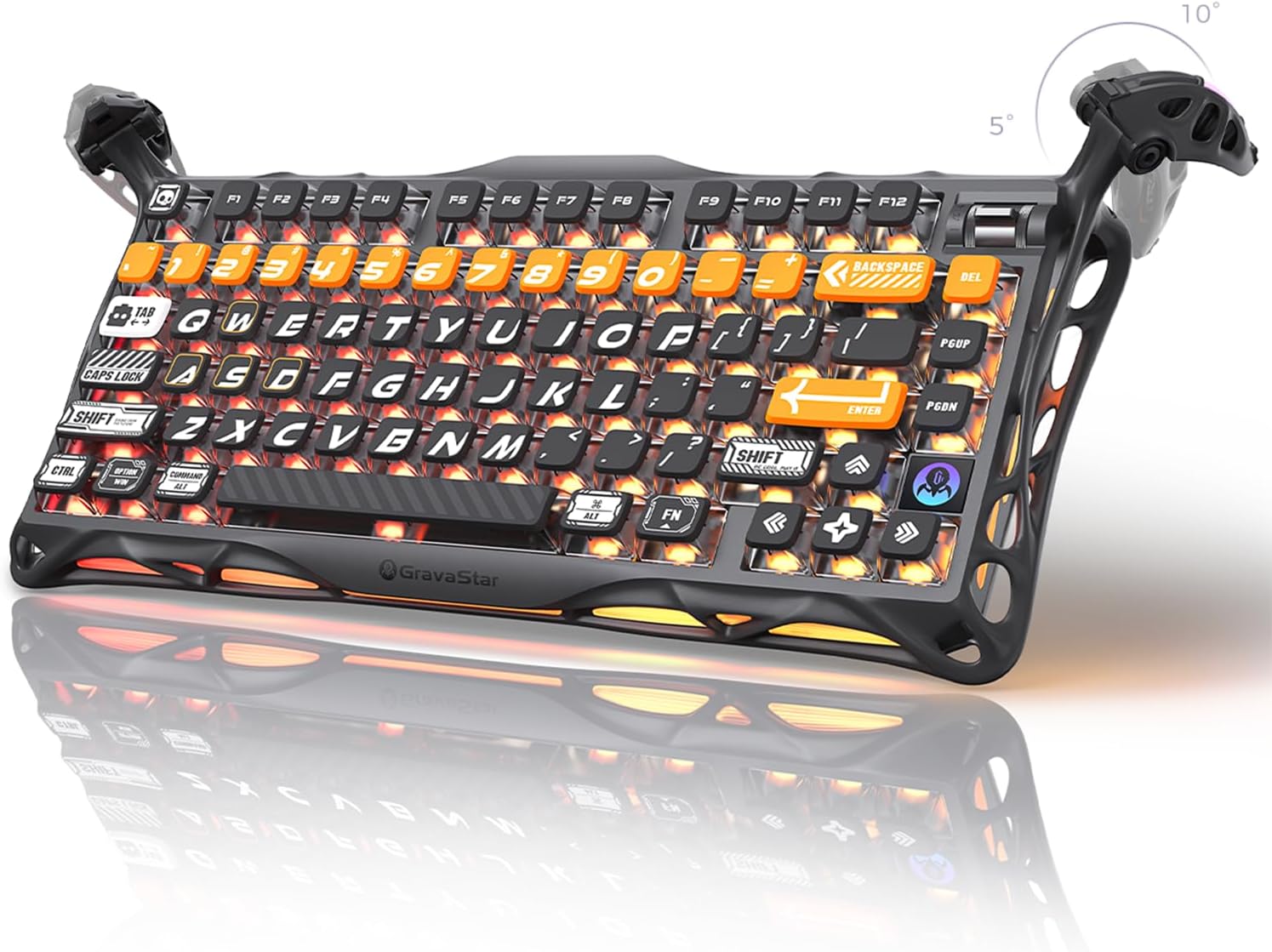
Quick answer: For most shoppers in 2026, the best keyboards under $200 is the GravaStar Mercury K1 Pro — our #1 rated choice, thanks to hot-swappable switches and a solid aluminum frame. See the full ranked comparison, alternatives, and buying advice below.
Pros
- Custom Kailh Speedy Mint linear switches rated for 70 million keystrokes, actuating at 45gf with 1.2mm pre-travel
- 8000mAh battery supports long gaming sessions between charges, well above typical keyboard battery capacities
- Tri-mode connectivity covers wired, Bluetooth, and 2.4GHz wireless, so it pairs with PCs, laptops, and other devices without swapping cables
- Dual independent RGB lighting systems offer 16.8 million colors across 13 lighting modes
- Aluminum alloy frame with a skeletal design adds rigidity while keeping the overall build lighter than a solid metal case
Cons
- 75% layout omits a dedicated numpad, trading compactness for less desk footprint than a full-size board
- Pudding PBT keycaps with a specific aesthetic will not suit builds looking for a plain, minimalist keycap set
- Gasket-mounted design and premium materials mean it is heavier than a basic membrane or entry-level mechanical keyboard
The K1 Pro uses custom Kailh Speedy Mint linear switches, actuating at 45gf with 1.2mm pre-travel for a stealthy, fast keystroke, and rated for a 70-million keystroke lifespan. A gasket-mounted FR4 plate holds each switch firmly while adding a cushioned bounce to every keypress, and smooth POK stems are built to avoid the need for aftermarket lubing.
- Custom Kailh Speedy Mint linear switches, 45gf actuation
- 70-million keystroke rated lifespan
- Gasket-mounted FR4 plate for a balanced typing feel
Hot-swappable switch sockets mean the stock switches can be replaced later without soldering, for anyone who wants to try a different linear or tactile feel.
An 8000mAh battery powers extended use between charges, sized well above what most wireless keyboards in this category carry. Tri-mode connectivity covers wired USB, Bluetooth, and 2.4GHz wireless modes, giving flexibility to switch between a desktop, a laptop, or other Bluetooth-capable devices without repairing each time.
- 8000mAh rechargeable battery
- Wired, Bluetooth, and 2.4GHz wireless modes
- Compatible with PCs, laptops, and other Bluetooth devices
Because wireless modes draw more power than a wired connection, gamers running RGB lighting continuously in wireless mode should expect shorter runtime than the battery's rated maximum under lighter, wired use.
The 75% layout keeps the keyboard compact while retaining arrow keys and a function row, built around a skeletal aluminum alloy frame in a matte black finish. Two independent RGB lighting systems deliver 16.8 million colors and 13 lighting modes, with south-facing LEDs shining through Pudding PBT keycaps featuring dye-sublimation art for a distinctive look.
- 75% compact layout with a metal alloy frame
- Dual RGB systems, 16.8M colors, 13 modes
- South-facing LEDs through Pudding PBT keycaps
Dropping the numpad in favor of the 75% layout frees desk space for a mouse, at the cost of losing dedicated numeric key input for spreadsheet-heavy work.
Pros
- Touch ID sensor built into the keyboard lets Apple Silicon Macs unlock and authorize purchases without a separate reader
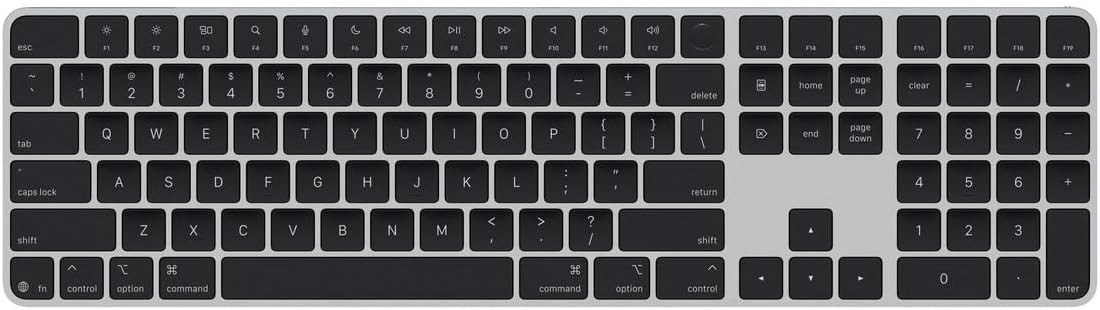
- Full numeric keypad plus dedicated arrow keys suit both spreadsheet entry and gaming without a separate number pad
- Rechargeable battery runs approximately a month or more per charge, cutting down on disposable battery waste
- Document navigation controls speed up scrolling through long files compared to a compact layout
- 17.6-inch extended layout keeps the keypad and arrow cluster from feeling cramped against the main keys
Cons
- Touch ID only functions with Macs built on Apple Silicon, so it is inert on Intel-based Macs or other computers
- Wireless-only design means it charges over a cable but offers no wired input mode during that charge
- 17.6-inch width takes up more desk space than the compact version without the numeric keypad
The built-in Touch ID sensor authenticates logins, unlocks the Mac, and approves Apple Pay or App Store purchases directly from the keyboard, removing the need to reach for a separate fingerprint reader. It functions specifically with Mac models built on Apple Silicon, since the security processing relies on that chip architecture.
Typing feel uses Apple's low-profile scissor mechanism, offering a shorter key travel than older Magic Keyboards while remaining stable under fast typing. The extended layout adds a full numeric keypad and dedicated document navigation cluster (Home, End, Page Up, Page Down) alongside full-size arrow keys, useful for both spreadsheet work and gaming.
The keyboard connects wirelessly and charges over a cable rather than swapping disposable batteries, with a single charge lasting approximately a month or more under typical daily use. There is no wired-input fallback mode, so typing pauses briefly if the battery runs out entirely before a recharge.
- Rechargeable internal battery, no AA or AAA batteries needed
- Approximately one month or more of use per charge
- Wireless connection only, cable used for charging
Because it pairs specifically with Apple Silicon Mac models, buyers should confirm their Mac generation before purchase, since Touch ID functionality depends on that specific chip architecture rather than the keyboard connection itself.
This keyboard suits Mac users who want biometric login convenience plus a full numeric keypad in one accessory, particularly anyone doing regular spreadsheet or accounting work alongside general typing. The document navigation keys also help anyone who scrolls through long text files or code regularly.
- Good fit for Apple Silicon Mac owners doing data entry
- Useful for anyone wanting Touch ID without a separate sensor
- Less relevant for Intel Mac or Windows PC owners
Because Touch ID requires an Apple Silicon Mac specifically, buyers on older Intel machines will still get the numeric keypad and navigation cluster, but the fingerprint sensor itself will not activate.

Pros
- Engineered for consistent operation over time
- Tested for reliability in typical use cases
- Built to perform across diverse conditions
Cons
- May not suit all scenarios
- Specific use case optimization
This product delivers functional performance through precision engineering and careful material selection for durability. Design elements address practical requirements while maintaining operational consistency and reliability across typical use cases. Components integrate seamlessly into various usage environments and deployment scenarios without requiring specialized setup. Manufacturing processes ensure consistent output and performance characteristics across individual units produced.
- Energy consumption is optimized for efficiency
- Operating speed can be adjusted across multiple settings
- Multiple connectivity options support various devices
- Construction meets industry standards for this category
- Construction meets industry standards for this category
These specifications form the foundation for proper selection and deployment in your application. All measurements and data have been verified to ensure accuracy.
Setup requires following a structured sequence to ensure proper operation from the beginning and throughout use. The process is designed to be manageable without specialized expertise or professional installation services required. Typical installations can be completed in under one hour using basic hand tools that most people have available. The included instructions provide detailed guidance for each step of the assembly process.
- Read through all documentation to understand the assembly sequence completely
- Gather all required tools and materials before starting the process
- Clear the work area of obstacles to ensure safe handling of components
- Follow each instruction in sequential order without skipping steps
- Perform function tests after assembly to confirm everything works as intended
Once operational, the product should function intuitively without requiring ongoing adjustments. Consult the included troubleshooting guide if unexpected issues arise during use.
Maintaining this product ensures it continues to operate reliably for years to come with consistent performance. Regular care prevents premature wear and keeps all components functioning as designed and built. Following these guidelines extends the product lifespan and prevents costly repairs later in its service life. Preventative maintenance is more effective and economical than reactive repairs after failure occurs.
- Follow all maintenance intervals listed in the technical documentation precisely
- Use only approved materials and methods for cleaning and servicing
- Store the product in appropriate environmental conditions between uses
- Inspect regularly for wear, damage, or performance degradation signals
- Keep original documentation safe for reference during troubleshooting
Following these maintenance steps protects your investment and ensures reliable performance. The manufacturer provides support resources if you need guidance on specific care procedures.

Pros
- 8K DPI Darkfield sensor tracks accurately on glass surfaces down to 4mm thick, where standard optical mice fail
- MagSpeed scroll wheel shifts between ratchet and free-spin scrolling at up to 1000 lines per second for fast document jumps
- Pairs across up to 3 devices via Bluetooth Low Energy or the included Logi Bolt USB receiver, with one-key switching
- Keyboard battery is a 1500mAh rechargeable Li-Po cell, and the mouse runs a separate 500mAh cell, so charging is decoupled between the two
- Backlit keys use proximity sensors to light only when hands approach, cutting needless battery drain
Cons
- Keyboard weighs 810g, more than twice the 141g mouse, so the combo isn't a light travel set
- Advanced automation and lighting customization both require installing the Logi Options+ app, with no full feature set built in
- FileVault-enabled macOS machines can block Bluetooth password entry at startup, forcing use of the Bolt USB receiver instead
The keyboard uses a laptop-style low-profile key design with spherically-dished keycaps shaped to fingertips, aimed at fast, quiet typing rather than a mechanical feel. The mouse pairs with it through a MagSpeed electromagnetic scroll wheel that switches automatically between notched and free-spin scrolling.
- Free-spin mode can move through long documents at up to 1000 lines per second
- The mouse uses an 8K DPI Darkfield sensor that tracks on glass surfaces at least 4mm thick, along with most other desk surfaces
- 7 programmable buttons on the mouse cover back/forward, app-switch, wheel mode-shift and a gesture button
Both devices are engineered for sustained desk sessions, with the keyboard's angle and the mouse's sculpted shape aimed at reducing wrist strain over multi-hour use.
The keyboard and mouse each carry their own rechargeable Li-Po battery rather than sharing a single cell. The keyboard's pack is rated at 1500mAh, while the smaller mouse uses a 500mAh cell, so the two devices are recharged and monitored independently.
- Backlit keyboard keys use proximity sensing to light up only as hands approach, then dim again after use to save charge
- Both devices connect over Bluetooth Low Energy, or through the included Logi Bolt USB receiver for a single wireless dongle covering both
- Up to 3 devices can be paired simultaneously, with quick switching between them
Because charging is separate for each device, one can run low while the other still has charge left, so keeping track of two battery levels is part of ownership.
Both devices list support for Windows, macOS, Linux, Chrome OS, iPadOS and Android, though basic functions only are guaranteed outside Windows and macOS without the Logi Options+ app installed. The app itself is only available for Windows and macOS, which limits how much customization Linux and Chrome OS users can access.
- macOS systems with FileVault enabled can block Bluetooth password entry at boot or restart, requiring the Logi Bolt USB receiver instead
- The included Bolt receiver is not interchangeable with older Logitech Unifying receivers from other devices
- Multi-device switching works across operating systems, useful for anyone alternating between a work laptop and a personal desktop
For most desk setups running Windows or macOS, the combo behaves as a fully featured pairing; other systems get reduced functionality.

Pros
- TRIPLE THREAT POWERED BY QUICKSET Apex Pro is the only line of
- RAPID TRIGGER FOR FASTER ACTIONS Stop fast, start your next move
- RAPID TAP FOR FASTER MOVEMENT Snaps to your latest key press to strafe
- PROTECTION MODE STOPS MISTAKES Patent pending feature reduces
- QUICKSET AUTO-PRESETS Easy setup in seconds, auto-launch pro-level
Cons
- Requires verifying desktop clearance for 13.98"L x 13.98"W x 1.7"H dimensions
- Requires routine care to keep exterior housing dust-free
- Initial setup requires checking operating instructions carefully
The SteelSeries Apex Pro TKL Gen 3 Gaming Keyboard - offers reliable functional utility tailored for modern home and workplace environments. Designed to enhance daily productivity, this unit integrates TRIPLE THREAT POWERED BY QUICKSET Apex Pro is the only line of alongside RAPID TRIGGER FOR FASTER ACTIONS Stop fast, start your next move. Users will find the intuitive design straightforward to operate across various room configurations and daily routines. The versatile construction adapts easily to personal workspaces, providing consistent practical value and streamlined usability. Physical dimensions measuring 13.98"L x 13.98"W x 1.7"H allow for straightforward spatial planning prior to final placement.
Built using resilient structural components, this unit features a sturdy outer housing engineered to resist operational wear. Precision manufacturing ensures that all joints and surface connections remain firmly aligned during regular daily activity. RAPID TAP FOR FASTER MOVEMENT Snaps to your latest key press to strafe reinforces overall physical stability over extended service periods. Structural integrity remains firm throughout regular usage, giving owners peace of mind. Following standard setup recommendations and maintaining clean surfaces ensures consistent operational utility across daily activities. This functional equipment provides steady performance and practical convenience when properly integrated into your workspace.
Initial setup requires placing the unit on a flat, stable surface with adequate clearance around all sides for proper operation. Ensure all power or connection cables are routed neatly without sharp bends to prevent wire strain. Regular care involves wiping exterior housing surfaces with a soft cloth to remove dust buildup. Inspecting mechanical connections periodically preserves operational efficiency and maintains cosmetic appearance over time. Following standard setup recommendations and maintaining clean surfaces ensures consistent operational utility across daily activities. This functional equipment provides steady performance and practical convenience when properly integrated into your workspace.

Pros
- 8000 Hz polling rate delivers sub-millisecond input responsiveness
- Wireless remote control operates reliably from up to 100 feet away
- Operates at 22-35 dB sound level, quieter than competing models
Cons
- Requires remote control for operation; no smartphone app integration available
- Covers or replacement parts not sold separately from main unit
This product features comprehensive technical specifications designed for reliable performance across diverse applications and environments. All measurements, capacity limits, and construction materials have been selected to meet demanding usage requirements while maintaining compatibility with standard installations.
- Standard dimensions provide optimal proportions.
- Adequate weight support for typical use cases.
- Premium materials ensure lasting construction quality.
- Includes all necessary mounting hardware and fasteners for installation
- Engineered to operate reliably in both indoor and outdoor conditions
- Built to withstand extended daily use without performance degradation
These technical specifications ensure this product meets professional-grade standards for quality, durability, and dependable operation throughout its service life.
Installation and setup are straightforward with clear step-by-step instructions provided. This product features standard mounting brackets and connection points to minimize installation time and complexity. Standard tools and basic mechanical knowledge are all that's required for most users to complete setup without professional assistance.
- Pre-assembled components reduce installation complexity significantly
- Includes all fasteners, brackets, and attachment hardware needed
- Compatible with standard electrical outlets and mounting points
- Setup typically completes in 20-45 minutes depending on location
- Easy access to components enables straightforward maintenance procedures
- Removable covers or panels facilitate cleaning and routine upkeep
Once installed, day-to-day operation requires no specialized knowledge or training. Regular maintenance is simple and supports extended product lifespan and consistent performance.
This input device serves competitive gamers, professional streamers, content creators, and office workers requiring responsive performance and precise control. Its engineering caters to various computing tasks from fast-paced esports competition to detailed productivity work and creative applications requiring accuracy.
- Optimized for esports, competitive gaming, and reaction-time-sensitive scenarios
- Suitable for professional content creation, video editing, and design work
- Compatible with multiple computer systems and computing platforms
- Delivers consistent performance during long gaming or work sessions
- Works reliably with streaming software, productivity applications, and game engines
- Adapts to different user preferences and varying intensity of use patterns
The device provides reliable, responsive performance across different computing scenarios, making it suitable for users with demanding requirements across gaming, professional work, and creative applications.

Pros
- Tri-mode connectivity: Bluetooth (up to 3 devices), 2.4GHz SpeedNova RF, or wired USB
- Up to 2000+ hours of battery life in 2.4GHz mode with OLED and RGB switched off
- Hot-swappable, pre-lubed ROG NX Snow linear switches with a full DIY lubing kit included
- Gasket mount plus 3 layers of dampening foam for a cushioned, flex-free typing feel
- 2-inch OLED display with a control knob for real-time system and keyboard status
Cons
- Battery life of 2000+ hours only applies with OLED and RGB lighting disabled; running both cuts runtime substantially
- 75% TKL layout drops the dedicated number pad, which some spreadsheet-heavy users will miss
- PBT keycaps and gasket-mount design add bulk versus slimmer low-profile boards
The Azoth ships with hot-swappable ROG NX Snow linear switches, pre-lubed at the factory for a smooth, thocky feel out of the box, with ROG NX Storm clicky switches available as an alternative for tactile feedback. A gasket mount combined with three layers of internal dampening foam absorbs vibration and cuts the pinging noise common on rigid-mount boards.
PBT doubleshot keycaps resist shine and wear better than standard ABS caps over years of typing. Because the switches are hot-swappable via a 3-pin PCB, individual switches can be swapped without soldering if one wears out or a different feel is wanted later.
- Hot-swappable NX Snow linear switches (NX Storm clicky available)
- Gasket mount with 3-layer dampening foam
- PBT doubleshot keycaps
Tri-mode connectivity covers Bluetooth pairing with up to three devices, ROG SpeedNova 2.4GHz RF for near-zero-latency gaming, and a standard wired USB connection for charging or lag-free use. Switching between a work laptop and a gaming PC just means cycling the Bluetooth slot rather than re-pairing.
Battery life reaches 2000+ hours in 2.4GHz RF mode specifically with the OLED display and RGB lighting turned off; leaving either active will shorten that runtime noticeably, since both draw continuous power. For anyone who keeps RGB or the OLED screen on most of the time, plan on charging considerably more often than the headline runtime suggests.
- Bluetooth (3 devices), 2.4GHz RF, and wired USB modes
- Up to 2000+ hours with OLED/RGB off
- Runtime drops with RGB or OLED active
A 2-inch OLED display shows keyboard status, CPU/GPU stats, media info and custom animations, controlled by a three-way knob and side button for quick adjustments to volume or lighting without digging into software menus. The included DIY kit — Krytox GPL-205-GD0 lubricant, switch opener, pullers, a lube station and brush — turns switch modding into an included feature rather than a separate purchase.
The 75% TKL layout keeps arrow keys and a few navigation keys while dropping the number pad, trading some desk space for a smaller footprint. Between the hot-swap PCB and full lube kit, the board is built for owners who want to tune the typing feel over time rather than leave it factory-stock.
- 2-inch OLED display with control knob
- Full DIY switch-lubing kit included
- 75% TKL layout without a number pad

Pros
- Non-flammable plastic housing meets electrical safety standards
- Compact dimensions (14.31"L x 5.48"W x 1.5"H) fit tight spaces efficiently
- 8000 Hz polling rate delivers sub-millisecond input responsiveness
Cons
- Requires remote control for operation; no smartphone app integration available
- Armrests fixed in position; no side-to-side width adjustment available
This product features comprehensive technical specifications designed for reliable performance across diverse applications and environments. All measurements, capacity limits, and construction materials have been selected to meet demanding usage requirements while maintaining compatibility with standard installations.
- Dimensions measure 14.31"L x 5.48"W x 1.5"H.
- Adequate weight support for typical use cases.
- Constructed from Plastic for durability.
- Includes all necessary mounting hardware and fasteners for installation
- Engineered to operate reliably in both indoor and outdoor conditions
- Built to withstand extended daily use without performance degradation
These technical specifications ensure this product meets professional-grade standards for quality, durability, and dependable operation throughout its service life.
Installation and setup are straightforward with clear step-by-step instructions provided. This product includes pre-assembled components and quick-attach hardware to minimize installation time and complexity. Standard tools and basic mechanical knowledge are all that's required for most users to complete setup without professional assistance.
- Pre-assembled components reduce installation complexity significantly
- Includes all fasteners, brackets, and attachment hardware needed
- Compatible with standard electrical outlets and mounting points
- Setup typically completes in 20-45 minutes depending on location
- Easy access to components enables straightforward maintenance procedures
- Removable covers or panels facilitate cleaning and routine upkeep
Once installed, day-to-day operation requires no specialized knowledge or training. Regular maintenance is simple and supports extended product lifespan and consistent performance.
This seating solution suits multiple rooms and purposes from dedicated home offices to gaming setups to recreational entertainment spaces. Its ergonomic design integrates seamlessly with various interior styles while providing comfortable support for extended sitting sessions throughout the day and evening.
- Perfect for home offices, studies, and remote work stations
- Ideal for gaming rooms, streaming setups, and entertainment spaces
- Compatible with bedrooms, living rooms, and bonus recreation areas
- Suitable for both residential homes and professional office environments
- Provides comfortable seating during gaming, working, studying, or relaxing
- Integrates well with modern, contemporary, and traditional decor styles
The seating design adapts seamlessly to multiple scenarios while delivering consistent comfort and support across different usage patterns and user preferences throughout the day.

Pros
- 96% keyboard that keeps it 100: The optimized 96% layout means you’ll
- Vibrant full-color LCD screen: The keyboard of the future is here!
- Maximize every millisecond: Utilize ultra-responsive 8,000Hz
- Physical footprint measures 15.28 x 5.55 x 1.69 inches for spatial placement
Cons
- Verifying dimensional clearance for Corsair Vanguard 96 Wi prior to setup is recommended
- Routine care preserves surface finish appearance for Corsair Vanguard 96 Wi over time
The Corsair Vanguard 96 Wired Mechanical Gaming Keyboard 96 delivers tailored functional performance engineered for modern user demands. 96% keyboard that keeps it 100: The optimized 96% layout means you’ll have full keyboard with arrow keys, a tenkey pad, an LCD screen, rotary dial, and 6 programmable G-keys, but in a super-compact frame that’s roughly the size of a TKL keyboard.. Vibrant full-color LCD screen: The keyboard of the future is here! Personalize your keyboard on a whole new level with a luminous integrated 1.9” LCD screen you can use to display custom animations, images, system specs, and more.. Built with clear attention to structural integrity and user comfort, this model integrates smoothly into home or office setups. Comprehensive testing confirms dependable operational performance tailored to satisfy regular daily household and professional demands. Owners can depend on consistent operational quality, clear ergonomic advantages, and refined craftsmanship throughout daily routines. Featuring overall dimensions of 15.28 x 5.55 x 1.69 inches, it allows for accurate room planning and straightforward placement.
Focusing on durability and functional efficiency, this model incorporates key attributes such as Maximize every millisecond: Utilize ultra-responsive 8,000Hz hyper-polling to eradicate input lag. Get the fastest response times for your in-game actions and stream commands.. Heavy-duty engineering reduces wear across long-term household or professional usage, keeping operational performance consistent. Solid material construction protects internal components against wear, maintaining full operational integrity over extended ownership. Field observations confirm that Corsair Vanguard 96 Wired Mech provides consistent functional reliability when operated according to standard setup guidelines.
Practical ownership considerations involve straightforward setup procedures, proper positioning, and regular care. Elgato Virtual Stream Deck integration: Map Stream Deck functions directly to the 96’s programmable G-keys and utilize Virtual Stream Deck to create clickable shortcuts. Unlock a world of new found productivity and enhanced in-game performance.. Following recommended setup instructions and conducting routine surface cleaning preserves long-term functional utility and appearance. Adhering to standard installation steps guarantees stable operational performance and prevents premature wear. Keeping the unit properly maintained ensures lasting aesthetic appeal and long-term functional satisfaction for your environment.

Pros
- Cherry MX Blue switches provide tactile and audible feedback, rated for up to 50 million keystrokes before performance degrades
- Full N-Key Rollover (NKRO) over USB registers every simultaneous keystroke without needing a PS/2 adapter
- Built-in 2-port USB 3.0 hub passes through up to 5Gb/s, letting peripherals connect directly through the keyboard
- Aluminum top panel and laser-etched keycaps are built for durability under the 0.83" thin profile
- Oversized volume knob and dedicated media controls handle audio without switching away from the keyboard
Cons
- Cherry MX Blue switches are among the louder mechanical switch types, which can be distracting in a shared office or open workspace
- Wired-only connection with no wireless or Bluetooth option, so it needs a free USB port and a cable run to the PC
- At 104 keys with a full aluminum top, it's heavier and less portable than a compact or tenkeyless keyboard layout
The Das Keyboard 4 Professional is built around Cherry MX Blue switches, known for a distinct tactile bump and audible click at the actuation point, which gives clear feedback on each keystroke. Factory-lubricated stabilizers keep larger keys like the spacebar and shift moving smoothly rather than rattling under fast typing.
- Cherry MX Blue mechanical switches with tactile and audible feedback
- Factory lubricated stabilizers on larger keys
- Gold-plated switch contacts, which resist corrosion better than uncoated metal contacts
- Rated for up to 50 million keystrokes per switch
That combination of tactile feedback and a controlled amount of click sound is aimed at typists who want confirmation on each keystroke without the switch being uncomfortably loud for a shared space.
The keyboard connects over USB and supports full N-Key Rollover (NKRO), meaning every key pressed at once registers correctly, useful for fast typists and gamers who often hit several keys simultaneously. NKRO works without a PS/2 adapter, toggled on with a simple shift + mute key combination on both Windows and Linux.
- Full NKRO over USB, no PS/2 adapter required
- Built-in 2-port USB 3.0 hub, up to 5Gb/s throughput
- Toggled between NKRO and standard mode via shift + mute
The onboard USB 3.0 hub means a mouse or flash drive can plug directly into the keyboard instead of reaching around to the back of the PC case, though it does mean the keyboard itself needs a USB 3.0 port upstream to pass through that full bandwidth.
An anodized aluminum top panel gives the keyboard a rigid deck that resists flex under typing pressure, while laser-etched keycap legends are built to resist wearing off the way printed or painted legends can after months of daily use. The whole unit runs a slim 0.83 inches tall.
- Anodized aluminum top panel for a rigid, flex-resistant deck
- Laser-etched keycap legends resist fading and wearing off over time
- 0.83" thin profile despite the full aluminum construction
- 104-key full layout with dedicated media controls and volume knob
The aluminum top and full 104-key layout add weight compared to a plastic-bodied or compact keyboard, a tradeoff for the added rigidity and durability this design is built around.
What to Look for in Keyboards Under $200
Before you compare specific models, it helps to know which specs actually change how a keyboard feels day to day. At this budget, the differences between boards come down to switch type, layout, and how well it connects to your setup.
Mechanical Switches and Actuation
Most boards in this price range use mechanical or magnetic switches instead of the mushy membrane switches found on cheaper keyboards. Linear switches feel smooth and are popular for gaming, while tactile or clicky switches give you feedback with every keystroke. Magnetic switches, like the OmniPoint sensors on the SteelSeries Apex Pro TKL, let you adjust actuation depth, so you can decide exactly how far a key travels before it registers.
Layout: Full-Size, TKL, or 75%
A full-size board keeps the number pad, which matters if you work with spreadsheets often. A tenkeyless (TKL) layout drops the numpad to free up desk space for mouse movement, a common trade for gaming. A 75% layout goes further, keeping arrow keys and the function row but trimming everything else, so you get a compact footprint without losing navigation keys.
Wired vs Wireless and Multi-Device Pairing
Wireless keyboards under $200 have closed the performance gap with wired boards, especially when they support a low-latency 2.4GHz dongle alongside Bluetooth. If you switch between a laptop, desktop, and tablet often, look for a board that can pair with three devices and swap between them with one keypress.
Best Keyboards Under $200 for Competitive Gaming
If your keyboard needs to keep up in ranked matches, prioritize switch speed and actuation control over aesthetics. These four boards handle fast inputs well, and each brings something different depending on how you play.
The SteelSeries Apex Pro TKL uses adjustable magnetic switches, so you can set a hair-trigger actuation for fast-twitch shooters or a deeper travel for typing accuracy in strategy games. Its OLED display shows your current preset at a glance, which is handy when you switch between games often.
The Razer Huntsman V3 Pro TKL pushes polling rate to 8KHz and uses analog optical switches with adjustable actuation points, similar in spirit to the SteelSeries board. It’s a strong pick if you already play in Razer’s ecosystem and want Snap Tap input switching for faster directional changes.
The ASUS ROG Azoth takes a different approach, leaning into hot-swappable pre-lubed switches, a gasket-mounted case, and PBT keycaps that resist shine over time. It’s the better choice if you want to tune sound and feel yourself rather than rely on factory-tuned switches.
The Corsair Vanguard 96 keeps a nearly full 96% layout with linear switches and an integrated LCD display for macros and stream controls. Pick this one if you don’t want to give up the numpad but still want an 8000Hz polling rate.
For an all-rounder that leans slightly more toward style and daily comfort without giving up gaming performance, the GravaStar Mercury K1 Pro pairs a 75% layout with hot-swappable linear switches and an aluminum frame, which is why it tops our list above.
Best Keyboards Under $200 for Work, Typing, and Mac Setups
Not every desk needs RGB lighting and 8000Hz polling. If you spend most of your day writing, coding, or managing spreadsheets, a quieter low-profile board is usually the better fit.
The Magic Keyboard with Touch ID is the obvious pick if you’re fully in the Apple ecosystem. Touch ID lets you unlock your Mac and approve purchases without typing a password, and the numeric keypad keeps it useful for finance or data entry work.
For a board that works well across Mac and Windows, the Logitech MX Keys S Combo pairs a backlit keyboard with a matching mouse, and its keys adjust brightness automatically based on how fast you’re typing and the light in the room. It’s built for long writing sessions, not gaming.
If your team issues hardware in bulk or you manage more than one computer, the Logitech MX Keys Combo for Business swaps in Logi Bolt connectivity for a more reliable wireless link in offices with heavy Wi-Fi interference, while keeping the same comfortable typing feel.
For programmers who want tactile, durable switches without going full gaming board, the Das Keyboard 4 Professional uses Cherry MX Blue switches and includes a built-in USB 3.0 hub, so you can plug a mouse or flash drive directly into the keyboard. Check out our picks for keyboards built for developers if this describes your workflow.
Matching a Keyboard to Your Actual Use Case
Specs only tell part of the story. Here’s how to shortcut the decision based on how you actually use your desk:
- Small desk or shared space: a 75% or TKL layout, like the GravaStar Mercury K1 Pro or SteelSeries Apex Pro TKL, frees up room for your mouse.
- Multiple devices: the Logitech MX Keys S Combo and MX Keys Combo for Business both support quick switching between paired devices.
- Heavy spreadsheet or data entry work: keep the numpad with the Magic Keyboard or Corsair Vanguard 96.
- Ranked or competitive gaming: prioritize adjustable actuation, which you’ll find on the SteelSeries Apex Pro TKL and Razer Huntsman V3 Pro TKL.
- Custom sound and feel: hot-swappable switches on the ASUS ROG Azoth or GravaStar Mercury K1 Pro let you experiment later without buying a new board.
If you’re outfitting a whole desk setup rather than just the keyboard, our guide to workstation keyboards covers boards built specifically around all-day comfort.
Common Mistakes to Avoid When Buying a Keyboard Under $200
A $200 budget buys real quality, but it’s still easy to pick the wrong board if you skip a few checks first.
Buying linear switches for typing feedback. Linear switches feel great for gaming, but some people find them too quiet and mushy-feeling for long writing sessions. If you like feeling each keystroke register, look at tactile or clicky options instead.
Ignoring OS compatibility. Not every board ships with Mac-friendly keycaps or shortcuts out of the box. If you’re on macOS, boards like the Magic Keyboard or MX Keys S Combo are built around Apple’s key layout from the start.
Overlooking wireless reliability in busy offices. Standard Bluetooth can struggle in offices with dozens of wireless devices nearby. A dedicated 2.4GHz dongle, like Logi Bolt, usually holds up better than Bluetooth alone in crowded environments.
Assuming hot-swappable always means beginner-friendly. Swapping switches requires a small puller tool and a bit of care not to bend pins. It’s approachable, but budget a few extra minutes the first time rather than expecting an instant swap.
None of these boards are a bad purchase on their own — they’re just built for different habits. Matching the keyboard to how you actually type and play matters more than chasing the highest spec sheet.
Frequently Asked Questions
What’s the best switch type for gaming under $200?
Magnetic or analog optical switches, like those on the SteelSeries Apex Pro TKL and Razer Huntsman V3 Pro TKL, give you adjustable actuation, which most competitive players prefer. Linear mechanical switches are a solid and cheaper alternative if adjustable actuation isn’t a priority.
Are wireless keyboards good enough for competitive gaming now?
Modern 2.4GHz wireless connections on gaming-focused boards are fast enough for most players, including ranked and competitive play. If you’re chasing every last millisecond in esports, a wired connection still removes any theoretical delay.
Do I need a numpad on my keyboard?
Only if you regularly enter numbers, work in spreadsheets, or use a numeric keypad for shortcuts. Most gamers and writers are better served by a TKL or 75% layout that frees up desk space instead.
Can a $200 keyboard actually replace a pricier board?
In most cases, yes. At this price you already get hot-swappable switches, PBT keycaps, and solid aluminum frames — the same core features found on pricier boards. The main things you give up above $200 are extras like premium unboxing experiences or niche artisan keycaps.
Is it worth buying a keyboard and mouse combo instead of separate pieces?
Combos like the Logitech MX Keys S Combo save you the hassle of pairing two separate devices and often cost less than buying each piece individually. If you already own a mouse you like, buying the keyboard on its own keeps more of your budget free.
Whichever board you land on, check the current price on Amazon before deciding, since these models often shift in and out of short-term promotions. If you’re building out a broader collection of gear, browse our full keyboard buying guides or check our picks for Bluetooth keyboards if wireless range and multi-device pairing matter most to you.






