
 Priya Raghavan
 Shopping for a new keyboard doesn’t have to mean overspending. Whether you type reports all day, jump into ranked matches after work, or just want something that feels nicer than what came with your PC, there are genuinely good options in this price range. This guide breaks down our 10 top picks for the best keyboards under $50 by use case, so you can match a board to how you actually type and play, then compare specs and availability before you decide.
Quick answer: If you only read one section, here it is: for most shoppers in 2026, the best keyboards under $50 is the Womier SK80 — our #1 rated choice thanks to its hot-swappable switches and a surprisingly premium feel for the price. See the full ranked comparison, alternatives, and buying advice below.

Pros
- 75% layout pairs with a customizable color display screen for GIFs, RGB modes and system status
- Gasket-mounted design with an EVA positioning plate is built to reduce typing noise and add flex
- Hot-swappable PCB accepts both 3-pin and 5-pin mechanical switches for easy customization
- Pre-lubed POM linear switches with south-facing light diffusers aim for a smooth, consistent keystroke feel
- 2-stage adjustable feet and a WIN/MAC toggle switch cover different desk heights and computer platforms
Cons
- Disassembly is explicitly discouraged by the manufacturer, since the fine display wiring is easy to damage
- Software customization for the display, macros and RGB requires installing the Womier driver on a PC
- 75% layout drops a dedicated numpad, which touch typists relying on one will need to adjust to
The SK80 uses a gasket mount construction paired with an EVA positioning plate and bottom filling, aimed at a softer, more cushioned typing feel than a tray-mount board.
- Pre-lubed POM linear switches ship factory-lubed and are built to self-lube further with continued use
- South-facing transparent light diffusers are intended to give a cleaner, more consistent backlight glow through the keycaps
- The hot-swappable PCB accepts both 3-pin and 5-pin switches, so switches can be changed without soldering
- 2-stage adjustable feet let the typing angle be raised for different desk heights or personal preference
That combination of gasket mounting and hot-swap support is aimed at users who want to fine-tune both feel and sound over time.
A small color multimedia display sits in the upper right corner of the board, angled at 11 degrees to sit closer to natural sightlines while typing.
- The screen can show a custom GIF image, caps lock and connection status, WIN/MAC mode, backlight brightness and RGB mode among other details
- RGB backlighting offers 16.8 million colors with multiple modes, including a music-syncing mode, adjustable through the Womier driver
- All display, macro and lighting customization runs through the companion software rather than onboard controls alone
- The manufacturer specifically advises against disassembling the keyboard, since the wiring connecting the display is thin and easily damaged
Because the display wiring is delicate, customization is best handled through software rather than physical modification.
The SK80 uses a compact 75% layout, keeping arrow keys and a function row while dropping the dedicated numpad found on full-size boards.
- A WIN/MAC system switch button lets the board toggle key mapping between Windows and Mac layouts
- The braided connecting cable adds durability over a standard rubber-coated cable for repeated desk moves
- A 3-sided conductor groove design is built into the case for cable routing flexibility
- Buyers who frequently use a numpad for data entry will need a separate numpad accessory, since one is not built into this layout
The 75% footprint suits desks with limited space, trading numpad convenience for a smaller overall keyboard size.
Pros
- 75% layout keeps the F-row, arrows, and shortcuts while cutting the numpad, freeing about 25% of desk space
- Tri-mode connectivity via USB-C, 2.4GHz, or Bluetooth 5.0, switching between up to 3 paired devices
- Built-in 4000mAh battery keeps it running wireless for extended sessions between charges
- Hot-swappable switch sockets let switches be swapped without soldering
- Wired latency as low as 2ms, useful for fast-paced gaming input
Cons
- Programming software and macro editing only run on Windows, so Mac users cannot remap keys
- No numpad included, so spreadsheet-heavy data entry needs a separate add-on pad
- RGB and driver customization require downloading extra software rather than working out of the box
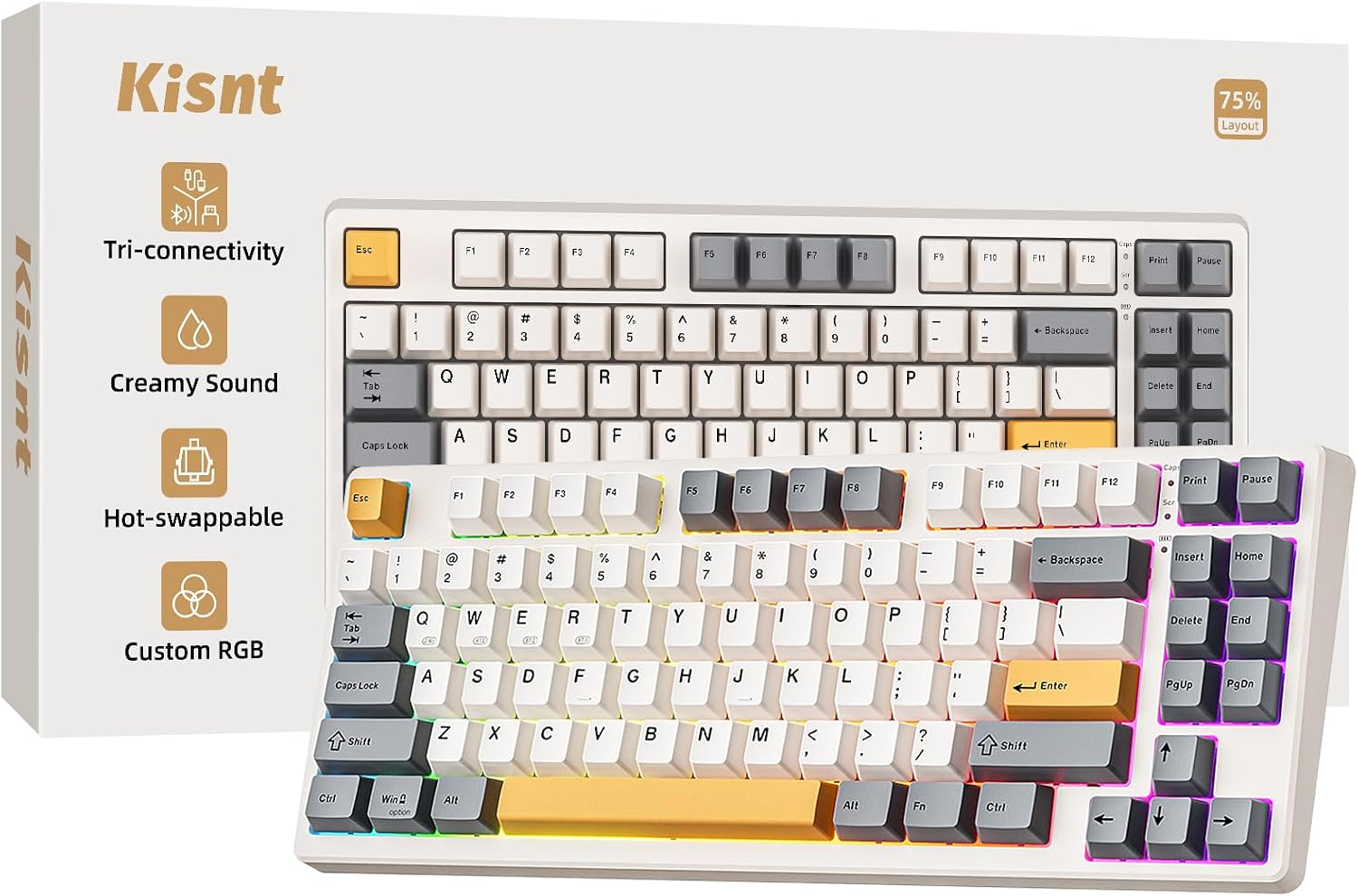
The KN85 uses a 75% layout that keeps the F1-F12 row, arrow keys, and common shortcuts while dropping the numpad, trimming the footprint to about 13.68" x 5.51" x 1.77" and freeing roughly 25% of desk space for mouse movement. Connectivity runs through three modes: wired USB-C, 2.4GHz wireless dongle, or Bluetooth 5.0 across up to three paired devices.
- 75% layout: 85 keys, no numpad
- Three connection modes: USB-C, 2.4GHz, Bluetooth 5.0
- Reported latency: 2ms wired, 5ms 2.4GHz, 11ms Bluetooth
Switching between a desktop, laptop, and tablet is handled through the mode switch on the board itself, without needing to unplug or re-pair each time.
The board ships with hot-swappable linear switches, so individual switches can be pulled and replaced without any soldering, letting the typing feel be tuned over time. PBT keycaps sit over an RGB backlight that shows through the legends and the gaps between keys. The layout is tuned for a deeper, creamy sound profile that separates it from the sharper click of standard mechanical boards.
- Hot-swappable sockets for tool-free switch changes
- PBT keycaps with RGB backlighting
- 20 preset RGB lighting effects with adjustable color and brightness
Because switches are swappable rather than soldered in, the board suits typists who want to experiment between linear, tactile, or clicky switches without buying a new keyboard each time.
A built-in 4000mAh battery powers the wireless modes, and the board can keep being used over a wired USB-C connection while that battery charges, so a low-power warning does not force a work stoppage. Full customization, including key remapping and macro editing, runs through the KN85 driver software, which is Windows-only and requires a wired or 2.4GHz connection to install.
- 4000mAh built-in rechargeable battery
- Charge-while-typing over USB-C
- Driver software for remapping and macros, Windows only
Mac and mobile users can still type, connect over Bluetooth, and use the onboard RGB presets, but key remapping and macro programming are limited to a Windows PC in wired or 2.4GHz mode.

Pros
- Single USB-A nano receiver pairs both keyboard and mouse over a 2.4GHz connection up to 10 meters away
- Keyboard battery is rated up to 3 years and the mouse up to 18 months, with batteries included in the box
- Integrated palm rest and spill-resistant design support long typing sessions
- Works across Windows, macOS and Chrome OS without separate driver installs
- Contoured mouse shape is shaped specifically for right-handed use
Cons
- Mouse is right-handed only, with no left-handed or ambidextrous version in this combo
- Single nano receiver means losing it disables both devices until a replacement is bought
- No backlighting on the keyboard, so keys are not visible in low light
Both the keyboard and mouse pair to a single USB-A nano receiver over a 2.4GHz connection, with a working range of up to 10 meters from the receiver. That single-receiver setup keeps only one USB port occupied rather than needing separate dongles for each device.
- Single USB-A nano receiver for both devices
- 2.4GHz wireless connection
- Range up to 10 meters
Losing the nano receiver disables both the keyboard and mouse until a replacement receiver is sourced, since they're paired specifically to it.
The combo works across Windows, macOS and Chrome OS without needing separate drivers for each platform, making it a plug-and-play option for mixed-device households or offices. An on/off switch on both devices helps extend battery life between uses.
- Compatible with Windows, macOS and Chrome OS
- Plug-and-play setup, no driver installation needed
- On/off switches on keyboard and mouse
There is no dedicated app for remapping keys or buttons - functionality is fixed to what's built into the hardware. This makes the combo a reliable pick for shared workstations or classroom computers, where installing extra software for each peripheral isn't practical.
The keyboard is rated for up to 3 years of battery life, while the mouse runs up to 18 months, with batteries included in the box. The keyboard includes an integrated palm rest and spill-resistant design, and the mouse uses a contoured shape built specifically for right-handed use.
- Keyboard: up to 3 years battery life
- Mouse: up to 18 months battery life
- Integrated palm rest, spill-resistant keyboard design
The mouse is shaped for right-handed use only, with no left-handed or ambidextrous version included in this combo.

Pros
- 108-key full-size anti-ghosting layout with 4 dedicated hotkeys for mute, calculator, screen lock and desktop
- Hot-swap sockets accept 3-pin or 5-pin switches without soldering, so the stock feel can be swapped out
- 19 preset RGB lighting modes with adjustable brightness, flow speed and a music-sync mode
- Two included keycap sets in mixed colorways let the board be restyled at no extra cost
- 2-stage adjustable feet and stock Red linear switches keep clicks discreet enough for shared rooms
Cons
- Wired only, with no Bluetooth or 2.4GHz mode, so it ties up a USB port and stays deskbound
- Full-size 108-key body spans 17.3 in wide, leaving little desk room beside a large mouse mat
- Stock switches are Red linear only, so a tactile or clicky feel means buying replacement switches
The K668 uses an upgraded hot-swap socket that takes almost any 3-pin or 5-pin mechanical switch, so the stock feel is a starting point rather than a fixed choice. No soldering iron is needed; switches pull out and reseat by hand.
- Ships with Red linear switches for a quiet, consistent keystroke
- Two keycap sets in mixed colors are included for an instant style change
- 104 keys register accurately during rapid multi-key combos, useful for fighting-game inputs and macros
Because the socket is switch-agnostic, players who prefer tactile bumps or louder clicky feedback can rebuild the feel of the board without replacing the whole keyboard.
Four extra keys sit above the function row, defaulting to mute, calculator, screen lock and desktop. Each can be reassigned through the bundled PRO software, along with custom macros and lighting effects.
- 19 preset RGB modes, including a music-sync mode tied to desktop audio
- Brightness and animation speed are adjustable per mode
- Macros can be recorded and bound to any key, not just the four hotkeys
This makes the K668 suited to users who want a single board to switch between office shortcuts during the day and gaming macros at night, without carrying a second keyboard or macro pad.
At 17.3 in long and 4.7 in wide, the K668 is a genuine full-size 108-key board with a dedicated number pad, not a compact layout. It weighs about 0.88 kg, giving it enough heft to stay put during fast key combos.
- 2-stage flip-out feet adjust the typing angle for long sessions
- Full-size layout needs more desk depth than tenkeyless boards
- Wired USB connection only, so cable routing matters on a crowded desk
Buyers with compact desks or those who want to slide a mouse mat directly beside the number pad should measure available space first, since the full 108-key footprint is noticeably wider than a TKL board.

Pros
- 33 ft wireless range through a USB unifying receiver, enough to reach a sofa from a media PC across the room
- Integrated 3.5-inch touchpad measuring 76 x 47 mm replaces a mouse entirely when the board sits on a lap
- Up to 18 months on a set of cells, with a physical on and off switch to stretch that further
- Spill-resistant deck and a 0.93-inch thick chassis that lies flat on a coffee table
- Supported on Windows 7 through current releases, Android 7 or later and Chrome OS with no driver install
Cons
- Uses a proprietary USB receiver with no Bluetooth, so phones, tablets and consoles without a full USB-A port cannot pair
- Keys are not backlit, which makes dark-room typing a matter of feeling for the layout
- macOS is absent from the supported platform list, so mapping and gestures may not behave as expected on a Mac
The unifying receiver plugs into a USB-A port and the keyboard pairs itself, with no app requirement and no pairing code to enter. Range is quoted at 33 ft, which in a normal living room means the media PC can sit in a cabinet against the far wall while you type from the sofa.
- One receiver, several devices: the same unifying dongle can host a compatible mouse, freeing a second USB port on a crowded machine.
- Optional software remaps the function row and adjusts touchpad behaviour, but the keyboard is fully usable without installing anything at all.
- An on and off switch on the top edge stops stray keypresses when the board rides in a sofa cushion.
Because the link is proprietary rather than Bluetooth, it will not connect to a phone, tablet or games console lacking a full-size USB socket.
The chassis measures 13.95 x 5.5 x 0.93 inches, so it spans a lap comfortably without the bulk of a desktop board. The touchpad sits to the right of the keys at 76 x 47 mm, about 3.5 inches across the diagonal.
- Layout: a compact set with no separate numeric pad, which is exactly what keeps the width down to something a lap can hold.
- Left click is a dedicated button at the top left of the deck, reachable with the left thumb while the right hand drives the pad.
- Key feel is quiet and short-travel, chosen so typing does not carry over a film soundtrack in a shared room.
Two-finger scrolling works from the moment it is plugged in. For long document sessions the shallow travel is a compromise; for navigating a media library from a sofa, it is exactly right.
Power comes from replaceable cells with a quoted life of up to 18 months at around two hours of typing a day. There is no charging port and no internal pack, which means no capacity degradation over the years but also a battery run to make eventually.
- Supported platforms are Windows 7 through current releases, Android 7 or later, and Chrome OS.
- macOS is not on that list, so key mapping and touchpad gestures may behave unpredictably on a Mac mini used as a media machine.
- Spill resistance is designed in, covering the knocked-over drink that ends most sofa keyboards.
A published carbon footprint of 4.9 kg CO2e and carbon neutral certification are unusual disclosures for an accessory of this kind, and useful if you track that sort of thing across a household.
Pros
- 16.9 x 4.9 x 0.6 inches and just 14.9 oz, yet still includes a full number pad and arrow cluster
- Built-in lithium battery rated for 6 months per charge at two hours of use a day, so no AAA hunting
- Stainless steel backplate removes the flex you get from thin all-plastic wireless boards
- Scissor-mechanism keys rated for over 3 million presses, with Windows media and copy/paste hotkeys
- Nano receiver works out to about 33 feet, enough to type from a sofa to a TV-connected PC
Cons
- 2.4GHz dongle only with no Bluetooth, so it will not pair with a tablet or a USB-C-only laptop unaided
- The lithium battery is sealed in and not user-replaceable, which sets a hard lifespan on the keyboard
- Arteck warns it may not work through some external USB hubs, so the receiver needs a direct port on the machine
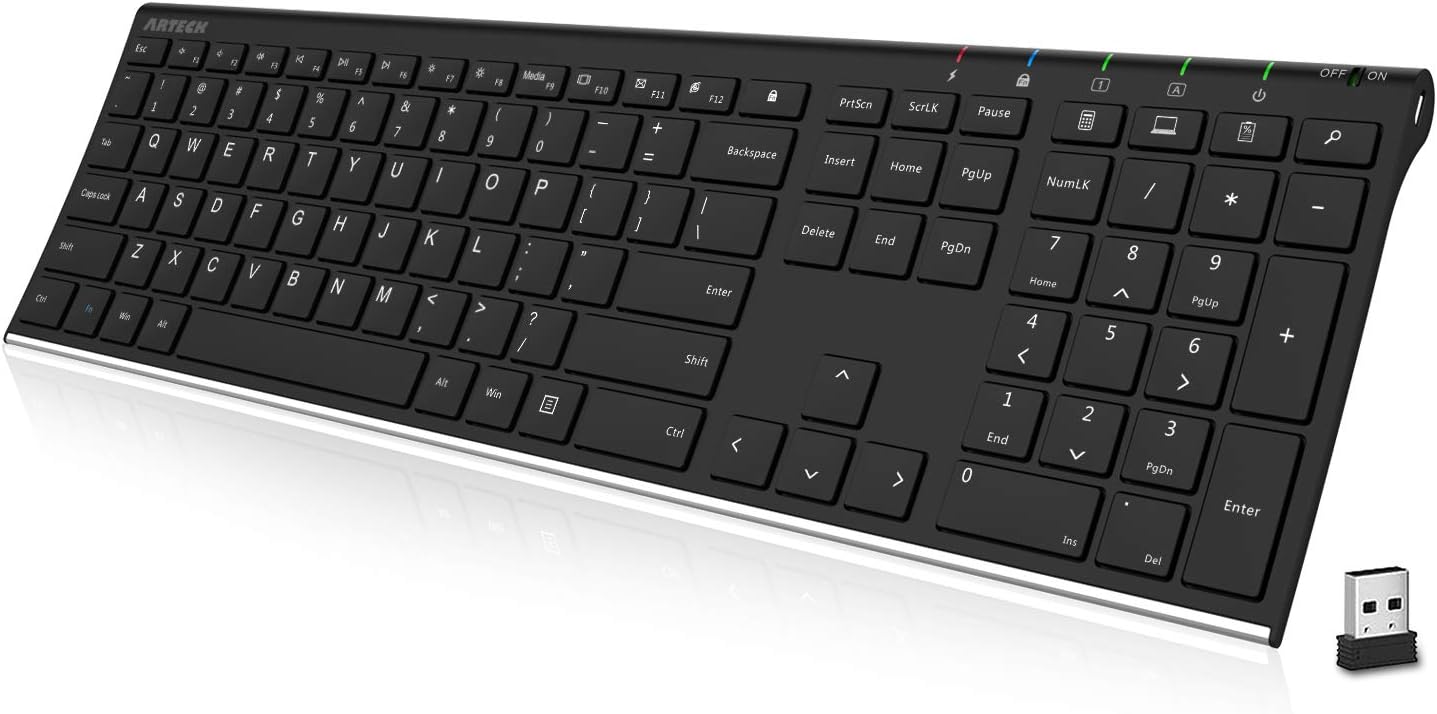
The board measures 16.9" x 4.9" x 0.6" and weighs 14.9 oz, which is the interesting part: that is a full-size layout in a chassis thinner than most laptops.
- Full layout retained: number pad, dedicated arrow keys, function row and Windows shortcut keys, so nothing is buried behind a function layer.
- Scissor-switch keys with a low-profile travel, rated for more than 3 million presses. The feel is close to a laptop keyboard rather than a mechanical one: quiet, short and light.
- Stainless steel top plate gives it a solid weight in the hand and stops the middle bowing when you type hard.
- Quiet operation makes it suited to shared offices and late-night use.
If you want tactile clicky feedback and deep travel, this is the wrong category entirely. If you like typing on a good laptop, it will feel immediately familiar.
Power comes from a built-in rechargeable lithium-polymer cell rather than disposable AAAs, charged over the supplied USB cable.
- Quoted life is 6 months per charge, based on two hours of continuous typing per day. Heavier use scales that down proportionally, but it is still measured in months not days.
- The USB cable is for charging only. It does not carry data, so you cannot use the keyboard as a wired board if the receiver goes missing.
- You can keep typing while it charges, since the wireless link runs independently of the cable.
- The cell is not replaceable. Like most sealed lithium devices, capacity will fall after a few years of charge cycles, and at that point the keyboard is consumable.
The upside of the trade is no battery drawer, no corrosion from leaking alkalines and a genuinely slim 0.6-inch profile.
This is a 2.4GHz keyboard using a nano USB receiver, stored in the packaging tube, and it needs no driver.
- Setup: plug the receiver into a USB-A port, switch the keyboard on, and it types immediately.
- Range is around 33 feet (10 metres), which makes it viable as a lounge keyboard for a media PC or smart TV.
- Compatibility: Windows 10, 8 and 7 desktops, laptops, Surface tablets with USB-A, and many smart TVs.
- Hubs are the known issue. Arteck states the keyboard may not work through some external USB hubs, so use a port on the machine itself.
- No Bluetooth means no pairing with an iPad, an Android tablet or a phone.
Lost receivers are handled by Arteck sending a free replacement, and the whole package carries a 24-month warranty.

Pros
- Ergonomic Design, Enhanced Typing Experience Improve your typing
- 15-Zone Rainbow Backlit Keyboard Customize your PC gaming keyboard with
- Whisper Quiet Design Experience near-silent operation with our
- IP32 Spill Resistance Our quiet gaming keyboard is IP32
- 25 Anti-Ghost Keys 12 Multimedia Keys Enjoy swift and precise responses
Cons
- Requires checking placement surface dimensions before setup
- Periodic cleaning recommended to maintain the Acrylonitrile Butadiene Styrene, Metal finish
- Initial setup requires checking operating instructions carefully
The TECKNET Wired Gaming Keyboard RGB Backlit Keyboard with offers reliable functional utility tailored for modern home and workplace environments. Designed to enhance daily productivity, this unit integrates Ergonomic Design, Enhanced Typing Experience Improve your typing alongside 15-Zone Rainbow Backlit Keyboard Customize your PC gaming keyboard with. Users will find the intuitive design straightforward to operate across various room configurations and daily routines. The versatile construction adapts easily to personal workspaces, providing consistent practical value and streamlined usability. Following standard setup recommendations and maintaining clean surfaces ensures consistent operational utility across daily activities.
Built using resilient structural components, this unit features a sturdy outer housing engineered to resist operational wear. Precision manufacturing ensures that all joints and surface connections remain firmly aligned during regular daily activity. Whisper Quiet Design Experience near-silent operation with our reinforces overall physical stability over extended service periods. Premium Acrylonitrile Butadiene Styrene, Metal construction maintains structural integrity and cosmetic appearance under routine handling. Structural integrity remains firm throughout regular usage, giving owners peace of mind. Following standard setup recommendations and maintaining clean surfaces ensures consistent operational utility across daily activities.
Initial setup requires placing the unit on a flat, stable surface with adequate clearance around all sides for proper operation. Ensure all power or connection cables are routed neatly without sharp bends to prevent wire strain. Regular care involves wiping exterior housing surfaces with a soft cloth to remove dust buildup. Inspecting mechanical connections periodically preserves operational efficiency and maintains cosmetic appearance over time. Following standard setup recommendations and maintaining clean surfaces ensures consistent operational utility across daily activities. This functional equipment provides steady performance and practical convenience when properly integrated into your workspace.

Pros
- Blue mechanical switches give a crisp click and tactile feedback on every keystroke
- Multimedia knob controls volume and cycles through 19 lighting effects, including 3 user-customizable presets
- Aluminum alloy top panel resists scratches better than an all-plastic keyboard case
- Magnetic wrist rest attaches and detaches without straps or clips, for typing comfort during longer sessions
- 104-key layout includes anti-ghosting support for reliable multi-key input during fast gameplay
Cons
- USB wired-only connection, with no Bluetooth or 2.4GHz wireless mode offered
- Blue switches produce an audible click on every press, which may not suit shared or quiet spaces
- Retro round keycap shape is a niche aesthetic that will not match standard rectangular keycap sets if swapped later
This keyboard uses mechanical blue switches, which give a springier response, a crisp click sound, and precise tactile feedback compared with membrane keyboards. Double-shot injection molded keycaps in a retro round shape are built for clear backlight visibility and long-term durability against fading.
- Switch type: Blue mechanical
- Keycap style: Retro round, double-shot injection molded
- Layout: 104-key with anti-ghosting
The stepped, floating keycap design is shaped to match fingertip positioning, aimed at reducing mistyped keys and fatigue during longer typing and gaming sessions alike.
A dedicated knob controls media playback and lighting depending on mode: in lighting mode it cycles through 19 backlight effects and adjusts brightness, while in media mode it adjusts volume and mutes audio. Long-pressing the knob for three seconds switches between the two modes.
- 19 selectable lighting effects
- 3 customizable backlight presets via M1/M2/M3 keys
- One-knob control for volume and lighting
Because both modes share the same physical knob, switching between adjusting your lights and controlling playback takes one press-and-hold rather than a separate button for each function.
The keyboard measures 17.13"L x 4.84"W x 1.5"H and pairs an aluminum alloy top panel with a magnetic, removable wrist rest for added wrist support during long sessions. It connects over a wired USB connection for a consistent, low-latency link to a PC.
- Dimensions: 17.13"L x 4.84"W x 1.5"H
- Panel material: Aluminum alloy
- Connection: USB wired
Because the connection is wired-only, it is best suited to a fixed desktop setup rather than a couch or multi-device switching workflow that benefits from wireless keyboards.

Pros
- 65% Compact Design Wired gaming keyboard compact mini design,
- Wired Connection Gaming Keybaord connects via a detachable Type-C cable
- Strong Working Life Wired gaming keyboard has more than 10,000,000
- LED Backlit Keyboard Wired Gaming Keyboard using the new
- Ergonomics Mechanical Feel Keyboard The ergonomically designed keycap
Cons
- Requires checking placement surface dimensions before setup
- Periodic cleaning recommended to maintain the Plastic finish
- Initial setup requires checking operating instructions carefully
The GEODMAER 65 Gaming Keyboard Wired Backlit Mini Keyboard offers reliable functional utility tailored for modern home and workplace environments. Designed to enhance daily productivity, this unit integrates 65% Compact Design GEODMAER Wired gaming keyboard compact mini design, alongside Wired Connection Gaming Keybaord connects via a detachable Type-C cable. Users will find the intuitive design straightforward to operate across various room configurations and daily routines. The versatile construction adapts easily to personal workspaces, providing consistent practical value and streamlined usability. Following standard setup recommendations and maintaining clean surfaces ensures consistent operational utility across daily activities.
Built using resilient structural components, this unit features a sturdy outer housing engineered to resist operational wear. Precision manufacturing ensures that all joints and surface connections remain firmly aligned during regular daily activity. Strong Working Life Wired gaming keyboard has more than 10,000,000 reinforces overall physical stability over extended service periods. Premium Plastic construction maintains structural integrity and cosmetic appearance under routine handling. Structural integrity remains firm throughout regular usage, giving owners peace of mind. Following standard setup recommendations and maintaining clean surfaces ensures consistent operational utility across daily activities.
Initial setup requires placing the unit on a flat, stable surface with adequate clearance around all sides for proper operation. Ensure all power or connection cables are routed neatly without sharp bends to prevent wire strain. Regular care involves wiping exterior housing surfaces with a soft cloth to remove dust buildup. Inspecting mechanical connections periodically preserves operational efficiency and maintains cosmetic appearance over time. Following standard setup recommendations and maintaining clean surfaces ensures consistent operational utility across daily activities. This functional equipment provides steady performance and practical convenience when properly integrated into your workspace.

Pros
- Full-size 17.25 by 5.75 in layout with a numeric keypad, so figure entry needs no separate keypad
- 2.4 GHz link holds up to 33 ft, enough to type from a sofa to a TV-connected PC
- Bundled USB receiver can also carry a compatible mouse, freeing a second port
- Up to 24 months on a set of batteries, with an on/off switch to stretch it further
- Spill-resistant chassis tested to 60 ml plus UV-coated keycaps that resist legend wear
Cons
- 2.4 GHz receiver only, with no Bluetooth, so tablets and receiver-less machines cannot connect
- Occupies a USB-A port, so a USB-C-only laptop needs an adapter
- Membrane keys with no backlighting, so dark-room typing relies entirely on touch
The board measures 17.25 by 5.75 by 0.75 in and uses a full-size layout including the number pad, so there is no relearning of key positions when moving from another desktop keyboard.
- Full-size layout with a dedicated numeric keypad
- Eight hotkeys for media playback, volume and common shortcuts
- Deep-profile keys with a springy bounce-back rather than a shallow laptop feel
- UV-coated keycaps that resist legend wear over years of use
The numeric pad matters if you enter figures for a living, since spreadsheet and accounting work is measurably slower on a tenkeyless board. The trade-off is desk width: at over 17 in wide it pushes the mouse further right than a compact keyboard would, which matters if shoulder comfort is a concern.
Connection is 2.4 GHz wireless through the bundled USB receiver. There is no pairing procedure to work through: plug the receiver into a USB-A port and the keyboard types within seconds.
- Signal range up to 33 ft, roughly 10 metres, in typical conditions
- The receiver can carry a compatible mouse on the same dongle
- Plug-and-play with Windows PCs and laptops, with no software needed to type
- Receiver is small enough to leave permanently in a laptop
Two limitations follow from that design. There is no Bluetooth, so tablets, phones and machines without a spare USB-A port cannot connect without an adapter. And the receiver is a physical object that can be lost, so stow it in the battery compartment when travelling.
Battery life is quoted at up to 24 months, calculated against an estimated two million keystrokes a year in an office environment. An on/off switch and power-saving electronics stretch that further when the keyboard sits idle for long stretches.
- Up to two years between battery changes under typical office use
- Manual on/off switch to conserve power during travel or holidays
- Spill-resistant design tested with a maximum of 60 ml of liquid
- UV-coated keys to resist shine and worn legends
The spill resistance is a survival feature rather than an invitation, since it is tested with a limited quantity and the keyboard must never be immersed. If something does go over it, unplug the receiver, turn the board upside down to drain and let it dry fully before switching it back on.
What to Look For in the Best Keyboards Under $50
At this price, you’re not choosing between “good” and “bad” so much as choosing which trade-offs fit your setup. Start with switch type. Mechanical switches use individual springs under each key, giving you a crisper feel and longer lifespan than the rubber-dome membrane switches found in most office keyboards.
Layout matters more than people expect. A full-size board keeps the number pad, which accountants and spreadsheet users lean on daily. A 75% or 65% layout drops that pad (and sometimes the function row) to save desk space, which gamers and minimalist setups tend to prefer.
Connectivity is another split. Wired keyboards are simpler and avoid any input lag, which matters for competitive gaming. Wireless and Bluetooth boards free up your desk but add battery management and, on cheaper models, occasional dropped keystrokes. Multi-device pairing is worth checking too, since some wireless boards can only remember one paired device at a time.
Finally, check whether the switches are hot-swappable. That means you can pull the stock switches out and replace them without soldering — a feature that used to be reserved for $150+ boards and now shows up under $50.
Best Overall: A Mechanical Feel Without the Mechanical Price
The Womier SK80 earns the top spot because it delivers what most people actually want from a budget board: a satisfying, “creamy” typing sound, a gasket-mounted case that softens keystrokes, and hot-swappable sockets so you can experiment with switches later. At $49.99 with a 4.7 rating across 1,714 reviews, it’s priced right at the edge of this category without feeling like a compromise.
The 75% layout is the main trade-off — you lose the number pad, so heavy spreadsheet users should look elsewhere. It also works with both Mac and Windows, which is handy if your household mixes operating systems. For anyone who wants their first taste of mechanical typing without spending real money, this is the one to check the current price on.
Best Wireless and Bluetooth Keyboards Under $50
Going wireless usually means giving up switch quality, but that’s changing. The Kisnt KN85 is a hot-swappable mechanical board with Bluetooth, 2.4GHz, and USB-C modes, so it pairs with a laptop, tablet, and desktop without re-pairing every time you switch devices. Reviewers rate it 4.6 across 1,160 reviews, and the linear switches give it that same creamy sound as pricier boards.
If you just need something dependable for everyday typing, the Logitech K270 is the safer, simpler pick. It includes a full number pad, a two-year battery life, and a single USB receiver — no fuss, no app required. For a deeper look at wireless-first options, our Bluetooth keyboard guide covers models built specifically around multi-device pairing.
Living-room setups have different needs entirely. The Logitech K400 Plus, with its built-in touchpad, is designed for controlling a media PC from the couch rather than a desk — worth checking if your “keyboard” also needs to double as a remote.
Best for Office and Everyday Productivity
If your keyboard needs to survive eight-hour workdays without drawing attention to itself, membrane keys and a comfortable palm rest matter more than RGB lighting. The Logitech MK345 combo pairs a full-size keyboard with an integrated palm rest and a compact mouse, both running off one small USB receiver. With over 41,000 reviews at a 4.5 average, it’s one of the most tested budget combos on Amazon.
Typists who want a slightly firmer keyboard without going mechanical should also consider the Arteck 2.4G wireless keyboard, which keeps a standard full-size layout at a lower price point. If you spend most of your day coding rather than emailing, our developer keyboard picks dig into layouts built for heavy shortcut use.
And if you’re outfitting a shared workstation rather than a personal desk, our workstation keyboard guide covers durability and cleaning considerations that don’t come up in a typical home office review.
Best Gaming Keyboards Under $50
Gamers care about two things a membrane board can’t always deliver: fast, consistent key response and full anti-ghosting so every keypress registers during fast combos. The Redragon K668 is hot-swappable, includes four dedicated hotkeys for mute and calculator shortcuts, and uses cushioned dampening for a quieter “thocky” sound — a strong pick if you want mechanical switches without customizing anything yourself.
For RGB lighting fans, the TECKNET RGB gaming keyboard adds 15-zone lighting, a metal top panel, and IP32 water resistance, which is a nice bonus if drinks tend to live near your setup. Both are wired, which competitive players should treat as a feature rather than a limitation — wired connections remove any wireless latency from the equation.
If you like a retro look, the AULA F2088’s typewriter-style round keycaps and removable wrist rest stand out from the usual gaming aesthetic, though it’s better suited to casual play than tournament settings.
Best Compact and Space-Saving Keyboards Under $50
Small desks, streaming setups, and travel all benefit from a shorter keyboard that leaves more room for a mouse. The GEODMAER 65% keyboard keeps just 68 keys total, dropping the function row and number pad while keeping full anti-ghosting for gaming. At under $17, it’s also the most affordable board in this roundup, though the membrane switches won’t feel as premium as the mechanical options above.
If you want a compact layout but aren’t ready to give up mechanical switches, the Womier SK80 mentioned earlier splits the difference at 75% — you keep arrow keys and a few extra function keys while still saving real desk space. Anyone who bounces between a compact battle station and a full-size desk setup should also browse our complete best keyboards guide for models across every layout and price tier.
Common Mistakes to Avoid When Buying a Budget Keyboard
The most common mistake is ignoring layout compatibility with your habits. If you use a number pad daily for data entry, a 65% or 75% board will slow you down no matter how nice it feels. Try the layout mentally against your actual workflow before you buy.
Another frequent misstep is assuming all wireless keyboards behave the same. Cheaper 2.4GHz dongles can introduce noticeable input lag under heavy multitasking, while Bluetooth connections sometimes lag slightly behind wired ones during fast gaming sessions. If responsiveness matters more than convenience, stick with a wired board.
Buyers also overlook compatibility. Not every keyboard ships with dedicated Mac keycaps or shortcuts, so double-check the listing if you’re on macOS. Finally, resist judging a keyboard purely by RGB lighting or keycap looks — switch feel and build quality matter far more once the novelty wears off. It also helps to think about noise. A creamy, dampened mechanical board is far more office-friendly than a loud clicky switch if you share a room with roommates or coworkers.
Are mechanical keyboards under $50 actually worth it?
Yes, for the most part. Hot-swappable budget boards like the Womier SK80 and Kisnt KN85 use the same basic switch technology as $150 keyboards, just with fewer premium extras like custom keycap sets or software suites.
What does hot-swappable mean, and do I need it?
Hot-swappable keyboards let you remove and replace switches without soldering, so you can try different feels or replace a worn switch later. It’s not essential, but it adds flexibility that used to require far more expensive boards.
Should I choose a full-size, 75%, or 65% layout?
Choose full-size if you regularly use a number pad. Pick 75% for a balance of compact size and full function keys, and 65% if desk space is your top priority and you rarely touch F-keys or a number pad.
Are wireless keyboards good enough for gaming?
Modern 2.4GHz wireless connections are close to wired in responsiveness, but Bluetooth can introduce slight delay. Competitive gamers should still lean toward wired boards like the Redragon K668 or TECKNET model above.
Do budget gaming keyboards support anti-ghosting?
Most do now, including the GEODMAER 65% and TECKNET boards covered here, which means multiple simultaneous keypresses register correctly during fast-paced games.
Picking the right keyboard under $50 comes down to matching the board to what you actually do at your desk. Gamers should prioritize wired connections and anti-ghosting, office workers should weigh palm comfort and number pads, and anyone craving a mechanical feel now has real hot-swappable options at this price. Whichever direction you lean, compare specs and current pricing before you commit, since availability on these models can shift quickly.


