
 Daniel Okafor
 If you want a screen that looks as sharp gaming at midnight as it does on a work call, you’re in the right place. This guide covers the best RGB monitors you can buy right now, from curved 1440p panels built for speed to color-accurate options creators actually trust. You’ll learn what “RGB” means on a spec sheet, which features matter for your desk and budget, and how to match a panel to the way you actually use your PC.
Quick answer: For most shoppers in 2026, the best rgb monitors option is the GAMEPOWER T50 — our #1 rated pick thanks to its curved 200Hz panel, RGB backlighting, and low price. See the full ranked comparison, alternatives and buying advice below.

Pros
- Physical footprint measures 10.78"D x 24.17"W x 17.78"H for spatial placement
Cons
- Spacious wall or desk clearance needed for BenQ SW272Q 27-inch 2K
- Careful cable routing recommended for BenQ SW272Q 27-inch 2K wall mounting

Pros
- Hear the audio difference Immerse yourself in sound with integrated
- Eye comfort Prioritize visual comfort with this T V-certified display.
- Designed for comfort Adjust your monitor to suit your preference
- Display and Peripheral Manager Experience s singular,
Cons
- Requires verifying desktop clearance for 7.95"D x 24.07"W x 15.36"H dimensions

Pros
- 200Hz refresh leaves 5ms between frames, ahead of the 144Hz that is common at this size
- 1500R curvature wraps the panel edges toward the viewer at normal desk distance
- VA panel delivers deeper blacks than the IPS panels usually fitted at this diagonal
- 0.5ms response time keeps trailing edges clean during fast horizontal movement
- Universal 100V to 240V input works without a converter after an international move
Cons
- VA panels shift colour more than IPS when viewed from a steep side angle, which matters if two people share the screen
- 1920x1080 stretched across 27 curved inches gives visibly softer text than a 1440p panel
- A 1500R curve is pronounced enough that straight lines look bowed when doing design or CAD work
The panel runs to 200Hz with a quoted 0.5ms response time. At 200Hz the gap between frames drops to 5ms, compared with 6.9ms at 144Hz and 16.7ms at 60Hz. The practical effect is that the on-screen image tracks mouse movement more closely, which is the reason competitive players chase refresh figures.
- 200Hz leaves 5ms between frames, tightening the link between input and image.
- 0.5ms response reduces the smeared trailing edge behind fast-moving objects.
- Full HD keeps GPU load modest, so mid-range cards can actually feed 200 frames.
- Higher refresh smooths camera panning even when frame output sits below the ceiling.
- The benefit is largest in shooters and racing titles with constant screen movement.
You need a graphics card capable of pushing frame counts near the ceiling to see the full benefit. At 60 frames per second output, a 200Hz panel behaves much like a 75Hz one.
The internal supply accepts anything from 100V to 240V, which covers essentially every mains standard worldwide. That removes the need for a step-down transformer if the monitor moves country with you, and it also means a single model serves both a home and an overseas office. Only the plug adapter changes.
- Universal 100V to 240V input works on both 110V and 230V mains.
- No step-down transformer is required after an international move.
- Only a plug shape adapter is needed rather than a voltage converter.
- Full HD resolution reduces the cable bandwidth needed to reach 200Hz.
- Standard mounting pattern allows a third-party arm in place of the stand.
Confirm your cable supports the refresh you are paying for, since an older cable will silently cap the panel. Check the on-screen menu after setup to confirm 200Hz is actually selected.

Pros
- Designed with SMOOTH GAMEPLAY Get a competitive edge with our monitor's QHD for reliable daily operation
- Designed with RAPID 165hz REFRESH RATE With variable refresh technology up to for reliable daily operation
- Designed with CINEMATIC DISPLAY Immerse yourself in stunning visuals with our monitor's for reliable daily operation
- Dimensions measure 11.5"D x 24.25"W x 20.65"H for spatial allocation
Cons
- Requires verifying available physical space for RCA 27 Evolution S prior to setup

Pros
- 100% sRGB Color Gamut With 100% sRGB, our display reveals an
- DP HDMI Ports Two HDMI ports and one DisplayPort port provide up to
- Blue Light Shift Blue Light Shift reduces blue light, allowing you to
- Built-in Speakers Perfectly suited to work gaming settings, built-in
- FPS-RTS Game Modes FPS and RTS are Sceptre s custom set display
Cons
- Requires verifying desktop clearance for 7.66"D x 24.13"W x 17.21"H dimensions

Pros
- Dimensions of 10.7"D x 28"W x 21.01"H engineered for optimal spatial fitting
Cons
- Requires verifying placement clearance for 10.7"D x 28"W x 21.01"H prior to installation
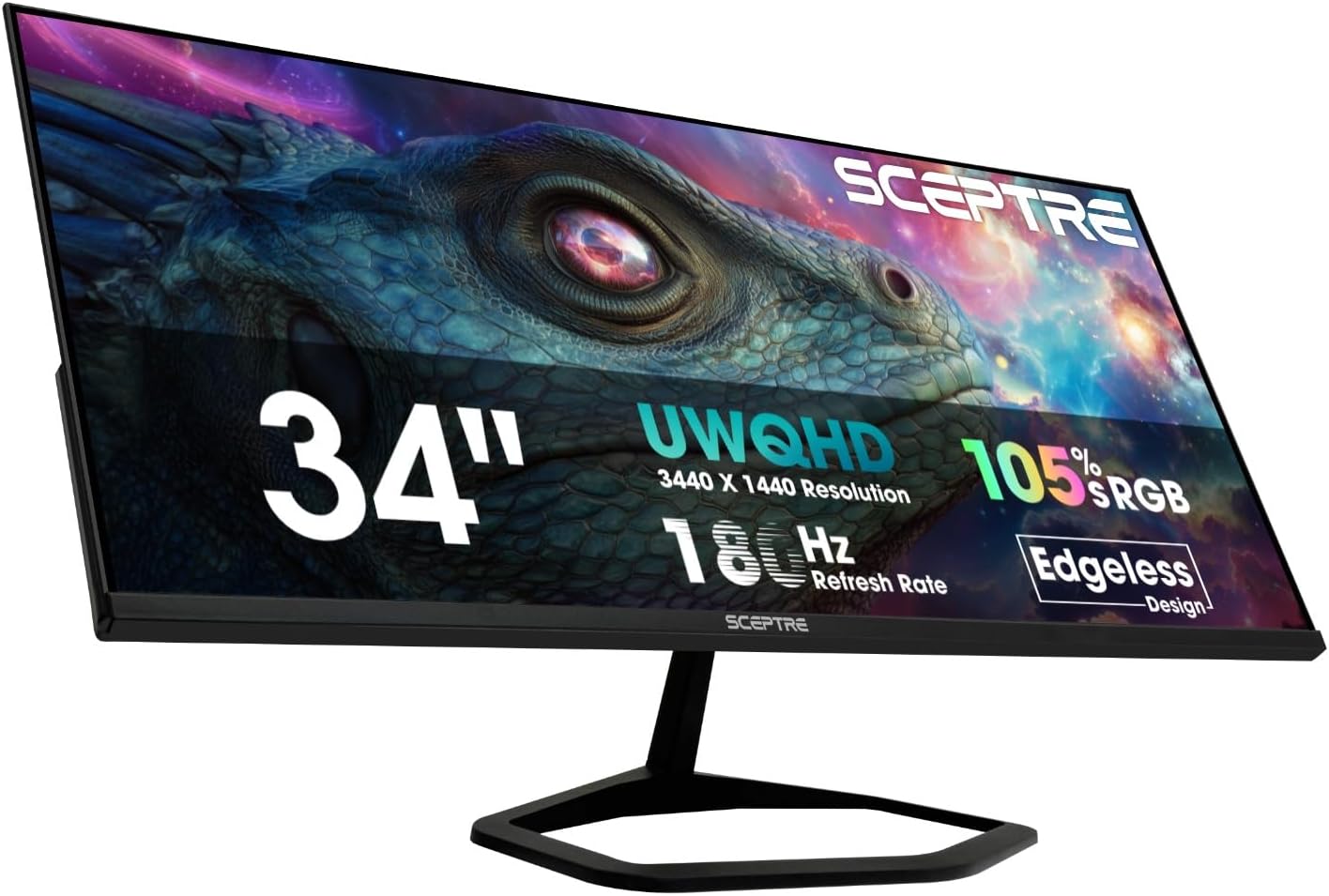
Pros
- 34-inch 21:9 ultrawide panel at 3440x1440 resolution gives more horizontal screen space than a standard 16:9 FHD display
- Refresh rate up to 180Hz across both HDMI and DisplayPort inputs supports smoother fast-motion gaming
- Built-in speakers and a separate audio out jack cover basic sound without requiring external speakers
- Adaptive Sync technology reduces screen tearing when paired with a compatible graphics card
Cons
- VA panel technology typically shows slower pixel response and narrower viewing angles than IPS panels at this size
- Ultrawide 34-inch footprint needs roughly 32 inches of desk width, ruling out smaller desk setups
- Built-in speakers are a convenience add rather than a substitute for dedicated desktop speakers on audio-focused use
This 34-inch VA panel measures 7.3 inches deep, 32.2 inches wide, and 18.9 inches tall with its stand, and runs a 21:9 ultrawide aspect ratio at 3440 x 1440 resolution. That gives noticeably more horizontal workspace than a standard 16:9 FHD monitor for spreadsheets, timelines or multiple open windows side by side.
- Blue-Light Shift technology reduces blue light emission for extended viewing sessions
- VA panel delivers deep contrast, with narrower viewing angles than IPS alternatives
- Custom gaming display modes are available for different genres like FPS titles
The 32.2 inch width is worth measuring against your desk before buying, since an ultrawide monitor this size needs more surface area than a typical 27-inch display.
Two HDMI ports and two DisplayPort inputs each support up to 180Hz refresh rate, giving flexibility to connect multiple sources at full performance rather than stepping down bandwidth on a secondary port. An audio out jack supplements the built-in speakers for external sound setups.
- 2x HDMI ports, both rated up to 180Hz
- 2x DisplayPort inputs, both rated up to 180Hz
- Built-in speakers provide basic audio without extra cables
Because both port types support the full refresh rate, switching between a console on HDMI and a PC on DisplayPort does not mean sacrificing smoothness on either connection.

Pros
- 120Hz refresh rate with AMD FreeSync Premium and 0.03ms response time keep fast motion tear-free
- 99% sRGB and 95% DCI-P3 coverage give accurate color for both everyday work and creative editing
- Single USB-C cable delivers video, data and up to 65W of power delivery to a connected laptop
- Built-in 2x10W speakers provide usable audio without needing separate desk speakers
Cons
- 300 cd/m2 peak brightness is modest next to dedicated HDR monitors rated for 600 nits or higher
- Curved WQHD format needs more desk depth than a flat monitor of the same diagonal size
Motion handling is built around adaptive sync technology rather than a maximum-refresh gaming panel.
- Refreshes at up to 120Hz with AMD FreeSync Premium support for tear-free gameplay
- Response time reaches as low as 0.03ms, keeping fast-motion scenes and gaming free of visible ghosting
- ComfortView Plus technology reduces harmful blue light emissions to 35% or less without shifting color accuracy
- The curved WQHD format adds a wider field of view for both productivity multitasking and immersive gaming
Since 120Hz sits below the 144Hz-plus figures on dedicated esports monitors, competitive gamers chasing maximum refresh rate should weigh that against this monitor's stronger color accuracy.

Pros
- 1152 individually controlled Mini LED zones drive VESA DisplayHDR 1400 certification for deep local dimming contrast
- Dual-mode panel switches between 3840x2160 at 160Hz and 1920x1080 at 320Hz for esports titles
- Factory calibration rated at Delta E=0.55 covers 99% Adobe RGB and 98% DCI-P3 for color-critical work
- 90W USB-C port charges a connected laptop while carrying 4K video and data over one cable
- Stand offers 130mm height travel, plus or minus 90 degree swivel, and tilt, plus 100x100mm VESA mount compatibility
Cons
- DisplayPort 1.4 input is limited to roughly 2K at 200Hz on this panel, so the full 4K 160Hz mode requires an HDMI 2.1 connection instead
- 1152-zone local dimming is zoned rather than per-pixel, so halo blooming can still show around small bright objects on dark backgrounds, a known trait of Mini LED backlights
- 21 inches of stand depth means shallow desks may need extra clearance behind the screen
The panel combines a 3840x2160 4K resolution with 1152 individually controlled Mini LED zones, reaching a 300,000:1 static contrast ratio and VESA DisplayHDR 1400 certification. Factory calibration is rated at Delta E=0.55 accuracy across 99% Adobe RGB, 98% DCI-P3 and 100% sRGB color spaces.
- Dual-mode refresh: 3840x2160 at 160Hz or 1920x1080 at 320Hz
- 1ms response time with Adaptive Sync support
- 300,000:1 static contrast ratio
- VESA DisplayHDR 1400 certification
Because the Mini LED backlight is zoned rather than per-pixel, expect strong contrast in most scenes with some light blooming possible around small bright highlights on otherwise dark backgrounds, a trait shared across zoned local-dimming monitors at this zone count.
Connectivity runs through two HDMI 2.1 ports at 48Gbps each for full 4K 160Hz console or PC gaming, one DisplayPort 1.4 input for roughly 2K at 200Hz, and a 90W USB-C port. The USB-C port handles video, data and laptop charging over a single cable, useful for a laptop docking setup.
- 2x HDMI 2.1 (48Gbps) for 4K 160Hz
- 1x DisplayPort 1.4 for roughly 2K 200Hz
- 2x USB-A and 1x USB-B ports for a USB hub function
- 90W USB-C with video, data and charging combined
For the full 4K 160Hz dual mode, connect through HDMI 2.1 rather than DisplayPort, since the DP 1.4 input on this panel is specified for lower resolution and refresh combinations.
The stand gives 130mm of height adjustment, plus or minus 90 degree swivel, and tilt, plus 100x100mm VESA compatibility for a wall or arm mount if the included stand is removed. Footprint measures 21 inches deep by 11 inches wide by 14 inches tall, so measure desk depth before ordering, especially on compact or corner desks.
- 130mm height adjustment range
- Swivel plus tilt adjustment
- 100x100mm VESA mount pattern for arm or wall mounting
- 21"D x 11"W x 14"H stand footprint
Desks under roughly 24 inches deep may feel tight once the monitor sits at a comfortable viewing distance, so a monitor arm using the VESA mount is worth considering on smaller desks.

Pros
- Two HDMI ports plus one DisplayPort give three independent inputs, plus a separate audio-in and headphone jack
- Built-in speakers handle basic audio without a separate speaker setup taking up desk space
- FPS and RTS game mode presets adjust display settings for those genres without manual tuning
Cons
- Built-in speakers are convenient but are not a replacement for dedicated speakers on music- or bass-focused listening
- 75Hz refresh rate trails the 144Hz-plus panels aimed at competitive gaming monitors
- No USB-C or USB hub port, so peripherals and charging still need separate cables to the PC
This is a 27-inch IPS monitor running 2560 x 1440 QHD resolution at up to 75Hz, with 99% sRGB color coverage aimed at both general desk work and casual gaming. The panel uses an edgeless design that reduces the visible bezel around the screen.
- Panel type: IPS, 27 inches
- Resolution: 2560 x 1440 (QHD)
- Refresh rate: up to 75Hz
- Color gamut: 99% sRGB
- Ports: 2x HDMI, 1x DisplayPort, audio-in, headphone jack
The IPS panel keeps color and contrast more consistent from off-center viewing angles than a TN panel would, which matters on a 27-inch screen where the edges sit further from center. The three video inputs allow a PC and a second source, such as a console, to stay connected simultaneously without swapping cables.
The 99% sRGB coverage and IPS panel make this a reasonable fit for general productivity, media viewing, and light color-sensitive work such as photo editing, while the 75Hz refresh and game mode presets extend it to casual gaming without needing a separate high-refresh panel.
- Home office and general desk use
- Casual gamers not chasing 144Hz-plus refresh rates
- Users who want built-in speakers instead of external ones
- Anyone connecting both a PC and a secondary HDMI source
It is less suited to competitive gamers who rely on refresh rates above 75Hz for fast-twitch titles, or to setups needing USB-C connectivity, since this panel sticks to HDMI and DisplayPort only. For everyday multitasking and moderate gaming on one screen, the port count and color coverage cover most needs.
What “RGB” Actually Means on a Monitor
Before you compare specs, it helps to know that “RGB” shows up in two very different contexts. The first is RGB backlighting: physical LEDs on the back or base of the panel that you can sync with your keyboard, mouse, or case fans. The GAMEPOWER T50 and RCA Evolution Select both fall into this category, with built-in RGB zones designed for gaming setups.
The second meaning is color gamut, written as percentages like sRGB, Adobe RGB, or DCI-P3. These numbers describe how much of the visible color spectrum a panel can reproduce, not how it lights up. A monitor like the BenQ SW272Q covers 99% Adobe RGB, which matters for photo editing far more than for gaming ambiance. Knowing which “RGB” a listing means saves you from buying the wrong panel for your needs.
What to Check Before You Buy a RGB Gaming Monitor
Once you know what kind of RGB you actually want, a handful of specs decide whether a monitor will feel right day to day. Here’s what experienced buyers check first.
Refresh Rate and Response Time
Refresh rate controls how smooth motion looks, measured in Hz. Casual use and office work are fine at 60-75Hz, but fast-paced games benefit from 144Hz or higher. The GAMEPOWER T50 runs at 200Hz with a 0.5ms response time, which is why it’s such a strong pick for competitive shooters and racing games where every frame counts.
Panel Type, Resolution and Curve
VA panels tend to have deeper blacks and higher contrast, while IPS panels usually win on color consistency and viewing angles. Resolution matters too: 1080p keeps frame rates high on modest GPUs, while QHD (1440p) and ultrawide formats give you more screen real estate for multitasking. If you’re comparing resolutions side by side, our best 1440p monitors guide breaks down the trade-offs in more depth. A curved screen, like the 1000R curve on the Samsung Odyssey G55C, can also reduce eye strain during long sessions by matching your natural field of view.
RGB Lighting Zones and Software Sync
Not every RGB monitor uses the same lighting ecosystem. Some pair with brand-specific apps, while others sync through standards like ARGB headers on your motherboard. Before buying, check whether the monitor’s lighting software plays nicely with the peripherals you already own — mismatched ecosystems mean your desk lighting won’t move in unison.
Ports, Speakers and Stand Adjustability
HDMI and DisplayPort versions determine your maximum resolution and refresh rate, so double-check compatibility with your GPU. Built-in speakers are a nice bonus but rarely replace a dedicated headset. Look for tilt, height, and swivel adjustment if you’ll be sitting in front of the screen for hours, since a fixed stand can force awkward neck angles over time.
Best RGB Monitors for Different Needs
There’s no single “best” pick here — the right monitor depends on your budget, your games, and how much desk space you have. Below are the 10 options we recommend for 2026, matched to specific use cases.
Best Overall: GAMEPOWER T50
The GAMEPOWER T50 earns the top spot because it balances speed, curve, and lighting at a low price. Its 1500R curved VA panel hits 200Hz with FreeSync support, and the RGB backlight adds ambiance without needing a separate accent light. The trade-off is a 1080p resolution, so it’s not the pick for detail-heavy creative work.
Best Value Under $150: RCA Evolution Select
If you want QHD resolution without stretching your budget, the RCA Evolution Select delivers 2560×1440 at 165Hz with adjustable RGB backlighting and a 1ms response time. It’s a smart pick for anyone upgrading from a budget 1080p screen who still wants smooth motion. Build quality feels a step below pricier panels, so treat it as a value pick rather than a premium one.
Best Curved Pick: Samsung Odyssey G55C
The Samsung Odyssey G55C wraps a 32-inch QHD panel around a tight 1000R curve, which is noticeably more immersive than flatter alternatives. At 165Hz with HDR10 support, it suits players who want size and speed together. If your desk is on the shallow side, measure first, since a deep curve needs more distance to look right.
Least Expensive Ultrawide: Sceptre 34-inch Prime
For anyone chasing an ultrawide field of view without an ultrawide price tag, the Sceptre 34-inch Prime offers 3440×1440 resolution at up to 180Hz. It’s genuinely the least expensive way into this screen ratio on this list. Color accuracy isn’t its strong suit, so pair it with a second monitor if you also do color-sensitive work.
Best for 4K and Content Creation: KOORUI QD-Mini LED
The KOORUI QD-Mini LED is the most versatile monitor here, switching between 4K at 160Hz and 1080p at 320Hz depending on what you’re doing. With 99% Adobe RGB coverage and HDR1400, it also holds up for photo and video editing. It costs more than the other picks, so it’s best suited to buyers who genuinely use both gaming and creative modes.
Best for Color-Critical Work: BenQ SW272Q
The BenQ SW272Q isn’t a gaming monitor first — it’s built for photographers who need accurate color. With 99% Adobe RGB, a nano-matte panel, and a 16-bit 3D LUT, it’s the most precise screen on this list. Gamers looking purely for refresh rate and RGB lighting should look elsewhere, since this panel prioritizes accuracy over speed.
Common Mistakes to Avoid When Buying an RGB Monitor
Even experienced buyers trip up on a few recurring issues. Watch for these before checking out.
- Assuming “RGB” means gaming-ready. A high color-gamut percentage is about accuracy, not lighting or speed — check both if you want both.
- Ignoring cable requirements. Hitting a monitor’s full refresh rate often needs a specific HDMI or DisplayPort version, not just any cable in the drawer.
- Skipping stand measurements. Curved and ultrawide panels take up more desk depth than you’d expect from the box dimensions alone.
- Overlooking software compatibility. Some RGB lighting apps only sync with matching brand peripherals, leaving other gear on a separate system.
- Buying resolution you can’t drive. A 4K 160Hz panel needs a capable GPU behind it, or you’ll never see those numbers in practice.
Setting Up RGB Sync With Your Peripherals
Getting your monitor’s lighting to match your keyboard and mouse usually takes a few extra minutes the first time. Start by installing the monitor manufacturer’s lighting app, then check whether it supports third-party sync standards before assuming it won’t work with your existing gear.
Most modern boards group lighting into zones you can control independently, so you don’t have to run the exact same color everywhere. A common approach is to set peripherals to a static accent color and let the monitor backlight react to on-screen content instead. It’s a small detail, but it’s the difference between a desk that looks intentional and one that looks like mismatched leftovers.
If your monitor doesn’t ship with dedicated software, most desks still look cohesive by matching a single accent color across an RGB monitor, keyboard, and any case lighting you already own. You don’t need every brand’s app running at once — consistency matters more than perfect synchronization.
Matching a Monitor to Your Setup
Think about what you’ll actually do most on this screen before you decide. Competitive gaming rewards refresh rate over resolution, so a 1080p or 1440p panel above 144Hz will feel better than a slower 4K screen. If you want a wider view for sims, strategy games, or multitasking, our best ultrawide monitors roundup covers panels built specifically for that format.
If your work leans creative, resolution and color accuracy should outrank refresh rate. Our best 4K monitors guide is a useful next stop if detail matters more than speed for you. And if you’re building a broader gaming setup rather than shopping for a single screen, our best monitors for gaming guide compares options across price tiers and use cases.
Frequently Asked Questions
Do all gaming monitors have RGB lighting?
No. Many gaming monitors focus purely on refresh rate and response time without any lighting elements. Check the product description for terms like “RGB backlight” or “ambient lighting” if that feature matters to you.
Does RGB backlighting affect gaming performance?
No, RGB lighting is purely cosmetic and has no impact on refresh rate, input lag, or image quality. It’s there for aesthetics and desk setup consistency, not performance.
What refresh rate do I need for a RGB gaming monitor?
144Hz is a solid baseline for most competitive games, while 165-200Hz gives noticeably smoother motion in fast-paced titles. Casual or story-driven games are perfectly enjoyable at 60-75Hz if budget is a bigger priority.
Can I sync monitor RGB with my keyboard and mouse?
Often yes, but it depends on the ecosystems involved. Compare specs and check the manufacturer’s lighting software list before buying if cross-device sync is important to you.
Is a curved or flat screen better for RGB gaming monitors?
Curved panels can feel more immersive and slightly reduce eye strain on larger screens, but flat panels are more forgiving for desk placement and multi-monitor setups. Neither is objectively better — it comes down to screen size and how your desk is arranged.
Whichever panel you land on, spend a few minutes checking cable requirements, GPU compatibility, and desk depth before you buy. The right RGB monitor should fit your games, your workflow, and your desk setup — not just look good in a product photo. When you’re ready to compare final numbers, see current pricing on Amazon for the models above and confirm they’re in stock at your preferred spec.


