Marcus Bell
 Choosing among the best PC cases for graphic design isn’t really about chasing RGB fans or the tallest tower on the shelf. It comes down to airflow, GPU clearance, and a chassis that stays quiet while you render, export, and multitask across Photoshop, Illustrator, or a 3D suite. A cramped or poorly ventilated case throttles your GPU right when you need it most, mid-render or mid-export. Below, you’ll find what actually matters, plus specific cases matched to real studio setups, from compact desks to full multi-monitor workstations.
Quick answer: For most creative professionals in 2026, the best PC cases for graphic design is the Fractal Design North — our #1 rated pick thanks to its balance of airflow, quiet operation, and a look that fits a design studio instead of a gaming den. See the full ranked comparison, alternatives, and buying advice below.

Pros
- Three 360 mm radiators can be mounted at top, bottom and side at the same time
- Top and bottom each take three 140 mm fans or two 160 mm fans
- Rear position accepts a 140 mm fan rather than the usual 120 mm, moving the same air at lower speed
- Dual-chamber layout puts the supply, drives and cable bulk behind the tray, leaving the main chamber clear
- 4 mm non-drilled tempered glass over 0.8 mm steel, with a seamless front-to-side edge
Cons
- No fans are included, so a chassis with this many mounts needs the entire fan set bought separately
- The glass front is a display choice rather than an intake, so bottom fans are the intake path the design depends on
- Full-tower E-ATX dimensions demand real floor or desk space and become heavy to move once built
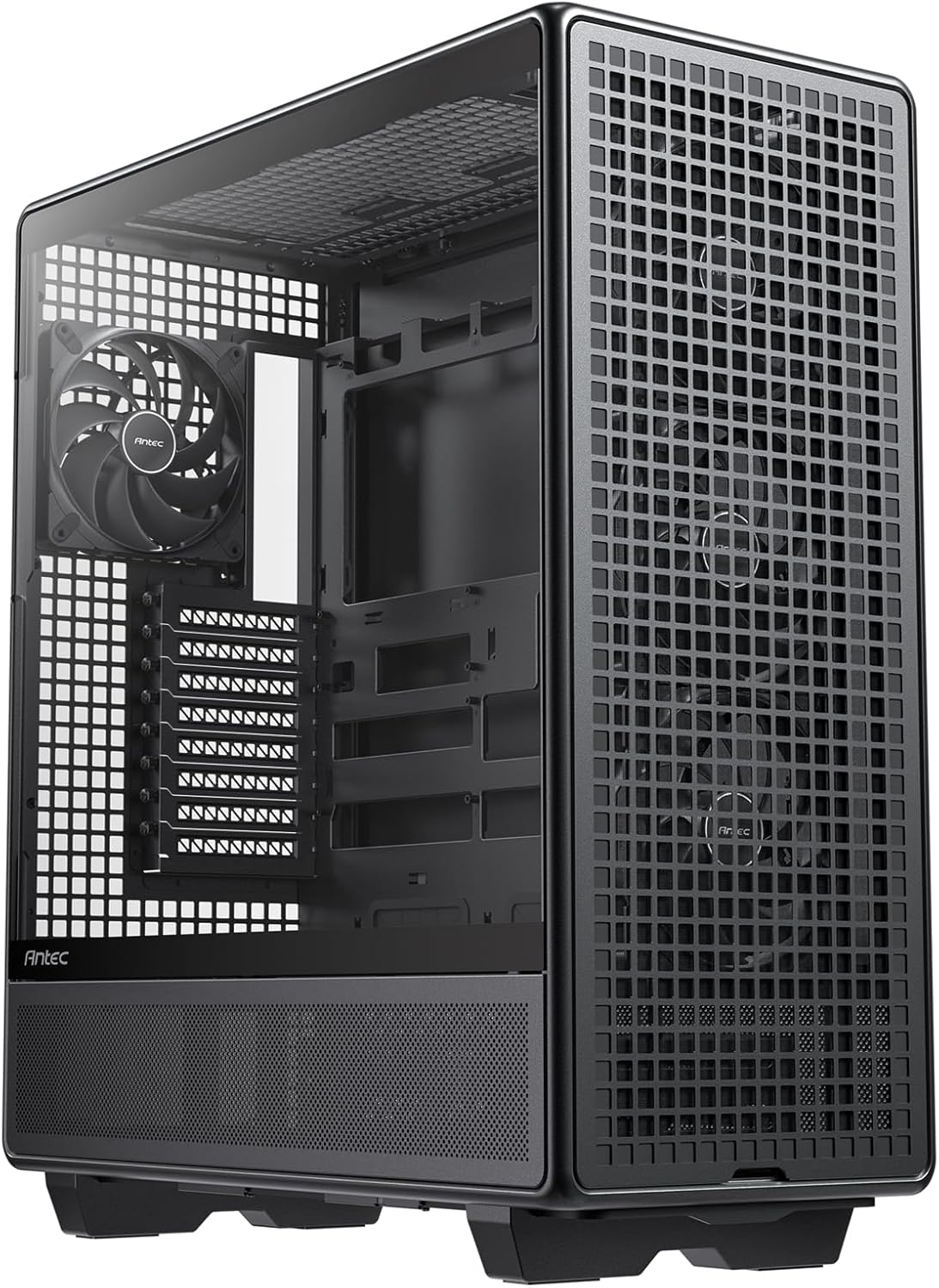
The C8 uses a dual-chamber design: the motherboard and graphics card occupy the main compartment while the power supply, drives and cable bulk live in a separate chamber behind the tray.
- That split means the main chamber sees cooling airflow only, rather than warm air coming off the supply.
- Fan capacity runs vertically rather than front to back: three 140 mm or two 160 mm fans mount on both the top and the bottom.
- The rear position accepts a 140 mm fan, larger than the 120 mm most chassis allow, so it shifts the same air at lower speed and less noise.
- A full cut-out at the bottom with interchangeable 120 mm and 140 mm brackets lets bottom intake blow directly onto the graphics card.
The full mesh top and right panel provide the exhaust route that the glass front and side cannot.
This is a full-tower E-ATX chassis and the cooling capacity reflects that scale.
- 360 mm radiators can be fitted at the top, bottom and side simultaneously, which is enough for separate CPU and graphics loops in one machine.
- Motherboard support runs up to E-ATX, so the largest workstation and enthusiast boards fit without overhanging the cable cut-outs.
- It is listed as compatible with RTX 40 series graphics cards, including the tall triple-slot designs that foul narrower chassis.
- Construction is 0.8 mm high-strength steel with 4 mm tempered glass that is non-drilled, giving a seamless front-to-side edge with no corner bolts on show.
Measure your floor or desk space before ordering. A full tower of this class is deep, and with three radiators and a full fan complement it becomes genuinely heavy to shift.
The C8 ships as a bare chassis, so a build list needs a few extras planned in from the start.
- Fans are not included. With mounts for six or more fans plus three radiator positions, the whole set has to be sourced separately.
- A front-panel Type-C header on your motherboard, if you want to use the chassis Type-C port.
- Long power supply cables or extensions, since routing from a rear chamber to a top-mounted 8-pin CPU connector on an E-ATX board is a longer run than in a single-chamber design.
One more point: the glass front is a display choice, not an airflow one. Air enters through the bottom and leaves through the mesh top and right panel, so bottom intake fans are not an optional extra here — they are the intake path the whole layout depends on.

Pros
- Ships with 4 pre-installed 120mm ARGB PWM fans plus a 26-LED strip, so lighting and airflow are ready without buying extras
- Clears GPUs up to 420mm, CPU coolers up to 178mm tall, and top radiators up to 360mm for high-end builds
- Tool-less side panels speed up access to internal components during builds or upgrades
- Supports back-connect ATX and Micro-ATX motherboards for cleaner cable routing behind the panel
- Side-mounted USB-C port puts a modern connection within reach without reaching around to the front
Cons
- Tempered glass panels add weight and a fragility risk during moving or panel removal that steel-only cases avoid
- Included fans run up to 1800 RPM with noise reaching 30.8 dBA at full speed, audible under sustained heavy load
- Fits ATX, Micro-ATX, and Mini-ITX boards only, so E-ATX motherboards are not supported
The Vector V100 comes with 4 pre-installed 120mm ARGB PWM fans using hydraulic bearings, each capable of up to 1800 RPM, 61.47-60.4 CFM airflow, and 2.54-2.17 mm-H2O air pressure, with noise ranging 26.5-30.8 dBA depending on speed. A 26-LED ARGB strip adds further lighting, and both fans and strip daisy-chain together for a simpler cable run than wiring each component separately.
- 4x 120mm ARGB PWM fans included, hydraulic bearing design
- 26-LED ARGB strip with full spectrum color control
- Daisy-chain connectivity reduces individual cable runs
Fan and strip lighting sync with motherboard ARGB software, so color and effects can match other components already running compatible lighting ecosystems.
The case supports ATX, Micro-ATX, Mini-ITX, and back-connect ATX or Micro-ATX motherboards, giving builders the option of a standard layout or a back-connect board for hidden cable routing behind the tray. Tool-less mounting on each side panel speeds up the build process, since panels come off without reaching for a screwdriver for routine access.
- Back-connect motherboard support for cleaner cable management
- Tool-less side panel mounting mechanism
- Included GPU support bracket for heavier graphics cards
E-ATX and other oversized motherboard formats are not on the supported list, so builders working with larger boards will need to confirm fit before assembling the rest of the build.
Internal clearance is built for high-end hardware: graphics cards up to 420mm, CPU air coolers up to 178mm tall, and a top-mounted radiator up to 360mm. That headroom leaves room to move from air cooling to a 360mm liquid loop, or to swap in a longer flagship GPU later, without the case itself becoming the limiting factor.
- 420mm max GPU length clearance
- 178mm max CPU cooler height
- 360mm top radiator support
A GPU support bracket is included to help offset the weight of longer graphics cards over time, reducing sag as heavier cards are installed.

Pros
- Seamless Edge on Front Side TG Panel with Exotic Wood.
- Dual Chamber Design.
- Space for Three 140mm Fans or Two 160mm Fans on Top and Bottom.
- Supports Thick 360mm Radiators on Top, Bottom, and Side Simultaneously.
- Full Cut-Out at Bottom with Interchangeable 120mm 140mm Fan Brackets.
Cons
- Requires verifying computer chassis clearance for 18.26"D x 11.93"W x 18.74"H
- Requires proper cable routing to maintain optimal interior airflow
- Requires periodic dust cleaning from internal cooling vents
The Antec C8 Wood Fans not Included Wooden Front Panel provides essential hardware performance for custom PC builds and workstation upgrades. Engineered to manage demanding electrical or thermal workloads, this model incorporates Seamless Edge on Front Side TG Panel with Exotic Wood. together with Dual Chamber Design.. PC builders and system integrators will benefit from the efficient internal layout, which simplifies system assembly while supporting high operational stability. The design helps maintain consistent hardware responsiveness across intensive computing tasks, gaming sessions, and daily multitasking workloads. Physical dimensions measuring 18.26"D x 11.93"W x 18.74"H allow for straightforward spatial planning prior to final placement.
Built using resilient structural components, this unit features a sturdy outer housing engineered to resist operational wear. Precision manufacturing ensures that all joints and surface connections remain firmly aligned during regular daily activity. Space for Three 140mm Fans or Two 160mm Fans on Top and Bottom. reinforces overall physical stability over extended service periods. Premium Tempered Glass construction maintains structural integrity and cosmetic appearance under routine handling. Structural integrity remains firm throughout regular usage, giving owners peace of mind. Maintaining adequate interior case airflow and clean ventilation ports preserves peak hardware efficiency during heavy processing workloads.
Initial setup requires placing the unit on a flat, stable surface with adequate clearance around all sides for proper operation. Ensure all power or connection cables are routed neatly without sharp bends to prevent wire strain. Regular care involves wiping exterior housing surfaces with a soft cloth to remove dust buildup. Inspecting mechanical connections periodically preserves operational efficiency and maintains cosmetic appearance over time. Maintaining adequate interior case airflow and clean ventilation ports preserves peak hardware efficiency during heavy processing workloads. Integrating this reliable component into your computer system ensures stable power delivery and long-term electrical protection.

Pros
- Supports GPUs up to 355mm long, or 300mm when a 360mm front radiator is installed
- Ships with two 140mm PWM fans pre-installed, rather than needing separate fan purchases
- Compatible with ATX, mATX, and ITX motherboards in one case
- 7 bridgeless expansion slots leave room for multi-card or unconventional build layouts
- Includes 2 combined 3.5-inch/2.5-inch drive mounts plus 2 dedicated 2.5-inch mounts for mixed storage setups
Cons
- Wood front panel material requires more careful handling during installation than an all-metal front
- Installing a 360mm front radiator reduces maximum GPU length from 355mm down to 300mm
- Tempered glass side panel adds weight and needs careful handling when removing it for internal access
This ATX mid tower measures roughly 17.6 inches deep, 8.46 inches wide and 18.46 inches tall, and combines a metal frame with a genuine walnut or oak wood front panel and a tempered glass side panel for viewing internal components. Two 140mm PWM fans come pre-installed, giving a working airflow setup before adding any aftermarket cooling.
- Metal frame paired with genuine wood front panel accents, cut from sustainably sourced walnut or oak
- Tempered glass side panel resists scratching while showing off internal components
- 2 pre-installed 140mm PWM fans provide baseline airflow without extra purchases
Front panel access uses an open-mesh design behind the wood slats for intake airflow, rather than a fully solid wood front that would restrict air movement.
The case supports ATX, mATX, and ITX motherboards in one shared layout, and GPUs up to 355mm in length fit with a standard configuration. Installing a 360mm radiator in the front reduces available GPU clearance to 300mm, so radiator size and GPU length need to be balanced against each other during planning.
- 355mm maximum GPU length in standard configuration without a front radiator
- 300mm GPU clearance remains available even with a 360mm front radiator installed
- 7 bridgeless expansion slots support multi-card or angled component layouts
Because GPU clearance changes depending on front radiator size, builders planning a large air-cooled GPU alongside front liquid cooling should measure both components against the case's clearance figures before buying.
Storage starts with 2 combined 3.5-inch/2.5-inch drive mounts plus 2 dedicated 2.5-inch mounts, covering a mix of traditional hard drives and SSDs without needing extra brackets. A front Type-C USB port supports newer peripherals and fast external transfers directly from the case front panel, and the interior layout leaves room for additional fans or radiators as a build's cooling needs grow.
- 4 total drive mounts, 2 combined plus 2 dedicated 2.5-inch, support a mixed HDD/SSD setup
- Front-panel USB Type-C port supports modern peripheral connections
- Removable side panels and a clip-off top panel simplify future internal upgrades
Because the drive mount count is fixed rather than expandable, builds needing more than 4 total drives will need external storage or a different case.

Pros
- Three 120 mm addressable RGB PWM fans arrive pre-installed in the front, each with eight LEDs and daisy-chained on one header
- Sliding steel fan rails accept units up to 200 mm in the front and 140 mm in the roof
- Cut-outs support rear-connector motherboards including ASUS BTF, MSI Project Zero and Gigabyte Stealth
- The inner side panel lifts out so fans can be mounted alongside the board tray instead of a cable cover
- The steel front panel is perforated in a three-dimensional Y pattern rather than left as a solid slab
Cons
- Modular parts such as the aluminium motherboard tray and alternative front I/O panels are sold separately
- All three supplied fans sit at the front, leaving the rear and roof positions empty
- Offered in black only in this configuration
Three 120 mm addressable PWM fans ship pre-installed behind a perforated steel front panel. The perforation uses a three-dimensional Y pattern designed to give air a low-obstruction path rather than forcing it through a flat mesh grille.
- Front rails take fans up to 200 mm
- Roof rails take fans up to 140 mm
- Side mounting available once the inner panel is removed
- Fans support a Zero RPM mode for near-silent behaviour at low load
The rail system is the useful part. Rather than fixed screw holes, the rails let you slide a fan to sit exactly over a graphics card or a radiator inlet. If you are running a high-power card, adding a rear exhaust fan is the first upgrade worth making, since all three included fans are intake.
This is a mid-tower ATX chassis built from alloy steel with aluminium elements, sized for a mainstream tower build rather than an extended workstation board.
- Supports ATX, micro ATX and mini ITX boards
- Supports rear-connector boards: ASUS BTF, MSI Project Zero, Gigabyte Stealth
- Roof radiator mounting up to 140 mm fan sizes
- The internal side panel doubles as a cable cover or a fan mount
Back-connect board support is the detail worth flagging. Those boards move every connector to the rear of the tray, which needs matching pass-through cut-outs in the case to work at all. If you are planning that style of build, this chassis is already prepared for it. For a conventional board, the same cut-outs simply serve as generous cable routing.
The distinguishing idea here is a chassis assembled from replaceable sections rather than a single riveted shell. Panels, the board tray and the front input panel are designed to come off and be swapped for alternatives.
- The motherboard tray can be exchanged for a billet aluminium version
- The front input panel can be swapped for one with a different port arrangement
- Side panels and rails come apart for access during a build
Two things follow from that. Building is easier, because you can strip the case back to a skeleton and reassemble around the components. And the case can change later without being replaced. The trade is that every alternative module is bought separately, so the version in the box is what you get until you choose to add to it.

Pros
- EXCEPTIONAL GPU COOLING-The PSU shroud is perforated on the side and
- LARGE RADIATOR SUPPORT-Supports up to a 360mm radiator in front and a
- HIGH-PERFORMANCE AIRFLOW-Ultra-fine mesh on the top, front, and side
- PRE-INSTALLED FANS-Equipped with two 120mm Quiet Airflow fans one in
- SEAMLESS CABLE MANAGEMENT-Effortlessly route and conceal cables using
Cons
- Requires verifying computer chassis clearance for 8.86"D x 16.93"W x 18.31"H
- Requires proper cable routing to maintain optimal interior airflow
- Requires periodic dust cleaning from internal cooling vents
The NZXT H5 Flow - Compact ATX Mid-Tower PC Case - Black provides essential hardware performance for custom PC builds and workstation upgrades. Engineered to manage demanding electrical or thermal workloads, this model incorporates EXCEPTIONAL GPU COOLING-The PSU shroud is perforated on the side and together with LARGE RADIATOR SUPPORT-Supports up to a 360mm radiator in front and a. PC builders and system integrators will benefit from the efficient internal layout, which simplifies system assembly while supporting high operational stability. The design helps maintain consistent hardware responsiveness across intensive computing tasks, gaming sessions, and daily multitasking workloads. Physical dimensions measuring 8.86"D x 16.93"W x 18.31"H allow for straightforward spatial planning prior to final placement.
Built using resilient structural components, this unit features a sturdy outer housing engineered to resist operational wear. Precision manufacturing ensures that all joints and surface connections remain firmly aligned during regular daily activity. HIGH-PERFORMANCE AIRFLOW-Ultra-fine mesh on the top, front, and side reinforces overall physical stability over extended service periods. Premium Metal construction maintains structural integrity and cosmetic appearance under routine handling. Structural integrity remains firm throughout regular usage, giving owners peace of mind. Maintaining adequate interior case airflow and clean ventilation ports preserves peak hardware efficiency during heavy processing workloads.
Initial setup requires placing the unit on a flat, stable surface with adequate clearance around all sides for proper operation. Ensure all power or connection cables are routed neatly without sharp bends to prevent wire strain. Regular care involves wiping exterior housing surfaces with a soft cloth to remove dust buildup. Inspecting mechanical connections periodically preserves operational efficiency and maintains cosmetic appearance over time. Maintaining adequate interior case airflow and clean ventilation ports preserves peak hardware efficiency during heavy processing workloads. Integrating this reliable component into your computer system ensures stable power delivery and long-term electrical protection.

Pros
- Experience mature wood grain design I O interface, seamlessly blending
- Accommodates a 360mm radiator at the top and supports high-end GPUs
- Despite its compact size, XR boasts exceptional compatibility, ensuring
- Equipped with 3 pre-installed ARGB fans, with a maximum speed of 1500
- Top-notch filters cover every angle top, bottom, and side panels
Cons
- Requires verifying computer chassis clearance for 17.1"D x 9"W x 17.7"H
- Requires proper cable routing to maintain optimal interior airflow
- Requires periodic dust cleaning from internal cooling vents
The MONTECH XR Panoramic High Airflow ATX PC Case 3 ARGB PWM provides essential hardware performance for custom PC builds and workstation upgrades. Engineered to manage demanding electrical or thermal workloads, this model incorporates Experience mature wood grain design I O interface, seamlessly blending together with Accommodates a 360mm radiator at the top and supports high-end GPUs. PC builders and system integrators will benefit from the efficient internal layout, which simplifies system assembly while supporting high operational stability. The design helps maintain consistent hardware responsiveness across intensive computing tasks, gaming sessions, and daily multitasking workloads. Physical dimensions measuring 17.1"D x 9"W x 17.7"H allow for straightforward spatial planning prior to final placement.
Built using resilient structural components, this unit features a sturdy outer housing engineered to resist operational wear. Precision manufacturing ensures that all joints and surface connections remain firmly aligned during regular daily activity. Despite its compact size, XR boasts exceptional compatibility, ensuring reinforces overall physical stability over extended service periods. Premium Tempered Glass construction maintains structural integrity and cosmetic appearance under routine handling. Structural integrity remains firm throughout regular usage, giving owners peace of mind. Maintaining adequate interior case airflow and clean ventilation ports preserves peak hardware efficiency during heavy processing workloads.
Initial setup requires placing the unit on a flat, stable surface with adequate clearance around all sides for proper operation. Ensure all power or connection cables are routed neatly without sharp bends to prevent wire strain. Regular care involves wiping exterior housing surfaces with a soft cloth to remove dust buildup. Inspecting mechanical connections periodically preserves operational efficiency and maintains cosmetic appearance over time. Maintaining adequate interior case airflow and clean ventilation ports preserves peak hardware efficiency during heavy processing workloads. Integrating this reliable component into your computer system ensures stable power delivery and long-term electrical protection.

Pros
- Iconic angular mesh design provides filtered airflow
- Dual-layout interior fits E-ATX and SSI-EEB boards
- Supports up to 18 HDDs and 5 SSD mounts
- Exceptional water cooling with radiators up to 480mm
- Tempered glass side panel for viewing build
Cons
- Large form factor requires adequate desk space
- Heavy weight makes repositioning difficult alone
With a 42-inch blade span and powerful DC motor, this ceiling fan efficiently cools large rooms up to approximately 400 square feet. The reversible motor switches from downward summer airflow to upward winter circulation, adapting to seasonal heating and cooling needs.
- Summer mode pushes cool air downward suitable for living rooms, bedrooms, and open-plan spaces.
- Gentle speeds 1-2 provide subtle air circulation ideal for bedrooms where strong breezes disrupt sleep.
- Maximum speeds 5-6 deliver powerful airflow for large rooms with high ceilings or poor natural ventilation.
- Winter mode reverses blade rotation to push warm air downward from ceiling heights, improving heat distribution.
Professional installers recommend this fan size for rooms larger than 300 square feet. Effective cooling without constant maximum-speed operation that wastes electricity and increases energy costs significantly.
The DC motor operates significantly quieter than traditional AC induction motors, producing minimal noise even at higher speeds. This silence makes the fan suitable for bedrooms, home offices, and nurseries where ambient noise causes distraction.
- Energy-efficient DC motor uses 40-50 percent less electricity than comparable AC ceiling fans over yearly operation.
- Quiet operation under 25 decibels allows conversation and television viewing without competing noise.
- Motor lifespan extends beyond typical ceiling fans due to brushless DC design with fewer moving parts.
- Variable speed settings allow running at lower speeds for background airflow, reducing power consumption.
The quieter operation and energy efficiency often justify the higher initial cost through reduced electricity bills. Some users report saving enough on utility costs over the fan lifespan to recoup investment completely.
Integrated LED lighting with stepless dimming provides adjustable illumination from 10 percent to 100 percent brightness. Three selectable color temperatures match the lighting to your activity and time of day for enhanced comfort and mood.
- Warm white 3000K mimics sunset lighting, signaling your body to wind down for improved sleep quality.
- Neutral white 4500K provides balanced illumination suitable for working, reading, and household activities.
- Cool white 6500K simulates daylight, boosting alertness and focus during morning hours or work.
- Timer function allows scheduling automatic fan off or fan-only operation without lights after sleep.
The color temperature flexibility appeals to people managing circadian rhythms and seasonal mood changes. Gradually shifting lighting mimics natural day-night cycles that improve sleep and productivity throughout the year.

Pros
- Iconic angular mesh front design filters airflow while providing bold aesthetic appeal in gaming setups
- Supports up to 285 mm E-ATX motherboards with adaptable dual-layout interior maximizing storage flexibility
- Fits radiators: 360 mm front, 420 mm top, 280 mm base enabling multi-radiator liquid cooling configurations
- Holds 11 hard drives plus 4 SSD mounts (9 brackets included) supporting massive storage arrays
Cons
- Bolt-free tempered glass requires careful handling; damage results in complete replacement necessity
- Tool-free design eliminates cable management organization options that screw-based systems provide
The iconic angular mesh design prioritizes filtered airflow over traditional enclosure aesthetics. The front mesh panel is hinged with removable nylon filter enabling easy maintenance while providing optimal cooling performance. Bold stealth-inspired aesthetic appeals to gaming and high-performance PC builders.
- Iconic angular mesh filters airflow while providing distinctive visual appearance
- Hinged mesh front with removable nylon filter simplifies dust maintenance significantly
- Radiator support: 360 mm front, 420 mm top, 280 mm base enables multi-radiator configurations
- Flexible cooling layout accommodates air and liquid cooling simultaneously
- Optimized internal airflow paths maximize heat dissipation efficiency
The radiator support flexibility enables custom water cooling configurations with multiple radiators for extreme cooling performance. Air cooling users benefit from large mesh intake area and multiple fan options.
The adaptable dual-layout interior supports both small storage arrays and massive drive configurations simultaneously. Support for 11 hard drives plus 4 SSDs with 9 included brackets accommodates everything from minimal configurations to extreme NAS-style storage arrays.
- 11 hard drive mounts enable large storage capacity in single case
- 4 SSD mounts plus 9 included brackets provide flexible SSD placement options
- Adaptable dual-layout supports E-ATX boards up to 285 mm width
- Flexible internal routing accommodates custom component arrangements easily
- Expansion capability enables future storage upgrades without case replacement
The storage capacity suits content creators, NAS builders, and gaming enthusiasts requiring 40+ terabytes internal storage without external enclosures or expansion boxes.
Bolt-free flush tempered glass design provides stunning visual presentation while requiring careful handling. Tool-free bezel and fully removable top panel grant excellent interior access for component installation and cooling system maintenance.
- Bolt-free tempered glass window provides seamless aesthetic appearance
- Tool-free front bezel enables quick access without screwdriver requirement
- Fully removable top panel grants complete interior access for installation and maintenance
- Tether-free bezel design eliminates cable management attachment points
- Professional appearance suitable for custom builds and demonstration showcases
The tempered glass construction prioritizes aesthetics over durability. Accidental breakage requires complete replacement without repair options. Installation must be done carefully to avoid stress cracks. This comprehensive approach ensures consistent performance throughout extended operational scenarios.

Pros
- Six PWM ARGB fans arrive pre-fitted, so no separate 120 mm fans are needed to populate intake and exhaust
- Tempered glass side door swings on magnets with a metal pull ring, so dust cleaning needs no screwdriver
- 15.35 x 8.07 x 18.98 inch shell takes a full ATX board while staying inside a mid-tower footprint
- Front panel carries two USB 3.0 ports plus audio for a headset and an external drive
- Addressable fans reach 16.8 million colours from a 3-pin motherboard header rather than a bundled controller
Cons
- Addressable lighting needs a 3-pin 5 V ARGB header; boards with only a 4-pin 12 V RGB header cannot drive the fans
- The carton holds the chassis and the six fans only, with no power supply, radiator or fan controller included
- Six fans plus a CPU cooler exceed the fan header count on many entry-level boards, so a PWM splitter hub may be needed
The shell measures 15.35 inches deep, 8.07 inches wide and 18.98 inches tall, the standard mid-tower envelope for a full ATX motherboard. Micro-ATX and mini-ITX boards drop onto the same standoffs, leaving spare room behind the tray for cable routing. Steel forms the frame and tempered glass the left panel, so the empty chassis has real mass before any hardware goes in. Front I/O covers two USB 3.0 ports plus audio, enough for a headset and an external drive without reaching behind the desk. Three numbers are worth checking before ordering: graphics card length, CPU cooler height and radiator thickness. The polygonal mesh front means intake is not choked by a solid door, but a 360 mm radiator with thick fans still deserves measuring against your board layout.
Six PWM ARGB fans arrive already mounted, which is unusual since most mid-towers ship with one or two. Two separate things need controlling:
- PWM speed runs from motherboard fan headers, so the fans idle slowly and ramp under load instead of spinning flat out all day.
- Addressable lighting needs a 3-pin 5 V ARGB header. Each fan then addresses 16.8 million colours through your board maker software.
Boards carrying only a 4-pin 12 V RGB header cannot drive addressable fans; lighting will default to a fixed pattern or need a separate controller. Count headers first, because six fans plus a CPU cooler is more connectors than many entry boards provide, and a PWM splitter hub is the simple fix. Upgraded bearings are quoted for service life, and the frames are standard 120 mm if you swap them later.
The side glass hangs on magnets with a metal pull ring, so it swings open like a door rather than needing four thumbscrews removed and a heavy panel balanced against the desk. That changes maintenance habits: a monthly wipe of the graphics card shroud and a blast through the front mesh becomes a two-minute job instead of a weekend chore. Dust filters still need pulling and rinsing, and they must be completely dry before refitting. The open door also gives quick access for swapping a card or reseating a memory stick without dragging the tower off the desk. Owners who display figures or models inside the case get the same benefit, since the door opens without disturbing cable routing. Clean the glass with a microfibre cloth, as household sprays can haze the coating over time.
What to Look for in the Best PC Cases for Graphic Design
Design work is bursts of heavy GPU load — rendering a 3D scene, exporting 4K video, or running several color-managed monitors — followed by long stretches of light editing. Your case needs to handle both without sounding like a hair dryer or cooking your components. Here’s what to prioritize before you look at any specific model.
Motherboard compatibility matters too, and it’s easy to overlook. Most of the cases below are built for standard ATX boards, but check the spec sheet if you’re running Micro-ATX or a compact ITX build, since a case that’s technically “compatible” can still leave awkward gaps around smaller boards. Standoff placement and drive bay count also shift between form factors, so match the case to the board you already own rather than assuming any ATX case works with everything.
Airflow and Thermal Headroom
A mesh front panel with real intake fans keeps your GPU and CPU running cooler under sustained load, which matters more for rendering than for casual browsing. Cases with tight, glass-only fronts look sleek but trap heat, forcing your fans to spin louder just to hold the same temperature.
GPU and Radiator Clearance
Modern graphics cards used for GPU-accelerated rendering (Octane, Redshift, DaVinci Resolve) are physically large. Check the maximum GPU length and confirm the case supports at least a 280mm or 360mm radiator, even if you’re on air cooling now — you may want liquid cooling later.
Cable Management and Noise Levels
A shared studio desk means your case’s fan noise is part of your workday soundtrack. Look for rubber grommets, a dedicated cable channel behind the motherboard tray, and fans rated for a good airflow-to-noise ratio rather than raw CFM alone.
Front-Panel Connectivity for Creative Peripherals
Drawing tablets, card readers, and external SSDs all want fast, accessible ports. A front-panel USB-C port saves you from crawling behind the desk every time you plug in a Wacom tablet or transfer a photo shoot from an SD card.
The Best PC Cases for Graphic Design, Picked by Use Case
Every studio setup is different, so instead of ranking these purely by spec sheet, here’s which case fits which kind of creative workflow — and where each one falls short.
Best Overall for a Quiet Creative Studio
The Fractal Design North pairs a genuine walnut wood front panel with real mesh airflow behind it, so it looks at home next to a design desk instead of a gaming rig. At $154.99 with a 4.7 rating across 3,462 reviews, it’s proven with heavy daily use. The trade-off: the wood front costs more than plain mesh cases, and it’s strictly ATX mid-tower, so it won’t fit E-ATX boards.
Best for Multi-GPU Rendering Power
If your workflow leans on GPU rendering or you run multiple graphics cards, the Antec C8 gives you a dual-chamber, full-tower layout with 360mm radiator support and E-ATX room to grow. It holds a 4.8 rating from 455 reviews at $104.99. Keep in mind it ships without fans, so budget for a few extra intake and exhaust fans on top of the case price.
Best Compact Airflow Build
For a smaller desk footprint, the NZXT H5 Flow is a compact ATX mid-tower with two included 120mm fans and 360mm front radiator support, priced at $74.99 with a 4.7 rating from 1,110 reviews. It’s an easy first airflow build, though its smaller interior means less room for thick radiators or oversized air coolers.
Best Budget-Friendly Airflow Case
The MONTECH XR undercuts most rivals at $69.99 while still supporting a 420mm GPU and 360mm radiator, with three ARGB fans included and a 4.7 rating from 736 reviews. It’s a strong value pick if you’re building on a tighter budget, though fit and finish feel a step below pricier options.
Best Premium Cable-Management Build
The Lian Li Vector V100 brings side I/O, a dust filter, and support for 420mm GPUs alongside four included ARGB fans, all for $74.99 with a 4.8 rating from 433 reviews. Its side-mounted I/O and display platform make cable routing noticeably cleaner, though the layout takes some getting used to if you’ve only built in traditional cases.
Best All-Around Airflow for Heavy Workloads
The CORSAIR 4000D RS ARGB ships with three pre-installed RS fans and an InfiniRail mounting system for flexible fan and radiator placement, priced at $89.99 with a 4.7 rating from 1,733 reviews. It’s a dependable all-rounder for sustained render loads, though its styling leans more toward a general gaming build than a design-studio aesthetic.
Common Mistakes to Avoid When Buying a PC Case for Design Work
A few recurring mistakes cost people money or force an early upgrade. Watch for these before you check out.
Desk space is another factor people plan around too late. Measure the footprint you actually have before ordering a full-tower case — some studio desks and credenzas are built around a mid-tower profile, and a taller case can block airflow to nearby monitors or simply not fit under the desk at all.
- Ignoring GPU clearance: A long graphics card can physically not fit in a compact case. Always check the listed maximum GPU length against your card.
- Choosing looks over airflow: A glass-front case can look stunning on a desk but trap heat, leading to louder fans and higher temperatures than a mesh equivalent.
- Skipping dust filters: Studios collect dust from paper, fabric, and foot traffic faster than you’d expect. A case without magnetic or slide-out filters means more frequent cleaning.
- Underestimating radiator support: If you might add liquid cooling later, buy a case that already supports a 280mm or 360mm radiator rather than upgrading the case too.
- Forgetting front-panel ports: Some budget cases skip USB-C entirely, which is a real inconvenience if your tablet or card reader needs it.
How Your Case Choice Affects Rendering and Multitasking Performance
Thermal headroom directly affects how long your GPU can sustain boost clocks during a render or export. A case that traps heat forces your components to throttle, which quietly adds minutes to every export queue over the course of a project. That’s a bigger deal for design work than most people assume, since rendering and exporting happen constantly throughout the day.
Case choice also ties into the rest of your desk setup. If you’re pairing your build with a color-accurate display, our guide to the best monitors for graphic design covers panel types and calibration features worth prioritizing. And since airflow and ergonomics both depend on where your tower sits, check our picks for best desks for graphic design if you’re planning the whole workstation from scratch.
If ATX form factor and expandability matter more to you than the design-specific picks above, our broader roundup of the best ATX PC cases compares more general-purpose options side by side.
Frequently Asked Questions
Do I need a full-tower case for graphic design work?
Not usually. A mid-tower case handles most single-GPU design workstations comfortably. Full-tower cases like the Antec C8 make more sense if you’re running multiple GPUs or plan significant future upgrades.
How much airflow does a design workstation actually need?
Enough to keep your GPU under sustained load during renders and exports, which usually means at least two to three intake fans and a mesh front panel. Cases with tempered glass on all sides tend to run warmer under the same workload.
Is a quiet case worth paying more for?
If you work near your PC for hours, yes. Fan noise becomes noticeably more tiring over a full workday than it seems during a quick test at the store, so cases with good stock fans and vibration dampening pay off long term.
Does case color or material affect performance?
Not directly, but solid front panels without mesh cutouts do restrict airflow more than open designs, regardless of color. Wood or glass fronts on cases like the Fractal Design North still route air through the sides or top to compensate, so check where the intake vents actually sit before assuming a stylish front panel hurts cooling.
What size radiator support should I look for?
Aim for at least 280mm support if you use air cooling now but might switch to liquid cooling later. Cases supporting 360mm radiators give you the most flexibility for future CPU or GPU cooling upgrades.
Your case is one of the few PC components you’ll look at and live with every single day at your desk, so it’s worth matching it to how you actually work rather than how a build looks in a photo. Start with the airflow and clearance basics above, match a case to your workflow from the picks in this guide, and check the current price on Amazon before you commit to a build.