
 Marcus Bell
 Choosing from the best firewall routers is one of the smartest moves you can make to protect a modern home or small business network. As more devices connect to the internet – laptops, phones, smart TVs, security cameras, and IoT gadgets – the humble router quietly becomes the first and most important line of defense against intruders, malware, and data theft. This guide walks you through what a firewall router actually does, the features that matter, and how to match the right hardware to your needs so you can shop with confidence.
Instead of ranking each model one by one, we focus on the buying decisions that really matter. Below you will find a curated list of popular options to reference as you read, followed by a practical framework for choosing the firewall router that fits your budget, network size, and technical comfort level.
Pros
- Dual-band Wi-Fi 6 reaches 574 Mbps on 2.4 GHz and 1201 Mbps on 5 GHz, enough for a hotel room full of streaming devices
- WireGuard tunnels run up to 550 Mbps over the wired ports, so encryption does not throttle a fast hotel line
- Three gigabit Ethernet ports let a games console and a work laptop stay wired while phones use the radio
- A 1.2 GHz quad-core chip with 512 MB DDR3L RAM handles up to 120 connected clients
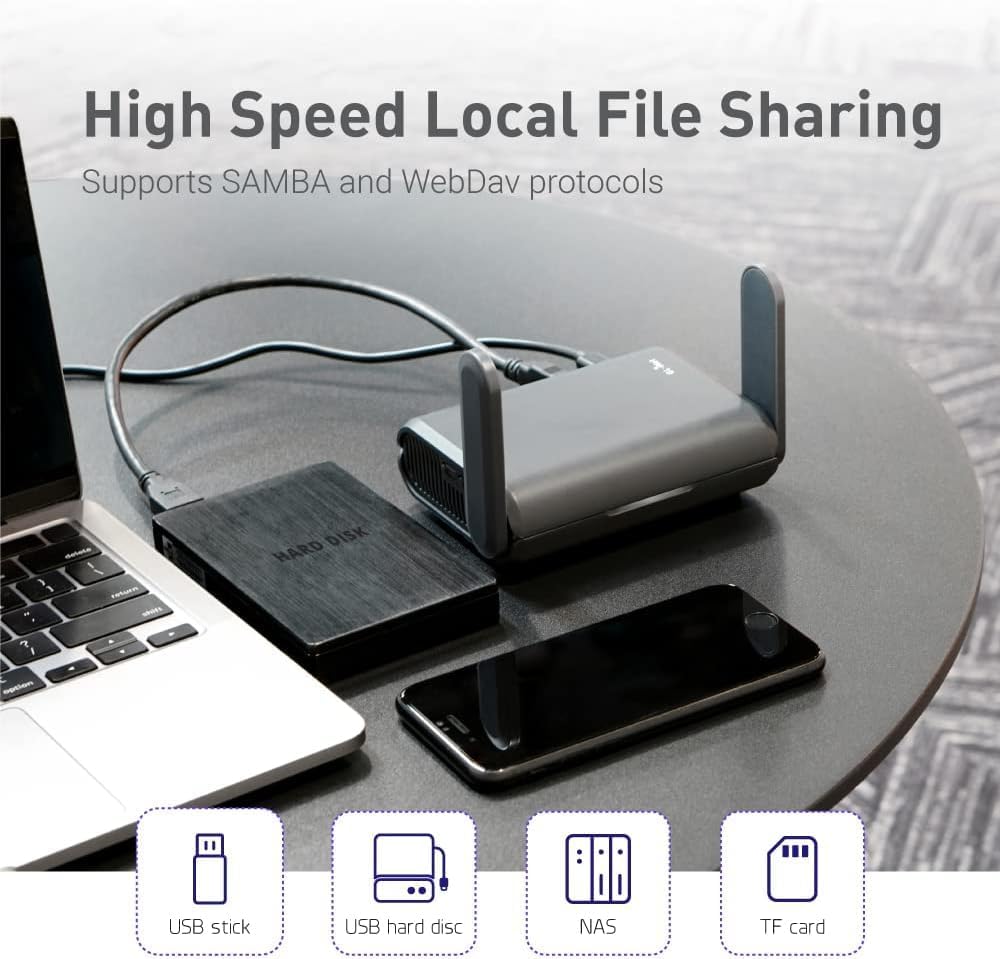
- A USB port turns any external drive into a SAMBA or WebDAV share for the room
Cons
- No built-in cellular modem, so it still needs a hotel line, public hotspot or tethered phone as its source
- Wi-Fi 6 without 6E, so the 6 GHz band is out of reach
- Powered over USB-C with no internal battery, so a wall outlet or power bank has to stay connected
The radio pair is quoted at a combined 1800 Mbps, split as 574-600 Mbps on 2.4 GHz and 1201 Mbps on 5 GHz. In a single hotel room or cabin that is far more headroom than the upstream line will ever supply, so the limiting factor is almost always the network you connect to, not the router.
- MU-MIMO, OFDMA and BSS colouring keep throughput steady when a dozen devices talk at once, which is the real workload on a family trip.
- Up to 120 simultaneous clients are supported, so it also works as a temporary access point at a small event.
- Three gigabit ports mean a wired desk setup stays wired.
Range is modest by design - this is a pocket unit meant to cover one room, not a whole house.
The usual routine takes a couple of minutes. Power the unit from USB-C, join its own network from a phone, then point it at whatever the venue provides.
- Repeater mode converts a public wired or wireless network into your own private one, and it works with captive portal sign-in pages.
- Free hotspots that enforce a time limit will disconnect the router when the clock runs out; you simply reconnect the uplink and every device behind it stays on the same private network.
- Your phones, tablets and console keep one saved network name across every hotel, so nothing needs pairing again on arrival.
Bring a short Ethernet patch lead. Where a room has a wall socket, plugging into it is both faster and more stable than repeating a shared lobby signal.
The unit runs OpenWrt 21.02 firmware, which is what separates it from a consumer travel router.
- OpenVPN and WireGuard clients are pre-installed and compatible with more than 30 VPN providers, so every device behind the router inherits the tunnel with no per-device app.
- WireGuard is quoted up to 550 Mbps and OpenVPN up to 500 Mbps, with wired OpenVPN throughput closer to 120 Mbps in practice.
- IPv6, Cloudflare encrypted DNS and AdGuard Home are all available from the web dashboard.
- Extra packages can be installed from the OpenWrt repository for anyone who wants to go further.
The trade-off is that the dashboard exposes real networking concepts. Anyone who has never touched a firewall rule will spend the first evening reading rather than clicking through a wizard.
Pros
- Handles up to 500,000 concurrent sessions and 1,000+ clients, suited to small offices rather than a single household
- Two 2.5 Gbps WAN ports plus a Gigabit SFP port allow multi-gig internet and fiber uplinks on the same box
- Supports up to 100 site-to-site IPsec tunnels alongside OpenVPN, L2TP, and PPTP for remote access
- Backed by a 5-year warranty with technical support staffed 6am-6pm PST on weekdays
- USB 2.0 port adds LTE failover or attached storage without extra hardware
Cons
- No built-in Wi-Fi, so a separate access point is required for wireless coverage
- Omada SDN features work best alongside other Omada hardware, and the configuration depth may exceed a typical home setup
- Only one Gigabit SFP slot, so a single fiber uplink option remains once the multi-gig WAN ports are in use
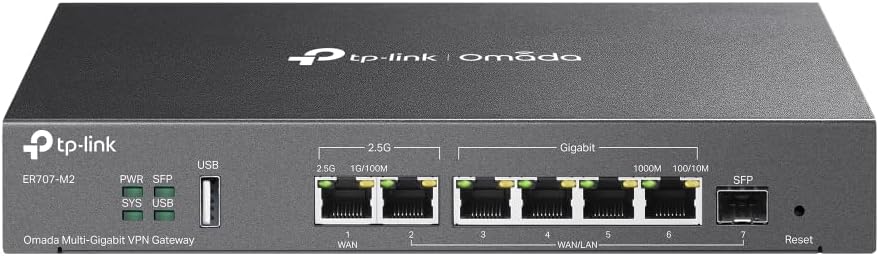
The ER707-M2 combines 1 dedicated 2.5 Gigabit WAN port, 1 flexible 2.5 Gigabit WAN/LAN port, 4 Gigabit WAN/LAN ports, and 1 Gigabit SFP WAN/LAN port, giving several ways to mix wired uplinks and local connections. A USB 2.0 port adds support for attached storage or an LTE dongle used as backup internet.
- Maximum concurrent sessions rated at 500,000, aimed at offices running many simultaneous connections rather than a single household
- Supports more than 1,000 connected clients across the network
- Flexible port roles let WAN and LAN assignments be reconfigured to match different ISP setups
- SPI firewall and lightning protection are built in for basic perimeter security
VPN support covers up to 100 site-to-site IPsec tunnels, 66 OpenVPN connections, and 60 each of L2TP and PPTP, giving multiple ways to connect remote sites or individual remote workers securely. Remote cloud access and the Omada app centralize management of the router alongside other Omada devices from one interface.
- Load balancing spreads traffic across available WAN connections for more consistent throughput
- Centralized management works across multiple sites from a single login rather than logging into each router separately
- 5-year warranty is paired with technical support available 6am to 6pm PST, Monday through Friday
- Designed to integrate with other Omada SDN hardware for unified network policy control
As a router-only device, the ER707-M2 needs a separate access point or mesh system for Wi-Fi, since it focuses purely on wired routing, VPN, and firewall duties. It is built to sit at the edge of a small office network, handling multi-gig WAN uplinks before traffic is passed to switches and access points.
- Works with standard 2.5 Gbps or Gigabit ISP connections through its flexible WAN port options
- Best suited to setups already using or planning to use Omada-managed switches and access points
- Configuration through the Omada app or controller software has more depth than a typical consumer router interface
- USB port allows LTE backup so internet connectivity is not fully dependent on the primary WAN link

Pros
- Five gigabit ports split as 1 fixed WAN, 2 configurable WAN/LAN and 2 fixed LAN
- A USB port accepts a 4G or 3G modem as a backup uplink when the main line drops
- Handles up to 20 LAN-to-LAN IPsec tunnels plus 16 each of OpenVPN, L2TP and PPTP
- Omada SDN management through a hardware, software or cloud controller
- SPI firewall with DoS defence and filtering by IP, MAC and URL
Cons
- No wireless radio at all, so access points have to be bought and cabled separately
- OpenVPN configuration requires an Omada SDN controller rather than being available from the standalone interface
- Five ports with no power over Ethernet output, so anything beyond a handful of wired devices needs a separate switch
Five gigabit Ethernet ports are split as one fixed WAN, two that can be configured as either WAN or LAN, and two fixed LAN. Running two or three WAN connections at once allows load balancing across separate lines, or automatic failover when the primary line drops.
- A USB port accepts a 4G or 3G modem as a further backup uplink.
- Bandwidth control and session limits stop one machine flooding the connection.
- Input accepts 100 to 240 V, so it works on either mains standard.
There is no wireless radio in this box at all. It is a gateway, and Wi-Fi has to come from separate access points cabled to the LAN side. Five ports also means a switch is needed for anything beyond a handful of wired devices at the site.
Tunnel capacity is what separates this from a home router: up to 20 LAN-to-LAN IPsec tunnels, plus 16 each of OpenVPN, L2TP and PPTP connections. That is enough to link several branch sites and still leave headroom for remote workers dialling in.
- An SPI firewall with DoS defence handles the standard flood and malformed packet attacks.
- Filtering by IP, MAC and URL, together with access control lists, sets who can reach what.
- Application layer gateway support covers FTP, H.323, PPTP, SIP and IPsec pass-through for VoIP and legacy software.
One caveat to plan around: OpenVPN configuration requires an Omada SDN controller rather than being available from the standalone interface. IPsec, L2TP and PPTP can be set up without one, so pick the tunnel type according to how you intend to manage the device.
The gateway can run standalone through its own web interface, or be adopted into the Omada software-defined networking platform alongside access points and switches. Adoption gives one dashboard for the whole site instead of logging into each device separately.
- Three controller choices: a hardware controller appliance, software running on a PC or server, or a cloud-based controller.
- Cloud access allows configuration and monitoring from outside the site.
- One-click automatic IPsec setup between Omada sites removes most of the manual tunnel configuration.
For a single-site installation the standalone interface is enough on its own. For anyone managing several locations, or handing a network over to someone else to support, the controller model is the main reason to choose this gateway over a consumer router, since configuration and firmware can be pushed centrally.

Pros
- WireGuard throughput up to 500 Mbps and OpenVPN up to 112 Mbps handled on the router itself
- 5 gigabit Ethernet ports, one WAN and four LAN
- Dual-band Wi-Fi 6 at 600 Mbps on 2.4 GHz and 1200 Mbps on 5 GHz
- OFDMA scheduling supports up to 120 connected clients
- 1.2 GHz quad-core processor with 512 MB DDR3L and 128 MB NAND flash
Cons
- Dual-band only, with no 6 GHz radio despite the Wi-Fi 6 label
- Ethernet ports top out at 1 Gbps, capping a multi-gigabit fibre line
- Initial setup expects a wired computer connection to reach the admin panel
Dual-band Wi-Fi 6 delivers up to 600 Mbps on 2.4 GHz and 1200 Mbps on 5 GHz, which is where the combined 1.8 Gbps headline figure comes from. Five gigabit Ethernet ports sit on the back, one for WAN and four for wired clients.
- 5 x 1 Gbps Ethernet ports
- Up to 120 connected devices via OFDMA
- 1.2 GHz quad-core processor
- 512 MB DDR3L memory, 128 MB NAND flash
OFDMA is what makes the 120-device figure realistic. It splits a channel between many small transmissions instead of servicing clients one after another, which suits a house full of phones, plugs and sensors more than raw headline throughput does.
This is the reason most people choose this model. WireGuard runs at up to 500 Mbps over Ethernet and OpenVPN at up to 112 Mbps, both processed on the router, so every device behind it sits inside the tunnel with no client software installed.
- WireGuard up to 500 Mbps
- OpenVPN up to 112 Mbps
- AdGuard Home built into the web interface
- IPv6 and EAP both supported
AdGuard Home blocks ads and trackers at the DNS layer for the whole network, including smart TVs and consoles that cannot run a blocker themselves. Real throughput depends on your line and the remote server, so treat both figures as ceilings rather than guarantees.
Setup starts with an Ethernet cable from a computer to a LAN port, then the web admin panel in a browser. The interface exposes far more than a typical consumer router: DNS settings, firewall rules, VPN profiles and package installs all live in one place.
- Web admin panel over a wired connection
- Upload VPN configuration files directly
- Runs as main router or behind an existing modem
- Firmware built on an OpenWrt base
If your provider supplies a combined modem and router, put that unit into bridge mode or accept a double NAT layer behind it. The learning curve is steeper than a phone-app router, and the trade is real control over routing, DNS and per-device policy.

Pros
- 【AC1200 Dual-band Wireless Router】Simultaneous dual-band with
- 【Easy Setup】Please refer to the User Manual and the Unboxing &
- 【Pocket-friendly】Lightweight design(145g) which designed for your
- 【Full Gigabit Ports】Gigabit Wireless Internet Router with 2 Gigabit
Cons
- Requires proper surface alignment during initial installation
- Periodic visual inspection recommended to ensure component tightness
Designed with precision, the GLiNet GL.iNet GL-SFT1200 Portable WiFi Travel Router Mini VPN delivers versatile performance for modern Routers spaces. Technical integration focuses on functional efficiency, incorporating 【AC1200 Dual-band Wireless Router】Simultaneous dual-band with wireless speed up to 300 Mbps (2.4GHz) + 867 Mbps (5GHz). 2.4GHz band can handles some simple tasks like emails or web browsing while bandwidth intensive tasks such as gaming or 4K video streaming can be handled by the 5GHz band.*Speed tests are conducted on a local network. Real-world speeds may differ depending on your network configuration.*. Its balanced engineering incorporates 【Easy Setup】Please refer to the User Manual and the Unboxing & Setup video guide on quality feature for detailed setup instructions and methods for connecting to the Internet. to streamline day-to-day interactions.
Evaluating build quality and structural execution reveals strong manufacturing standards across components. The physical build incorporates 【Pocket-friendly】Lightweight design(145g) which designed for your next trip or adventure. Alongside its portable, compact design makes it easy to take with you on the go., providing essential protection against surface wear. High tolerance assembly prevents unexpected mechanical looseness during daily operation. Quality craftsmanship supports long term satisfaction for residential and professional settings. User centered design choices streamline routine interactions and enhance practical convenience. Robust physical construction provides verified peace of mind during heavy daily usage. Thoughtful spatial layout allows versatile placement across modern living environments.
Long-term operational satisfaction is supported by adhering to standard installation and cleaning practices. Thanks to 【Full Gigabit Ports】Gigabit Wireless Internet Router with 2 Gigabit LAN ports and 1 Gigabit WAN ports, ideal for lots of internet plan and allow you to connect your wired devices directly., spatial alignment and initial setup progress smoothly for homeowners. Simple preventative care maintains mechanical responsiveness and aesthetic value over extended use. Quality craftsmanship supports long term satisfaction for residential and professional settings. User centered design choices streamline routine interactions and enhance practical convenience. Robust physical construction provides verified peace of mind during heavy daily usage.
Pros
- AX3000 Wi-Fi 6 dual-band wireless delivers fast 3000Mbps total speeds
- Gigabit Ethernet ports support multiple WAN load balancing and failover
- Integrated hardware VPN server supports IPSec, WireGuard, and OpenVPN
- Centralized Omada SDN cloud management via web interface or app
- Durable metal housing ensures reliable continuous business operation
Cons
- Advanced VPN and VLAN routing configuration requires basic IT networking knowledge
- Wi-Fi 6 speed performance requires Wi-Fi 6 compatible wireless client devices
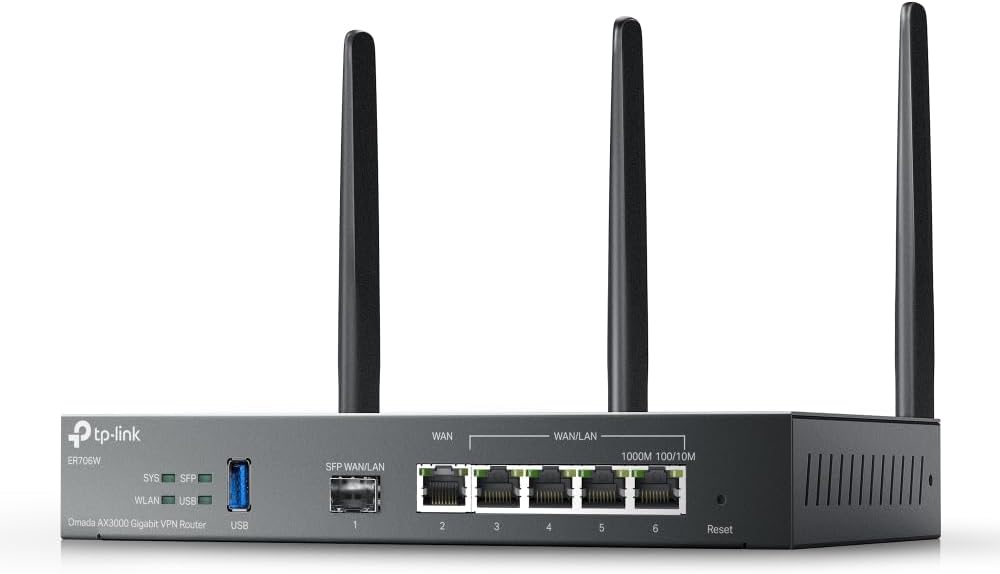
The TP-Link Omada ER706W wireless Gigabit VPN router provides enterprise-grade networking engineered for small businesses, branch offices, and demanding home office environments. Featuring dual-band AX3000 Wi-Fi 6 technology, it delivers combined wireless speeds up to 3000Mbps for high-density client connections. Multi-WAN capability featuring configurable Gigabit WAN/LAN ports and a USB 4G/5G modem backup port provides load balancing and automatic internet failover. Business owners can connect secondary ISP connections to ensure continuous online uptime for point-of-sale systems, video calls, and cloud server access.
Built for secure remote connectivity, the router incorporates high-performance hardware VPN engines supporting IPSec, WireGuard, OpenVPN, and L2TP protocols. Remote workers can establish encrypted site-to-site VPN tunnels back to corporate office networks securely. Integrated into the TP-Link Omada Software Defined Networking (SDN) platform, administrators can manage routers, switches, and access points centrally via the web or mobile app. Advanced firewall security, VLAN segmenting, and guest portal management protect corporate data assets from unauthorized access across commercial networks and branch offices.
Housed in a sturdy metal enclosure with detachable high-gain antennas, the ER706W operates reliably on office desks or wall-mounted inside network closets. Initial setup is simple using the web-based management wizard or Omada mobile app. Connect your main ISP modem line to the designated WAN port and run Ethernet cables to local network switches or workstations. Planning your VLAN subnets and VPN user accounts during setup ensures a secure and scalable small business network environment for long-term operational uptime and reliable enterprise-grade network stability.

Pros
- Dual-core ARM Cortex-A53 processor running at 1.2GHz delivers near-gigabit routing throughput
- Firewall throughput exceeds 650 Mbps, enough for most home and small-office internet connections
- Three switchable 1GbE ports let the same hardware serve as WAN, LAN and a separate OPT segment
- Ships pre-loaded with pfSense+ software, so no separate OS installation is needed before configuring
- One year hardware warranty plus lifetime pfSense+ software updates are included with the unit
Cons
- Three 1GbE ports cap wired throughput below multi-gig WAN speeds now offered by some fiber providers
- No WiFi radio built in, so a separate access point is needed for wireless devices
- Configuring pfSense+ has a steeper learning curve than consumer router firmware for first-time users
A dual-core ARM Cortex-A53 processor at 1.2GHz drives this security gateway, delivering near-gigabit routing for common traffic and more than 650 Mbps of firewall throughput. That level of throughput covers most home and small-office internet connections without the router becoming the bottleneck.
- Near-gigabit routing performance handles typical home and office internet speeds
- Firewall throughput exceeds 650 Mbps for encrypted and filtered traffic
- Compact, fanless design keeps power draw low for continuous use
Businesses or households with multi-gigabit fiber connections should note that the 1GbE ports and this throughput ceiling will cap speeds below what faster fiber plans can deliver.
Three switchable 1GbE ports can each be configured as WAN, LAN or a separate OPT segment, giving flexibility to split guest, IoT or business traffic onto its own network segment. This is more configurable than a typical consumer router's fixed WAN and LAN roles.
- Three 1GbE ports allow flexible WAN, LAN and OPT segment assignment
- Silent, fanless design suits placement on a desktop, wall or rack without noise
- Compact form factor fits small office or home network closets easily
Because the unit has no built-in WiFi radio, a separate wireless access point is required to serve WiFi devices on the network.
The gateway ships pre-loaded with pfSense+ software, with lifetime software updates included at no additional cost and a one-year hardware warranty. Netgate's TAC Lite technical support is included to help with initial setup and connecting the appliance to the internet.
- pfSense+ software comes pre-installed, skipping a separate OS installation step
- Lifetime software updates keep the firewall and routing features current
- TAC Lite support assists with initial internet connection during setup
First-time users unfamiliar with pfSense+ configuration should plan for a learning curve, since the interface is built for network flexibility rather than simplified consumer router menus.

Pros
- Power over Ethernet — 8 PoE ports capable of delivering up to 123
- VLAN for Added Security —Each of the Ethernet ports can be assigned
- Up to 3 WAN Ethernet Ports – 1 gigabit WAN port and 2 gigabit
- Device Management Made Easy — Conveniently centralized control over
Cons
- Requires proper surface alignment during initial installation
- Periodic visual inspection recommended to ensure component tightness
Built for everyday utility, the ASUS ExpertWiFi EBG19P Gigabit PoE VPN Wired Router 8 PoE provides reliable functionality in active Routers settings. Practical hands-on evaluation highlights core functional attributes including Power over Ethernet — 8 PoE ports capable of delivering up to 123 watts of power offer a convenient solution for powering various PoE-enabled devices.. Furthermore, features like VLAN for Added Security —Each of the Ethernet ports can be assigned to one or more VLAN IDs that provides additional security for your business. ensure seamless adaptability across varied spatial layouts. This balanced configuration fits smoothly into existing interior designs while maximizing efficiency.
High standards of material craftsmanship ensure the framework manages daily physical loads easily. Materials engineering centers on Up to 3 WAN Ethernet Ports – 1 gigabit WAN port and 2 gigabit WAN/LAN ports with load balancing optimize multi-line broadband usage. Besides, the USB port can be used as a backup WAN by connecting it to a mobile phone with hotspot to maintain a reliable internet connection., preserving visual appeal and physical integrity over time. Thoughtful material placement preserves functional responsiveness throughout continuous service. This balanced configuration fits smoothly into existing interior designs while maximizing efficiency.
To optimize operational lifespan and maintain visual quality, proper setup and care routines are recommended. With user-friendly details such as Device Management Made Easy — Conveniently centralized control over the PoE devices like EBA63 connected to the EBG19P., setting up the equipment requires minimal effort. Routine visual checks ensure that mounting hardware and structural screws stay properly tightened. This balanced configuration fits smoothly into existing interior designs while maximizing efficiency. Quality craftsmanship supports long term satisfaction for residential and professional settings. User centered design choices streamline routine interactions and enhance practical convenience. Robust physical construction provides verified peace of mind during heavy daily usage.

Pros
- Built-in intrusion detection and prevention (IDS/IPS) monitors home network traffic for malware, phishing, and hacking attempts
- Can operate in router mode or bridge mode alongside an existing router, adapting to different home network setups
- Parental controls let specific devices or activities, like gaming or social apps, be cut off from a smartphone in a few taps
- Built-in OpenVPN and WireGuard servers add secure remote access without a separate VPN subscription service
- Does not require an ongoing subscription to keep its core security features running
Cons
- IPS throughput is capped at 500 Mbits, so households on faster internet plans will not see full-speed intrusion prevention on all traffic
- This unit has no built-in WiFi, so it works alongside an existing WiFi router or access point rather than replacing one
- Effective use assumes some networking and cybersecurity knowledge, since alarms and configuration require active management rather than a fully hands-off setup
The Purple SE runs real-time intrusion detection and prevention (IDS/IPS), ad and tracking script blocking, and content filtering, with IPS throughput capped at 500 Mbits on this model.
- Network analytics and bandwidth usage tracking run continuously in the background
- Device health monitoring flags unusual behavior from connected devices
- Network segmentation and VLAN support separate guest or IoT devices from the main network
Because IPS is capped at 500 Mbits, households on gigabit or faster plans should expect protected throughput to top out below their full internet speed when the IPS engine is active.
The device sets up through a mobile app and can run in router mode as the main router, or in bridge/simple mode alongside an existing router, though simple mode may not be compatible with every router model.
- Plug-and-play installation supports multiple connection methods
- Router mode adds smart queue management and policy-based routing
- Basic router login and configuration may be needed during setup
Checking the compatibility guide for a specific router before choosing simple mode helps avoid setup issues, since not all routers work smoothly with that configuration.
Firewalla Purple SE runs on dedicated hardware with a four-core ARM CPU, 2GB memory, and 16GB eMMC storage, connecting through 2 routable ethernet ports rather than WiFi.
- No built-in WiFi means it pairs with an existing router or access point for wireless coverage
- App support covers both iOS and Android devices
- One app can manage multiple Firewalla units across a property
Because this is a security and networking device rather than a plug-and-forget appliance, ongoing familiarity with alarms, rules, and firmware updates is part of getting full value from it over time.

Pros
- Designed with 𝟐 𝟐.𝟓𝐆 𝟓 𝐆𝐢𝐠𝐚𝐛𝐢𝐭 𝐏𝐨𝐫𝐭𝐬 1 2.5G WAN Port 1 for reliable daily operation
- Designed with 𝐎𝐧𝐞 𝐔𝐒𝐁 𝐖𝐀𝐍 𝐏𝐨𝐫𝐭 𝐟𝐨𝐫 𝐛𝐫𝐨𝐚𝐝𝐛𝐚𝐧𝐝 𝐛𝐚𝐜𝐤𝐮𝐩 - Mobile broadband for reliable daily operation
- Designed with 𝐂𝐨𝐦𝐩𝐥𝐞𝐭𝐞 𝐁𝐮𝐬𝐢𝐧𝐞𝐬𝐬-𝐂𝐥𝐚𝐬𝐬 𝐄𝐜𝐨𝐬𝐲𝐬𝐭𝐞𝐦 - Festa Self-Organizing Network platform integrates network for reliable daily operation
Cons
- Positioning near central open spaces is recommended for optimal wireless coverage
- Requires pairing with compatible internet service provider modems or gateways
- Note placement considerations for batch 9083
Evaluating network infrastructure performance shows that the TP-Link Festa FR307-M2 Multi-Gigabit VPN Wired Router delivers dependable data throughput across domestic or small office spaces. Primary specifications feature 𝟐 𝟐.𝟓𝐆 𝟓 𝐆𝐢𝐠𝐚𝐛𝐢𝐭 𝐏𝐨𝐫𝐭𝐬 1 2.5G WAN Port 1 along with 𝐎𝐧𝐞 𝐔𝐒𝐁 𝐖𝐀𝐍 𝐏𝐨𝐫𝐭 𝐟𝐨𝐫 𝐛𝐫𝐨𝐚𝐝𝐛𝐚𝐧𝐝 𝐛𝐚𝐜𝐤𝐮𝐩 - Mobile broadband. This model incorporates durable materials designed to withstand regular operational activity.
- Engineered with 𝟐 𝟐.𝟓𝐆 𝟓 𝐆𝐢𝐠𝐚𝐛𝐢𝐭 𝐏𝐨𝐫𝐭𝐬 1 2.5G WAN Port 1 to support efficient daily operation.
- Incorporates 𝐎𝐧𝐞 𝐔𝐒𝐁 𝐖𝐀𝐍 𝐏𝐨𝐫𝐭 𝐟𝐨𝐫 𝐛𝐫𝐨𝐚𝐝𝐛𝐚𝐧𝐝 𝐛𝐚𝐜𝐤𝐮𝐩 - Mobile broadband for enhanced structural reliability during routine use.
- Features 𝐂𝐨𝐦𝐩𝐥𝐞𝐭𝐞 𝐁𝐮𝐬𝐢𝐧𝐞𝐬𝐬-𝐂𝐥𝐚𝐬𝐬 𝐄𝐜𝐨𝐬𝐲𝐬𝐭𝐞𝐦 - Festa Self-Organizing Network platform integrates network to ensure practical usability across varied workspace setups.
- Built to maintain consistent operational stability within standard wireless networking conditions.
- Designed with manageable physical proportions for convenient installation and maintenance.
For optimal signal propagation, position the unit elevated away from large metal appliances or thick masonry barriers.
What Is a Firewall Router and Why Do You Need One?
A firewall router combines two essential jobs in a single device. The router directs traffic between your local network and the wider internet, while the firewall inspects that traffic and blocks anything suspicious or unauthorized. Standard consumer routers include a very basic firewall, but the best firewall routers go much further, offering deep packet inspection, VPN support, intrusion prevention, and granular control over what enters and leaves your network.
Why does this matter? Because your internet-facing connection is constantly probed by automated bots looking for open ports and weak passwords. A capable firewall router filters out these threats before they ever reach your computers. For remote workers, small businesses, and anyone handling sensitive data, this extra layer of protection is no longer optional – it is a baseline requirement for staying safe online.
Software Firewall vs. Hardware Firewall
Software firewalls run on individual computers and protect only that single machine. A hardware firewall built into a dedicated router protects every device on the network at once, including those that cannot run their own security software, like smart plugs and cameras. This network-wide coverage is exactly why investing in a proper firewall router pays off over time.
Key Features to Look For in the Best Firewall Routers
Not every firewall router is built the same. Before you buy, weigh the following features against how you actually use your network. Getting these priorities right will save you money and frustration.
1. Stateful Packet Inspection (SPI) Firewall
SPI is the core technology that tracks the state of active connections and only allows return traffic that matches a legitimate request. Wired options like the TP-Link ER605 and the TP-Link ER707-M2 build their security around a robust SPI firewall, making them dependable gatekeepers for busy networks. If a router does not clearly advertise SPI, treat that as a red flag.
2. Built-In VPN Support
A VPN encrypts your traffic and lets you connect securely to your home or office network from anywhere. Many of the best firewall routers include VPN servers and clients out of the box. The GL.iNet Slate AX travel router and the GL.iNet Flint both support OpenVPN and WireGuard, which are ideal if you frequently work on public Wi-Fi or need encrypted remote access.
3. Throughput and Multi-Gigabit Ports
Security features can slow down traffic if the hardware is underpowered. If you have gigabit or faster internet, look for multi-gigabit WAN ports. The TP-Link Festa FR307-M2 and the multi-gig TP-Link ER707-M2 provide 2.5G ports that keep your firewall from becoming a bottleneck on fast connections.
4. Wired vs. Wireless
Some firewall routers are wired-only gateways designed to sit behind or in front of your existing Wi-Fi, while others include their own wireless radios. The TP-Link ER706W bundles Wi-Fi 6 with firewall and VPN features, whereas the wired ASUS and Netgate units expect you to pair them with separate access points. Decide whether you want an all-in-one device or a dedicated security layer.
5. Advanced Threat Protection
Higher-tier devices add intrusion detection, ad blocking, parental controls, and real-time threat intelligence. The Firewalla Purple SE and the Netgate 1100 pfSense+ lean into these deeper capabilities for users who want serious, configurable security beyond the basics.
How to Choose the Right Firewall Router for Your Situation
The best choice depends heavily on who you are and what you are protecting. Use the profiles below to narrow your options quickly.
For Home Users and Families
If your main goals are blocking malware, controlling screen time, and keeping IoT devices in check, prioritize ease of use over raw enterprise features. A device with a friendly app and automatic threat blocking, such as the Firewalla Purple SE, lets non-technical users get strong protection without learning command-line tools. Pair it with your existing router and you gain parental controls, ad blocking, and a built-in VPN with no monthly fees.
For Remote Workers and Travelers
People who work on the move need portable security. Compact travel routers create a trusted, encrypted bubble even on hotel or cafe Wi-Fi. The pocket-sized GL.iNet Slate AX delivers Wi-Fi 6 speeds with full VPN support, while the budget-friendly GL.iNet Opal is a lightweight option for basic secure browsing on the road. Both fit easily in a laptop bag.
For Small Businesses and Home Offices
Businesses juggle more devices, employees, and compliance concerns, so reliability and scalability come first. Wired VPN gateways like the TP-Link ER707-M2 and the TP-Link ER605 support load balancing across multiple internet lines and integrate with centralized management platforms. For offices that also power access points and cameras over Ethernet, the ASUS ExpertWiFi EBG19P adds PoE+ ports so you can build a tidy, commercial-grade network from one device.
For Enthusiasts and Power Users
If you enjoy tinkering and want complete control, a platform-based firewall is hard to beat. The Netgate 1100 pfSense+ runs the highly regarded pfSense software, giving advanced users deep customization, detailed logging, and enterprise-grade rule sets. The open-source firmware on GL.iNet models like the GL.iNet Flint similarly rewards those who like to fine-tune their setup.
Understanding Price and Value
Firewall routers span a wide price range, and more expensive does not always mean better for your needs. Entry-level wired routers can protect a small network for well under one hundred dollars, while advanced security appliances cost several times that. The key is to match capability to requirement rather than overspending on features you will never enable.
- Budget-friendly: Wired gateways such as the TP-Link ER605 and the portable GL.iNet Opal deliver solid firewall protection at a low cost.
- Mid-range all-rounders: Devices like the GL.iNet Flint and the TP-Link ER706W blend Wi-Fi, VPN, and firewall features for growing networks.
- Premium security: The Netgate 1100, ASUS ExpertWiFi EBG19P, and Firewalla Purple SE target users who want the deepest protection and management options.
Setup and Maintenance Tips
Buying one of the best firewall routers is only the first step. To keep your network genuinely secure, follow a few simple habits after installation.
- Change default credentials immediately. Weak factory passwords are the most common way networks get compromised.
- Keep firmware updated. Manufacturers regularly patch vulnerabilities, so enable automatic updates where available.
- Segment your network. Put IoT gadgets on a separate guest or VLAN network to limit the damage if one device is breached.
- Enable logging and alerts. Reviewing blocked traffic helps you spot unusual activity early.
- Turn on the VPN for remote access. Never expose management interfaces directly to the internet.
Common Mistakes to Avoid
Many buyers focus only on speed and forget that a firewall router is a security tool first. Do not disable the firewall to fix a minor connectivity issue, do not forward ports you do not fully understand, and do not ignore firmware notifications. A powerful device configured carelessly can be less safe than a modest one set up correctly.
Frequently Asked Questions
Do I need a firewall router if I already have antivirus software?
Yes. Antivirus protects a single device from files and programs, while a firewall router protects your entire network at the connection level. The two work together, and neither fully replaces the other.
Will a firewall router slow down my internet?
A properly sized router with adequate throughput should not noticeably slow you down. Problems only arise when you enable heavy inspection features on underpowered hardware, which is why matching the device to your internet speed matters.
Can I use a firewall router with my existing Wi-Fi?
Absolutely. Wired firewall gateways like the TP-Link ER707-M2 are designed to sit alongside your current access points, adding a security layer without replacing your whole setup.
Final Thoughts on the Best Firewall Routers
The right firewall router transforms your network from an easy target into a well-defended perimeter. Start by identifying your priorities – simple home protection, portable security, business reliability, or advanced customization – then choose hardware that comfortably covers those needs without overspending. Whether you lean toward an easy-to-manage appliance like the Firewalla Purple SE, a versatile GL.iNet Flint, or a business-ready TP-Link ER707-M2, the goal is the same: reliable, always-on defense for everything you connect. Use the list above to compare current options and take the first step toward a safer, more resilient network today.


