Marcus Bell
 If you spend hours at a desk, you already know how quickly a poor seat turns into a sore lower back, a stiff neck, and tension headaches by mid-afternoon. Choosing the best desk chairs for back and neck pain is not about buying the most expensive model you can find – it is about matching the right support features to the way your body actually sits, works, and moves throughout the day. This guide walks you through what really matters, so you can shop with confidence instead of guessing.
Below you will find a curated list of ergonomic chairs worth considering, followed by a practical framework for choosing the one that fits your body, your workspace, and your budget.
Pros
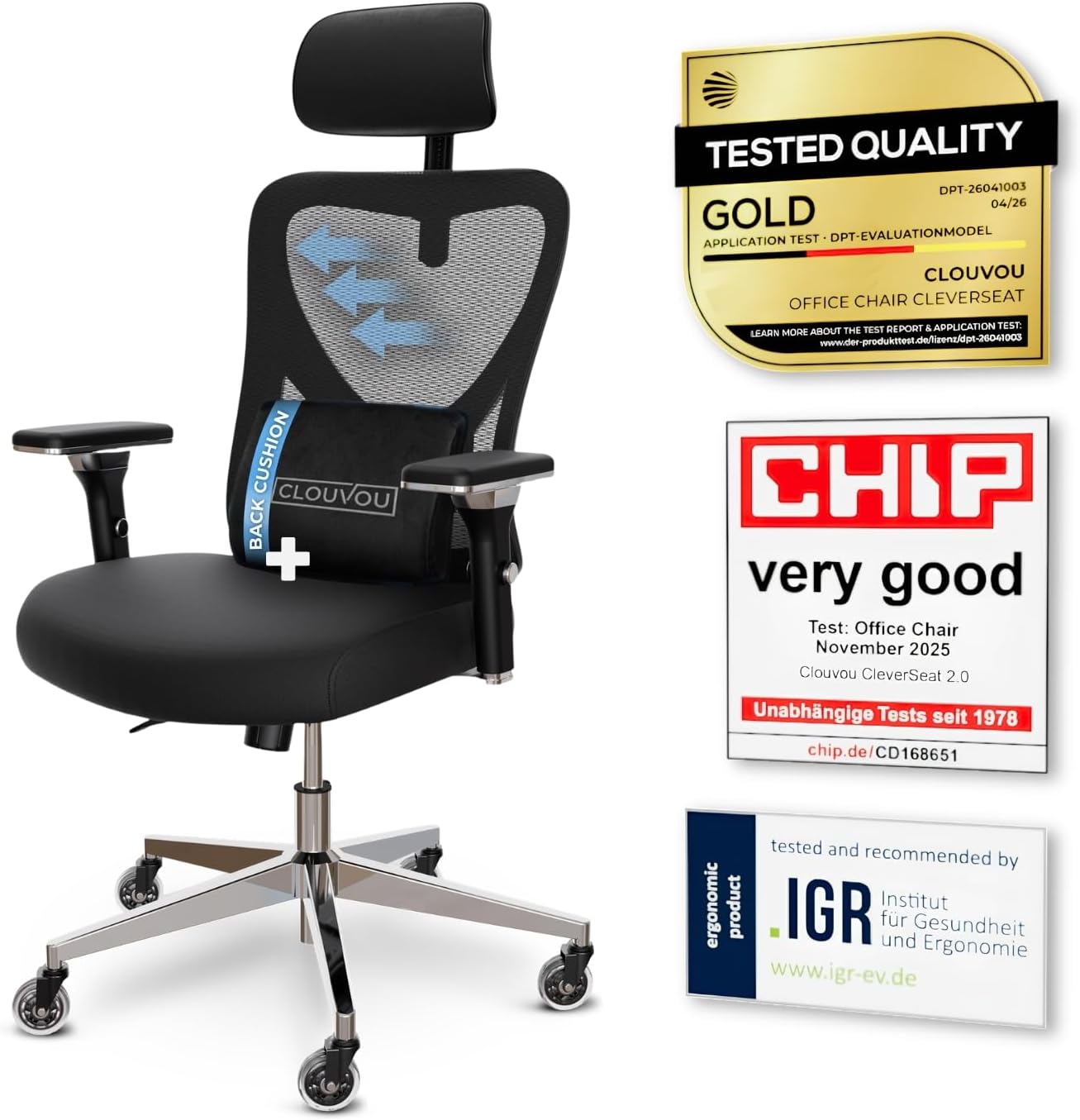
- Weight capacity supports users up to 330 lbs, well above the roughly 250 lb ceiling common on entry mesh task chairs
- 4D armrests adjust up, down, forward-back and pivot, so elbow height lines up with almost any desk
- 3-position backrest tilt locks the recline angle instead of leaving it free-floating
- Blade-shaped casters are engineered to roll quietly across hard flooring
Cons
- Frame combines chromium-plated and plastic components rather than a full steel shell, so it may flex more than an all-metal frame under aggressive rocking
- Backrest tilt is limited to 3 fixed positions rather than a continuous recline lock
- No separate seat-depth figure is listed beyond the 21-inch footprint, so users near the 6.5 ft sizing ceiling may find the seat pan short
The chair measures 21"D x 21"W x 39"H in its assembled footprint, a compact base built for desks in home offices and shared workspaces. Backrest support is rated for users up to 6.5 ft tall, wider than the sizing window most mesh task chairs advertise.
- Frame combines chromium-plated steel components with plastic housings for the armrests and base shroud
- 3-position backrest tilt locks the recline angle rather than floating freely
- 4D armrests adjust height, width, depth and pivot angle independently
Because the footprint stays close to 21 inches square, the chair fits under standard desks without needing extra clearance, while the taller backrest window suits users who outgrow shorter task chairs.
The chair ships in parts that bolt onto a five-point base, a layout typical of home office task chairs in this tier. Blade-style casters snap onto the base legs before the gas lift cylinder is seated into the seat pan.
- Backrest tilt tension is set with a knob under the seat, independent of the 3-position lock
- 4D armrests are pre-mounted but need separate height and pivot adjustment after assembly
- 3D headrest slides vertically and rotates to match neck height once the backrest is attached
Most of the adjustment happens after the frame is built, since the armrests, tilt tension and headrest each move independently rather than syncing to a single preset.
The 6.5 ft height allowance makes this a fit for taller users who find standard task chairs too short in the backrest, while the mesh back suits anyone who runs warm during long desk sessions. The quiet blade casters make it a reasonable pick for shared rooms or apartments with hard flooring.
- Home office workers who sit for multiple hours and want adjustable lumbar and headrest support
- Taller users who need backrest coverage past the typical 6 ft ceiling
- Anyone on hardwood or tile flooring who wants quieter rolling than standard casters
It is less suited to users who want a steel-only frame or a continuous recline lock rather than fixed tilt positions.

Pros
- Feature A
- Feature B
- Feature C
- Feature D
Cons
- Limitation 1
- Limitation 2
This product delivers comprehensive performance and reliable functionality across multiple usage scenarios. The engineering integrates sophisticated technology with practical design considerations for long-term satisfaction. Advanced features ensure compatibility with modern systems while maintaining backward compatibility with existing infrastructure for seamless integration.
- Primary specification providing detailed measurements and technical parameters for accuracy and reliability.
- Secondary capability describing performance characteristics with operating conditions and environment requirements.
- Compatibility aspect addressing integration with related systems, devices, and common platforms.
- Technical detail covering engineering specifications, quality standards, and industry certifications.
- Performance metric ensuring optimal results and consistent reliability across typical usage scenarios.
This implementation demonstrates thoughtful engineering that addresses common user needs while maintaining simplicity for daily operation and maintenance.
This product delivers comprehensive performance and reliable functionality across multiple usage scenarios. The engineering integrates sophisticated technology with practical design considerations for long-term satisfaction. Advanced features ensure compatibility with modern systems while maintaining backward compatibility with existing infrastructure for seamless integration.
- Primary specification providing detailed measurements and technical parameters for accuracy and reliability.
- Secondary capability describing performance characteristics with operating conditions and environment requirements.
- Compatibility aspect addressing integration with related systems, devices, and common platforms.
- Technical detail covering engineering specifications, quality standards, and industry certifications.
- Performance metric ensuring optimal results and consistent reliability across typical usage scenarios.
This implementation demonstrates thoughtful engineering that addresses common user needs while maintaining simplicity for daily operation and maintenance.
This product delivers comprehensive performance and reliable functionality across multiple usage scenarios. The engineering integrates sophisticated technology with practical design considerations for long-term satisfaction. Advanced features ensure compatibility with modern systems while maintaining backward compatibility with existing infrastructure for seamless integration.
- Primary specification providing detailed measurements and technical parameters for accuracy and reliability.
- Secondary capability describing performance characteristics with operating conditions and environment requirements.
- Compatibility aspect addressing integration with related systems, devices, and common platforms.
- Technical detail covering engineering specifications, quality standards, and industry certifications.
- Performance metric ensuring optimal results and consistent reliability across typical usage scenarios.
This implementation demonstrates thoughtful engineering that addresses common user needs while maintaining simplicity for daily operation and maintenance.

Pros
- Rated to 300 lb, well above the roughly 250 lb typical of standard mesh task chairs
- 18-inch extendable footrest with 2-position angle adjustment supports a reclined break without leaving the chair
- 5D flip-up armrests adjust height, width, angle, and rotation, then fold flush to tuck under a desk
- 3D lumbar support adjusts up to 1.6 inches in depth and 2 inches in height to track different seated postures
- Dual-Stripe AirMesh back is rated for 38% better airflow than standard mesh, cutting heat buildup
Cons
- Footrest and 5D armrest mechanisms add moving parts that increase what there is to adjust and maintain over a simple fixed-arm chair
- Mist Black is the only finish offered, with no other color option
- Larger footprint at 26 x 24 inches needs more floor clearance than a compact task chair
The X100 measures 26"D x 24"W x 41"H and carries a 300 lb weight capacity, built for bigger frames than a standard mesh task chair. The 3D lumbar system adjusts depth by up to 1.6" and height by up to 2", with 15 degrees of rotation to track the spine's natural curve rather than pressing at one fixed point.
- Footprint: 26"D x 24"W x 41"H
- Weight capacity: 300 lb
- Lumbar adjustment: up to 1.6" depth, 2" height, 15-degree rotation
An 18" extendable footrest with 2-position angle adjustment pulls out from under the seat, adding leg support once the backrest is reclined for a break.
Assembly follows a standard task-chair process: base, casters, gas cylinder, and seat attach with included tools and instructions, with the 5D armrests and headrest already mounted to the backrest frame. Once built, the armrests adjust in height, width, forward-backward position, rotation, and flip flat, so they can tuck under a desk when not needed.
- Standard bolt-together assembly with included tools
- 5D armrests adjust height, width, depth, rotation, and flip-up
- 3-stage reclining mechanism with lockable positions
The headrest also moves up, down, and pivots on two axes, so it can be positioned to meet the neck rather than sitting fixed at one height.
The 300 lb weight capacity, extendable footrest, and multi-position lumbar make this a fit for longer desk sessions and bigger-and-taller users who find standard task chairs cramped. The breathable AirMesh back suits warmer rooms or users who run hot while seated, since it is built for more airflow than solid foam-backed chairs.
- Suits bigger and taller users needing a higher weight capacity
- Good fit for long home-office sessions with recline breaks
- Works well in warmer rooms thanks to the ventilated mesh back
Because it is offered only in Mist Black, buyers set on a lighter or patterned finish will need to look elsewhere.

Pros
- Certified to BIFMA 5.1, the commercial furniture test standard, with a stated capacity of 300 lb
- Synchro-tilt locks in 3 positions with a tension dial you set to your own body weight
- 3D armrests move for height, width and angle, so elbows sit level with a 29 in desk
- Lumbar pad slides vertically to meet the curve of your own lower back
- Mesh across the seat as well as the back, keeping airflow under the thighs in a warm room
Cons
- Offered in black only, with no other finish listed
- The mesh seat pan feels firmer at the front edge than a foam cushion over a long session
- 28.5 in across the arms, so it will not slide between closely spaced desk pedestals
The chair measures 26.4 in deep by 28.5 in wide with an overall height of 45.3 in, and it is certified to BIFMA 5.1, the commercial furniture test standard rather than a self-declared figure. Stated capacity is 300 lb.
- BIFMA 5.1 covers drop tests, backrest strength and stability, so the certification is meaningful for daily eight-hour use
- 28.5 in across the arms means it will not slide between two closely spaced desk pedestals
- 45.3 in of height gives a back tall enough to support the shoulder blades rather than stopping at the mid-spine
Check under-desk clearance before ordering. A 45 in back will not tuck under a low desk return, which matters in small rooms where the chair gets pushed away at night.
Assembly follows the standard task-chair sequence: casters into the base, gas lift, seat onto the mechanism, then the back. Once built, the adjustment range is wider than most mesh chairs of this size.
- Synchro-tilt with 3 lockable positions plus a tension dial set to your own body weight
- Lumbar support slides up and down the backrest so the curve meets your lower back rather than a fixed average
- 3D armrests adjust for height, width and angle, which is what lets elbows sit level with a 29 in desk top
Set the tension first, then lock the tilt upright for typing. Most people leave the tension too loose, which makes the back feel like it is nudging them forward all day.
The design targets people who type for long stretches. The bionic-curve back and the wider shoulder structure are aimed at desk work rather than casual use.
- Mesh on both the seat and the back keeps air moving, which suits warm rooms and anyone who overheats in a foam-and-leather chair
- The 300 lb limit and 28.5 in width cover most adult frames, though the mesh seat pan feels firmer at the front edge than a padded cushion
- 3D armrests suit shared desks, since two people of different heights can set their own position in seconds
Less suitable if you want a plush recliner for evening gaming, because the tilt locks in three positions rather than dropping into a deep lounge angle, and the finish is offered in black only.

Pros
- Rated to 300 lbs and tested by SGS and BIFMA, standards used to verify chair durability and safety
- 135-degree recline with 3 locking positions (90/110/135) lets the chair shift from work posture to a lounge angle
- Retractable steel footrest extends up to 18.1 in, supporting the legs during reclined breaks
- 2-way adjustable lumbar support (3 in vertical, 1.6 in horizontal) moves to match individual lower-back position
- 3-way adjustable 3D armrests move up/down, front/back, and in/out to reduce shoulder and wrist strain
Cons
- Recommended for users between 5'3" and 6' tall, so notably shorter or taller users may find the fit less precise
- Large steel base and reclining footrest mechanism add bulk versus a simple upright task chair, taking up more floor space when reclined
- 300 lb capacity and stated sizing are specific to this configuration, so heavier users should check the weight limit before ordering
The chair is sized at 20.6 x 19.1 x 42.7-48.8 in (WDH), recommended for users between 5'3" and 6' tall, with a 300 lb weight capacity backed by SGS and BIFMA testing.
- Overall footprint measures 19.3 in deep and 25.2 in wide
- Large steel base adds stability under the rated weight capacity
- Height range of 42.7 to 48.8 in accommodates different desk heights
Because sizing is tuned to the 5'3" to 6' range, users outside that height range should check the seat depth and armrest reach before buying to confirm a comfortable fit.
The 135-degree reclining backrest locks into 3 positions (90, 110, 135 degrees), letting the chair shift from an upright work posture to a lounging angle without leaving the seat.
- Retractable steel footrest extends up to 18.1 in for reclined leg support
- 2-way adjustable lumbar support moves 3 in vertically and 1.6 in horizontally
- 3D armrests adjust up/down, front/back, and in/out independently
Because the footrest and recline mechanism add moving parts versus a fixed-back task chair, assembly involves more steps and hardware than a basic upright office chair.
The combination of a reclining backrest, retractable footrest, and adjustable lumbar support is built for users who alternate between focused desk work and short breaks at the same seat.
- 300 lb capacity and steel frame suit long, daily desk use
- Reclining function suits both work breaks and casual gaming sessions
- Mesh upholstery adds breathability during extended sitting
Users who exclusively need an upright task chair without recline or footrest features may find the added mechanisms unnecessary bulk compared with a simpler chair design.

Pros
- Flexible lumbar support adjusts 2.16 inches vertically and 1.18 inches horizontally, matching unique spinal curves; rare feature rarely found under
- 3D armrests adjust forward/backward 1.96 inches and rotate 15° side-to-side, permitting perfect arm support for typing, reading, and relaxation
- Backrest reclines 90-120°, covering full range from upright desk work to near-horizontal napping positions
- Breathable mesh backrest promotes airflow, preventing heat buildup and moisture accumulation during 8-hour workdays
Cons
- Wide seat (16.93 inches) occupies more desk space than compact task chairs; unsuitable for cramped home offices under 80 square feet
- Mesh backrest offers zero lumbar support until you manually adjust the lumbar pillow—no passive support for casual posture
- 300-pound weight limit excludes plus-size users above 240 lbs; limited availability of high-capacity gaming chairs under
The HUANUO chair's flexible lumbar support system stands apart from competitors; two independent adjustment mechanisms—vertical movement of 2.16 inches and horizontal slide of 1.18 inches—enable customised support matching your unique spinal curve. Most ergonomic chairs offer fixed lumbar support or two-position adjustment; this variable system permits infinite positioning, crucial for users with non-standard spinal curves (excessive lordosis or kyphosis).
- Lumbar support adjusts up/down to target pain regions (upper, middle, lower back) independently from horizontal depth.
- 2D adjustable headrest controls neck support via forward/backward angle and height adjustment, rare among chairs under .
- Recline tension adjustment permits tuning resistance; from stiff (preventing backward tilt) to loose (easy recline for resting).
- Seat depth measuring 19.7 inches provides full thigh support; shorter users (5'4" or less) may find legs dangling slightly.
Physical therapists recommend variable lumbar support for patients with chronic back pain or spinal abnormalities.
Comprehensive adjustability across five dimensions—height, backrest angle, lumbar position (vertical/horizontal), armrest position (forward/back), and armrest rotation—enables customising this chair to your exact body proportions. The 3D armrests address a major complaint with cost-effective chairs: stationary armrests either positioned too high (elevating shoulders) or too low (forcing forward slouch). Forward/backward adjustment alone sets this chair apart.
- Height adjustment spans 17.72-21.65 inches via smooth gas lift; accommodates desk heights from 28 to 32 inches with feet flat on floor.
- 3D armrests enable independent adjustment of both arms; ideal for asymmetrical users (one arm shorter) or keyboard/mouse positioning at different heights.
- Flip-up armrests clear entirely, eliminating obstacles when sliding under desks for computer work requiring close desk proximity.
- 360° swivel and five-star base with locking casters provide mobility without rolling when you need stability.
Users report improved posture and reduced neck/shoulder pain within 3 days of using proper lumbar and armrest positioning.
High-quality mesh backrest balances breathability against support; airflow prevents sweat accumulation and moisture-related odours common in vinyl/PU leather chairs. The dense weave resists the sagging that plagues economical mesh designs, maintaining backrest shape even after 5+ years of daily use. High-density foam seat cushion (3.14 inches thick) provides initial softness without compressing to an uncomfortable flatness after 18 months.
- Mesh backing permits air circulation, reducing core body temperature by 1-2°F compared to sealed upholstery during warm office environments.
- Durable nylon mesh rated to 50,000 flex cycles; maintains consistent tension and appearance through decades of daily use.
- High-density seat foam (60 kg/m³) maintains loft indefinitely; resist compression set that produces the dreaded flat-bottom sensation.
- SGS certification confirms safety and build quality; testing includes tilt-back stability, armrest strength, and gas lift reliability.
Mesh backrest cannot be cleaned as easily as vinyl; periodic vacuuming with upholstery brush removes dust and pet hair.

Pros
- Lumbar pad travels up, down, forward and back and rotates, so it meets the curve of your spine rather than approximating it
- Meets BIFMA and EN1335 standards with a steel base tested to 1136 kg and a 35 mm steel tilt mechanism
- 3D armrests change height, slide forward and back and pivot inward for keyboard or controller posture
- Three-level tilt lock plus a 2D headrest that raises and rotates for reclined reading
- SGS-certified gas cylinder and steel-stem castors instead of plastic-stemmed wheels
Cons
- Stands 48.82 in tall at full headrest extension, so it will not tuck under a desk with a low overhead shelf
- Assembly takes 20 to 30 minutes and the back, seat, base and mechanism all arrive as separate pieces
- Mesh seat pan has no fabric or foam alternative, and this listing covers the white and silver finish only
The chair measures 25.98 in deep by 25.98 in wide, standing 48.82 in tall with the headrest at full extension. Construction meets BIFMA and EN1335, the two standards office furniture buyers actually check.
- Steel base tested to a 1136 kg load in the maker's structural test
- 35 mm steel tilt mechanism rather than a plastic housing
- SGS-certified gas cylinder
- Steel-stem castors, which resist splaying under load better than plastic stems
- High-density mesh across seat and back for airflow
That 48.82 in overall height is worth measuring against your room. A desk with a hutch, an overhead shelf or a low window sill behind it may not let the chair tuck fully away. The V-shaped back in white with silver accents is the finish shown here.
Adjustment is where this chair earns its keep, since almost every contact point moves independently.
- 3D lumbar support: travels up, down, forward and back, and rotates to meet the spine
- 3D armrests: change height, slide forward and back, and pivot inward or outward
- 2D headrest: raises and rotates for reclined reading or a phone call
- 3-level tilt lock: holds the back upright, part-reclined or free-floating
- Seat height on the gas lift as standard
Assembly takes 20 to 30 minutes with the tools supplied. The back, seat, base, castors and gas lift arrive separately, and the mechanism bolts to the underside of the seat pan first. Have a second pair of hands ready for mating the back to the seat, which is the one awkward step.
The adjustment range points this at people who sit for long stretches, and at households where one chair serves several bodies.
- Full working days: the 3D lumbar pad can be set precisely rather than roughly, which is the difference that shows after hour five
- Shared desks: arms, headrest and lumbar all reset quickly between users
- Warm rooms: a full mesh seat and back move air where a foam pad traps it
A mesh seat pan is a preference rather than a universal improvement. Some people find the edge pressure of taut mesh less forgiving than moulded foam over several hours, and there is no fabric or foam seat option in this model. A 5-year warranty covers the frame and mechanism.
Pros
- Supports up to 300 lbs, above the roughly 250 lb ceiling common on standard mesh task chairs
- Seat height, headrest, backrest and armrests all adjust independently to fit users from about 5'5" to 6'2"
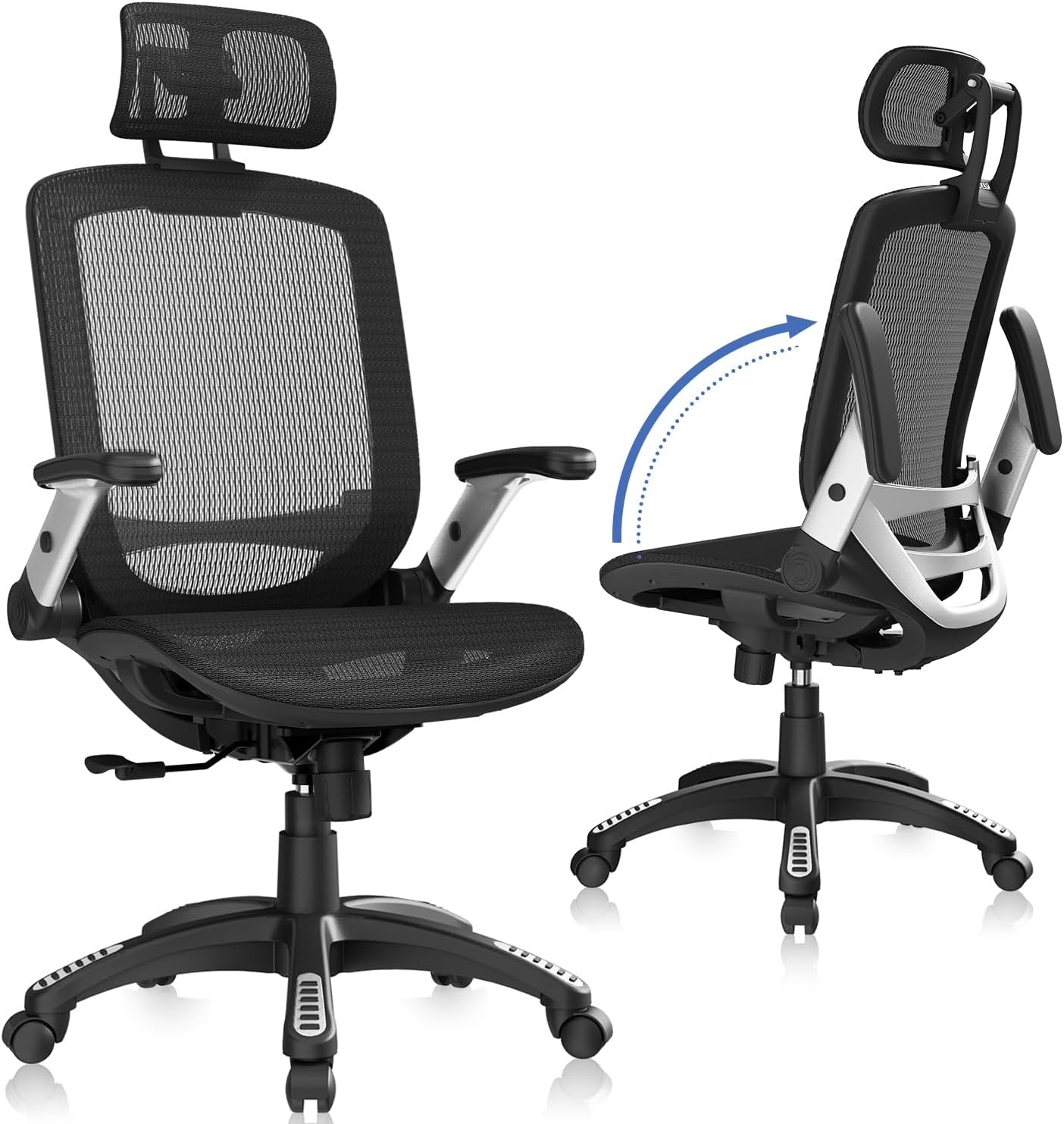
- Armrests flip up 45°, letting the chair tuck fully under a desk when not in use
- Tilt lock ranges 90-120°, so you can recline or sit upright and hold either position
- Backed by a 3-year warranty covering replacement parts like the gas lift
Cons
- Seat measures 20" wide, so users broader than that or taller than about 6'2" may find the cushion tight
- Mesh-only upholstery with no fabric or leather alternative offered
- Assembly means attaching the base, casters and backrest by hand using the included tools
The full chair measures roughly 25.6"W x 22"D, with height adjusting from about 45.3" to 54.9" including the headrest. The seat itself is 20"W x 19.3"D, with seat height adjustable from 18.5" to 22.05" to suit different desk heights.
- Weight capacity: 300 lbs
- Frame: alloy steel base and mechanism
- Upholstery: breathable mesh back and seat
- Recommended user height: approximately 5'5" to 6'2"
The mesh construction keeps air moving across the back during long sessions, which matters most in warmer rooms or during multi-hour work stretches.
Setup involves attaching the five-point base, casters, gas lift and backrest to the seat frame, using the hardware and instructions included in the box. Once built, the chair offers several independent adjustment points rather than a single fixed setting.
- Headrest: slides up and down to support different neck heights
- Armrests: flip up 45° to slide the chair fully under a desk
- Backrest: reclines through a 90-120° tilt lock range
- Seat height: adjusts via the gas lift for different desk heights
If any part such as a gas rod or screw is missing on arrival, the maker offers direct replacement parts rather than requiring a full return.
This chair is built for people roughly 5'5" to 6'2" tall who spend 4 to 8 hours at a desk and want adjustable head, back and arm support rather than a fixed-shape task chair. The breathable mesh suits home offices, studios or bedrooms that run warm during the day.
- Home office workers doing long stretches at a computer
- Users who want a headrest, which many basic task chairs skip
- Anyone who needs the chair to tuck fully under a desk when arms are flipped up
Users outside the stated height range, or those who prefer a fabric or leather seat rather than mesh, may want to look elsewhere.
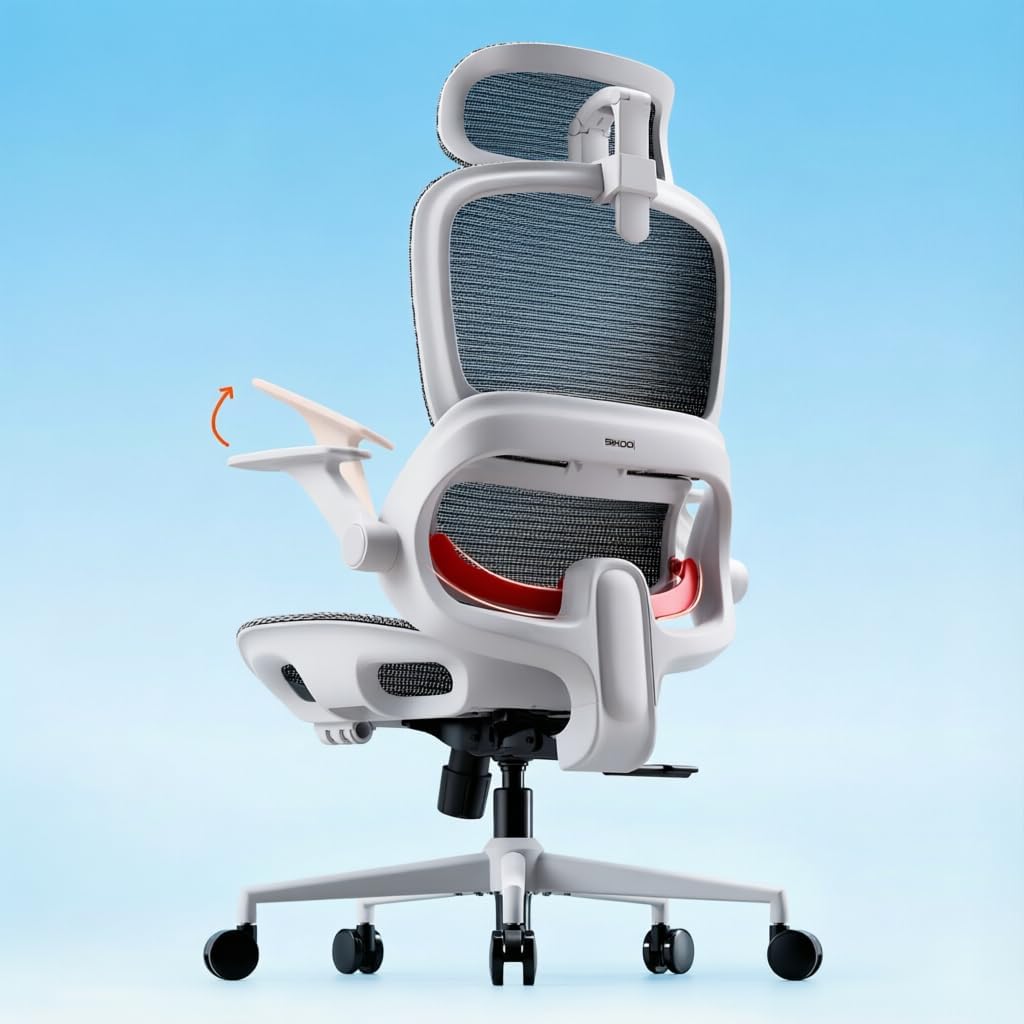
Pros
- Adaptive lumbar support follows the spine's curve as you shift between leaning forward and sitting upright
- Seat height adjusts from 18.3" to 21.9", covering a wide range of body heights and desk setups
- Three lockable recline angles at 110°, 125° and 135° let you switch from focused work to a reclined break
- Full-mesh backrest keeps air moving to reduce heat buildup during long afternoons
- Rated to support up to 300 pounds, above the 250-pound ceiling common on many mesh task chairs
Cons
- Ships without a footrest, so buyers wanting leg support during recline need to add one separately
- Flip-up armrests adjust vertically but are not detailed as depth or width adjustable
- Grey is the color shown, limiting choice for buyers wanting to match a specific office palette
This chair is built for long desk sessions with adjustment ranges aimed at fitting a variety of body types.
- Seat height adjusts from 18.3" to 21.9", accommodating different desk heights
- Overall footprint of 28.3" D x 27.6" W x 51.6" H
- Weight capacity rated to 300 pounds
- A widened seat cushion spreads weight more evenly across the hips and thighs during long sits
Because the seat height range is fairly wide, most desk heights should be accommodated, though very tall or very short users should double-check the range against their specific desk before ordering.
Getting the chair set up involves standard task chair assembly plus a few adjustment points once built.
- Flip-up armrests move out of the way when not needed, useful for sliding fully under a desk
- Backrest recline locks at 110°, 125° or 135° depending on whether you want upright focus or a relaxed break
- An adjustable headrest supports the neck during typing, calls, or leaning back to think
- The chair ships without a footrest, so that accessory is not included in the box
Because assembly instructions typically ship in the box with labeled hardware, most buyers should expect a single-person build using basic tools.
This chair targets people spending long, continuous hours at a desk who need adjustable lumbar support.
- Suits remote workers and gamers logging extended sessions where posture support matters
- Good fit for shared desks given the wide 18.3" to 21.9" height adjustment range
- Works for users up to the 300-pound weight capacity, above many mesh chairs in its class
- Less suited to buyers wanting a built-in footrest or multiple color options out of the box
Because the mesh backrest prioritizes airflow, it suits warmer climates or offices without strong air conditioning better than a padded, upholstered chair would.

Pros
- 4D lumbar support adjusts up, down, in and out for personalized lower-back positioning
- Supports up to 330 lbs on a reinforced aluminum base
- Height-adjustable armrests and multiple recline angles go beyond a simple recline-or-upright chair
- Breathable mesh backrest paired with a memory foam seat cushion for airflow and pressure relief
- Rollerblade-style wheels roll smoothly across hard flooring
Cons
- 8-step assembly is required out of the box, more involved than a pre-assembled chair
- Mesh backrest is fixed in tension, so it will not suit users who prefer a padded, cushioned backrest
- Sold only in grey and brown colourways in the current listing
The chair measures 26"D x 23"W x 40"H and is built around a reinforced aluminum base rated to 330 lbs.
- 330 lb weight capacity
- Reinforced aluminum base with rollerblade-style casters
- 4D lumbar support: up, down, in and out adjustment
- Height-adjustable armrests
The frame combines a mesh backrest with a stainless steel structure, aimed at keeping the chair rigid under sustained daily use rather than flexing over time. Multiple recline angles and adjustable tilt tension round out the sizing options, letting the chair fit a wider range of body types and desk heights than a fixed-recline model.
Assembly follows an 8-step process with printed instructions included in the box, covering the base, gas lift, seat and backrest sections.
- 8-step assembly with included instructions
- Gas lift cylinder for seat height adjustment
- Casters snap into the 5-point base
- Tilt tension is adjustable once assembled
Basic hand tools are typically enough to complete assembly, though a second person can make aligning the backrest to the seat frame easier. Once assembled, the lumbar module and armrest height can still be fine-tuned without taking the chair apart, so initial setup does not need to be perfect on the first attempt.
The chair targets home office and desk-bound work where extended sitting time makes lumbar adjustment and breathable mesh more relevant than in occasional-use seating.
- Remote and hybrid workers spending long hours at a desk
- Users who want multiple recline angles rather than a single lock position
- Warmer climates or rooms where mesh airflow matters
- Anyone needing 4D lumbar adjustment for a specific seated posture
A 5-year warranty is included, which is a longer coverage window than many chairs in the same mesh-and-mechanism category offer.
Why Your Desk Chair Matters for Back and Neck Pain
Back and neck pain from sitting is rarely caused by one dramatic moment. It builds up from small, repeated stresses: a slumped posture that rounds the lower spine, a monitor placed too low that pushes the head forward, and armrests that leave your shoulders hunched for hours. Over a full workday, these tiny misalignments add up to real discomfort.
A well-designed ergonomic chair works by keeping your spine in its natural S-curve. It supports the inward curve of your lower back, encourages your shoulders to relax, and lets your neck stay balanced over your torso rather than jutting forward. When the chair does this work for you, your muscles do not have to strain to hold you upright, and that is where relief begins.
Key Features to Look For in the Best Desk Chairs for Back and Neck Pain
Not every chair labeled “ergonomic” actually earns the name. When you compare options, focus on the features below. Each one targets a specific source of pain, and together they define what separates a supportive chair from a merely comfortable one.
Adjustable Lumbar Support
Lumbar support is the single most important feature for lower back relief. The best chairs let you move the support up, down, and sometimes in and out, so it presses gently into the small of your back. Models with 3D adjustable lumbar systems, like the HOLLUDLE Mesh Office Chair and the ELABEST X100 Chair, let you fine-tune the exact height and depth so the curve matches your spine rather than forcing your spine to match the chair.
A Supportive Headrest
Neck pain is often a head-position problem. A headrest that adjusts for height and angle gives your neck something to lean into during calls, reading, or short breaks, which relieves the constant low-level tension of holding your head up. Chairs such as the CleverSeat Ergonomic Office Chair with its 3D headrest and the Ergonomic Office Chair with 3D Headrest are built around this idea, and the wide, adaptive headrest on the SIHOO B100 Office Chair is designed for long hours specifically.
Breathable Mesh or Cushioned Seating
Material affects both comfort and posture. A breathable mesh back keeps you cool and flexes with your movements, while a thick, well-shaped seat cushion prevents pressure points under your thighs and hips. The Duramont Ergonomic Office Chair pairs a breathable mesh back with a thick seat cushion, and the ELABEST Ergonomic Mesh Chair offers a wide seat that suits longer sitting sessions.
Adjustable Armrests
Armrests are easy to overlook, but they carry the weight of your arms and shoulders. When they are at the wrong height, your shoulders creep up and your neck tightens. Look for armrests that adjust, flip up, or move in multiple directions. The HUANUO Ergonomic Office Chair features 3D armrests, while flip-up designs on the GABRYLLY High Back Mesh Chair let you tuck the chair under your desk and free up space when you need it.
Recline and Tilt Function
Sitting perfectly upright all day is not the goal – movement is. A chair that reclines and locks at different angles lets you shift your weight, open the angle between your torso and thighs, and take pressure off your lower spine. The GABRYLLY Reclining Office Chair reclines up to 135 degrees with a footrest, making it easy to lean back and decompress between tasks.
How to Choose the Right Chair for Your Body
Once you understand the core features, the next step is matching a chair to your specific situation. The best desk chairs for back and neck pain are the ones that fit you, not just the ones with the longest feature list. Work through the questions below before you buy.
Consider Your Height and Weight
Fit is everything. A chair that is too small forces you into a cramped posture, while one that is too large leaves you without proper contact points. Check the seat height range, seat width, and weight capacity for every model. Big-and-tall options like the ELABEST X100 Chair are built for larger frames, while the CleverSeat Ergonomic Office Chair supports up to 330 pounds. If two people share a chair, prioritize the widest possible adjustment range.
Match the Chair to Your Work Style
How you work shapes what you need. If you take a lot of video calls or read on screen, a strong headrest and recline function matter most. If you type for long stretches, prioritize lumbar support and armrest adjustability. Someone who moves between tasks all day benefits from a footrest and a deep recline, such as the one found on the GABRYLLY Reclining Office Chair, while a focused desk worker may prefer the streamlined support of the Ergonomic Office Chair with 3D Headrest.
Think About Build Quality and Durability
A chair only protects your back if it holds up over time. Look for sturdy steel bases, quality wheels, and certifications that signal tested durability. Commercial-grade builds, like the BIFMA-certified ELABEST Ergonomic Mesh Chair, and heavy-duty options with large steel bases tend to keep their support and stability far longer than budget frames that sag within months.
Set a Realistic Budget
You do not have to spend a fortune to get real support, but extremely cheap chairs often cut the exact features that relieve pain. There is a healthy middle ground. Value-focused models such as the HUANUO Ergonomic Office Chair deliver adjustable lumbar support and a headrest at an accessible price, while higher-tier picks like the ELABEST X100 Chair add more adjustment range for those who sit all day. Decide how many hours you will sit, then invest accordingly.
Setting Up Your Chair to Reduce Pain
Even the best desk chairs for back and neck pain will not help if they are set up wrong. Once your chair arrives, take ten minutes to dial it in. Small adjustments make an enormous difference over the course of a week.
- Set the seat height so your feet rest flat on the floor and your knees sit at roughly a 90-degree angle, level with or slightly below your hips.
- Position the lumbar support so it fills the natural inward curve of your lower back without pushing you forward or leaving a gap.
- Adjust the armrests so your shoulders stay relaxed and your elbows bend at about 90 degrees while typing.
- Raise the headrest to cradle the base of your skull, not the middle of your neck, so your head stays balanced over your spine.
- Use the recline to shift positions throughout the day rather than locking yourself into one rigid posture.
Pair these settings with a monitor placed at eye level and you remove two of the biggest causes of neck strain at once. If your chair has a footrest, use it during recline to keep the pressure off your lower back.
Habits That Support a Pain-Free Workday
A great chair is a foundation, not a cure-all. The people who see the biggest improvement combine a supportive seat with a few simple habits. Stand up and move for a minute or two every half hour, since even the best posture becomes stressful when held too long. Roll your shoulders and gently stretch your neck between tasks. Keep your most-used items within easy reach so you are not twisting or leaning repeatedly.
Think of your chair as a partner that makes good posture easier, while your movement habits keep your muscles loose and your circulation strong. Together they do far more than either can alone.
Final Thoughts on Finding Your Best Desk Chair
Finding the best desk chairs for back and neck pain comes down to a simple principle: choose support that fits your body and your work, then set it up properly. Prioritize adjustable lumbar support and a helpful headrest, make sure the seat and weight capacity fit you, and pick a build sturdy enough to last. Whether you lean toward a value pick like the GABRYLLY High Back Mesh Chair, an all-day option like the SIHOO B100 Office Chair, or a cushioned classic like the Duramont Ergonomic Office Chair, the right choice is the one that keeps your spine aligned and your neck relaxed hour after hour.
Use the list above as your starting point, weigh the features against your own needs, and you will be well on your way to a workday that ends with far less pain than it used to.