
 Daniel Okafor
 Finding the best computer monitors for gaming can feel overwhelming when every display promises higher refresh rates, richer colors, and smoother motion. Whether you are building your first gaming rig or upgrading an aging screen, the right monitor transforms how games look and feel – sharper visuals, faster response, and less eye strain during those long sessions. This guide breaks down what actually matters so you can match a display to your setup, your games, and your budget without getting lost in the spec sheet.
Instead of ranking products one by one, we will walk through the features that separate a good gaming monitor from a mediocre one, then point to real examples across different price points so you can see how those specs play out in practice.

Pros
- 27" IPS panel covers 99% sRGB for accurate color across a 1920x1080 Full HD resolution
- Refresh rate up to 120Hz plus a 1ms VRB response time keep fast motion clear in games and video
- Adaptive-Sync (FreeSync compatible) matches the display's refresh rate to a compatible graphics card to reduce screen tearing
- Tilt adjustment on the stand lets you fine-tune viewing angle without a separate mount
- Dual HDMI and VGA inputs allow both a modern GPU and an older PC to connect
Cons
- No USB-C or DisplayPort listed, only HDMI and VGA, which limits single-cable laptop hookups
- 250-nit brightness is modest next to HDR-capable monitors meant for bright rooms or HDR content
- Stand offers tilt only, with no height, swivel, or pivot adjustment mentioned
The panel is a 27-inch IPS display at 1920 x 1080 resolution, covering 99% sRGB for color accuracy. It supports refresh rates up to 120Hz with a 1ms VRB response time, and brightness is set at 250 nits with a 0.311mm pixel pitch.
- 27-inch IPS panel, Full HD 1920 x 1080 resolution
- Up to 120Hz refresh rate for smoother motion
- 1ms VRB response time reduces motion blur and ghosting
- 99% sRGB color coverage and 250-nit brightness
The IPS panel type also maintains consistent color and contrast from wider viewing angles than a typical TN panel at this size.
Connectivity runs through HDMI and VGA ports, covering both current GPUs and older desktops or laptops without a digital output. Adaptive-Sync (FreeSync compatible) support means the monitor can sync its refresh rate to a compatible AMD graphics card for smoother, tear-free motion.
- HDMI input for modern PCs, consoles, and laptops
- VGA input for legacy desktop and laptop connections
- Adaptive-Sync (FreeSync compatible) for tear-free gaming and video
- No USB-C or DisplayPort input included on this model
Because there is no USB-C port, laptops that rely on single-cable video and power delivery will need a separate power connection alongside the HDMI cable.
The combination of a 120Hz refresh rate, 1ms response time, and Adaptive-Sync support makes this monitor a fit for everyday gaming and fast-motion video without stepping up to a premium 1440p or 4K display.
- Gamers upgrading from a 60Hz monitor who want smoother motion at Full HD
- Home office users who also want a monitor capable of fast-paced gaming after hours
- Anyone connecting an older PC via VGA alongside a newer HDMI source
- Not aimed at colour-critical creative work needing 4K resolution or wide-gamut coverage
Upgrading later to a higher-resolution panel would mean stepping past this monitor's 1920 x 1080 ceiling, since it is not built for 1440p or 4K signal input.

Pros
- 27 inch VA panel with a 1500R curve at 1920 x 1080, giving stronger native contrast than IPS
- Two HDMI inputs plus VGA, so a desktop and a console can both stay connected permanently
- 99% sRGB coverage with 178 degree horizontal and vertical viewing angles
- Built-in 2 x 2W speakers and a headphone jack, so no separate desktop pair is required
- Adaptive Sync smooths tearing when frame output drops below the panel refresh
Cons
- The listing quotes both 100Hz and 75Hz in different places, so confirm the mode your input negotiates
- 1080p across 27 inches works out near 82 pixels per inch, so text looks coarser than on a 1440p panel of the same size
- Stand tilts only, with no height, swivel or pivot adjustment, and 250 cd/m2 brightness limits use in bright rooms
A 27 inch VA panel at 1920 x 1080 with a 1500R curve. VA is the sensible choice for a curved display of this size because its native contrast is stronger than IPS, giving deeper blacks in dark game scenes, at the cost of slower pixel transitions in the very darkest tones.
Colour coverage is quoted at 99% sRGB, which is what matters for web work, video and games, though it is not a wide-gamut panel for print or DCI-P3 workflows. Viewing angles are 178 degrees both horizontally and vertically, and brightness is 250 cd/m2, comfortable in a normally lit room but a struggle against direct sunlight coming over your shoulder.
Response time is quoted at 8ms grey to grey.
Inputs are two HDMI plus one VGA, with a headphone jack alongside them. Two HDMI ports is the practical detail here: a desktop and a console can both stay plugged in permanently, with no switch box and no crawling behind the panel every time you change source.
Two 2W speakers are built in. They handle system sounds, video calls and background video, and they save the desk space a separate pair would take, but nobody should expect bass from a 2W driver mounted in a thin panel.
Adaptive Sync matches the panel refresh to graphics card output, which removes tearing when frame rates fluctuate. It engages over HDMI once enabled in the graphics driver, and the VGA input is there for older office machines and legacy KVM setups rather than anything modern.
With the stand attached the monitor measures roughly 24.27 x 9.01 x 17.69 inches, dropping to 24.27 x 2.56 x 14.43 inches without it. That 9 inch stand depth is the number to check against a shallow desk, particularly if a keyboard has to live in front of it.
The included stand tilts and does nothing else. There is no height adjustment, no swivel and no pivot, so screen height is set by the desk and by whatever you are prepared to put under the base. Anyone who needs the top of the panel at eye level should plan a riser from the start rather than discovering the gap later.
The finish is a brushed metal pattern with a thin bezel, and the whole assembly is light enough for one person to position without help.

Pros
- 1800R curvature wraps the screen closer to natural field of vision than flatter monitors, widening perceived depth
- Refresh rate reaches 100Hz once enabled in settings, up from a default 60Hz, reducing motion blur in fast-paced content
- TÜV-certified eye comfort technology reduces blue light emission and screen flicker for long work sessions
- Game Mode adjusts color and contrast automatically and fills the screen for wider-format game content
- Dual connectivity via HDMI and D-sub ports supports both modern and legacy source devices
Cons
- Default refresh rate ships at 60Hz — reaching the 100Hz maximum requires manually changing the setting in the monitor menu
- Panel resolution is capped at FHD (1920x1080), below the QHD or 4K options available on other 27-inch monitors
- VA panel type typically trades some viewing-angle color accuracy for higher contrast compared to IPS panels
The 27-inch VA panel uses a 1800R curvature that wraps more closely around the field of vision than a flat monitor of the same size.
- Native resolution is Full HD at 1920 x 1080
- Refresh rate reaches up to 100Hz, reducing lag and motion blur during fast-paced gaming or video playback
- The monitor ships with refresh rate set to 60Hz by default and must be changed to 100Hz in the on-screen settings
- Panel dimensions measure 9.2 in D x 24.5 in W x 18.4 in H
The curved format and 100Hz ceiling suit everyday gaming and media use rather than competitive esports setups that call for 144Hz or higher panels.
Two features are aimed at extended screen sessions: TÜV-certified eye comfort technology and a dedicated Game Mode.
- Eye comfort technology reduces blue light output and minimizes screen flicker during long work or reading sessions
- Game Mode adjusts color and contrast settings to make details easier to spot in darker scenes
- Game Mode also fills the screen with game content for a wider in-game view
- Both features are toggled through the monitor's on-screen menu rather than external software
These are display-level enhancements rather than hardware upgrades — they adjust how the existing panel renders content rather than adding new panel capability.
The monitor connects to source devices through two port types: HDMI and D-sub (VGA).
- HDMI supports most current laptops, desktops, and consoles
- D-sub allows connection to older PCs or docking stations that lack HDMI output
- No USB-C or DisplayPort connection is included on this model
- Cable management is limited to routing both cords out the rear of the stand, since no built-in cable channel is listed
This port selection favors compatibility with a mix of newer and older source devices over the single-cable convenience that USB-C or DisplayPort would offer on higher-tier monitors, which matters most for offices still running legacy desktop towers.

Pros
- 180Hz refresh rate outpaces the 60-144Hz range of standard office monitors for smoother fast motion
- 1ms response time (MPRT) in Extreme mode keeps fast on-screen motion from blurring
- AMD FreeSync syncs refresh rate to the graphics card to cut down on screen tearing
- 3-sided borderless design keeps bezels narrow for a cleaner dual-monitor setup
Cons
- 1ms MPRT response applies specifically in Extreme mode, so results vary with content and monitor settings outside that mode
- Black Equalizer and Virtual Aim Point overlays only help within supported games, not universally across all titles
- No height-adjustable stand is listed beyond tilt, so desk height becomes the main way to set eye-level positioning
The monitor runs at a 180Hz refresh rate with 1ms response time (MPRT) in Extreme mode, aimed at fast-paced competitive gaming where motion clarity matters more than peak resolution. AMD Radeon FreeSync keeps the display's refresh rate synced to a compatible graphics card to reduce tearing.
- 180Hz refresh rate smooths fast on-screen motion well past standard 60Hz monitors
- 1ms MPRT response time reduces blur behind fast-moving objects
- AMD FreeSync support minimizes tearing during frame rate fluctuations
Response time figures like 1ms are measured under specific test conditions and Extreme mode settings, so real-world results shift depending on the game and content being displayed.
Black Equalizer brightens dark areas of a scene so enemies hiding in shadow become easier to spot, while Virtual Aim Point overlays a fixed crosshair on the screen for games without one built in. Eye Saver Mode reduces blue light and flicker for longer sessions.
- Black Equalizer adjusts shadow detail independently of overall brightness
- Virtual Aim Point adds an on-screen crosshair reference for precision aiming
- Eye Saver Mode cuts blue light output and reduces screen flicker
These are software-driven display features rather than hardware changes, so their effect depends on how a specific game renders its shadows and UI on top of them.
The 3-sided borderless design minimizes bezel width on the top and both sides, making side-by-side placement with a second monitor look closer to seamless. The included stand tilts for comfort, and the monitor measures 9.2"D x 21.4"W x 19.3"H in its stand configuration.
- 3-sided borderless bezels reduce the visible gap in dual-monitor setups
- Ergonomic stand allows tilt adjustment for a comfortable viewing angle
- Compact footprint fits most standard desk depths without crowding
Height adjustment is not listed as a stand feature beyond tilt, so getting the screen to eye level may depend more on desk or monitor riser height than the stand itself.

Pros
- Quality Visuals: The KG271U 27" IPS monitor with 2560 x 1440 QHD
- AMD FreeSync Technology: Say “goodbye” to stuttering and tearing.
- Up to 180Hz: The 180Hz refresh rate speeds up the frames per second
- Responsive!!: Up to 0.5ms GTG (Gray to Gray) response time enhanced
- Dimensions of 8.28"D x 24.2"W x 18.14"H engineered for optimal spatial fitting
Cons
- Requires verifying placement clearance for 8.28"D x 24.2"W x 18.14"H prior to installation
- Periodic visual inspection recommended to ensure component tightness
Built for everyday utility, the acer Nitro 27 Inch QHD 2560 x 1440 IPS Gaming Monitor AMD provides reliable functionality in active Monitors settings. Daily usage reveals robust utility supported by Quality Visuals: The KG271U 27" IPS monitor with 2560 x 1440 QHD resolution in a 16:9 aspect ratio presents stunning, high-quality images with excellent detail. The zero-frame design does away with the thick frames found on conventional monitors freeing up precious screen space.. Complementing its primary framework, the design also incorporates AMD FreeSync Technology: Say “goodbye” to stuttering and tearing. With AMD FreeSync, the monitor’s frames are synced with the graphics card’s frames, which eliminates screen tearing and provide the smoothest gaming experience. to optimize routine handling. Measurements of 8.28"D x 24.2"W x 18.14"H provide clear dimensional boundaries for precise space planning.
Focusing on material selection, this hardware is constructed to resist ongoing physical fatigue. Reinforced internal elements like Up to 180Hz: The 180Hz refresh rate speeds up the frames per second to deliver an ultra-smooth 2D motion scene. With a rapid refresh rate of up to 180Hz, Acer Gaming Monitors shorten the time it takes for frame rendering, lower input lag and provide gamers an excellent in-game experience. maintain steady operational balance under continuous use. Solid structural engineering allows the unit to maintain physical stability under load. This balanced configuration fits smoothly into existing interior designs while maximizing efficiency.
Maintaining optimal hardware conditions involves simple periodic inspection and spatial planning. Featuring Responsive!!: Up to 0.5ms GTG (Gray to Gray) response time enhanced gamers’ in-game experience. No matter the fast-moving action or any dramatic transitions will be all rendered smoothly without the annoying effects of smearing or ghosting with KG271U Gaming Monitor., ongoing operation remains intuitive across varied household routines. Wiping surfaces periodically with a soft cloth prevents dust accumulation in functional crevices. This balanced configuration fits smoothly into existing interior designs while maximizing efficiency. Quality craftsmanship supports long term satisfaction for residential and professional settings.

Pros
- Feature A
- Feature B
- Feature C
- Feature D
Cons
- Limitation 1
- Limitation 2
This product delivers comprehensive performance and reliable functionality across multiple usage scenarios. The engineering integrates sophisticated technology with practical design considerations for long-term satisfaction. Advanced features ensure compatibility with modern systems while maintaining backward compatibility with existing infrastructure for seamless integration.
- Primary specification providing detailed measurements and technical parameters for accuracy and reliability.
- Secondary capability describing performance characteristics with operating conditions and environment requirements.
- Compatibility aspect addressing integration with related systems, devices, and common platforms.
- Technical detail covering engineering specifications, quality standards, and industry certifications.
- Performance metric ensuring optimal results and consistent reliability across typical usage scenarios.
This implementation demonstrates thoughtful engineering that addresses common user needs while maintaining simplicity for daily operation and maintenance.
This product delivers comprehensive performance and reliable functionality across multiple usage scenarios. The engineering integrates sophisticated technology with practical design considerations for long-term satisfaction. Advanced features ensure compatibility with modern systems while maintaining backward compatibility with existing infrastructure for seamless integration.
- Primary specification providing detailed measurements and technical parameters for accuracy and reliability.
- Secondary capability describing performance characteristics with operating conditions and environment requirements.
- Compatibility aspect addressing integration with related systems, devices, and common platforms.
- Technical detail covering engineering specifications, quality standards, and industry certifications.
- Performance metric ensuring optimal results and consistent reliability across typical usage scenarios.
This implementation demonstrates thoughtful engineering that addresses common user needs while maintaining simplicity for daily operation and maintenance.
This product delivers comprehensive performance and reliable functionality across multiple usage scenarios. The engineering integrates sophisticated technology with practical design considerations for long-term satisfaction. Advanced features ensure compatibility with modern systems while maintaining backward compatibility with existing infrastructure for seamless integration.
- Primary specification providing detailed measurements and technical parameters for accuracy and reliability.
- Secondary capability describing performance characteristics with operating conditions and environment requirements.
- Compatibility aspect addressing integration with related systems, devices, and common platforms.
- Technical detail covering engineering specifications, quality standards, and industry certifications.
- Performance metric ensuring optimal results and consistent reliability across typical usage scenarios.
This implementation demonstrates thoughtful engineering that addresses common user needs while maintaining simplicity for daily operation and maintenance.

Pros
- 240 Hz refresh with MPRT quoted at 1 ms and FreeSync to keep frames in step with the graphics card
- 1500R curvature across a 27 inch panel wraps the edges toward a seated player
- 130 per cent sRGB and 95 per cent DCI-P3 coverage with a 4000:1 contrast ratio
- HDMI, DisplayPort 1.4 and a 3.5 mm audio jack, with cables supplied in the box
- VESA 100 by 100 mm mounting on a metal stand offering -5 to 15 degrees of tilt
Cons
- 1080p spread across 27 inches works out near 81 pixels per inch, so text and interface edges look coarser than on a 1440p panel of the same size
- No built-in speakers, so the audio jack only passes sound through to headphones or powered speakers
- The stand tilts but offers no height, swivel or pivot adjustment, so raising the panel needs a separate arm
The headline combination is a 27 inch curved panel at 1920 by 1080 running up to 240 Hz, with MPRT quoted at 1 ms and FreeSync keeping frames in step with the graphics card. A 1500R curve is a fairly aggressive wrap at this size, pulling the edges of the image toward a seated player.
- Colour coverage is quoted at 130 per cent sRGB and 95 per cent DCI-P3.
- Contrast is specified at 4000:1, giving deeper blacks than a typical IPS panel manages.
- Brightness peaks at 300 nits, with HDR, anti-flicker and a low blue light mode included.
At 1080p across 27 inches, pixel density lands near 81 per inch, so text and interface edges look softer than on a 1440p screen of the same size. That is the trade made to reach 240 Hz without demanding a high-end graphics card.
Connections cover HDMI, DisplayPort 1.4 and a 3.5 mm audio jack, and the cables ship in the box rather than being a separate order. DisplayPort is the input to use for the full 240 Hz, since HDMI versions vary in what they will carry at that refresh.
- There are no built-in speakers; the jack passes audio through to headphones or powered speakers.
- The metal stand offers tilt from -5 to 15 degrees, with no height, swivel or pivot movement.
- A VESA 100 by 100 mm pattern on the rear accepts a standard arm or wall mount.
If your seating position needs the panel higher than the fixed stand puts it, plan for a monitor arm from the start. Overall depth with the stand fitted is 7.66 inches, so a shallow desk against a wall will still take it.
The intended user is a player running fast shooters or racing titles on a mid-range graphics card, where 1080p is exactly what allows frame rates to approach the 240 Hz the panel can display. Feeding 240 frames a second at higher resolution takes considerably more graphics power.
- Game presets, a shadow booster for dark corners and an overlay crosshair are built into the menu.
- The wide colour coverage also suits casual photo and video viewing.
- An anti-glare coating and a low blue light mode help across long sessions.
It suits desk work less well. Spreadsheets and long documents expose the coarse pixel density, and the curve makes straight lines in design software appear to bow slightly. Anyone spending the day in text should weigh a flat 1440p panel instead. Coverage here is a 1 year warranty with ongoing technical support.

Pros
- 23.8" Full HD (1920 x 1080) Widescreen VA Monitor
- AMD FreeSync Premium Technology
- Refresh Rate: 165Hz
- Response Time: 1ms (VRB)
- Dimensions of 7.44"D x 21.27"W x 16.3"H engineered for optimal spatial fitting
Cons
- Requires verifying placement clearance for 7.44"D x 21.27"W x 16.3"H prior to installation
- Best placed in well ventilated indoor spaces away from excess moisture
The Acer Nitro KG241Y Sbiip 23.8 Full HD VA Gaming Monitor AMD offers a refined combination of structural durability and user convenience for Monitors setups. Key physical design elements prioritize user comfort through 23.8" Full HD (1920 x 1080) Widescreen VA Monitor. Equipped with AMD FreeSync Premium Technology, the hardware delivers reliable structural support under regular demands. Measurements of 7.44"D x 21.27"W x 16.3"H provide clear dimensional boundaries for precise space planning. Precision engineering delivers a stable foundation tailored for active household demands. Carefully selected components ensure minimal maintenance overhead over long service life. Attention to manufacturing details ensures reliable utility for your Monitors.
Component assessment indicates careful selection of durable materials tailored for active usage. Key structural features including Refresh Rate: 165Hz support overall longevity during regular operational cycles. Careful manufacturing ensures that frame connections retain rigidity over long term use. Precision engineering delivers a stable foundation tailored for active household demands. Carefully selected components ensure minimal maintenance overhead over long service life. Attention to manufacturing details ensures reliable utility for your Monitors. Using proper installation techniques maintains physical stability across daily activities. This balanced configuration fits smoothly into existing interior designs while maximizing efficiency. Quality craftsmanship supports long term satisfaction for residential and professional settings.
Preserving structural integrity over extended service life is achieved through consistent daily care. Attributes like Response Time: 1ms (VRB) allow hassle-free integration into existing room configurations. Preventing prolonged exposure to harsh environmental factors helps preserve original finish quality. Precision engineering delivers a stable foundation tailored for active household demands. Carefully selected components ensure minimal maintenance overhead over long service life. Attention to manufacturing details ensures reliable utility for your Monitors. Using proper installation techniques maintains physical stability across daily activities. This balanced configuration fits smoothly into existing interior designs while maximizing efficiency. Quality craftsmanship supports long term satisfaction for residential and professional settings.

Pros
- BOOST YOUR REALITY: Your gaming world, more lifelike than ever.
- REACT IN REAL TIME: Experience the exhilaration of gameplay as you
- YOUR SENSES: Experience the next level of heart-pounding gaming;
- STAY IN SYNC WITH ALL THE ACTION: AMD Radeon FreeSync keeps your
- Dimensions of 10.7"D x 28"W x 21.01"H engineered for optimal spatial fitting
Cons
- Requires verifying placement clearance for 10.7"D x 28"W x 21.01"H prior to installation
- Best placed in well ventilated indoor spaces away from excess moisture
Tailored for residential and professional settings, the SAMSUNG 32 Odyssey G55C Series QHD 1000R Curved Gaming addresses routine requirements effectively. From an operational perspective, this model emphasizes key capabilities such as BOOST YOUR REALITY: Your gaming world, more lifelike than ever. With 1.7x the pixel density of Full HD, QHD resolution offers razor-sharp, highly detailed visuals. Experience a wider view with more space to immerse yourself in every moment of action. Additionally, the integration of REACT IN REAL TIME: Experience the exhilaration of gameplay as you speed through scenes with a 165Hz refresh rate that eliminates lag for smooth action; Jump on enemies immediately with a 1ms1 response time (MPRT) for frames with minimal blur¹ enhances overall usability during continuous activity. Measurements of 10.7"D x 28"W x 21.01"H provide clear dimensional boundaries for precise space planning.
Structural analysis confirms an emphasis on long-term mechanical resilience and component stability. Designed for lasting service, the structure leverages YOUR SENSES: Experience the next level of heart-pounding gaming; Vivid scenes wrap even more tightly around you with the 1000R curved display, filling your peripheral vision and drawing you right into the character's shoes to minimize mechanical stress. Advanced joint reinforcement guards against structural sagging or premature joint wear. Carefully selected components ensure minimal maintenance overhead over long service life. Attention to manufacturing details ensures reliable utility for your Monitors. Using proper installation techniques maintains physical stability across daily activities.
Following practical maintenance guidelines ensures the unit retains its performance properties. Highlighting STAY IN SYNC WITH ALL THE ACTION: AMD Radeon FreeSync keeps your monitor and graphics card refresh rate in sync to reduce image tearing, providing a superfluid entertainment experience. Watch movies and play games without interruptions, initial assembly and positioning remain straightforward using basic tools. Gentle surface cleaning with non-abrasive tools keeps outer materials looking clean and pristine. Carefully selected components ensure minimal maintenance overhead over long service life. Attention to manufacturing details ensures reliable utility for your Monitors. Using proper installation techniques maintains physical stability across daily activities.
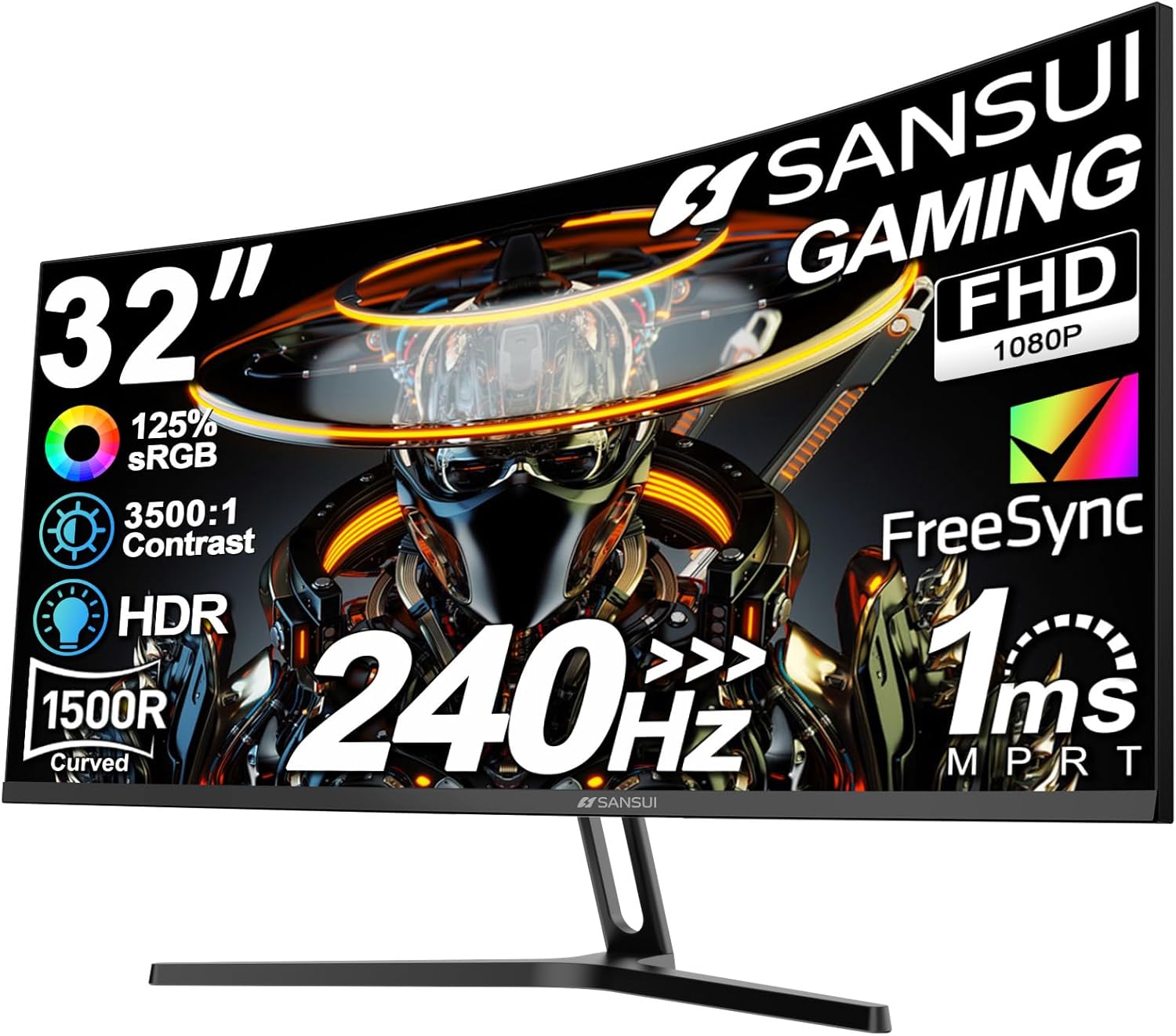
Pros
- Runs 240Hz over both HDMI and DP 1.4, with 1ms MPRT and FreeSync to remove tearing
- A 1500R curve across 32 inches brings the panel edges measurably closer to a centred viewing position
- Covers 125 percent of sRGB with 16.7M colours and a quoted 3500:1 contrast figure
- VESA 100 by 100mm mounting frees the desk from the 4.26 inch deep stand when moved onto an arm
- A DP cable is supplied, so the full 240Hz refresh is available without sourcing a separate lead
Cons
- 1920 by 1080 spread across 32 inches works out near 69 pixels per inch, so text looks coarse up close
- No built-in speakers, only a headphone jack, so desk audio needs separate hardware
- Tilt from minus 5 to 15 degrees is the only stand adjustment, with no height, swivel or pivot
This is a motion-first panel. Everything in the specification is arranged around delivering frames quickly rather than packing in pixels.
- A 240Hz refresh rate updates the image four times as often as a standard 60Hz display, which is where the smoothness in fast shooters comes from
- Response is quoted at 1ms MPRT, the backlight-strobing measurement, which reduces the visible smear behind moving objects
- FreeSync synchronises the panel to the graphics card output, so frames do not tear when the rate fluctuates
- Colour coverage reaches 125 percent of sRGB with 16.7M colours, brightness sits at 300 nits and contrast is quoted at 3500:1
- Anti-flicker and low blue light modes are included for long sessions
At 300 nits the HDR support is best treated as a tone-mapping mode rather than a bright highlight experience.
Connectivity is focused rather than generous, with everything present that a gaming PC needs and little beyond that.
- DisplayPort 1.4 carries the full 1920 by 1080 at 240Hz, and the required DP cable is supplied in the box
- HDMI also reaches 240Hz on this panel, which is unusual at this size and useful for a second machine
- A headphone jack passes audio through from the source, since there are no speakers built into the chassis
To actually reach 240Hz, the graphics card must have a DisplayPort 1.4 or comparable HDMI output, and the refresh rate must then be selected manually in the display settings after connection. Windows commonly defaults to 60Hz on first detection, which is the most frequent reason a new high-refresh panel appears to perform no differently from the old one.
The assembled monitor measures 28.16 inches wide by 16.62 high with a 4.26 inch deep stand, so it needs a desk of at least 30 inches width to sit comfortably.
- The metal stand supports tilt from minus 5 to 15 degrees, which handles glare angle but not seated height differences
- There is no height adjustment, swivel or pivot, so screen centre height is fixed by the stand and the desk surface
- VESA 100 by 100mm holes are provided, which is the fix: a standard monitor arm restores full height, tilt and swivel control and clears the desk beneath
The 1500R curvature is comparatively aggressive, which works in favour of a single-user gaming position where eyes stay roughly centred. Viewing from the side of the desk, or sharing the screen with someone beside you, suits a flat panel better.
Why Your Monitor Matters More Than You Think
A powerful graphics card can only show off its work through your display. If you are gaming on an old 60Hz office monitor, you are leaving performance on the table. Modern gaming monitors deliver faster refresh rates, lower input lag, and better motion clarity, which translate directly into a more responsive and immersive experience. Competitive players notice the difference in fast-paced shooters, while single-player fans enjoy smoother panning and crisper detail.
The good news is that gaming monitors have become dramatically more affordable. You no longer need to spend a fortune to get a high refresh rate panel with adaptive sync. The key is knowing which specifications deserve your attention and which are marketing fluff.
Refresh Rate: The Single Most Important Spec
Refresh rate, measured in hertz (Hz), tells you how many times per second the screen redraws the image. A higher number means smoother motion. Standard displays run at 60Hz, but gaming monitors start around 100Hz and climb well past 240Hz.
For casual and story-driven gaming, a 100Hz to 120Hz panel already feels far smoother than a basic office display. The Samsung Essential S3 and the affordable Acer KB272 both land in this range and make an excellent entry point for anyone stepping up from a standard screen.
If you play competitive titles like first-person shooters or battle royales, aim higher. A 165Hz to 180Hz panel such as the Samsung Odyssey G3 or the Acer Nitro KG241Y gives you a clear edge in responsiveness. Serious esports players who want every possible advantage should look at 240Hz displays like the Dell SE2726HG, where motion is buttery smooth and target tracking becomes noticeably easier.
Resolution and Screen Size: Finding the Sweet Spot
Resolution determines how sharp and detailed your image looks, while screen size affects immersion and how close you can sit. These two work together, so it helps to consider them at once.
1080p (Full HD)
Full HD remains the most popular choice for gaming because it is easy to drive, meaning even mid-range graphics cards can push high frame rates. On screens from 24 to 27 inches, 1080p looks crisp and keeps performance high. Most budget-friendly high refresh monitors, including the SANSUI 27-inch Curved, use this resolution to hit fast refresh rates without demanding a top-tier GPU.
1440p (QHD)
Quad HD delivers a noticeable jump in sharpness and desktop space, and it has become the new sweet spot for many gamers. A 27-inch QHD panel like the Acer Nitro KG271U looks stunning while still being manageable for modern mid-range and high-end cards. If you want extra screen real estate, the 32-inch Samsung Odyssey G55C pairs QHD sharpness with a large, immersive curved surface.
Screen Size Considerations
A 24-inch monitor keeps the entire play area within your natural field of view, which many competitive players prefer. A 27-inch screen balances immersion and clarity, making it the most popular size overall. Jump to 32 inches and you get a cinematic feel that shines in open-world and racing games, though you will want a higher resolution to keep the image sharp at that size.
Panel Type: IPS vs VA
The panel technology inside your monitor shapes color, contrast, and viewing angles. Two types dominate the gaming space.
IPS panels offer the best color accuracy and wide viewing angles, so the image stays consistent even when you look from the side. They are ideal if you also edit photos or watch a lot of media. The Acer Nitro KG271U uses an IPS panel with excellent color coverage, and the Dell SE2726HG combines IPS clarity with a fast 240Hz refresh rate.
VA panels shine when it comes to contrast, producing deeper blacks and more striking dark scenes. This makes them a great match for atmospheric single-player games. Many curved gaming monitors, including the Sceptre Curved 27, rely on VA technology to deliver rich contrast at a low price.
Response Time and Motion Clarity
Response time measures how quickly a pixel can shift from one color to another, usually stated in milliseconds. Lower is better because slow response times cause ghosting, a faint trail behind fast-moving objects. Most modern gaming monitors advertise 1ms response times, which is fast enough for the vast majority of players.
Do not obsess over tiny differences in these numbers, since testing methods vary between brands. Instead, look for a monitor that pairs a low response time with a high refresh rate. Panels like the SANSUI 240Hz series and the Samsung Odyssey G3 are tuned specifically for crisp motion, which matters far more in real gameplay than a single spec figure.
Adaptive Sync: FreeSync and G-Sync Compatibility
Screen tearing happens when your graphics card and monitor fall out of step, producing an ugly horizontal split in the image. Adaptive sync technology fixes this by matching the display refresh rate to your frame rate in real time.
AMD FreeSync is the most common version and works with a wide range of graphics cards, including many Nvidia GPUs through compatibility mode. Nearly every monitor on this list supports it, from the SANSUI 32-inch Curved to the Acer Nitro lineup. If you want the smoothest possible experience with no tearing and minimal stutter, make sure adaptive sync is on your checklist – it is one of the best quality-of-life features available.
Flat vs Curved Displays
Curved monitors wrap the image slightly toward your eyes, which can boost immersion and reduce the sense of distortion at the edges of larger screens. The effect is most noticeable on wide or large panels. A 1500R or 1000R curve, like the ones found on the Samsung Odyssey G55C and the SANSUI Curved models, gently draws you into the action.
Flat monitors remain the go-to for competitive gaming, where a consistent, distortion-free view helps with precise aiming. If you mostly play fast shooters, a flat panel such as the Acer Nitro KG241Y may suit you better. For immersive single-player adventures and racing sims, a curved display is hard to beat.
Extra Features Worth Considering
Beyond the core specs, a few practical features can improve your day-to-day experience. Built-in speakers, like those on the Sceptre Curved, save desk space if you do not own dedicated audio gear, though serious gamers usually prefer a headset. Eye comfort modes and flicker-free technology, common on Samsung and Acer displays, reduce fatigue during marathon sessions.
Port selection matters too. Look for at least one DisplayPort connection alongside multiple HDMI ports so you can hook up a PC and a console at the same time. An adjustable stand with tilt, and ideally height adjustment, helps you dial in a comfortable, ergonomic position.
Matching a Monitor to Your Budget
You can build a great gaming setup at almost any price. Here is how the options generally break down.
- Under $100: Entry-level displays like the Acer KB272 deliver smooth 120Hz gameplay and solid color for casual players on a tight budget.
- $100 to $150: This is the value sweet spot. High refresh 1080p panels such as the Samsung Odyssey G3, the Dell SE2726HG, and the SANSUI 27-inch bring fast motion and adaptive sync within easy reach.
- $150 to $200: Step up to QHD sharpness or larger curved screens. The Acer Nitro KG271U and the SANSUI 32-inch both offer more resolution or size for the money.
- Above $200: Premium picks like the Samsung Odyssey G55C combine large curved panels, QHD resolution, and high refresh rates for a truly immersive centerpiece.
How to Choose the Right One for You
Start by identifying the types of games you play most. Competitive gamers should prioritize refresh rate and response time, favoring fast 1080p panels at 165Hz or higher. Players who love visually rich single-player worlds will appreciate the sharper resolution of a 1440p display or the contrast of a good VA panel.
Next, be honest about your graphics card. There is no point buying a high-resolution monitor if your GPU cannot drive games at that resolution and frame rate. Pairing a capable card with a matching display gives you the best value. Finally, factor in your desk space and viewing distance to pick the right screen size, and confirm the monitor has the ports and adaptive sync support your system needs.
Final Thoughts
The best computer monitors for gaming are the ones that fit your games, your hardware, and your budget rather than simply the ones with the flashiest numbers. Focus on refresh rate first, choose a resolution and size that match your graphics card, then decide between IPS color accuracy and VA contrast based on what you play. Add adaptive sync and comfortable ergonomics, and you have a display that will keep games looking and feeling great for years.
Any of the models highlighted above make a strong choice for their category, so use this guide to narrow down what matters most to you and pick the gaming monitor that will level up your setup today.







Comments are closed.
No reviews yet. Be the first to share your experience!