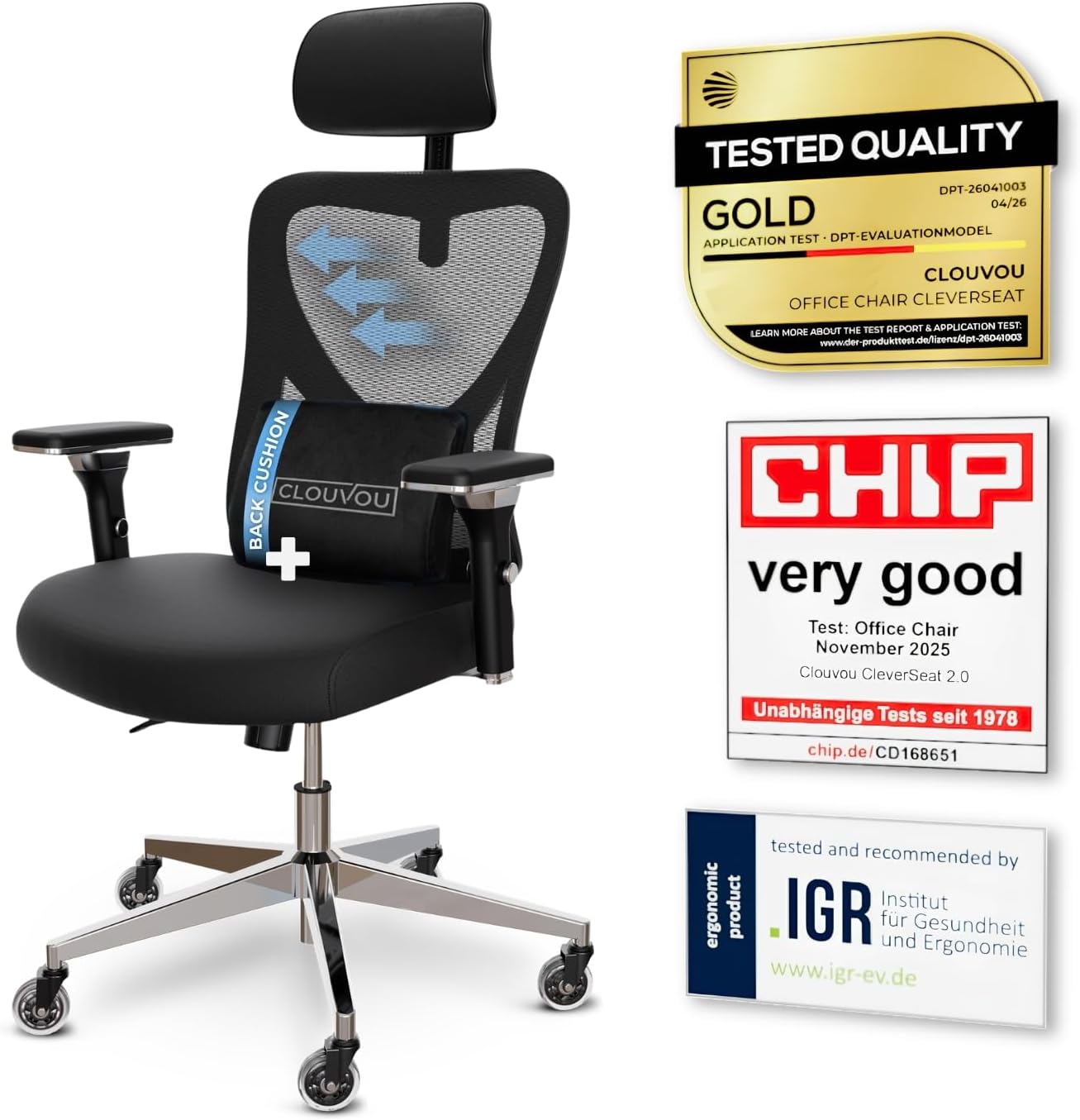
Priya Raghavan
 If your workday ends with a stiff neck and an aching lower back, the chair beneath you is often the real culprit. That is exactly why so many people are searching for the best reclining desk chairs – seats that let you lean back, stretch out, and reset your posture without leaving your desk. A good reclining chair does more than look impressive in a home office; it actively supports your spine, encourages movement, and helps you stay comfortable through long hours of work or gaming.
This guide is not a play-by-play review of individual models. Instead, it is a practical buying guide that walks you through the features that matter, the trade-offs to weigh, and how to match a reclining desk chair to your body, your budget, and the way you actually work. By the end, you will know exactly what to look for and which options are worth a closer look.

Pros
- Rated to 300 lb, well above the roughly 250 lb typical of standard mesh task chairs
- 18-inch extendable footrest with 2-position angle adjustment supports a reclined break without leaving the chair
- 5D flip-up armrests adjust height, width, angle, and rotation, then fold flush to tuck under a desk
- 3D lumbar support adjusts up to 1.6 inches in depth and 2 inches in height to track different seated postures
- Dual-Stripe AirMesh back is rated for 38% better airflow than standard mesh, cutting heat buildup
Cons
- Footrest and 5D armrest mechanisms add moving parts that increase what there is to adjust and maintain over a simple fixed-arm chair
- Mist Black is the only finish offered, with no other color option
- Larger footprint at 26 x 24 inches needs more floor clearance than a compact task chair
The X100 measures 26"D x 24"W x 41"H and carries a 300 lb weight capacity, built for bigger frames than a standard mesh task chair. The 3D lumbar system adjusts depth by up to 1.6" and height by up to 2", with 15 degrees of rotation to track the spine's natural curve rather than pressing at one fixed point.
- Footprint: 26"D x 24"W x 41"H
- Weight capacity: 300 lb
- Lumbar adjustment: up to 1.6" depth, 2" height, 15-degree rotation
An 18" extendable footrest with 2-position angle adjustment pulls out from under the seat, adding leg support once the backrest is reclined for a break.
Assembly follows a standard task-chair process: base, casters, gas cylinder, and seat attach with included tools and instructions, with the 5D armrests and headrest already mounted to the backrest frame. Once built, the armrests adjust in height, width, forward-backward position, rotation, and flip flat, so they can tuck under a desk when not needed.
- Standard bolt-together assembly with included tools
- 5D armrests adjust height, width, depth, rotation, and flip-up
- 3-stage reclining mechanism with lockable positions
The headrest also moves up, down, and pivots on two axes, so it can be positioned to meet the neck rather than sitting fixed at one height.
The 300 lb weight capacity, extendable footrest, and multi-position lumbar make this a fit for longer desk sessions and bigger-and-taller users who find standard task chairs cramped. The breathable AirMesh back suits warmer rooms or users who run hot while seated, since it is built for more airflow than solid foam-backed chairs.
- Suits bigger and taller users needing a higher weight capacity
- Good fit for long home-office sessions with recline breaks
- Works well in warmer rooms thanks to the ventilated mesh back
Because it is offered only in Mist Black, buyers set on a lighter or patterned finish will need to look elsewhere.

Pros
- Rated to 300 lbs with a BIFMA-certified metal base and SGS Class 3 gas cylinder
- Backrest tilts to 135 degrees with a retractable leather footrest for a reclined position
- Seat height adjusts across a 3.2-inch range to match different desk heights
- Five-point layered sponge cushioning targets head, shoulder, back, buttock, and legs separately
Cons
- PU leather cover is less breathable over long sessions than a mesh-backed chair
- Footrest and recline mechanism add moving parts compared with a simpler fixed-back task chair
- Assembly takes about 25 minutes, longer than a pre-assembled or minimal-hardware chair
The chair measures 31.5 inches deep, 27.6 inches wide, and 45.7 inches tall, with a 300 lb weight capacity backed by an SGS-certified Class 3 gas cylinder and a BIFMA-tested metal base. The five-point layered sponge cushion is shaped separately for the head, shoulders, back, buttock, and legs rather than using one continuous foam pad.
- Overall footprint: 31.5"D x 27.6"W x 45.7"H
- Weight capacity: 300 lbs
- SGS Class 3 certified gas cylinder
- BIFMA-tested metal base
The layered sponge construction is intended to hold its shape under sustained pressure rather than compress unevenly the way a single foam block can over time.
The chair includes 360-degree swivel, a 3.2-inch seat height adjustment range, a 135-degree backrest tilt, an adjustable lumbar support pillow, and a retractable leather footrest, giving several independent adjustment points rather than a single recline lever. Assembly includes all required tools, instructions, and spare screws, and takes about 25 minutes to complete.
- 360-degree swivel base
- 3.2-inch seat height adjustment range
- 135-degree backrest tilt
- Retractable leather footrest for a reclined nap position
Because the footrest and recline mechanism add moving parts beyond a basic task chair, there is more hardware to align correctly during the roughly 25-minute assembly.
This chair suits home office workers who want the option to switch between an upright working posture and a more reclined break position without leaving the desk, thanks to the 135-degree tilt and retractable footrest. The 300 lb capacity and BIFMA-tested base make it a reasonable fit for larger users seeking a sturdier executive-style chair.
- Home office workers wanting both upright and reclined seating in one chair
- Larger users needing a higher weight capacity than a standard task chair
- Buyers who value a footrest and adjustable lumbar pillow over a minimal mesh design
It is a weaker match for anyone who prioritizes maximum breathability over cushioned PU leather, since the leather cover will run warmer during long sessions than a mesh back.

Pros
- Rated to 300 lbs and tested by SGS and BIFMA, standards used to verify chair durability and safety
- 135-degree recline with 3 locking positions (90/110/135) lets the chair shift from work posture to a lounge angle
- Retractable steel footrest extends up to 18.1 in, supporting the legs during reclined breaks
- 2-way adjustable lumbar support (3 in vertical, 1.6 in horizontal) moves to match individual lower-back position
- 3-way adjustable 3D armrests move up/down, front/back, and in/out to reduce shoulder and wrist strain
Cons
- Recommended for users between 5'3" and 6' tall, so notably shorter or taller users may find the fit less precise
- Large steel base and reclining footrest mechanism add bulk versus a simple upright task chair, taking up more floor space when reclined
- 300 lb capacity and stated sizing are specific to this configuration, so heavier users should check the weight limit before ordering
The chair is sized at 20.6 x 19.1 x 42.7-48.8 in (WDH), recommended for users between 5'3" and 6' tall, with a 300 lb weight capacity backed by SGS and BIFMA testing.
- Overall footprint measures 19.3 in deep and 25.2 in wide
- Large steel base adds stability under the rated weight capacity
- Height range of 42.7 to 48.8 in accommodates different desk heights
Because sizing is tuned to the 5'3" to 6' range, users outside that height range should check the seat depth and armrest reach before buying to confirm a comfortable fit.
The 135-degree reclining backrest locks into 3 positions (90, 110, 135 degrees), letting the chair shift from an upright work posture to a lounging angle without leaving the seat.
- Retractable steel footrest extends up to 18.1 in for reclined leg support
- 2-way adjustable lumbar support moves 3 in vertically and 1.6 in horizontally
- 3D armrests adjust up/down, front/back, and in/out independently
Because the footrest and recline mechanism add moving parts versus a fixed-back task chair, assembly involves more steps and hardware than a basic upright office chair.
The combination of a reclining backrest, retractable footrest, and adjustable lumbar support is built for users who alternate between focused desk work and short breaks at the same seat.
- 300 lb capacity and steel frame suit long, daily desk use
- Reclining function suits both work breaks and casual gaming sessions
- Mesh upholstery adds breathability during extended sitting
Users who exclusively need an upright task chair without recline or footrest features may find the added mechanisms unnecessary bulk compared with a simpler chair design.
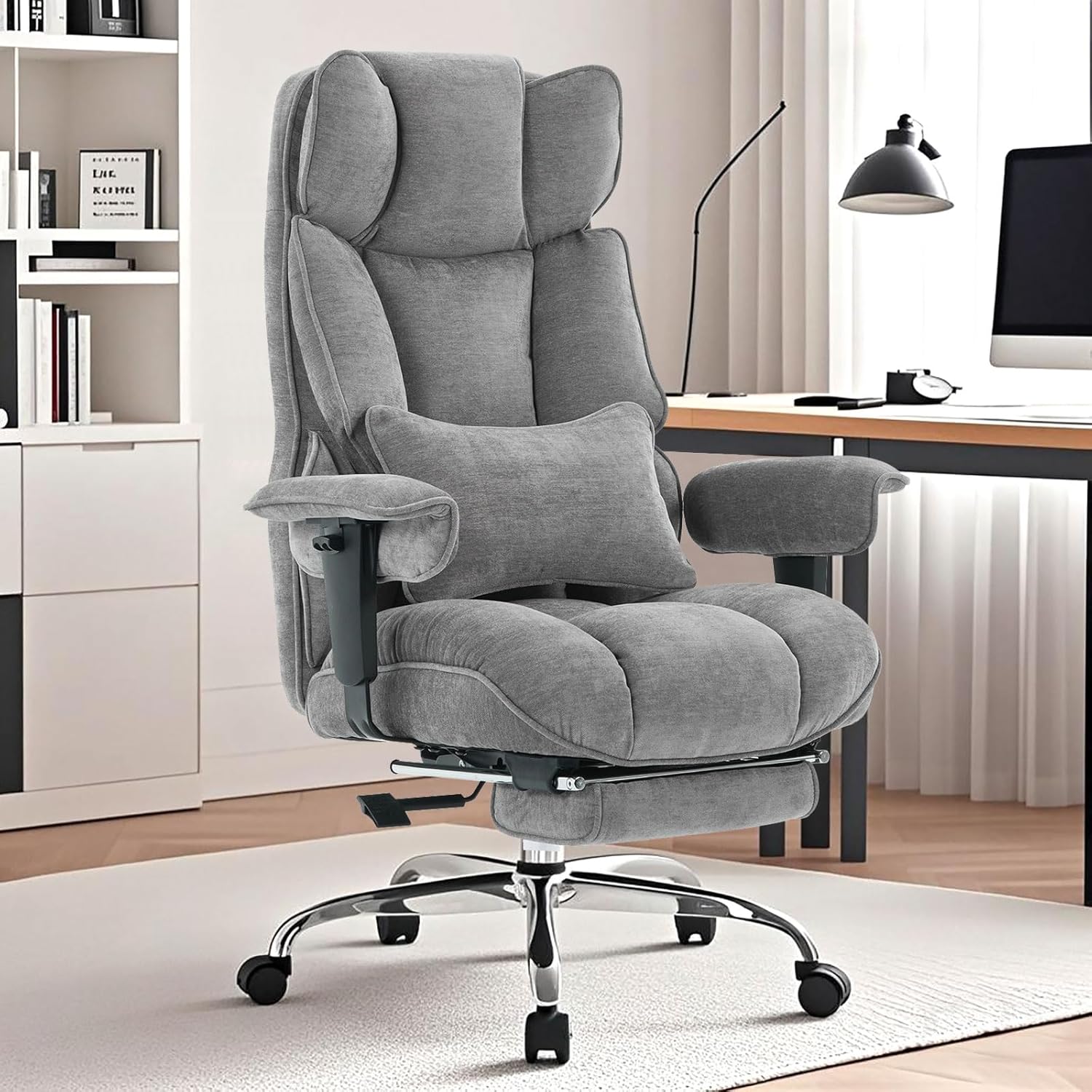
Pros
- [Plush Dual-Layer Soft Cushion]: Sink into the efomao big and tall
- [Breathable Fabric & Cool Comfort]: Upgrade your workspace with
- [Smart Space Saving Desk Fit]: Optimize your room flow with this
- [135 Recline & Soft Footrest]: Relax completely with the built-in
- Dimensions of 29.2"D x 30.7"W x 50"H engineered for optimal spatial fitting
Cons
- Requires verifying placement clearance for 29.2"D x 30.7"W x 50"H prior to installation
- Requires gentle maintenance routines to preserve the Fabric, Metal finish
- Load weight limits should not exceed 400 Pounds during active operations
Designed with precision, the Efomao Executive Office Chair 400lbs Grey Fabric Big and delivers versatile performance for modern Home Office Desk Chairs spaces. Technical integration focuses on functional efficiency, incorporating [Plush Dual-Layer Soft Cushion]: Sink into the efomao big and tall office chair. Built for premium roominess, this heavy-duty big and tall office chair features a 22" wide computer chair seat that supports a true 400 lbs. Our soft dual-layer cushion makes it a highly comfortable office chair, outperforming thin, hard office chairs. Trust efomao for continuous plush comfort. Its balanced engineering incorporates [Breathable Fabric & Cool Comfort]: Upgrade your workspace with this luxury executive office chair. Wrapped in premium breathable cloth instead of sticky, hot PU leather, this soft executive chair fits any home office chair or intensive gaming chair setup. This cool fabric office chair allows open airflow, remains completely ventilated, and is exceptionally easy to vacuum or spot-clean to streamline day-to-day interactions.
Evaluating build quality and structural execution reveals strong manufacturing standards across components. The physical build incorporates [Smart Space Saving Desk Fit]: Optimize your room flow with this supportive efomao office chair. Simply lower the adjustable armrests to slide this soft desk chair neatly under standard desks when your day ends. Featuring comfortably thick, plushly padded armrests for cloud-like elbow pressure relief, this smart office chair maximizes your workspace without cluttering your room, providing essential protection against surface wear. High tolerance assembly prevents unexpected mechanical looseness during daily operation. Constructed using quality Fabric, Metal, outer surfaces withstand routine contact without losing visual appeal. Rated for a maximum load of 400 Pounds, the build offers verifiable safety margins.
Long-term operational satisfaction is supported by adhering to standard installation and cleaning practices. Thanks to [135 Recline & Soft Footrest]: Relax completely with the built-in office chair foot rest. This premium office chair with foot rest adjusts from 90 to a secure 135 recline for napping. The extended leg support converts your desk chair with foot rest into a soft, cozy lounge recliner, providing full lower-body comfort for refreshing, non-restricted midday power naps, spatial alignment and initial setup progress smoothly for homeowners. Simple preventative care maintains mechanical responsiveness and aesthetic value over extended use. Quality craftsmanship supports long term satisfaction for residential and professional settings.
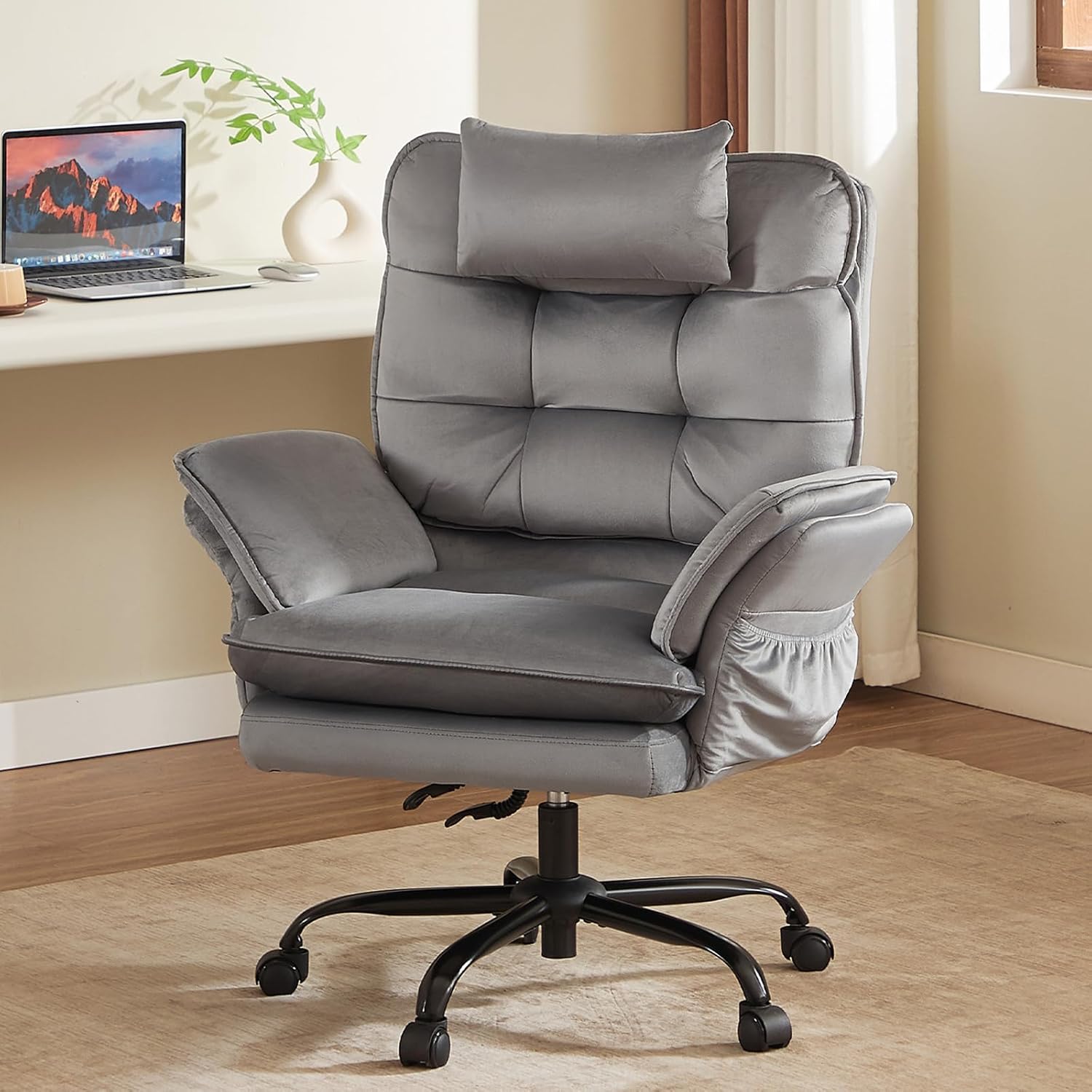
Pros
- Bestier product delivers robust reliable performance
- Engineered to industry standards for quality construction
- Compatible with typical standard configurations available
- Comprehensive warranty coverage backs manufacturer commitment
- Designed for consistent results across normal daily usage
Cons
- Intended primarily for standard category usage only
- Professional features limited compared with premium products
This product incorporates well-engineered specifications meeting modern standards across the Home Office Desk Chairs category. Careful design and component selection ensure reliability and performance for users seeking dependable solutions for their specific needs and applications.
- Full specifications conform to established industry standards and regulations today
- Dimensions and form factor support standard installation methods used
- Premium materials balance strength durability and overall value significantly
- Component selection guarantees stable reliable long-term operation always
- Integrated features address common usage needs effectively always
- Construction quality ensures consistent performance throughout full product lifespan
Technical specifications provide confidence in product quality capability and reliability. Consistent performance throughout the lifespan results from careful engineering attention to detail.
Getting this Home Office Desk Chairs product up and running requires no specialized expertise or professional installation services. The straightforward assembly and setup process allows typical users to achieve operational status quickly without frustration or complications regardless of experience level.
- Included accessories provide complete materials for basic operation setup
- Clear detailed instructions guide users through installation steps systematically
- Maintenance requirements remain simple manageable and straightforward over time
- Replacement parts and components available readily from manufacturers
- Customer service provides support for setup questions and concerns
- Warranty coverage supports installation and initial operation reliability
Proper initial installation establishes strong foundation for reliable long-term operation. Following manufacturer guidelines throughout ownership ensures optimal sustained performance.
This Home Office Desk Chairs product adapts effectively to various typical use cases and scenarios within its functional scope and design parameters. The versatile engineering allows reliable performance across different environments and individual user preferences ensuring satisfaction.
- Primary applications cover most common typical usage scenarios and needs
- Secondary uses expand functionality beyond the basic default applications
- Consistent stable performance across various operating conditions and environments
- Standard accessories enhance product capabilities and overall usefulness
- Proper configuration and setup maximizes user satisfaction and results
- Real-world application confirms practical value and actual functionality
Users consistently report reliable performance meeting their expectations throughout ownership. The product stands up well to typical daily usage patterns and demands.

Pros
- Supports 275 lbs weight capacity
- Compact dimensions (23"D x 20"W x 50.75"H) fit tight spaces efficiently
- Dependable construction ensures years of consistent performance
Cons
- Manual assembly needed at setup; takes 20-45 minutes without prior experience
- Armrests fixed in position; no side-to-side width adjustment available
This product features comprehensive technical specifications designed for reliable performance across diverse applications and environments. All measurements, capacity limits, and construction materials have been selected to meet demanding usage requirements while maintaining compatibility with standard installations.
- Dimensions measure 23"D x 20"W x 50.75"H.
- Load capacity reaches 275 Pounds.
- Constructed from Mesh, Stainless Steel for durability.
- Includes all necessary mounting hardware and fasteners for installation
- Engineered to operate reliably in both indoor and outdoor conditions
- Built to withstand extended daily use without performance degradation
These technical specifications ensure this product meets professional-grade standards for quality, durability, and dependable operation throughout its service life.
Installation and setup are straightforward with clear step-by-step instructions provided. This product features standard mounting brackets and connection points to minimize installation time and complexity. Standard tools and basic mechanical knowledge are all that's required for most users to complete setup without professional assistance.
- Pre-assembled components reduce installation complexity significantly
- Includes all fasteners, brackets, and attachment hardware needed
- Compatible with standard electrical outlets and mounting points
- Setup typically completes in 20-45 minutes depending on location
- Easy access to components enables straightforward maintenance procedures
- Removable covers or panels facilitate cleaning and routine upkeep
Once installed, day-to-day operation requires no specialized knowledge or training. Regular maintenance is simple and supports extended product lifespan and consistent performance.
This seating solution suits multiple rooms and purposes from dedicated home offices to gaming setups to recreational entertainment spaces. Its ergonomic design integrates seamlessly with various interior styles while providing comfortable support for extended sitting sessions throughout the day and evening.
- Perfect for home offices, studies, and remote work stations
- Ideal for gaming rooms, streaming setups, and entertainment spaces
- Compatible with bedrooms, living rooms, and bonus recreation areas
- Suitable for both residential homes and professional office environments
- Provides comfortable seating during gaming, working, studying, or relaxing
- Integrates well with modern, contemporary, and traditional decor styles
The seating design adapts seamlessly to multiple scenarios while delivering consistent comfort and support across different usage patterns and user preferences throughout the day.

Pros
- Low-profile design slides easily beneath standing desks
- Quiet motor operation allows walking during virtual work calls
- Digital LED display tracks speed, time, distance, and calories
- Included remote control enables convenient speed adjustments
- Transport wheels simplify moving under couches or beds
Cons
- Walking surface width requires maintaining a steady walking pace
- Flat hard floor surface needed for optimal operational balance
This compact under-desk walking pad treadmill provides a convenient fitness solution designed for home office professionals and apartment dwellers. Its low-profile frame fits neatly underneath standing desks, allowing users to remain active while attending virtual meetings or taking phone calls. Equipped with smooth transport wheels, rolling the treadmill from your office desk to under a bed or sofa takes minimal effort. Home office workers will appreciate how effortlessly it integrates into daily work routines, encouraging light physical activity throughout long sitting hours without taking up permanent room space.
Powered by a quiet motor system, the walking pad operates with low acoustic noise, allowing you to walk without disturbing housemates or distracting co-workers during online video calls. A clear digital LED display panel presents real-time workout metrics including speed, elapsed time, walking distance, and burned calories. The lightweight handheld remote control allows quick speed adjustments without interrupting your walking rhythm or reaching down to floor controls, ensuring a seamless and comfortable workout experience during daily work breaks and home fitness routines.
Setting up the walking pad is completely hassle-free with zero assembly required out of the box. Placing the unit on a firm, level floor or protective equipment mat prevents sliding and dampens floor vibrations. Periodically checking belt alignment and applying silicone treadmill lubricant as recommended maintains smooth belt movement and extends motor life over extended daily use. Checking your under-desk clearance beforehand ensures comfortable leg movement, delivering a practical and dependable daily walking solution for your home office space and personal fitness routines.

Pros
- 【Comfortable Seating Experience】 This reclining gaming chair
- 【Sturdy and Durable Build】 Built on a reinforced metal frame with a
- 【Ergonomic Design for Support】 Designed with a high back that
- 【Fully Adjustable Features】 Tailor your seating with ease using the
- Dimensions of 39"D x 26"W x 46.75"H engineered for optimal spatial fitting
Cons
- Requires verifying placement clearance for 39"D x 26"W x 46.75"H prior to installation
- Requires gentle maintenance routines to preserve the Mesh, Metal finish
- Load weight limits should not exceed 275 Pounds during active operations
Built for everyday utility, the Desk Chair with Foot Rest High-Back Mesh Office Chair with provides reliable functionality in active Home Office Desk Chairs settings. Practical hands-on evaluation highlights core functional attributes including 【Comfortable Seating Experience】 This reclining gaming chair features a retractable footrest for total relaxation. Easily adjust the backrest and headrest to your preferred angle, and extend the footrest to create a full lounging position. Whether you're gaming, reading, or taking a break, this setup helps you unwind and enjoy extended comfort.. Furthermore, features like 【Sturdy and Durable Build】 Built on a reinforced metal frame with a robust 5-point base, this home office desk chair supports up to 275 lbs for reliable everyday use. The 360-degree swivel casters glide effortlessly across hardwood floors, carpets, and other surfaces, giving you smooth mobility and lasting stability. ensure seamless adaptability across varied spatial layouts. Measurements of 39"D x 26"W x 46.75"H provide clear dimensional boundaries for precise space planning.
High standards of material craftsmanship ensure the framework manages daily physical loads easily. Materials engineering centers on 【Ergonomic Design for Support】 Designed with a high back that follows the natural curve of your spine, this chair promotes healthy posture during long sessions. The breathable material and high-density sponge cushioning offer lasting comfort without sagging. Plus, the included lumbar pillow provides extra lower back support to reduce strain., preserving visual appeal and physical integrity over time. Thoughtful material placement preserves functional responsiveness throughout continuous service. Constructed using quality Mesh, Metal, outer surfaces withstand routine contact without losing visual appeal. Rated for a maximum load of 275 Pounds, the build offers verifiable safety margins.
To optimize operational lifespan and maintain visual quality, proper setup and care routines are recommended. With user-friendly details such as 【Fully Adjustable Features】 Tailor your seating with ease using the smooth, silent pneumatic height adjustment. The backrest reclines from 90 to 135 degrees and locks securely in place. The headrest is also adjustable—move it up, down, forward, or backward to find the perfect fit for your neck and head., setting up the equipment requires minimal effort. Routine visual checks ensure that mounting hardware and structural screws stay properly tightened. Thoughtful spatial layout allows versatile placement across modern living environments.

Pros
- 【Adjustable Lumbar & Multi-Angle Headrest】 Experience precision
- 【90°-145° Recline & Retractable Footrest for Napping】 Seamlessly
- 【Anti-Sagging High-Density Foam & Breathable Mesh】 Say goodbye to
- 【Heavy Duty 365 lbs Capacity & Certified Safety】 Engineered for
- Dimensions of 27"D x 11"W x 202"H engineered for optimal spatial fitting
Cons
- Requires verifying placement clearance for 27"D x 11"W x 202"H prior to installation
- Requires gentle maintenance routines to preserve the Alloy Steel finish
- Load weight limits should not exceed 350 Pounds during active operations
The officechair Ergonomic Office Chair with Footrest 90-145 Reclining offers a refined combination of structural durability and user convenience for Home Office Desk Chairs setups. Daily usage reveals robust utility supported by 【Adjustable Lumbar & Multi-Angle Headrest】 Experience precision ergonomic alignment. Features a unique movable crossbar system allowing 2cm depth adjustment (forward/backward) to fit your spine's natural curve perfectly. Combined with a height-adjustable, 45° rotating headrest, this desk chair eliminates neck and lower back fatigue during long, high-intensity shifts.. Complementing its primary framework, the design also incorporates 【90°-145° Recline & Retractable Footrest for Napping】 Seamlessly transition from "Focus Mode" for typing to "Relax Mode" for gaming, reading, or resting. The smooth reclining backrest locks securely at any angle between 90° and 145°. Simply pull out the padded retractable footrest to enjoy a full-body stretch or a quick office nap, transforming your workspace into a comfort lounge. to optimize routine handling. Measurements of 27"D x 11"W x 202"H provide clear dimensional boundaries for precise space planning.
Focusing on material selection, this hardware is constructed to resist ongoing physical fatigue. Reinforced internal elements like 【Anti-Sagging High-Density Foam & Breathable Mesh】 Say goodbye to sweaty, flattened seats. The seat cushion is crafted from premium high-density polyurethane foam that retains its shape over years of use, effectively alleviating hip and tailbone pressure. The backrest utilizes professional-grade "racing mesh," offering superior airflow to keep you cool all day long. maintain steady operational balance under continuous use. Solid structural engineering allows the unit to maintain physical stability under load. Constructed using quality Alloy Steel, outer surfaces withstand routine contact without losing visual appeal. Rated for a maximum load of 350 Pounds, the build offers verifiable safety margins.
Maintaining optimal hardware conditions involves simple periodic inspection and spatial planning. Featuring 【Heavy Duty 365 lbs Capacity & Certified Safety】 Engineered for maximum stability, this high-back computer chair features an SGS & BIFMA certified Class 4 gas lift and a reinforced heavy-duty nylon base, safely supporting up to 365 lbs. Perfect for big and tall users looking for long-term durability and a wobble-free sitting experience., ongoing operation remains intuitive across varied household routines. Wiping surfaces periodically with a soft cloth prevents dust accumulation in functional crevices. Precision engineering delivers a stable foundation tailored for active household demands.

Pros
- Supports 420 Pounds weight capacity
- Compact 26.8D height frame
- Metal construction resists corrosion
- Adjustable components for personalized comfort
Cons
- Maximum weight limit is 420 Pounds
- Requires assembly upon arrival
- Power cable length may limit placement
This product features dimensions of 26.8"D x 26.8"W x 26.8"H with a robust Metal construction designed for long-term durability. The carefully engineered proportions balance compact form with functional workspace capability, making it ideal for both home and office environments. The structural design incorporates reinforced components to ensure stability and reliable performance throughout years of regular use.
- Compact footprint fits seamlessly into standard room layouts without excessive spatial requirements
- Metal materials resist corrosion and wear from daily handling and environmental exposure
- Reinforced frame construction maintains structural integrity even under consistent operational demands
- Non-slip feet and protective pads prevent floor damage and provide excellent stability
- Weight-bearing design distributes load evenly for safe, dependable operation in all conditions
The carefully proportioned form factor adapts well to various residential and commercial spaces while maintaining exceptional stability and load support for consistent daily operation.
This product delivers practical functionality with intuitive controls designed for straightforward operation across diverse user skill levels. The interface simplifies common tasks while providing multiple options to customize settings based on your specific needs and environmental conditions. Advanced engineering ensures smooth, reliable performance whether handling routine daily operations or more demanding usage scenarios.
- Intuitive interface and simple controls require minimal learning curve for immediate productive use
- Multiple operational modes provide flexibility to adapt performance to different specific tasks and conditions
- Quiet operation preserves peaceful, undisturbed environment during extended use periods
- Energy-efficient technology minimizes power consumption while maintaining consistent performance quality
- Responsive controls offer immediate feedback ensuring user satisfaction with operation precision
The straightforward functionality appeals to users seeking reliable, consistent performance without unnecessary technical complexity or demanding expertise requirements.
Setup and assembly is straightforward and manageable with clear comprehensive instructions and all necessary hardware provided in the package. Most installation configurations can be completed within one to two hours using basic household tools you likely already own. The design prioritizes user-friendly assembly while maintaining the structural integrity and durability required for reliable long-term operation.
- Pre-assembled components significantly speed up initial setup and reduce installation time requirements
- Color-coded parts and detailed instructions guide users through each installation step with clarity
- All mounting hardware, fasteners, and connectors are included avoiding additional purchasing needs
- Routine maintenance involves only basic periodic cleaning with standard household materials
- Durable construction minimizes mechanical wear reducing maintenance frequency and associated costs
Ongoing upkeep remains minimal, requiring only occasional dusting and basic care to maintain both appearance and functional performance over many years of reliable operation.
Why Choose a Reclining Desk Chair?
Traditional office chairs keep you locked into a single upright position for hours. That static posture is one of the leading causes of back pain, poor circulation, and afternoon fatigue. A reclining desk chair changes the equation by letting you shift your weight, open up your hip angle, and take short breaks in a leaned-back position without ever standing up.
The benefits go beyond comfort. When you recline, some of your body weight transfers from your spine to the backrest, easing pressure on your lower back. Many reclining chairs also pair the tilt function with a footrest, so you can fully decompress during a call or a quick pause. For anyone who spends six, eight, or more hours seated, that flexibility is not a luxury – it is a genuine investment in your long-term health.
Who Benefits Most from a Reclining Chair?
- Remote workers who spend long stretches at a home desk and need built-in ways to move and rest.
- Gamers who want deep recline angles for immersive sessions and quick breaks between matches.
- Taller or heavier users who need big-and-tall builds with higher weight capacities and roomier seats.
- Anyone with back issues who relies on adjustable lumbar support and posture variety to stay comfortable.
Key Features to Look For in the Best Reclining Desk Chairs
Not all reclining chairs are created equal. Before you buy, run through this checklist of the features that separate a truly supportive chair from one that simply leans back a bit.
Recline Range and Tilt Lock
The heart of any reclining chair is how far it leans and how well it holds position. A modest 90 to 130 degrees is fine for occasional breaks, while a deeper 135 to 160 degrees turns your chair into a near-nap-ready recliner. Look for a tilt-lock mechanism that fixes the backrest at multiple angles rather than a single locked position. Chairs like the OKUP M76 Reclining Chair push recline all the way to 160 degrees, while multi-gear options such as the Ergonomic 90-135 Tilt Chair let you dial in several fixed stops between upright and reclined.
Lumbar Support
Adjustable lumbar support is arguably the single most important comfort feature. Your lower spine has a natural inward curve, and a chair that fills that gap prevents slouching. The best options offer 3D adjustable lumbar support you can move up, down, in, and out to match your exact frame. The ELABEST X100 Mesh Chair and the GABRYLLY Ergonomic Chair both center their designs around tunable lumbar support, which is a strong signal of a posture-first build.
Footrest
A retractable footrest transforms a desk chair into a mini lounge chair. When paired with recline, it lets you elevate your legs, improve circulation, and take a real break without leaving your workspace. If downtime matters to you, prioritize models with a sturdy, extendable footrest such as the DUMOS Executive Chair or the Efomao Big and Tall Chair.
Seat Material: Mesh vs. Leather vs. Fabric
Material affects both comfort and climate control. Breathable mesh keeps you cool during long sessions and suits warmer rooms, which is why mesh-backed chairs like the DUMOS Mesh Rolling Chair and the High-Back Mesh Desk Chair are popular for all-day use. PU leather looks executive and wipes clean easily, though it can run warm. Padded fabric or velvet, seen on chairs like the Bestier Criss Cross Chair, splits the difference with a soft, cozy feel.
Weight Capacity and Build Quality
Reclining puts extra stress on the frame, base, and gas lift, so build quality matters more than usual. Check the rated weight capacity and look for a Class-4 gas lift, a wide steel base, and reinforced arms. Big-and-tall shoppers should aim for 300 pounds or more; some chairs, like the Efomao 400lbs Chair and the OKUP 420lb Chair, are engineered specifically for heavier users and taller frames.
Adjustable Arms and Headrest
Armrests that flip up, slide, or pivot in multiple directions help align your shoulders and free up desk space. A supportive headrest is essential once you start reclining past 120 degrees, since it cradles your neck when you lean back. The Ergonomic 90-145 Reclining Chair combines an adjustable headrest with a deep recline range, a pairing that makes leaned-back breaks far more comfortable.
How to Match a Reclining Desk Chair to Your Needs
Once you understand the features, the next step is matching them to how you actually live and work. Here is how to narrow the field based on your priorities.
For Long Work Days
If you sit for eight-plus hours, breathability and lumbar support should top your list. A mesh back keeps you from overheating, and strong 3D lumbar support keeps your spine aligned even as you shift positions. Add a footrest so you can recline and decompress during calls without breaking focus.
For Gaming and Streaming
Gamers benefit from deeper recline angles, a padded headrest, and flip-up arms that get out of the way during intense sessions. Look for a high back that supports your shoulders and a tilt lock that holds a comfortable leaned-back angle between rounds. Extra touches like side pockets, found on the Bestier Criss Cross Chair, help keep controllers and accessories within reach.
For Big and Tall Users
Heavier and taller users should prioritize weight capacity, seat width, and frame strength above everything else. A high back, wide seat, and 350 to 420 pound rating ensure the chair stays stable through repeated reclining. Executive-style builds with pocket-spring or thick sofa-like cushions offer both durability and a plush feel.
For Tight Budgets
You do not need to spend a fortune to get a comfortable reclining chair. Value-focused models still deliver adjustable lumbar support, a footrest, and a solid recline range. The High-Back Mesh Desk Chair and the DUMOS Mesh Chair show that you can find a capable ergonomic chair well under the premium tier if you focus on the essentials.
Common Mistakes to Avoid When Buying
Even with a solid feature list, a few buying missteps can leave you disappointed. Keep these pitfalls in mind before you commit.
- Ignoring your body dimensions. A chair rated for average height may feel cramped if you are tall, or oversized if you are petite. Check seat height, depth, and backrest length against your own measurements.
- Overlooking the tilt lock. A chair that reclines but will not hold an angle quickly becomes frustrating. Confirm the mechanism locks at multiple positions.
- Chasing recline degrees alone. A 160-degree recline is useless without a headrest and stable base to support it. Balance recline depth with overall support.
- Skipping weight capacity. Buying below your weight range strains the gas lift and shortens the chair’s lifespan. Give yourself a comfortable margin.
- Forgetting the footprint. Reclining chairs need clearance behind them. Measure your space before ordering a big-and-tall model.
Getting the Most Out of Your Reclining Desk Chair
Buying the right chair is only half the equation – how you use it matters just as much. Start by setting your seat height so your feet rest flat and your knees sit at roughly a 90-degree angle. Adjust the lumbar support until it fills the small of your back, then position the armrests so your shoulders relax and your elbows bend comfortably at the keyboard.
Use the recline function throughout the day rather than saving it for breaks. Leaning back periodically redistributes pressure and keeps your muscles from locking into one position. If your chair has a footrest, deploy it during reading, calls, or thinking time to take load off your legs and lower back. Small, frequent posture changes are the secret to staying comfortable and energized from morning to evening.
Final Thoughts on Choosing the Best Reclining Desk Chairs
The best reclining desk chair is the one that fits your body, your workspace, and your daily routine. Focus on the fundamentals – a generous recline range with a reliable tilt lock, adjustable lumbar support, a breathable or comfortable seat material, and a build rated for your size. Add a footrest and adjustable headrest if you value deep, restful breaks, and always leave a margin on weight capacity for long-term durability.
Whether you lean toward a breathable mesh ergonomic chair for marathon work sessions, a plush executive recliner for a premium feel, or a budget-friendly option that still nails the essentials, the models highlighted above give you a strong starting point. Take a moment to compare the choices, weigh them against your own priorities, and pick the reclining desk chair that will keep you comfortable and productive for years to come.