
 Hannah Lindqvist
 Best TV Lights: The Complete Buying Guide for a Brighter Home Theater
If you have ever spent hours searching for the best TV lights, you already know how quickly the options pile up. From simple bias lighting strips to camera-based systems that match the colors on your screen in real time, the market is crowded with choices that all promise a more immersive viewing experience. The truth is that the right TV lights can genuinely change how your living room feels, cut down on eye strain during long binge sessions, and make your favorite movies and games look far more cinematic. This guide walks you through everything you need to know before you buy, so you can pick a set that fits your screen, your budget, and the way you actually use your TV.
Rather than rating each product one by one, we focus on the features that matter, the mistakes that trip people up, and the situations where each style of light shines. By the end, you will understand exactly what to look for and be able to shop with confidence.

Pros
- RGBIC segmentation displays multiple colors at once across the strip instead of one solid color only
- 99+ preset scene modes plus 11 music modes controllable through the Govee Home app
- Built-in microphone syncs color and brightness to ambient music without extra hardware
- 12.5ft strip length wraps all 4 sides of a 55-65 inch TV in one kit
- Compatible with Alexa and Google Assistant for voice-based on/off and color commands
Cons
- Does not sync with on-screen TV colors, despite being marketed as a TV backlight; it only reacts to music or manual scenes
- Voice and app control require a 2.4GHz WiFi connection only, with no 5GHz network support
- Strip is coated but not waterproof, and cutting or extending it is not recommended by the manufacturer
Govee's RGBIC technology divides the strip into color-segmented zones, so different sections can display different colors at the same time instead of the whole strip changing as one block. The Govee Home app includes more than 99 preset scene modes and 11 music-reactive modes, pulling from a built-in microphone to sync color and brightness to whatever is playing in the room.
Worth knowing going in: these strips do not analyze or mirror the TV's on-screen picture. Color changes come from the app's scenes or the music sync feature, not from what is showing on screen.
- RGBIC zones display multiple colors across the strip at once
- Music sync reacts to ambient sound through the built-in mic
The 12.5ft strip is sized to run around all four sides of a 55 to 65 inch TV in a single kit, with adhesive backing for mounting directly to the back of the panel. Cable clips are included to keep the strip snug against the TV edges rather than sagging away from the frame over time.
Cutting or extending the strip beyond its factory length is not recommended, so measuring the TV size against the 55-65 inch range before buying matters more than with cuttable strip lights.
- Adhesive strip and cable clips included for mounting
- Not designed to be cut or extended past its kit length
The full kit draws 18W at 12V/1.5A through the included power adapter, low enough to run continuously behind a TV without a noticeable impact on a household electric bill. App and voice control rely on a 2.4GHz WiFi connection paired with Bluetooth for initial setup, so a router broadcasting only a 5GHz network will need a 2.4GHz band enabled first.
Once connected, the strip works with both Amazon Alexa and Google Assistant for hands-free on/off and color commands.
- 18W power draw at 12V/1.5A
- Needs a 2.4GHz WiFi band; 5GHz-only routers require a band change

Pros
- Fish-eye correction chip widens accurate color-matching along the screen edges, addressing a common blind spot in camera-based TV lighting
- 4-in-1 RGBICW lamp bead adds a dedicated warm white chip, producing a purer white tone than a standard 3-in-1 RGB strip
- DreamView syncing links up to 7 additional Govee sub-devices for a 360-degree lighting setup beyond just the TV
- 11.8 ft LED strip is sized for 55-65 inch TVs without needing to trim or extend
- Camera-based color capture works with any content source, including streaming, gaming, and live TV, without a compatibility list to check
Cons
- Requires a 2.4GHz WiFi connection; 5GHz-only networks are not supported for the video sync mode
- Camera must be mounted on top of the TV only, so ultra-thin bezel-less setups with no top clearance may not fit it properly
- Compatible TV thickness is limited to 4mm-35mm, so unusually thick or thin panel edges may not accept the mounting clip
A 4-in-1 RGBICW lamp bead adds a dedicated warm white chip alongside red, green, and blue, which produces a cleaner white tone than a standard 3-in-1 strip when the scene calls for plain white light rather than color. The upgraded Envisual chip includes fish-eye correction, extending accurate color-matching further toward the screen edges than earlier Govee camera models.
- 4-in-1 lamp bead: red, green, blue, plus warm white
- Fish-eye correction widens accurate edge color-matching
- Camera captures color from any TV content source in real time
Because the correction happens at the camera and chip level, no manual calibration is needed beyond an initial setup pass, though slight image distortion during that calibration step is normal and does not affect color accuracy.
The camera uses a gravitational hanging design that clips over the top edge of the TV, with adhesive available to stabilize it against wobble. It is built for TVs between 4mm and 35mm thick, and the camera must sit on top of the screen rather than beside or below it, since off-axis placement risks ceiling light reflecting into the color-picking sensor.
- Fits TV panel thickness from 4mm to 35mm
- 11.8 ft LED strip sized for 55-65 inch screens
- Camera mounts on top of the TV only
Extra 3M adhesive strips are included for reinforcing both the LED strip and the camera's counterweight grip, which helps on ultra-thin panels where the clip alone may not hold as firmly.
The lights are managed through the Govee Home app or voice commands via Alexa and Google Assistant, with over 99 preset light effects plus black bar elimination and blank screen detection built in. DreamView syncing extends the effect to up to 7 additional Govee sub-devices for a room-wide lighting scheme rather than just the screen edges.
- Controlled via Govee Home app, Alexa, or Google Assistant
- DreamView syncing supports up to 7 additional sub-devices
- 99+ preset light effects available in the app
A 2.4GHz WiFi connection is required for video sync mode; the strip will not pair on a 5GHz-only network, which is worth checking against home router settings before setup.

Pros
- 16.4-foot LED strip is sized to wrap around 75 to 85-inch TVs for edge-matched backlighting
- Fish-eye correction camera widens the color-matching range along screen edges compared to earlier Govee models
- RGBICW lamp beads add a dedicated warm white chip alongside RGB for a purer white when not displaying color effects
- DreamView syncing links up to 7 additional Govee sub-devices for a coordinated lighting setup beyond the TV itself
- Supports TV panel thickness from 4mm to 35mm using a gravitational hanging camera mount
Cons
- Requires a 2.4GHz Wi-Fi connection specifically, since 5GHz-only networks are not supported for video sync mode
- Camera must be installed on top of the TV only, ruling out side or bottom placement in tighter setups
- Sized for 75 to 85-inch TVs, so smaller or larger screens outside that range are not a direct fit
This kit is built for a specific TV size range and mounting position to keep color capture accurate.
- The 16.4ft LED strip is sized for 75 to 85-inch TVs.
- The color-matching camera must sit on top of the TV to avoid capturing reflected ceiling light.
- Supported TV panel thickness ranges from 4mm to 35mm for the gravitational hanging camera mount.
TVs outside the 75-85 inch range, or with unusual bezel shapes, may see the strip not wrap the full perimeter evenly.
Setup and daily operation run through the Govee Home app, with a specific Wi-Fi requirement for video sync features.
- A 2.4GHz Wi-Fi connection is required for video mode; 5GHz is not supported.
- Voice control works through Alexa and Google Assistant once connected to the app.
- Scene modes, black bar exclusion and blank screen detection can each be toggled within the app.
Homes running 5GHz-only networks will need to enable a 2.4GHz band or use a dedicated guest network for setup.
Color capture accuracy is the core feature this generation focuses on improving over earlier Govee TV lighting kits.
- Fish-eye correction technology expands accurate color-matching coverage along screen edges.
- RGBICW lamp beads add a warm white chip for a purer white tone alongside standard RGB colors.
- DreamView syncing connects up to 7 additional sub-devices for a wider immersive lighting setup around the room.
Because color accuracy depends on the camera correction, some slight image curvature is normal and does not affect the actual color-picking results, per the manufacturer's own guidance.

Pros
- RGBIC segmenting displays multiple colors along one 16.4-foot strip instead of a single uniform color like standard RGB strips
- Built-in high-sensitivity microphone syncs lighting to audio across 11 selectable music modes
- 64+ preset scene options are stored in the companion app without needing to build effects manually
- 16 million color options through the DIY tool let you save custom combinations to the app
Cons
- No Alexa support on this model, so voice control through Alexa-based devices isn't available
- Bluetooth-only connection on this model, with no Wi-Fi option, so control range is limited to Bluetooth distance from a phone
- Adhesive backing needs a clean, dry surface and isn't recommended for outdoor installation
RGBIC segmenting lets different sections of the same 16.4-foot strip display separate colors at once, rather than the single uniform color that standard RGB strips are limited to, and the companion app unlocks the full DIY palette of 16 million colors plus regularly updated AI-created themes.
- RGBIC multi-color-per-line display
- 16 million colors through the DIY tool
- 64+ preset scenes built into the app
An integrated high-sensitivity microphone drives 11 music sync modes, matching the lighting pattern to whatever audio is playing nearby, which suits a desk setup or small gathering space more than a whole-room party system. Effects and scenes can be saved and shared within the app's community, so building a custom look doesn't require starting from a blank preset every time.
The strip attaches with an adhesive backing that requires a clean, dry surface for it to hold properly, since dust, hair, or residue on the mounting surface will reduce how well the tape sticks over time.
- Adhesive-backed FPC strip material
- 16.4-foot length per strip
- Not recommended for outdoor installation
Wiping the mounting surface down and letting it fully dry before applying the strip is worth doing even if the surface looks clean, since oils and dust are often invisible until the adhesive fails to grip. Because it's not built for outdoor use, this strip suits bedrooms, desks, and indoor accent spaces rather than patios or exterior trim.
This model connects over Bluetooth only and does not include Wi-Fi, so control runs through the companion app on a nearby phone rather than over the internet from anywhere, and there's no Alexa integration built into this specific model.
- Bluetooth-only connectivity, no Wi-Fi
- No Alexa voice assistant support on this model
- App control via Bluetooth range from the paired phone
For anyone specifically wanting voice control through Alexa or remote access when away from home, Govee's Wi-Fi RGBIC strip line covers that instead, since this Bluetooth-only version depends on being within Bluetooth range of a paired phone. Within a single room, that's rarely a limitation, but it's worth knowing before assuming full smart home voice integration out of the box.

Pros
- Sized specifically for 65-inch TVs, with mounting brackets that bend around screen corners without extra hardware
- Blends millions of colors across the strip length rather than a single flat color, creating a gradient effect that follows on-screen content
- Voice control works through Alexa or Google Assistant once linked to a companion app
- Warm-to-cool white range covers everyday lighting, not just colored accent lighting
- Rated at 120V for standard household outlets, with mounts that reposition easily if TV placement changes
Cons
- Requires a separate bridge and sync box, neither included, before content-syncing works at all
- Built specifically for 65-inch TVs, so it will not properly wrap around significantly smaller or larger screens
- Ongoing dependence on Wi-Fi and the bridge means a network outage disables app and voice control
The strip blends millions of colors and a warm-to-cool white range across its length, creating a gradient effect rather than a single flat color down the strip. Once connected through a sync box, the lighting reacts to on-screen content in real time for movies, music or gaming, shifting color and brightness as the picture changes.
- Millions of colors plus adjustable white temperature
- Gradient blending across the strip length, not a single fixed color
- Syncs to on-screen content via a dedicated sync box
Content syncing is the headline feature but is entirely dependent on the separate sync box being connected; without it, the strip functions as static or app-controlled color lighting only.
Sized at 11.4 x 0.67 x 0.63 in, this strip is built specifically for 65-inch TVs, with included mounting brackets that bend around screen corners for a clean attach-to-the-back installation. It requires a smart home bridge for app and voice control, and a sync box for content-reactive lighting, both sold separately and necessary before the strip does more than basic on/off color control.
- Mounting brackets designed for 65-inch TV corners
- Bridge required for app/voice control (sold separately)
- Sync box required for content-sync lighting (sold separately)
Buyers already invested in this lighting ecosystem gain the most value here, since the bridge in particular may already be owned from other products in the line.
Once linked through the companion app, the strip accepts voice commands via Alexa or Google Assistant for on/off, brightness and color changes, and it can be grouped with other compatible lights for whole-room scenes. Household voltage is 120V, standard for US outlets, and setup runs through the app rather than a separate remote.
- Voice control via Alexa or Google Assistant
- Can be grouped into multi-room lighting scenes
- 120V standard household voltage
Because control depends on a Wi-Fi-connected bridge, losing internet or bridge power drops both voice control and content syncing until connectivity returns.
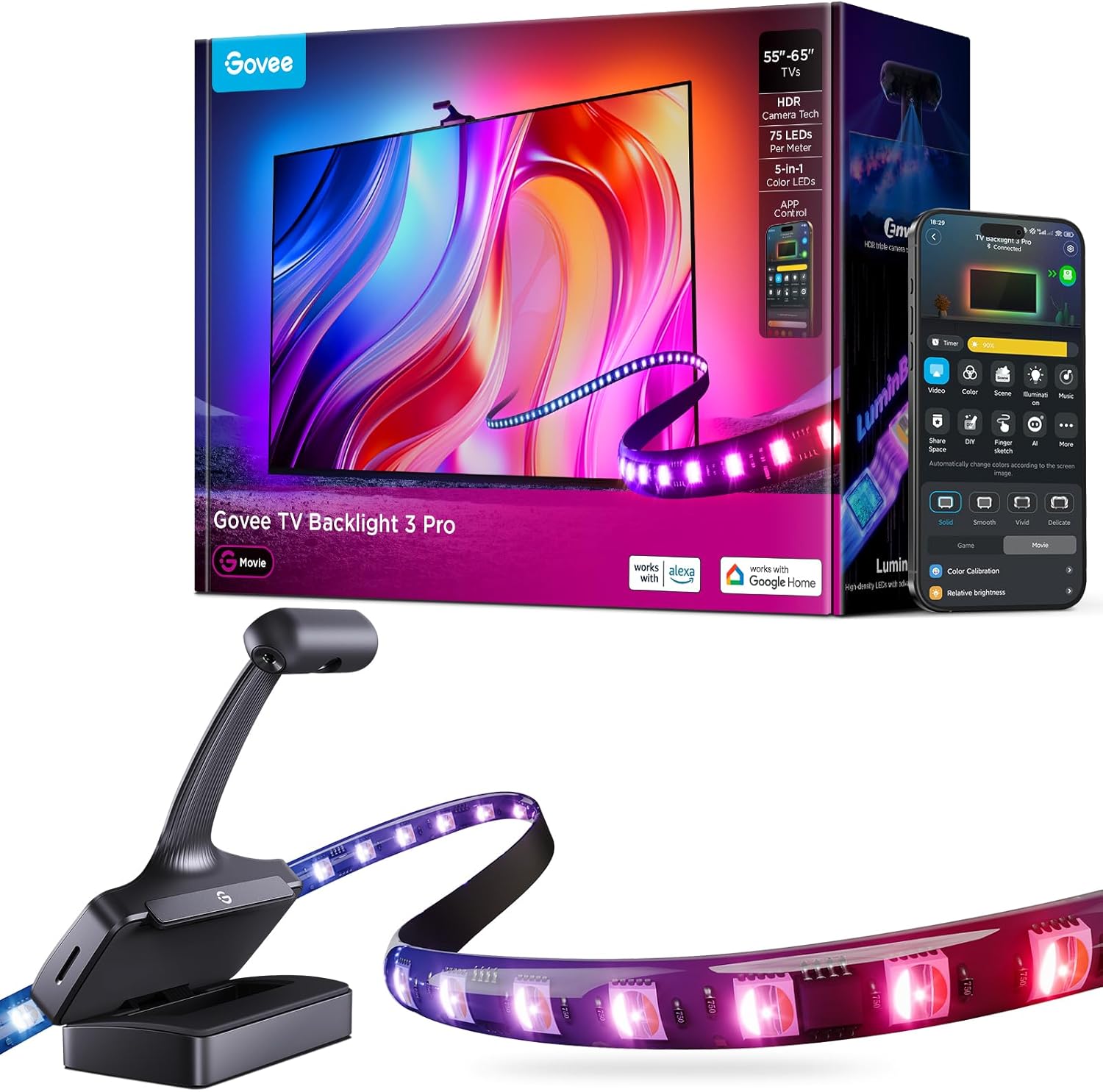
Pros
- HDR Image Capture Capability: Govee TV Backlight 3 Pro's HDR sensor
- High-Precision Triple Camera: The TV Backlight expands the
- High-Density TV Strip with LuminBlend Tech: Brighter with 75 LEDs/m
- Compact 85mm Camera Length for Seamless Installation: The new small
- Built with high grade Plastic for lasting wear resistance
Cons
- Requires gentle maintenance routines to preserve the Plastic finish
- Periodic visual inspection recommended to ensure component tightness
Integrating thoughtful design principles, the Govee TV Backlight 3 Pro with HDR Triple Camera 11.8ft enhances daily routines within LED Strip Lights areas. Operational testing demonstrates clear performance benefits driven by HDR Image Capture Capability: Govee TV Backlight 3 Pro's HDR sensor fuses short and long exposures, ensuring bright scenes keep detail without overexposure and dark areas stay rich, delivering precise color sampling and theater-quality picture. In active use, the presence of High-Precision Triple Camera: The TV Backlight expands the color-pick area by 50% around the corners by using a triple-lens setup, and improves accuracy by independently capturing colors across multiple individually calibrated zones on the TV screen eliminates common operational friction for homeowners.
Engineering integrity remains a central attribute, with robust joints and reinforced surfaces. Hardware stability is reinforced through High-Density TV Strip with LuminBlend Tech: Brighter with 75 LEDs/m and 5-in-1 RGBWWIC lamp beads blending cool and warm white. The built-in 16-bit chip delivers accurate colors and smoother gradients through an intelligent color-mixing algorithm, ensuring dependable daily performance. Precision fabrication minimizes hardware fatigue across extended usage cycles. Constructed using quality Plastic, outer surfaces withstand routine contact without losing visual appeal. Quality craftsmanship supports long term satisfaction for residential and professional settings. User centered design choices streamline routine interactions and enhance practical convenience.
Maximizing hardware utility relies on appropriate room placement and straightforward maintenance procedures. Incorporating Compact 85mm Camera Length for Seamless Installation: The new small lens module has been visually reduced in size and naturally fits the curve of TV edges when installed. The Gravitational Hanging Design of the camera adapts to most ultra-thin TVs, routine adjustments can be performed efficiently without specialized hardware. Keeping the positioning area clear of excess clutter optimizes operational space and user comfort. Quality craftsmanship supports long term satisfaction for residential and professional settings. User centered design choices streamline routine interactions and enhance practical convenience.

Pros
- Ultra-High Resolution Lens: Industry-leading dual hybrid lens with
- Smart AI Color-Mapping: Govee TV Backlight 3 innovative algorithm
- High-Density RGBWIC Strip: This tv led backlight features 60 LEDs/m
- Slim Gravity-Fit Camera: This camera length is just 90mm, nearly
- Built with high grade Plastic for lasting wear resistance
Cons
- Requires gentle maintenance routines to preserve the Plastic finish
- Requires proper surface alignment during initial installation
Integrating thoughtful design principles, the Govee TV Backlight 3 with Dual 4MP Lens TV Lights Sync to enhances daily routines within LED Strip Lights areas. Technical integration focuses on functional efficiency, incorporating Ultra-High Resolution Lens: Industry-leading dual hybrid lens with 4MP high-resolution optical performance. Hybrid lens structure minimizes color dispersion for sharper edges. Every frame precisely captured, light flows naturally from your display. Its balanced engineering incorporates Smart AI Color-Mapping: Govee TV Backlight 3 innovative algorithm divides the screen into 24 zones for independent color capture. AI filter detects film style and adjusts lighting theme to enhance mood without distraction for eye-friendly viewing to streamline day-to-day interactions.
Evaluating build quality and structural execution reveals strong manufacturing standards across components. The physical build incorporates High-Density RGBWIC Strip: This tv led backlight features 60 LEDs/m with 4-in-1 beads. Dedicated white channel delivers purer colors. 20% brighter with richer layers and depth. Seamless transitions extend light naturally from screen edge to wall, providing essential protection against surface wear. High tolerance assembly prevents unexpected mechanical looseness during daily operation. Constructed using quality Plastic, outer surfaces withstand routine contact without losing visual appeal. Using proper installation techniques maintains physical stability across daily activities. This balanced configuration fits smoothly into existing interior designs while maximizing efficiency.
Long-term operational satisfaction is supported by adhering to standard installation and cleaning practices. Thanks to Slim Gravity-Fit Camera: This camera length is just 90mm, nearly invisible without blocking the screen. Gravity-fit design works with ultra-thin TVs. Govee tv lights upgraded adhesive for super easy installation. Heat-resistant and residue-free, spatial alignment and initial setup progress smoothly for homeowners. Simple preventative care maintains mechanical responsiveness and aesthetic value over extended use. Using proper installation techniques maintains physical stability across daily activities. This balanced configuration fits smoothly into existing interior designs while maximizing efficiency. Quality craftsmanship supports long term satisfaction for residential and professional settings.

Pros
- 15ft strip with 138 LEDs is sized to wrap all 4 sides of a 70 to 80 inch TV
- RGBIC segmented lighting shows multiple colors at once instead of one flat hue across the strip
- Built-in mic drives music sync so lighting reacts to on-screen audio and game sound
- 99+ preset scene modes plus 11 music modes are available through the Govee Home App
- Controllable via Bluetooth and WiFi, plus Alexa and Google Assistant voice commands
Cons
- Does not sync with on-screen TV colors, so effects run independently of what's playing
- Coated but not waterproof, so it is not suited to humid or outdoor installations
- Strip length is fixed at 15ft and is not recommended to be cut or extended with pin connectors
RGBIC technology lets this backlight display segmented, multi-color effects along the same 15ft run rather than a single solid color, drawing from 99+ preset scene modes in the Govee Home App. A built-in microphone powers 11 music-sync modes that shift color and brightness with audio or gaming sound in real time.
- RGBIC segmented multi-color display
- 99+ preset scene modes
- 11 music-sync modes via built-in mic
This backlight does not capture or mirror the TV's on-screen colors automatically, so its lighting effects run as ambient accents rather than a screen-matching bias light.
At 15ft with 138 LEDs, the strip is sized to run around all four edges of a 70 to 80 inch TV, mounted using the included adhesive and cable clips to keep it seated against the frame. The strip has a protective coating but is not rated waterproof, so it should stay in a dry indoor spot.
- 15ft / 138 LEDs, sized for 70-80 inch TVs
- Cable clips included to secure the run
- Coated but not waterproof
The strip is not recommended for cutting or extending with pin connectors, so measuring the TV frame against the fixed 15ft length before ordering avoids a mismatch on unusually shaped screens.
Control runs through Bluetooth and WiFi via the Govee Home App, with voice control available through Alexa and Google Assistant once linked to a home network. The 24W power draw runs on a 12V/2A adapter, with the strip and power cable running roughly 1.8 meters to the outlet.
- Bluetooth and WiFi app control
- Alexa and Google Assistant compatible
- 24W power draw at 12V/2A
Because both Bluetooth and WiFi are supported, the strip can still be adjusted locally over Bluetooth if the home WiFi network happens to drop, keeping basic scene and color changes available.

Pros
- Strip runs 16.4 feet, sized specifically for 75 to 85 inch TVs rather than smaller screens
- Dual-camera color matching updates in real time to on-screen content across movies, sports and games
- LED density doubles to 60 LEDs per meter for denser, more uniform color transitions along the strip
- DreamView syncing links additional non-camera Govee lights over Bluetooth for whole-room color matching
- Camera mount uses a counterweight system for installation on ultra-thin TV frames
Cons
- Camera can only be mounted at the top of the TV, unlike some Govee models that also allow bottom placement
- Strip length is fixed at 16.4 feet for 75-85 inch screens, so it is not sized for smaller TVs without cutting and re-sealing the strip
- Color-matching accuracy can drop if other bright lights or on-screen reflections interfere with the camera, requiring the mounting position or room lighting to be adjusted
This backlight kit ships with a 16.4 foot RGBIC LED strip built specifically for 75 to 85 inch televisions; the strip is not intended for smaller screens without trimming and re-sealing connectors, so screen size should be checked before ordering. The camera housing itself measures 3.94 x 3.94 x 3.94 inches and mounts using a counterweight design that lets it sit securely even on the narrow top edge of an ultra-thin TV.
LED density is doubled to 60 LEDs per meter with dual light beads, aimed at giving smoother, more saturated color transitions around corners than a single-row strip produces. Optional 3M adhesive stickers are included for securing the camera unit to the top of the frame.
- Strip length: 16.4 ft
- TV size fit: 75-85 inches
- Camera unit: 3.94 x 3.94 x 3.94 inches
- LED density: 60 LEDs/m
The dual-camera unit mounts only at the top of the TV, using a counterweight system rather than the bottom-mount option available on some other Govee backlight models. Calibration is done through the Govee Home app over a mobile hotspot, matching colors along the picture edges to the LED strip in real time as content plays.
Color-matching accuracy can be thrown off by strong direct light, other lamps, or reflections from the screen itself hitting the camera lens; adjusting saturation and white balance in the app, or repositioning nearby lights, is the usual fix. The unit connects over Wi-Fi for app control and can also act as the main device for Bluetooth-based DreamView syncing with other Govee lights in the room.
- Mount position: top of TV only
- Calibration: via Govee Home app and mobile hotspot
- Connectivity: Wi-Fi plus Bluetooth DreamView sync
This kit is built for a media room or living room centered on a large-format 75 to 85 inch television, where the goal is extending on-screen color out to the surrounding wall for a more immersive viewing or gaming session. The DreamView feature lets it act as the anchor for other non-camera Govee lights placed around the same room, spreading color-matched lighting beyond just the TV surround.
It is not sized for bedrooms or offices with smaller monitors or TVs under 75 inches, since the strip length is fixed rather than adjustable to shorter runs. Rooms with a lot of ambient light or reflective surfaces near the screen may see less consistent color matching than a darker, controlled viewing space.

Pros
- 𝗥𝗘𝗔𝗟-𝗧𝗜𝗠𝗘 𝗧𝗩 𝗖𝗢𝗟𝗢𝗥 𝗦𝗬𝗡𝗖: Aura TV Backlight uses advanced camera color
- 𝗖𝗜𝗡𝗘𝗠𝗔𝗧𝗜𝗖 𝗜𝗠𝗠𝗘𝗥𝗦𝗜𝗢𝗡 𝗔𝗧 𝗛𝗢𝗠𝗘: Eliminate flat, lifeless lighting and eye
- 𝗔𝗗𝗩𝗔𝗡𝗖𝗘𝗗 𝗥𝗚𝗕𝗜𝗖 𝗟𝗘𝗗 𝗣𝗥𝗘𝗖𝗜𝗦𝗜𝗢𝗡: TV led lights built with durable
- Crafted with Plastic materials
Cons
- Spacious wall or desk clearance needed for Aura Labs Smart TV Bac
- Careful cable routing recommended for Aura Labs Smart TV Bac wall mounting
The Aura Labs Smart TV Backlight Sync to Screen for 70-85 Inch delivers tailored functional performance engineered for modern user demands. 𝗥𝗘𝗔𝗟-𝗧𝗜𝗠𝗘 𝗧𝗩 𝗖𝗢𝗟𝗢𝗥 𝗦𝗬𝗡𝗖: Aura TV Backlight uses advanced camera color recognition to mirror your screen in real time, transforming movies, shows, and gaming sessions into a vivid light experience; unlike basic tv backlight 75 inch or standard tv backlights, RGBIC technology displays multiple colors at once for deeper contrast and next-level ambience.. 𝗖𝗜𝗡𝗘𝗠𝗔𝗧𝗜𝗖 𝗜𝗠𝗠𝗘𝗥𝗦𝗜𝗢𝗡 𝗔𝗧 𝗛𝗢𝗠𝗘: Eliminate flat, lifeless lighting and eye strain with dynamic tv backlight that syncs with tv effects that react instantly to on-screen action and music beats; whether it’s a plot twist or boss battle, your led back lights for 75 inch smart tv setup becomes more cinematic, engaging, and unforgettable.. Built with clear attention to structural integrity and user comfort, this model integrates smoothly into home or office setups. Visual evaluation demonstrates excellent color accuracy, deep contrast levels, and crisp highlight reproduction for immersive viewing quality. Owners can.
Focusing on durability and functional efficiency, this model incorporates key attributes such as 𝗔𝗗𝗩𝗔𝗡𝗖𝗘𝗗 𝗥𝗚𝗕𝗜𝗖 𝗟𝗘𝗗 𝗣𝗥𝗘𝗖𝗜𝗦𝗜𝗢𝗡: TV led lights built with durable multi-color RGBIC LEDs and powered by an advanced CMOS camera sensor for precise color matching; strong 3M adhesive ensures secure installation with tv led lights that sync with tv, delivering long-lasting performance you can rely on.. Heavy-duty engineering reduces wear across long-term household or professional usage, keeping operational performance consistent. The integrated processing engine optimizes dynamic range and frame smoothing without introducing distracting visual artifacts or motion blur. Upholstered or framed in quality Plastic, the exterior provides strong wear resistance.
Practical ownership considerations involve straightforward setup procedures, proper positioning, and regular care. 𝗔𝗣𝗣 & 𝗩𝗢𝗜𝗖𝗘 𝗦𝗠𝗔𝗥𝗧 𝗖𝗢𝗡𝗧𝗥𝗢𝗟: Adjust brightness, colors, scenes, and speeds through the Aura app or enjoy hands-free control with Alexa and Google Home compatibility; perfect for tv sync led lights or tv led backlight, creating the perfect ambient mood lighting in your living room or bedroom.. Optimal setup involves calculating proper eye-level viewing height and verifying VESA wall mount bracket load feedback prior to secure installation. Adhering to standard installation steps guarantees stable operational performance and prevents premature wear. Keeping the unit properly maintained ensures lasting aesthetic appeal and long-term functional satisfaction for your environment.
Why Add TV Lights in the First Place?
TV lights, often called bias lighting or backlighting, are LED strips that mount to the rear edge of your television and cast a soft glow onto the wall behind it. That glow does more than look pretty. When you watch a bright screen in a dark room, your eyes constantly adjust between the intense light of the display and the surrounding darkness, which can lead to fatigue and headaches. A gentle backlight raises the ambient brightness just enough to ease that contrast, so your eyes relax and stay comfortable for longer.
There is a visual payoff too. A subtle halo of light behind the panel makes blacks look deeper and colors appear more vivid, because your brain perceives contrast relative to the surroundings. Add color-matching technology and the effect becomes dramatic, spilling the on-screen action out onto your wall for a truly immersive feel. Whether you want practical eye relief or full-blown movie-night magic, the best TV lights deliver both.
The Main Types of TV Lights
Static Bias Lighting
The simplest option is a single-color or manually adjustable strip that stays one shade while you watch. These are inexpensive, easy to install, and perfect if your only goal is reducing eye strain. Many RGB strips fall into this category, letting you dial in a warm white or a mood color that stays constant. A flexible pick like the Govee RGBIC LED Strip works well here because it can wrap a TV, a desk, or a headboard, giving you decorating freedom beyond the screen.
Screen-Sync Backlights
The next tier reads the content on your display and matches the LED colors to what is happening in each corner of the picture. Older systems used an external HDMI box, while modern designs rely on a small camera clipped to the top of the TV that watches the screen and reproduces the colors along the edges. This is where the magic happens for gamers and movie fans, since explosions, sunsets, and fast action bleed convincingly onto your wall.
Premium Ecosystem Lighting
At the top end you will find products built around a full smart-home ecosystem, often requiring a hub or sync box to unlock advanced gaming and entertainment modes. These cost more but reward you with rich color accuracy and tight integration with other smart lights in the room. The Philips Hue Play Gradient is the classic example, flowing gradients across the panel and syncing with music and games when paired with the required bridge and sync box.
Match the Lights to Your TV Size
One of the most common buying mistakes is grabbing a strip that is too short or too long for the screen. TV lights are sold in lengths tuned to specific size ranges, and getting this wrong means either a strip that does not reach the final corner or an awkward overhang you have to fold back. Measure the perimeter of your TV, or simply check the size range printed on the product listing, before you add anything to your cart.
For a mid-size set, options like the Govee TV LED Backlight and the Govee TV Backlight 3 Lite are cut for 55 to 65 inch panels, the most popular living-room size. If you own a large screen, look at longer runs such as the Govee Backlight 3 Lite for 75-85 inch TVs or the Govee LED Backlight for 70-80 inch TVs. Buyers with the very biggest displays should consider a dual-camera system like the Govee Envisual T2, which is designed to keep color accuracy consistent across a wide 75 to 85 inch surface.
Key Features to Compare
Color Accuracy and Camera Quality
If you want true screen syncing, the camera and the way it processes color are what separate a convincing effect from a distracting one. Newer cameras include fish-eye correction so the lens does not warp the color mapping at the edges of the screen, and some use multiple lenses for sharper matching. Systems such as the Govee TV Backlight 3 with dual lenses and the Govee Backlight 3 Pro with a triple-camera HDR setup are built around this idea, using smart filtering to reproduce colors more faithfully than single-sensor designs.
Control and Smart Features
Almost every set worth buying offers app control over your phone, letting you change scenes, brightness, and colors from the couch. The best options add Wi-Fi and voice control through Alexa or Google Assistant, and increasingly support the Matter standard for smoother smart-home integration. If you already run a smart home, look for these hooks. If you just want plug-and-play simplicity, a Bluetooth strip may be all you need, though it will lack remote and voice features.
Lighting Effects and Scene Modes
Beyond screen sync, many strips include dozens or even hundreds of preset scene modes, music-reactive lighting that pulses to your audio, and DIY options that let you paint custom colors along the strip. These extras turn your TV lights into a full mood-lighting system for parties, relaxation, or focus. RGBIC technology, where multiple colors appear on a single strip at once, is the feature to watch for if you want the richest effects.
Ease of Installation
Most TV lights use an adhesive backing that sticks to the rear of the panel, plus corner clips to guide the strip around each turn. Cable management matters too, since a camera clip and a power adapter add a couple of wires you will want to route neatly. Read the size guidance carefully and clean the back of your TV before applying the adhesive so the strip holds firmly over time.
How to Choose the Right TV Lights for You
Start with your main goal. If you simply want to reduce eye strain and add a warm glow, a straightforward RGB or bias strip keeps things affordable and easy. If immersion is your priority, a camera-based sync system is worth the extra spend, especially for gaming and movies where the color spill genuinely enhances the action.
Next, factor in your TV size and pick a length made for your range, as covered above. Then decide how much smart integration you need. Voice control, Wi-Fi, and Matter compatibility are great if you value convenience, while a budget Bluetooth strip suffices for casual users. Finally, think about the ecosystem. A pick like the Aura Labs Smart TV Backlight offers camera-based color matching for large screens from a smaller brand, which can be a nice middle ground between basic strips and premium hubs.
Budget is the last piece. Simple strips cost little, mid-range camera kits sit in the middle, and ecosystem lighting that needs a bridge or sync box climbs higher. Decide what features you will actually use, and avoid paying for a premium system if a straightforward backlight meets your needs.
Getting the Most From Your TV Lights
Once installed, spend a few minutes in the app calibrating the color zones so the sync matches your screen accurately, particularly with camera-based models. Position the strip so the LEDs face the wall rather than the room, which produces the softest, most even glow. Keep the ambient light in your room dim but not pitch black for the best contrast, and experiment with brightness until the backlight feels comfortable rather than overpowering.
For music lovers, try the sync modes during parties or relaxed evenings, and save a couple of favorite scenes for quick access. If your strip supports schedules, set it to switch on with your TV or fade to a warm tone late at night. Small tweaks like these help you enjoy the full value of whatever set you choose.
Final Thoughts
The best TV lights are the ones that fit your screen, match how you watch, and land within your budget. If you want the simplest upgrade, a basic bias strip eases eye strain and looks great for very little money. If you crave immersion, a modern camera-based backlight with accurate color matching turns every movie and game into a spectacle, and premium ecosystem options push that experience even further. Measure your TV, decide which features matter most, and choose a length made for your size range. With the right pick from the list above, you will be surprised how much a strip of light behind your television can transform an ordinary room into a proper home theater.




