
 Ethan Caldwell
 Upgrading to one of the best digital door locks is one of the simplest ways to make your home more secure and a lot more convenient. No more fumbling for keys in the dark, no more hiding a spare under the mat, and no more panicking when you lend a key to a house guest and never get it back. Modern digital door locks let you unlock your front door with a fingerprint, a PIN code, a smartphone app, or your voice, and many still keep a physical key as a backup for peace of mind.
In this guide we break down what actually matters when you shop for a digital door lock in 2026, how the different unlocking methods compare, and which types of locks fit different homes, apartments, and rentals. The goal is to help you choose confidently, not to bury you in spec sheets. Below you will find our curated shortlist, followed by a practical buying framework.
Top digital door lock picks for 2026
Here is the current lineup we are tracking. These models cover the full range, from budget keypad deadbolts to premium fingerprint and Wi-Fi smart locks, so there is a fit for nearly every door and budget.


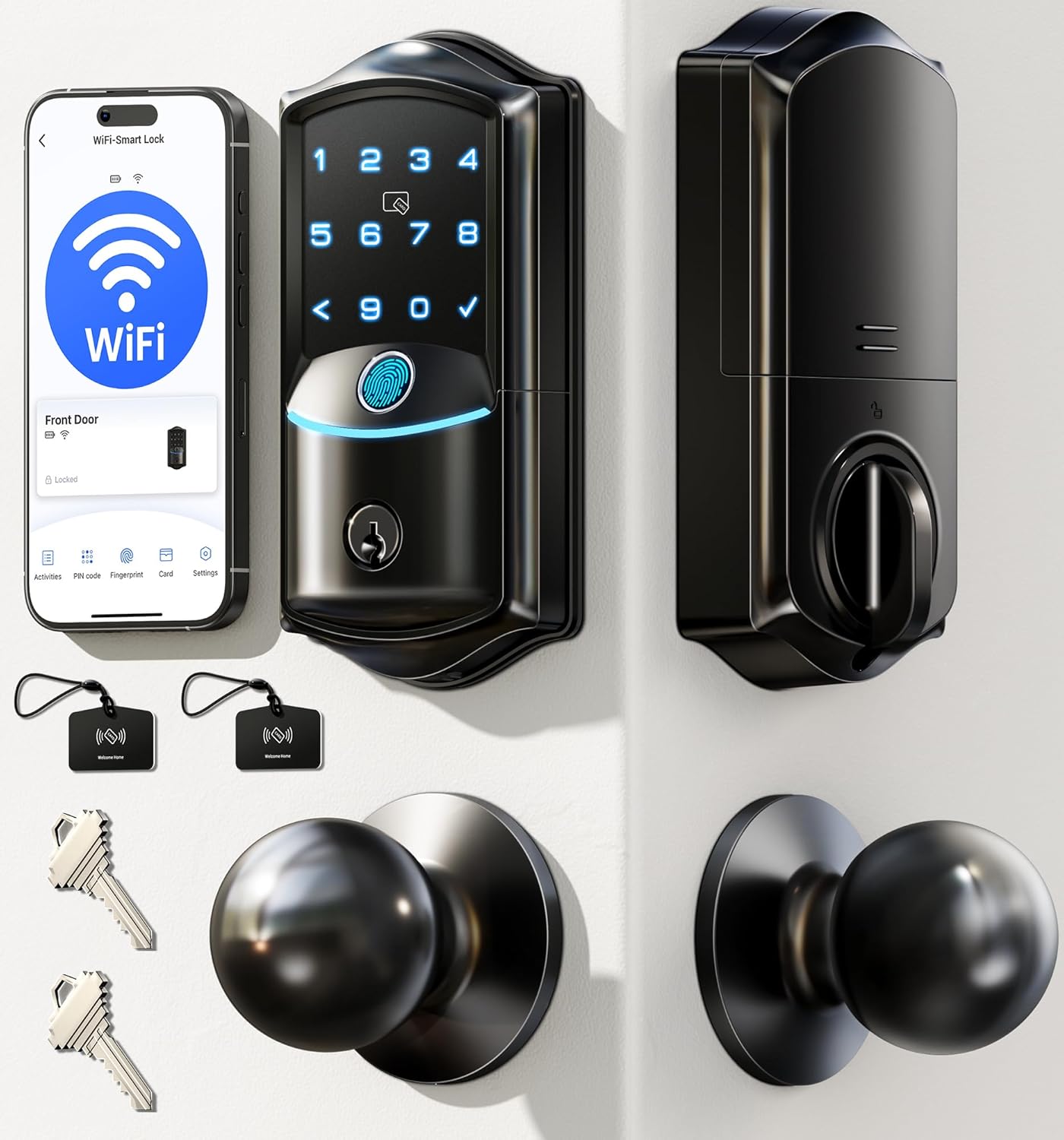


If you want a proven, no-frills starting point, the TEEHO TE001 is one of the most popular keypad deadbolts available, with tens of thousands of reviews behind it. For a fingerprint-first upgrade, models like the Fingerprint Smart Deadbolt add app control and auto-lock, while touchscreen Wi-Fi locks bring remote access and long battery life to the table. We link each pick in the relevant section below.
Why switch to a digital door lock?
The appeal of a digital door lock comes down to three things: convenience, control, and security. A keyless entry system means you can walk up to your door with your hands full of groceries and simply tap in a code or press a fingerprint sensor. There is no key to lose, copy, or forget.
Control is the second big win. With app-connected models you can create temporary codes for a dog walker, a cleaner, or a weekend guest, then delete them when you are done. Many locks log every entry, so you know exactly who came and went and when. If you rent out a room or run a short-term rental, this alone can justify the upgrade.
Finally, the best digital door locks improve security by removing the weak points of traditional keys. Bump keys and lock picks are far less effective against a well-made electronic deadbolt, and features like auto-lock make sure your door is never accidentally left unlocked. If you are comparing broader options, our overview of the best smart locks for modern homes is a helpful companion read.
Types of digital door locks
Keypad locks
Keypad locks are the most common and usually the most affordable entry point. You unlock the door by entering a PIN on a physical or touchscreen keypad. They do not require Wi-Fi, batteries last a long time, and setup is simple. The Veise Backlit Keypad Deadbolt is a good example, pairing an illuminated keypad with a matching handle set and one-time code support.
Fingerprint locks
Fingerprint (biometric) locks read your fingerprint to grant access in a fraction of a second. They are fast, hard to fool, and ideal for families since you can enroll several prints. The Fingerprint Smart Deadbolt and the Veise VE027-K WiFi Smart Lock both combine a fingerprint reader with keypad and app backup, so you are never locked out if a finger is wet or dirty.
Wi-Fi and app-connected smart locks
Wi-Fi smart locks connect directly to your home network, letting you lock, unlock, and monitor the door from anywhere in the world. Many also work with Alexa and Google Assistant for voice control. The Philips Wi-Fi Smart Lock and the Philips WiFi Keypad Lock are strong picks here, offering remote control, fingerprint unlock, and voice assistant support without needing a separate hub. If you specifically want a bolt-style upgrade, see our guide to the best smart deadbolts available now.
Handle and knob locks
Not every digital lock is a deadbolt. Some replace the door handle or knob itself, which is handy for interior doors, side doors, or homes where you want the electronics built into the handle. The Nyboer Keypad Handle Lock and the Veise Keyless Entry Handle Set both put the keypad right on the handle for a clean, integrated look.
How to choose the best digital door lock
Match the lock to your door
Before anything else, measure your door and check the existing hardware. Most digital deadbolts fit standard doors between 1-3/8 and 1-3/4 inches thick with a standard bore hole, but always confirm. If you are replacing a deadbolt, look for a deadbolt-style lock; if you are replacing a knob or lever, choose a handle set. A lock that does not fit your door is the number one cause of returns.
Decide which unlocking methods you want
The best digital door locks give you several ways in, and redundancy is a feature, not a luxury. A lock that offers fingerprint, keypad, app, and a physical key backup means you always have a fallback. If a family member does not carry a phone, make sure keypad or fingerprint access is included. If you travel often, prioritize Wi-Fi and remote app control like the Tapo DL110 offers.
Check the security rating
Look for a BHMA (Builders Hardware Manufacturers Association) grade. Grade 1 is the most robust, Grade 2 is excellent for residential use, and Grade 3 covers basic residential needs. The Tapo DL110 carries a BHMA Grade 2 rating, while the Tapo DL100 is a Grade 3 option at a lower price point. Weather resistance matters too: an IP54, IP65, or better rating means the lock will hold up to rain and dust on an exposed front door.
Think about battery life and backup power
Almost all digital door locks run on batteries. Some use standard AA cells, while others use a rechargeable pack that can last a year on a single charge, like the Tapo DL110. Whatever you choose, look for a low-battery warning and an emergency power option, such as a USB or 9V terminal on the outside, so a dead battery never leaves you stranded on your porch.
Consider installation and rentals
Many of these locks are genuinely DIY-friendly and install with a screwdriver in under 30 minutes. That is great news for renters, since most keypad and fingerprint deadbolts reuse the existing bolt hole and can be swapped back when you move out. If you are outfitting a rental or apartment, a simple keypad model like the TEEHO TE001 keeps things reversible and affordable. For a deeper look at securing your entryway, our guide to the best front door locks for every home is worth a read.
Smart features worth paying for
Once you move up from a basic keypad, a handful of smart features genuinely change how you live with your door. Auto-lock is the standout: the lock secures itself after a set delay, so you never have to wonder whether you locked up. One-time and scheduled codes are perfect for deliveries and guests. Entry logs give you a running history of activity, and app notifications can ping your phone the moment the door opens.
Voice assistant support is a nice bonus if you already use Alexa or Google Assistant, letting you check the lock status or secure the door hands-free. Models like the Philips WiFi Keypad Lock bundle voice control, fingerprint unlock, and remote app access into a single package. Just remember that Wi-Fi features draw more power, so factor that into your battery expectations.
Installation tips for a smooth setup
Even the best digital door locks are only as good as their installation. Start by removing your old deadbolt or handle and keeping the screws organized. Confirm the bolt throws smoothly before you attach the electronics, since a misaligned strike plate is the most common cause of jams and motor strain. Tighten the mounting screws evenly so the lock sits flush and square against the door.
When you power it on, enroll your fingerprints and codes carefully, and always set at least one backup method. Test the lock from both sides several times before you trust it, and add the manufacturer app if the model supports it so you get firmware updates and low-battery alerts. Keep the physical backup key, if included, somewhere safe but off-site.
Budgeting for a digital door lock
Prices in this category range widely. Basic keypad deadbolts start around 35 to 55 dollars, mid-range fingerprint and handle models sit in the 55 to 90 dollar range, and premium Wi-Fi locks with every feature run past 100 dollars. The right choice depends on which features you will actually use. If you never plan to unlock the door remotely, you can save money by skipping Wi-Fi. If you rent out space or travel constantly, the added cost of a connected lock pays for itself in convenience.
For most homeowners, a mid-range fingerprint or keypad deadbolt hits the sweet spot of security, convenience, and price. Renters and budget shoppers do great with a reliable keypad model, while tech enthusiasts and frequent travelers will appreciate a full Wi-Fi smart lock. If you are building out a fully connected entryway, you may also want to compare dedicated smart locks for front doors to round out your setup.
Final thoughts
The best digital door locks combine everyday convenience with real security upgrades, and there has never been a better time to make the switch. Whether you want a simple keypad deadbolt, a fast fingerprint reader, or a fully connected Wi-Fi smart lock, the options on our shortlist cover every door, budget, and lifestyle. Focus first on fit and unlocking methods, then layer in the smart features that match how you live. Do that, and you will end up with a lock that makes coming home easier and keeps your household safer for years to come.


