 Naomi Tanaka
 A smart thermostat is one of the easiest upgrades you can make to cut heating and cooling costs while adding real convenience to daily life. The best wi fi thermostats let you control your home’s temperature from your phone, build automatic schedules around your routine, and squeeze more efficiency out of your HVAC system without constant fiddling. If you have been eyeing an upgrade, this guide walks through what actually matters, how to shop smart, and which models are worth a closer look.
Below you will find our curated shortlist, followed by a practical buying framework so you can match the right wi-fi thermostat to your home, your heating system, and your budget.

Pros
- Includes one SmartSensor for room-level occupancy and temperature detection beyond the thermostat's own location
- Quad-core processor and dual-band Wi-Fi support faster app response and far-field voice pickup
- Alexa is built directly into the thermostat, so no separate smart speaker is needed for voice commands
- Installs in about 45 minutes using the in-app guided walkthrough
- Integrates with Google Assistant, Apple HomeKit, SmartThings and IFTTT for broader automation setups
Cons
- Built-in Alexa microphone means the thermostat is always listening for its wake word, a consideration for privacy-conscious households
- Bluetooth 5.0 is required for initial pairing, so very old phones without Bluetooth cannot complete setup
- Additional SmartSensors beyond the included one are sold separately for covering more rooms
Installation runs through a video walkthrough inside the companion app, and most single-zone systems can be swapped in around 45 minutes without a technician.
- Step-by-step guided install through the mobile app
- Bluetooth 5.0 used during the pairing process
- Compatible with the wiring found in most forced-air and heat pump systems
- Glass-front touch display replaces the existing wall thermostat
Systems with unusual staging, such as multi-stage heat pumps or zoned dampers, should be checked against the compatibility tool before ordering. A built-in level also helps square the wall plate during mounting, before wiring is connected to the equipment terminals.
Alexa is built directly into the thermostat, so voice commands for temperature, weather or music work without pairing a separate smart speaker.
- Built-in Alexa for hands-free control and Alexa Calling
- Dual-band Wi-Fi and far-field microphones for voice pickup across a room
- Mobile app control from a phone, tablet, computer or compatible watch
- Works with Google Assistant and Siri Shortcuts alongside Alexa
Because the microphone is always active for wake-word detection, households that prefer a silent thermostat can mute the mic through the on-screen settings.
A single SmartSensor ships in the box and reports occupancy and temperature from wherever it is placed, letting the thermostat favor an occupied bedroom over an empty hallway at night.
- Included SmartSensor for room-level occupancy detection
- Additional sensors can be added to cover more rooms
- Integrates with SmartThings, Apple HomeKit and IFTTT routines
- Reports energy usage patterns through the companion app
Multi-room comfort depends on how many sensors are placed around the home, since the single included unit only tracks one room by default.

Pros
- Touchscreen color display simplifies schedule changes without a paired phone nearby
- Built-in level and illuminated click terminals speed up DIY wall-plate installation
- Compatible with most HVAC systems already wired with a common wire (C-wire)
- Available in black, white or silver to match existing wall trim
- Delivers usage reports and equipment alerts, including filter-change reminders, through the mobile app
Cons
- Requires a C-wire at the furnace or air handler, so older 2-wire systems need an added adapter
- Touchscreen only ships on this model; the base line in the same family uses physical buttons instead
- Wi-Fi is 2.4GHz only, so it will not join a 5GHz-only home network
Setup uses a built-in bubble level and illuminated, click-style terminals so wires land in the right slot without guesswork. Step-by-step instructions run inside the companion app during the process.
- C-wire required for power; systems without one need a compatible add-on adapter
- Works with the wiring typically found in gas, electric and heat pump systems
- Wall plate covers most existing thermostat cutouts for a clean swap
- No professional visit needed for a standard single-zone changeover
Once wired, the display walks through a guided pairing sequence before handing control to the app.
The thermostat connects to a 2.4GHz Wi-Fi network so it can be adjusted from a phone or tablet anywhere there is a signal. The app also stores usage history that can be checked at any time.
- Flexible scheduling by day and time block
- Remote temperature adjustment from the companion app on Android or iOS
- Usage reports show runtime patterns over time
- Equipment alerts flag issues like short cycling or missed maintenance
The manufacturer states it does not sell personal information collected through the app to third parties, a distinction from thermostats that share usage data with advertisers.
The thermostat is designed to work with the heating and cooling equipment found in most homes, including conventional forced-air and heat pump setups, provided a common wire is present at the equipment end.
- Energy Star certified, built around scheduling and setback strategies for lower runtime
- Touchscreen color display with backlight for low-light rooms
- Keypad lockout available for households with children
- Works with Alexa for voice-based temperature changes
Systems with dual-fuel setups, zoned dampers or unusual staging should confirm compatibility with the manufacturer before installation, since not every configuration is supported out of the box.

Pros
- Dimensions of 1"D x 4.05"W x 4.05"H engineered for optimal spatial fitting
- Built with high grade Plastic for lasting wear resistance
- Provides reliable operational efficiency for daily indoor setup
Cons
- Requires verifying placement clearance for 1"D x 4.05"W x 4.05"H prior to installation
- Requires gentle maintenance routines to preserve the Plastic finish
Tailored for residential and professional settings, the ecobee3 Lite Smart Thermostat - Programmable Wifi addresses routine requirements effectively. Technical integration focuses on functional efficiency, incorporating high structural stability and user utility. Its balanced engineering incorporates engineered hardware precision and smooth operation to streamline day-to-day interactions. Measurements of 1"D x 4.05"W x 4.05"H provide clear dimensional boundaries for precise space planning. Carefully selected components ensure minimal maintenance overhead over long service life. Attention to manufacturing details ensures reliable utility for your Programmable. Using proper installation techniques maintains physical stability across daily activities. This balanced configuration fits smoothly into existing interior designs while maximizing efficiency.
Evaluating build quality and structural execution reveals strong manufacturing standards across components. The physical build incorporates practical installation attributes and space-saving structure, providing essential protection against surface wear. High tolerance assembly prevents unexpected mechanical looseness during daily operation. Constructed using quality Plastic, outer surfaces withstand routine contact without losing visual appeal. Carefully selected components ensure minimal maintenance overhead over long service life. Attention to manufacturing details ensures reliable utility for your Programmable. Using proper installation techniques maintains physical stability across daily activities. This balanced configuration fits smoothly into existing interior designs while maximizing efficiency. Quality craftsmanship supports long term satisfaction for residential and professional settings.
Long-term operational satisfaction is supported by adhering to standard installation and cleaning practices. Thanks to long-term material resilience and easy care routines, spatial alignment and initial setup progress smoothly for homeowners. Simple preventative care maintains mechanical responsiveness and aesthetic value over extended use. Carefully selected components ensure minimal maintenance overhead over long service life. Attention to manufacturing details ensures reliable utility for your Programmable. Using proper installation techniques maintains physical stability across daily activities. This balanced configuration fits smoothly into existing interior designs while maximizing efficiency. Quality craftsmanship supports long term satisfaction for residential and professional settings.

Pros
- Includes one wireless room sensor in the box to average temperature readings across rooms
- Built-in far-field microphone lets Alexa respond to voice commands without a separate smart speaker
- Touchscreen unit measures 3.23"D x 7.56"W x 7.64"H, larger than a typical dial-style thermostat
- Compatible with most 24V HVAC systems typically found in homes with central heating and cooling
- Works alongside Apple HomeKit, Google Assistant and Amazon Alexa for cross-platform voice control
Cons
- Most 24V HVAC systems need a common wire (C-wire); older systems may require a power extender kit
- Additional room sensors are sold separately if more than one room needs monitoring
- Setup requires a home Wi-Fi network, so it will not function remotely during an internet outage
This thermostat is built for 24V HVAC systems, the type used in most central heating and cooling setups, and measures 3.23"D x 7.56"W x 7.64"H on the wall. Installation typically calls for a common wire (C-wire) to keep the touchscreen and Wi-Fi radio powered continuously.
- Designed for systems with a common wire; older two-wire setups may need a power extender kit
- Touchscreen interface replaces the physical buttons found on basic programmable thermostats
- Wall-mounted footprint of 3.23"D x 7.56"W x 7.64"H
Anyone with a heat pump, dual-fuel system or unusual wiring configuration should check compatibility against their existing wiring before purchase, since not every legacy HVAC setup includes the wires this thermostat expects.
A wireless room sensor ships in the box and reports temperature and occupancy from wherever it is placed, letting the thermostat average conditions across more than one room instead of relying on the reading at the thermostat itself.
- One room sensor included in the package, placeable in a bedroom or living area
- Sensor works alongside the thermostat's own reading to balance temperature across rooms
- Additional sensors can be added for homes with more rooms to monitor
Homes with only one or two rooms typically get full use from the included sensor, but larger homes wanting sensor coverage in every bedroom will need to purchase extra sensors separately, since only one comes bundled.
A built-in microphone and speaker let Amazon Alexa respond to voice commands directly through the thermostat, without needing a separate Echo device in the room. The thermostat also connects to a home Wi-Fi network for remote scheduling and app control.
- Built-in far-field microphone for Alexa voice commands
- Compatible with Apple HomeKit, Google Assistant and Amazon Alexa ecosystems
- Requires a home Wi-Fi network for app control and remote access
Because voice control and remote scheduling both depend on an internet connection, the thermostat falls back to basic on-device operation if the home Wi-Fi network goes down, losing app access and geofencing features until the connection returns.

Pros
- Works without a c-wire in most installations, unlike most smart thermostats that make it mandatory
- ENERGY STAR certified with a claimed saving of about 23% on HVAC energy through scheduling and usage reports
- 5.88 x 3.75 inch face fits the footprint of a typical old thermostat, so no patching and repainting the wall
- Physical buttons and a backlit display, so the household can change the temperature without opening an app
- Emerson states it does not sell your personal information to third parties, and there is no camera or microphone
Cons
- No colour touchscreen - the Sensi Touch at 164.21 is the model to buy if you want that display
- 2.4GHz Wi-Fi only, which is a nuisance on merged-band routers during setup
- No built-in room sensor network or occupancy detection, so it heats to the hallway temperature rather than the room you are in
Sensi builds this model specifically around a self-install, and two design choices make that realistic.
- No c-wire in most homes. Where most smart thermostats demand a common wire for constant power, the ST55 runs from batteries or a c-wire, so many older systems work untouched.
- Same footprint. At 5.88 x 3.75 x 1.0 inches it covers the area a traditional thermostat left behind, which usually means no filling, sanding or repainting.
- Built-in level in the backplate so it goes on straight first time.
The app walks you through wire by wire: photograph the existing terminals before you disconnect anything, label each wire, then follow the on-screen prompts. Kill power at the furnace breaker first. Most installs run 20 to 30 minutes.
Sensi states the ST55 works with the HVAC equipment found in most homes, but a few checks are worth doing before ordering.
- Photograph your wiring and run it through Sensi's compatibility checker. Conventional gas, oil and electric systems plus most heat pumps are covered.
- Power: batteries or c-wire. This is the key difference from the Sensi Touch models, all of which require a c-wire.
- Wi-Fi: 2.4GHz only. If your router merges 2.4 and 5GHz under one name, split the bands temporarily to get through setup.
- Apps: requires a phone with the Sensi app; Alexa works for voice control.
Systems with proprietary controls, multi-stage setups beyond the supported configuration, or line-voltage baseboard heating are the usual exclusions - check those before buying.
The claimed 23% saving on HVAC energy is not automatic - it comes from actually using the scheduling features.
- Flexible schedules: drop the temperature during working hours and overnight, and bring it back before you wake or arrive home.
- Remote access: turn the heating on from the road if plans change, or off entirely when a trip runs long.
- Usage reports: monthly runtime data shows where the hours are actually going, which is how you find an oversized or short-cycling system.
- Maintenance alerts: filter change reminders and equipment alerts, which quietly protect efficiency over years.
Day to day it behaves like a normal thermostat with buttons and a keypad lockout, so guests, children and less technical household members are not stuck. Emerson also commits to not selling your personal data - unusual in this category.
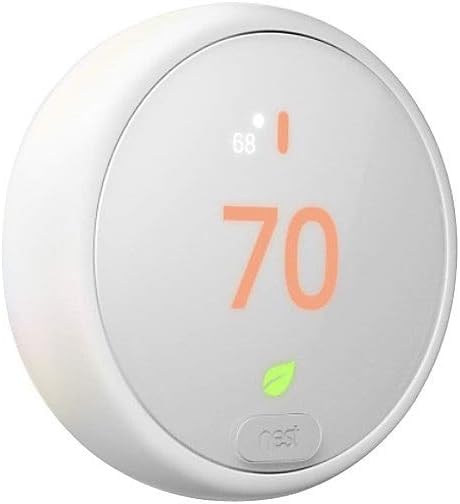
Pros
- Requires only a Wi-Fi connection and a phone or tablet running iOS or Android for the companion app, no separate hub box needed
- Remote control works from a phone, laptop, or tablet, so the temperature can be set before anyone walks in the door
- Built-in HVAC monitoring watches the heating and cooling system and sends an alert plus maintenance reminders if something looks off
- Pairs with a separately sold room temperature sensor accessory to track one specific room instead of just the hallway
- Frosted plastic display is designed to blend into a wall rather than stand out as a gadget
Cons
- Remote control and alerts depend on a working home Wi-Fi connection, so a network outage disables app access
- Room-specific temperature tracking needs an accessory sensor bought separately, not included in the box
- Compatible with common heating/cooling wiring, but older or unusual HVAC systems should be checked before buying
This thermostat starts with a simple schedule and lets you adjust it anytime from the companion app on a phone, laptop, or tablet. An Away Assist feature switches to an eco temperature automatically once everyone leaves, so an empty home is not heated or cooled the same as an occupied one.
- Self-learning schedule that can be edited manually at any point
- Away Assist switches to an eco setting when the home is empty
- Remote access from a phone, laptop, or tablet over Wi-Fi
- An on-screen indicator appears when a chosen temperature is set to save energy
Full functionality requires a stable Wi-Fi connection and a phone or tablet running iOS or Android, plus a free account for the companion app.
Installation typically takes about 60 minutes or less, and the required hardware is included in the box along with a trim plate that helps cover marks left by a previous thermostat. The plastic body and frosted display are designed to sit flush against most wall styles.
- Typical install time of around 60 minutes with included hardware
- Compatible wiring covers common heating and cooling setups
- Built-in HVAC monitoring flags issues with the connected system and offers maintenance reminders
- Works alongside an optional, separately sold room temperature sensor for wiring into multi-zone homes
Anyone unsure about their wiring type should check compatibility before installing, since not every older HVAC system is supported.
The thermostat works with Alexa, Google Assistant, and other smart speakers, so temperature changes can be spoken instead of tapped into an app. It suits households that already run a smart speaker or two and want one more device tied into that same routine.
- Voice control through Alexa, Google Assistant, and other compatible smart speakers
- Frosted display designed to blend into a range of wall colors and room styles
- Energy History in the app shows how much energy was used and offers suggestions to reduce it
- A separately sold room sensor extends control to bedrooms or offices away from the main unit
Households without an existing Wi-Fi network or smart speaker will get less use from these features than ones already set up with a connected home.

Pros
- Color touchscreen display fits a compact 3.5 x 4.5 inch wall plate footprint
- Wi-Fi connectivity enables remote schedule and temperature adjustments away from the wall unit
- Manufactured in the United States, with plastic housing shipped in a 6 x 2 x 8 inch package
- Programmable design allows separate temperature settings across different times of day
Cons
- Requires a dedicated C-wire for power, so homes without one need an added C-wire adapter or professional wiring
- White finish only, with no alternate color or trim kit included in this listing
- No humidity sensor or air-quality data is listed on the specification sheet for this model
This thermostat requires a C-wire (common wire) for continuous power to run its Wi-Fi radio and color touchscreen, which is standard for most Wi-Fi-connected thermostats but means older HVAC systems wired without a common wire will need an added C-wire adapter or a short electrician visit before installation. The unit measures 3.5 x 4.5 inches at the wall plate and 0.75 inches deep, keeping the wall footprint compact next to a light switch or door frame.
Housing is plastic, and the unit is manufactured in the United States. It ships in a 6 x 2 x 8 inch box. Because there is no battery-only fallback mode listed for this model, planning for the C-wire requirement ahead of installation day avoids a return trip partway through setup.
The color touch screen replaces physical buttons with an on-screen interface for setting schedules and adjusting temperature at the wall, while built-in Wi-Fi lets the same schedule be checked or changed remotely once connected to a home network. That combination suits anyone who wants to adjust heating or cooling before arriving home rather than waiting until they are standing in front of the thermostat.
- Wi-Fi connectivity is built in, without a separate bridge or hub required for network access
- Touchscreen display replaces mechanical dials or push-buttons for day-to-day adjustments
- Programmable scheduling allows different temperature settings across different times of day
Because the listing does not specify voice-assistant integration or a companion smart-home hub connection, buyers building a specific smart-home setup should confirm compatibility with their existing platform before purchase.
This thermostat suits a household replacing an older programmable or non-Wi-Fi thermostat that already has a C-wire run, or one willing to add a C-wire adapter as part of the upgrade. The compact 3.5 x 4.5 inch touchscreen fits standard wall thermostat cutouts, so it is a like-for-like swap in most homes rather than requiring new wall work.
Because the specification sheet included with this listing is limited to physical dimensions, materials, and wiring notes, buyers with specific questions about zoning support, multi-thermostat setups, or advanced scheduling features should check the manufacturer's own product documentation directly before deciding, since those details are not part of the data provided here.

Pros
- Built-in radar occupancy sensor preheats or precools the home before you arrive
- Compatible with 90% of 24VAC HVAC systems, including gas, oil, electric, heat pump, and boiler setups
- Power Extender Kit is included in the box for homes without a C-wire, avoiding a separate purchase
- Works with Siri, Alexa, and Google Assistant for voice-based temperature adjustments
- Compact 4.09 x 4.09 x 0.94-inch metal housing mounts on a standard wall plate footprint
Cons
- Hardwired installation is required, so it depends on your home's HVAC wiring rather than running on batteries alone
- Line-voltage systems (110/220V) and millivolt or 0-10VDC systems are explicitly not compatible
- Room-level SmartSensors for occupancy detection in individual rooms are sold as a separate add-on
This thermostat is built to work with roughly 90% of 24VAC HVAC equipment, covering gas, oil, electric, dual-fuel, forced-air conventional systems up to 2 heat/2 cool, heat pumps up to 3 heat/2 cool, and boilers. A Power Extender Kit and trim kit are both included in the box for homes without an existing C-wire.
- Compatible with 90% of 24VAC HVAC systems
- Power Extender Kit and trim kit included
- Not compatible with line-voltage (110/220V) or millivolt/0-10VDC systems
Checking wire labels against the manufacturer's own compatibility checker before installation is worth doing, since the excluded system types above are common enough in older homes to catch buyers off guard.
A built-in radar sensor detects occupancy and can preheat or precool a space ahead of arrival, then automatically shifts settings based on whether the home is occupied or everyone is asleep. The system also factors in humidity when adjusting temperature, aiming for comfort beyond a simple set-point schedule.
- Built-in radar occupancy detection
- Automatic preheat/precool before arrival
- Humidity-aware temperature adjustment
- Optional SmartSensors detect occupancy room by room
Room-level SmartSensors are sold separately from the main thermostat, so multi-room occupancy detection beyond the thermostat's own built-in sensor requires an additional purchase.
Control is available through the ecobee app from a smartphone, tablet, or Apple Watch, and voice control is supported through Siri, Alexa, and Google Assistant. The unit is hardwired rather than battery-powered, which removes the risk of losing control if batteries die, but also ties installation to the home's existing HVAC wiring.
- App control from smartphone, tablet, or Apple Watch
- Voice control via Siri, Alexa, and Google Assistant
- Hardwired power, no batteries to replace
- Metal housing, 4.09 x 4.09 x 0.94-inch footprint
Because it's hardwired, installation is a DIY electrical task rather than a simple mount-and-go swap, though the included Power Extender Kit is meant to cover most common wiring gaps found in older thermostat setups.
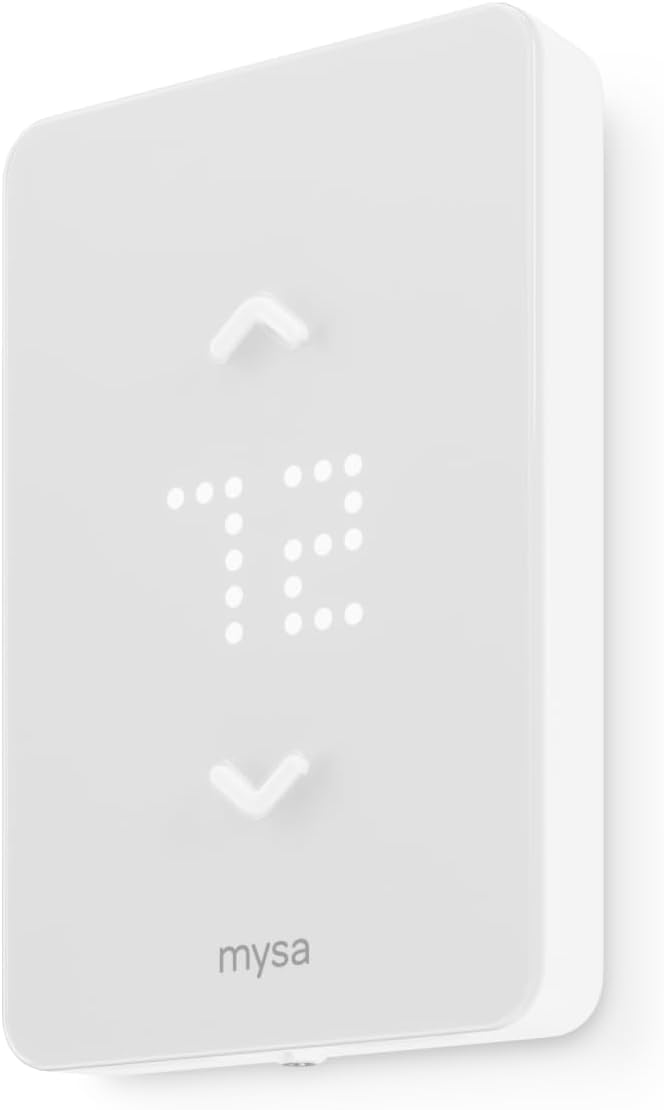
Pros
- Connects straight to home Wi-Fi with no separate hub required, unlike some competing baseboard thermostats
- Compatible with 120V, 208V, and 240V circuits, covering single-pole and double-pole baseboard, fan-forced, and convector heaters
- Requires 4 wires (neutral or second live) for install, with a guided walkthrough inside the free app
- Works with Apple HomeKit, Amazon Alexa, and Google Home for voice-set temperatures
- Sends a monthly per-room runtime report by email so you can compare schedules across rooms
Cons
- Needs 4 wires including a neutral or second live wire, so older 2-wire baseboard setups may not be compatible without an electrician
- No physical hub means all remote features depend on your home Wi-Fi staying online
- Housed in a compact 2.48 x 4.65 x 6.02 inch plastic shell available only in the standard finish shown
The LITE model is built for electric baseboard heaters, fan-forced heaters, wall heaters, and convector units running on 120V, 208V, or 240V circuits, and it supports both single-pole and double-pole wiring configurations. Installation is DIY-oriented: the in-app guide walks through each wire connection step by step, with most homes needing no electrician.
- Requires 4 wires at the switch box — a neutral wire or second live wire is mandatory
- Typical install time runs about 15 minutes once wiring is confirmed compatible
- Housed in a 2.48"D x 4.65"W x 6.02"H plastic faceplate that fits a standard switch box
Before ordering, check your existing wiring against the app's compatibility guide, since homes without a neutral or second live wire at the baseboard will need rewiring first.
Once connected to your home Wi-Fi, the Mysa LITE runs 7-day custom schedules per room and drops temperature automatically during set away periods. Control runs through the free Mysa app on iOS and Android, and every scheduling and monitoring feature is unlocked at setup with no recurring subscription or paywalled tier.
- Pairs with Apple HomeKit, Amazon Alexa, and Google Home for voice-based temperature changes
- Monthly runtime report emails break down energy use by room so schedules can be compared over time
- Touch controls on the unit itself allow manual adjustment without opening the app
Because there is no separate hub, all remote and voice features rely on a stable home Wi-Fi connection — if your router goes down, only local touch control keeps working.
This thermostat suits households heating individual rooms with electric baseboard, fan-forced, or convector units who want per-room scheduling without adding a central hub to the setup. It works well for anyone comfortable following an in-app wiring guide, since most installs are designed to be completed without calling an electrician.
- Good fit for renters or homeowners replacing an existing mechanical baseboard thermostat one room at a time
- Well suited to multi-room homes where different schedules per room matter more than centralized HVAC control
- Less suited to homes with only 2-wire baseboard circuits, since a neutral or second live wire is required
Anyone managing central 24V HVAC systems instead of baseboard heat should look at the 24V Mysa variant rather than this LITE model.

Pros
- Customizable color touchscreen changes to match room decor, not fixed to one display color
- ENERGY STAR certified, with monthly energy reports tracking heating and cooling patterns
- Compatible with forced air systems using gas, oil or electric, plus hot water, steam, and heat pumps with electric backup
- 7-day programmable scheduling adapts to different weekday and weekend routines
- Works with Alexa and Google Assistant for voice-based temperature adjustments
Cons
- Requires a C-wire for power, which is not present in every older home's HVAC wiring
- Not compatible with electric baseboard heat systems running 120-240V
- Compact 3.5-inch by 4.5-inch screen size is fixed, with no larger display option offered
This thermostat works with forced air systems running on gas, oil, or electric, along with hot water, steam, and heat pump systems that include electric backup. It requires a C-wire for continuous power, so homes without one may need a C-wire power adapter added during installation before the thermostat can run.
- Compatible with gas, oil, and electric forced air systems
- Supports heat pump systems with electric backup, though not standalone electric baseboard heat
- C-wire requirement means some older HVAC setups need an adapter before installation
It is explicitly not compatible with electric baseboard heat systems running 120-240V, so checking existing wiring against the compatibility list before buying avoids a mismatched install.
A customizable color touchscreen can be set to match a room's decor, and 7-day programmable scheduling allows different routines for weekdays versus weekends rather than one fixed daily schedule. The thermostat connects over Wi-Fi and pairs with the companion app for remote schedule changes, plus voice control through Alexa or Google Assistant.
- 7-day programming supports separate weekday and weekend routines
- Wi-Fi connectivity enables remote schedule and temperature adjustments from a phone or tablet
- Alexa and Google Assistant compatibility adds voice-based temperature control
Because full functionality depends on a Wi-Fi connection, remote features and app-based schedule changes are unavailable if the home network goes down, though the local touchscreen schedule keeps running.
This thermostat is ENERGY STAR certified and generates monthly energy reports covering heating and cooling activity, along with personalized tips aimed at reducing overall energy use. Intelligent alerts flag air filter and humidifier pad change reminders, plus notifications for extreme high or low indoor temperature and humidity readings.
- Monthly energy reports track heating and cooling activity over time
- Filter and humidifier pad change reminders reduce the chance of forgotten maintenance
- Alerts for extreme temperature or humidity swings flag potential equipment issues early
Local weather forecasts display directly on the touchscreen, with 5-day forecasts available through the companion app for planning heating and cooling needs ahead of time.
Why upgrade to a wi-fi thermostat?
Traditional thermostats do one thing: hold a temperature. A wi-fi model connects to your home network so you can adjust settings remotely, receive alerts, and let the device learn when to heat or cool for maximum savings. The payoff is both comfort and money. Many households report meaningful reductions on their energy bills once schedules and away modes are dialed in, and the return on investment often lands within a couple of heating and cooling seasons.
Beyond savings, the best wi fi thermostats fold neatly into a broader connected-home setup. If you are already building out a system of connected smart home devices, a wi-fi thermostat becomes a natural hub for comfort automation, working alongside voice assistants and routines you may already use.
Top wi-fi thermostats to consider
Every home is different, so the right pick depends on your heating system and how hands-on you want to be. Here are strong options across price points and feature sets, all highly rated by owners.
Premium picks with sensors and voice control
If you want the most complete experience, the ecobee SmartThermostat pairs a bright touchscreen with built-in voice control and an included room sensor, so it balances temperature based on the rooms you actually occupy rather than the hallway where the thermostat happens to sit. Its close sibling, the ecobee4, brings built-in Alexa and a bundled sensor as well, making it a tidy choice if you want a speaker and thermostat in one device.
For a newer, streamlined option in the same family, the ecobee Smart Thermostat Enhanced keeps the Energy Star certification and wide assistant support while trimming the price. All three integrate with Siri, Alexa, and Google Assistant, which makes them flexible no matter which ecosystem your household leans on.
Best value and easy DIY installs
Not everyone needs sensors and a speaker. The Sensi Wi-Fi Thermostat from Emerson is a long-time favorite for a reason: it is affordable, DIY-friendly, Energy Star certified, and backed by tens of thousands of positive reviews. If you want a color touchscreen and a more premium feel without jumping to the top tier, the Sensi Touch adds a crisp display and app control while staying reasonably priced. Do note that some Sensi models require a common (C) wire, so check your wiring before ordering.
The ecobee3 Lite is another sweet-spot choice, delivering the core ecobee app experience and broad assistant support at a lower cost than the flagship, with the option to add sensors later.
Reliable mainstream options
Honeywell has decades of HVAC pedigree, and its wi-fi lineup reflects that. The Honeywell Home RTH9585WF offers a customizable color touchscreen, seven-day programming, and Alexa compatibility, making it a dependable all-rounder. Homeowners who prefer a larger, brighter interface may gravitate to the Honeywell Wi-Fi 9000 series, though it does require a C wire.
Google fans should look at the Nest Thermostat E, a hubless model with a clean, minimalist look and simple app scheduling. And if you heat with electric baseboards, the Mysa Smart Thermostat is purpose-built for line-voltage systems, supports HomeKit, Alexa, and Google, and can cut heating costs significantly in the right home.
How to choose the best wi-fi thermostat
1. Confirm HVAC compatibility first
This is the single most important step. Most wi-fi thermostats are designed for standard low-voltage forced-air, heat pump, or boiler systems. If you have electric baseboard or in-floor line-voltage heating, you need a dedicated model like the Mysa rather than a conventional smart thermostat. Snap a photo of your existing wiring before you shop, and pay special attention to whether you have a C (common) wire. Several high-end models, including some Sensi and Honeywell units, need one for steady power. Many boxes include a power adapter or add-a-wire kit if you do not.
2. Decide how much automation you want
Smart thermostats fall on a spectrum. Some, like the Nest, lean into learning your habits and adjusting automatically. Others give you granular, hands-on control with detailed seven-day scheduling. If you love tinkering, a fully programmable thermostat lets you fine-tune every setback. If you would rather set it and forget it, look for models that emphasize automatic scheduling and geofencing, which uses your phone’s location to switch to an energy-saving mode when everyone leaves.
3. Match the ecosystem you already use
Voice control and app integration only feel seamless when they match your existing gear. Alexa households will appreciate the ecobee4’s built-in speaker, Apple homes should confirm HomeKit or Siri support, and Google users will find the Nest and ecobee lineup accommodating. Cross-shopping the wider category of smart thermostats can help you see how each brand plays with the rest of your connected home.
4. Consider room sensors for uneven homes
If some rooms run hot while others stay cold, remote room sensors are a genuine upgrade rather than a gimmick. Models like the ecobee SmartThermostat and ecobee4 include a sensor in the box and let you add more, so the system heats and cools based on occupied rooms. For a single open floor plan or a small apartment, you can usually skip sensors and save money.
5. Weigh screen, design, and interface
You will glance at this device every day, so the interface matters. Color touchscreens on the Honeywell and Sensi Touch models feel modern and are easy to read at a distance. The Nest’s dial-and-ring design is minimalist and blends into a wall. Think about where the unit sits and whether you want it to disappear or stand out.
Installation tips
Most wi-fi thermostats are advertised as DIY, and for standard systems the job typically takes 20 to 45 minutes. Always turn off power to your HVAC at the breaker before you start. Label each wire as you remove the old thermostat, using the stickers most kits provide. Take a photo of the original wiring as a backup reference. When you mount the new unit, follow the app’s guided setup, which walks you through connecting to your wi-fi network and identifying your system type.
If you run into an unusual configuration, a missing C wire, or high-voltage wiring, it is worth calling a professional. A short service visit is far cheaper than a damaged HVAC board. Once installed, spend a few minutes building your schedule and enabling away or eco modes, since that is where the real savings come from.
Getting the most savings from your thermostat
Buying the hardware is only half the equation. To actually lower your bills, set modest setbacks while you sleep and while the house is empty, typically a few degrees cooler in winter and warmer in summer. Enable geofencing if your model supports it so the system responds automatically to an empty house. Use any built-in energy reports to spot patterns and adjust. Pairing the thermostat with good habits, such as sealing drafts and using ceiling fans, multiplies the effect.
It also helps to think of the thermostat as one piece of a larger comfort strategy. Reviewing the broader field of home thermostats can clarify whether a simpler programmable model or a fully connected smart unit best fits your goals and budget.
Frequently asked questions
Do all wi-fi thermostats need a C wire?
No. Many models, including the standard Sensi and several ecobee units, can work without one or include an adapter. However, some larger touchscreen models do require a C wire for reliable power, so always verify before buying.
Will a wi-fi thermostat work if my internet goes down?
Yes. The thermostat still controls your heating and cooling locally using its stored schedule. You simply lose remote app access and voice control until the connection returns.
How much can I really save?
Savings vary by climate, home size, and habits, but many households see a noticeable reduction on heating and cooling costs once schedules and away modes are configured. Electric baseboard users with a dedicated model like the Mysa can see especially large percentage savings.
Are these hard to install?
For standard low-voltage systems, most are genuinely DIY and take under an hour with the guided app. Line-voltage or unusual wiring is where you may want a professional.
Final thoughts
The best wi fi thermostats deliver a rare combination of comfort, convenience, and genuine cost savings. Start by confirming your system compatibility and C-wire situation, then choose based on how much automation you want and which smart-home ecosystem you use. Whether you opt for the sensor-equipped ecobee SmartThermostat, the budget-friendly Sensi, the dependable Honeywell Home lineup, or the baseboard-ready Mysa, a well-chosen wi-fi thermostat pays you back season after season. Take a moment to check your wiring, pick the model that fits your home, and enjoy a smarter, more efficient way to stay comfortable year-round.