Ryan Delgado
 How to Choose the Best Home Security Camera Systems in 2026
Finding the best home security camera systems is no longer a luxury reserved for large houses or tech enthusiasts. Whether you rent an apartment, own a suburban home, or manage a small business, a reliable camera setup gives you eyes on your property around the clock. But with hundreds of options across wireless kits, wired PoE systems, and all-in-one alarm bundles, the real challenge is knowing which type fits your needs, your budget, and your comfort with technology.
This guide walks you through everything that matters before you buy – power options, storage, resolution, monitoring, and installation – so you can invest in a system that actually protects your home instead of collecting dust in a drawer. Below you will also find a curated shortlist of the most popular systems available today.
Pros
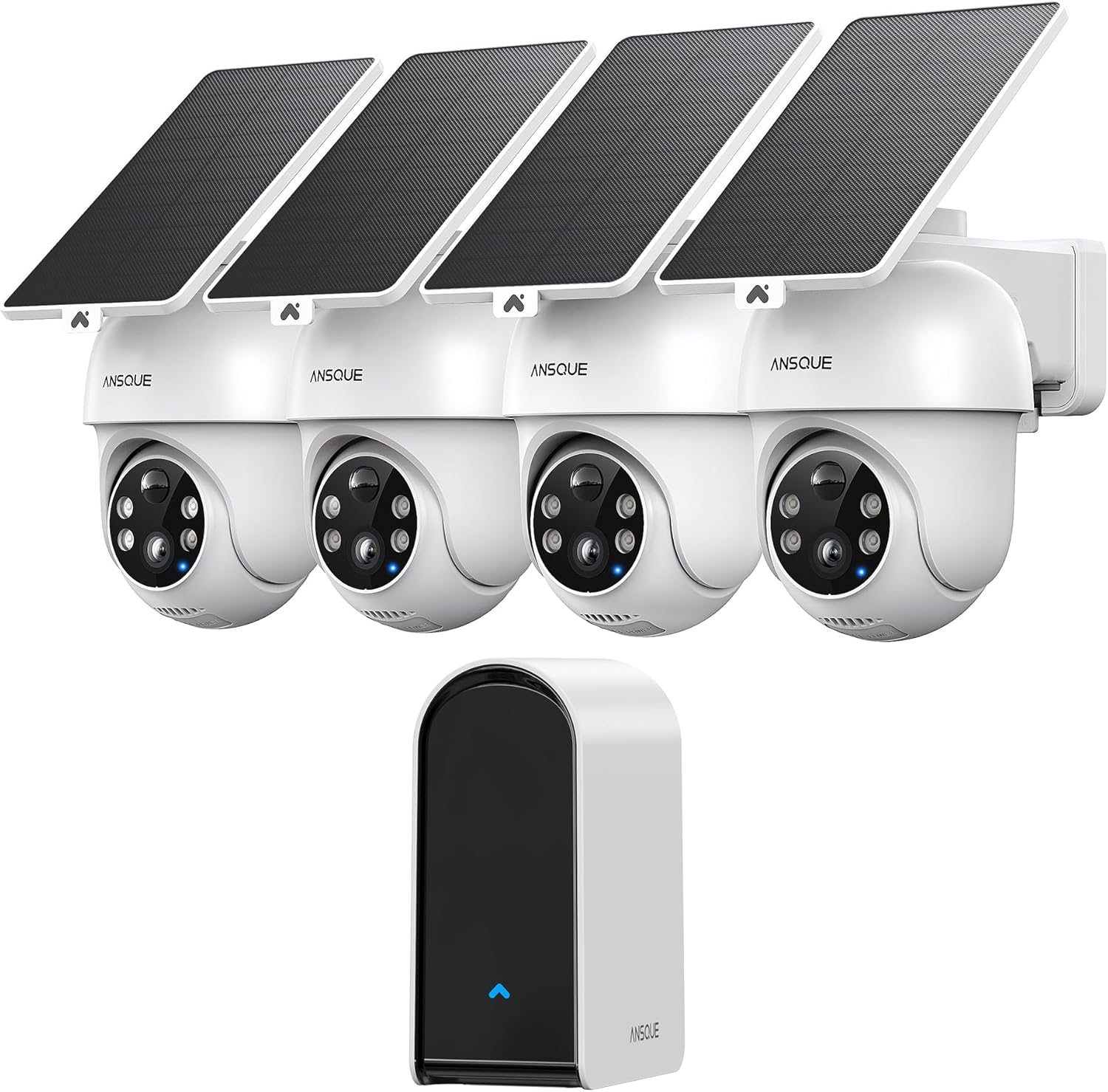
- Built-in 32GB local storage holds up to 120 days of event-loop recording without a subscription
- 360° pan-tilt-zoom coverage eliminates the blind spots a fixed-lens camera leaves at driveway corners
- Four LED lights plus a PIR sensor spot motion up to 40 ft (12 m) away after dark
- Runs on a 2-hour solar top-up, so there is no cable to route to an outdoor mount
- 8x digital zoom lets you pull in a license plate or package label without walking outside
Cons
- Local storage tops out at 32GB, so heavy motion zones will loop and overwrite footage faster than a cloud-backed system
- Solar charging depends on consistent daylight, so shaded mounting spots may need a supplemental charge
- Four-camera kit ships as one fixed bundle, with no single-camera expansion option listed
Each camera mounts with the included hardware and draws power from an attached solar panel, so no outdoor electrical outlet is needed nearby. Two hours of direct sunlight is enough to keep the unit running through a full day and night cycle, and the built-in panel eliminates the cable run that wired outdoor cameras usually require.
- 360° pan-tilt-zoom motor covers a driveway, porch, or pool area from a single mounting point
- Cross-camera tracking hands a moving subject off between units instead of losing them at the edge of one frame
- Best placed where the panel gets consistent midday sun rather than under an eave or dense tree cover
Because the kit ships with four cameras, most single-family homes can cover front, back, and side approaches from one setup without buying separate accessories.
Footage is written to a 32GB local storage module built into the base station, giving up to 120 days of event-loop recording without a recurring subscription or a memory card to swap. Video is protected with AES-128 encryption, and if a camera is removed from its mount, recorded clips stay on the base rather than the camera itself.
- No app paywall: motion alerts, playback, and zone settings are included with the hardware
- Loop recording means older clips are overwritten once the 32GB module fills, so long-term archiving needs a manual backup
- 2K color night vision keeps footage readable after dark instead of switching to grainy black-and-white
This setup suits households that want footage to stay on-site rather than uploaded to a cloud server by default.
The kit covers cameras, mounting hardware, and solar panels, but a few extras make setup smoother. A phone or tablet with the companion app is required to view live feeds and set custom detection zones, and a stable home Wi-Fi connection is needed since the cameras are not cellular-connected.
- Two-way talk needs a quiet mounting spot; wind noise near the microphone can mask the person speaking
- Auto human tracking works best in open areas like driveways and yards rather than cluttered porches with furniture
- Package includes four cameras and one base station, so an add-on camera purchase is not offered separately
Best suited to a single-family home perimeter rather than an apartment balcony or a rental where permanent mounting is not an option.
Pros
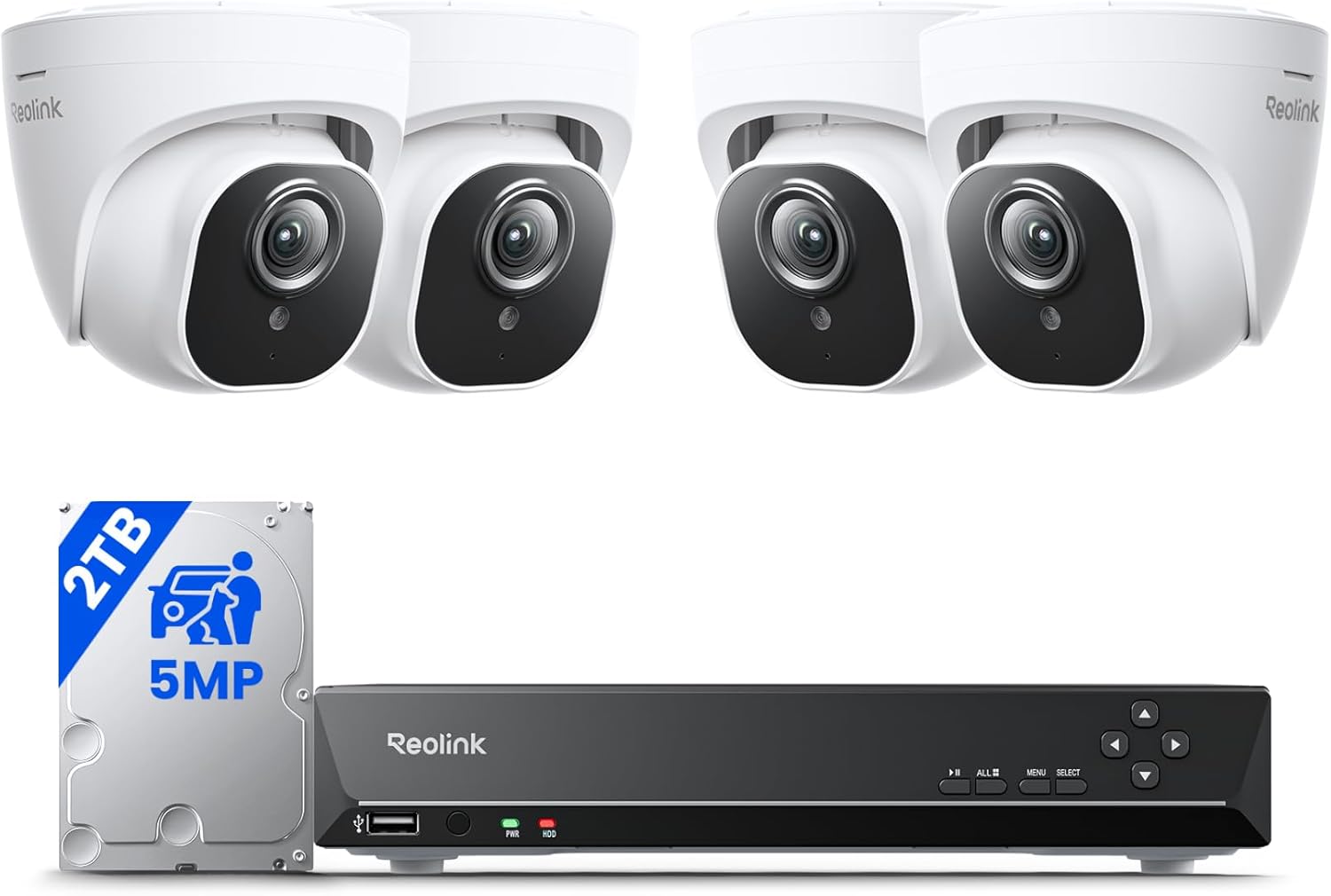
- Includes 4 wired 5MP PoE cameras plus an 8-channel NVR with a pre-installed 2TB HDD
- Infrared night vision reaches up to 100ft in the dark for outdoor coverage
- Person, animal, and vehicle detection filters out false alerts from bugs or leaves
- Built-in microphones on the cameras capture audio alongside video for fuller context
- NVR's e-SATA port supports adding an external 8TB HDD for extended storage
Cons
- Pre-installed 2TB HDD stores roughly ten days of continuous recording before older footage overwrites, unless expanded
- All four cameras are wired PoE units, so cable runs to each camera location are required — there's no wireless option in this kit
- Smart detection accuracy depends on keeping camera firmware updated to the latest version
This 8-channel kit pairs four 5MP PoE cameras with an NVR built for continuous home or property monitoring.
- 5MP HD resolution across all four included cameras
- Infrared night vision effective up to 100ft in darkness
- Smart detection separates people, animals, and vehicles from irrelevant motion like bugs or leaves
- Built-in microphones record audio alongside video footage
General motion detection remains available as a fallback alongside the smart classification. Because detection accuracy depends partly on firmware, keeping all four cameras updated to the latest version helps maintain the lower false-alert rate the system is built around.
Setup is designed around a plug-and-play PoE connection between each camera and the central NVR.
- Each of the 4 cameras connects to the NVR over a single PoE Ethernet cable, carrying both power and video
- No separate power adapters needed at each camera location thanks to PoE
- NVR handles recording centrally rather than requiring per-camera storage
Because every camera is wired, planning Ethernet cable runs to each mounting location ahead of installation is necessary — there is no wireless camera option within this particular kit. Once cabled, connecting each camera to the NVR is meant to be straightforward without additional network configuration.
Recording storage is handled centrally through the included hard drive, with room to expand.
- Pre-installed 2TB HDD stores about ten days of recording before older footage overwrites
- An additional external 8TB HDD can be added via the NVR's e-SATA port for longer retention
- Free Reolink app enables remote playback and live viewing from a smart device
Households wanting more than ten days of rolling footage should plan on the external HDD expansion from the start, since the internal drive capacity is fixed at 2TB. Remote access through the app does not require an ongoing subscription for basic playback and live viewing.

Pros
- 8 cameras rated IP67 for outdoor exposure, each recording at 5MP resolution
- 355-degree pan plus 90-degree tilt per camera for coverage without fixed blind spots
- Pre-installed 1TB hard drive stores 24/7 footage for 15+ days before overwriting
- Color night vision activates via 6 onboard LEDs when human motion is detected, up to 4 cameras
- Functions on a local monitor without an internet connection or monthly subscription fee
Cons
- AI person/vehicle detection and color night-vision spotlight activation are limited to 4 of the 8 cameras
- Pan/tilt is controlled manually through the app or DVR; there is no automatic tracking or patrol cruise mode
- Wired system requires running BNC cable to each camera, unlike a battery or Wi-Fi kit
Each of the 8 cameras covers 355-degree pan and 90-degree tilt, adjustable from the DVR remote or the mobile app, giving broad coverage without a fixed blind spot. Night vision runs in two modes: an infrared black-and-white mode reaching 100 ft in darkness, and a color mode that triggers 6 onboard LEDs when human motion is detected on up to 4 of the cameras.
- 5MP resolution per camera, sharper than 1080p
- AI human/vehicle filtering reduces false alerts from animals or leaves
- Push notifications sent to the app with no monthly fee
The system does not include automatic tracking or a cruise patrol mode; pan and tilt adjustments are manual, made through the app or DVR interface rather than the camera moving on its own.
The DVR ships with a pre-installed 1TB hard drive, storing continuous or motion-triggered footage for 15 or more days before older recordings are overwritten. Playback supports 256x fast-forward to skip through long recordings quickly, along with an event filter that searches by person or vehicle tags on the 4 AI-enabled cameras.
- 24/7 or motion-only recording modes
- Local monitor viewing without an internet connection
- 256x playback speed for scanning footage
Because storage is local to the included 1TB drive rather than cloud-based, there is no recurring subscription fee, but footage retention depends on how much of the drive gets used by continuous versus motion-only recording settings.
Cameras mount to a wall or ceiling using 4 screws each, then connect to the DVR through BNC cable rather than Wi-Fi. All 8 cameras and the DVR are sealed to IP67, built to run across -40C to 60C (-40F to 140F) for outdoor use in most climates.
- Wired BNC connection to the DVR, not wireless
- IP67 sealing on all included cameras
- One-way audio lets you speak through the camera
Because the system is fully wired, installation involves running cable from each camera position back to the DVR, which takes more planning than a battery or Wi-Fi camera kit but avoids the range and interference issues wireless systems can have.

Pros
- Simple to set up. Seriously secure. Get ready to protect right out
- Advanced professional monitoring for fast police response with no
- Complete control of your system with the SimpliSafe App - Arm,
- Stop crime in real time - With the Smart Alarm Wireless Indoor
- Dimensions of 12.2 x 10.8 x 6.3 inches engineered for optimal spatial fitting
Cons
- Requires verifying placement clearance for 12.2 x 10.8 x 6.3 inches prior to installation
- Requires proper surface alignment during initial installation
Designed with precision, the SimpliSafe 11 Piece Wireless Home Security System Gen 3 delivers versatile performance for modern Home Security Systems spaces. Technical integration focuses on functional efficiency, incorporating Simple to set up. Seriously secure. Get ready to protect right out of the box. Just plug in the Base Station, place your wireless camera and sensors where you want, and start protecting your home. No wiring or drilling required.. Its balanced engineering incorporates Advanced professional monitoring for fast police response with no hidden fees or long term contracts. With optional Core Monitoring and intruder intervention, SimpliSafe agents can act on an alarm within 5 seconds. Following false alarm grace period. SimpliSafe products and professional monitoring services are only offered for sale and supported in the US to streamline day-to-day interactions. Measurements of 12.2 x 10.8 x 6.3 inches provide clear dimensional boundaries for precise space planning.
Evaluating build quality and structural execution reveals strong manufacturing standards across components. The physical build incorporates Complete control of your system with the SimpliSafe App - Arm, disarm and protect anytime, anywhere, providing essential protection against surface wear. High tolerance assembly prevents unexpected mechanical looseness during daily operation. Robust physical construction provides verified peace of mind during heavy daily usage. Thoughtful spatial layout allows versatile placement across modern living environments. Dependable hardware performance ensures consistent operational output throughout the year. Precision engineering delivers a stable foundation tailored for active household demands. Carefully selected components ensure minimal maintenance overhead over long service life.
Long-term operational satisfaction is supported by adhering to standard installation and cleaning practices. Thanks to Stop crime in real time - With the Smart Alarm Wireless Indoor Camera and 24/7 live guard protection exclusively from SimpliSafe, monitoring agents can actively see and speak to intruders during an alarm through the two-way audio feature, spatial alignment and initial setup progress smoothly for homeowners. Simple preventative care maintains mechanical responsiveness and aesthetic value over extended use. Robust physical construction provides verified peace of mind during heavy daily usage. Thoughtful spatial layout allows versatile placement across modern living environments.

Pros
- Four identical 1080p units in one pack cover a nursery, a back door, a hallway and a garage together
- Infrared night vision reaches roughly 40 ft in a fully dark room
- microSD slot accepts cards up to 512 GB, so recording works without any cloud plan
- RTSP and ONVIF support lets each camera feed an existing NVR or a home automation server
- Built-in siren pairs with two-way audio through the onboard microphone and speaker
Cons
- Fixed lens with no pan or tilt, so each camera only ever watches the angle it was mounted at
- 2.4 GHz Wi-Fi only and mains powered through the DC adapter, so every unit needs a socket within reach
- microSD cards are not included, and person or baby-cry history beyond live alerts sits behind the Tapo Care tier
The pack contains four identical units, each measuring 2.66 x 2.15 x 3.89 in, so several rooms can be covered in one setup session.
- Each camera joins a 2.4 GHz Wi-Fi network, as 5 GHz is not supported
- Every unit runs from its supplied DC adapter and must stay plugged in, since there is no battery
- The lens is fixed with no pan or tilt, so the mounting angle is the coverage you get
That makes placement the most important decision of the install. Corners at ceiling height give the widest useful view, and pointing along a hallway rather than across it keeps a face in frame for longer. Four units spread around a house each want a socket within cable reach, which is worth checking before anything gets drilled.
Recording is local first, with a cloud tier available as an option rather than a requirement.
- A microSD card up to 512 GB slots into each camera for continuous or event recording, and no card is supplied
- The Tapo Care tier adds 30 days of video history along with motion tracking and baby-crying detection
- Push alerts distinguish general motion, a person and a baby crying
Check the manufacturer compatibility list before buying cards, since not every 512 GB card is accepted. For anyone who prefers footage never to leave the house, cards alone work fully, and the RTSP and ONVIF support means the streams can also be pulled into a local NVR or a home automation server. Cameras inside a home should be disclosed to everyone living there.
Out of the box the pack covers the cameras and their adapters, and a working installation usually needs a little more.
- Four microSD cards, or one shared cloud plan, since nothing is retained without storage
- Four mains sockets, or a multi-way strip near each mounting point
- A 2.4 GHz network name separated from 5 GHz during pairing
Optional additions matter more than they first appear. A screen-equipped smart speaker lets any of the four feeds be called up by voice. A machine running NVR or home automation software turns the RTSP streams into a single searchable archive. Night vision reaches about 40 ft indoors, so a very large room may still want a lamp left on at the far end.

Pros
- AI Motion Detection 2.0 – Driving AI to the next level,
- Tried-and-True Safe Guard – This one-stop security solution can
- Reliable 24/7 Continuous Recording – With a pre-installed 1TB
- Smart Dual-Light Effectively Guard Your Home – This newly upgraded
- Dimensions of 17.32 x 13.39 x 7.09 inches engineered for optimal spatial fitting
Cons
- Requires verifying placement clearance for 17.32 x 13.39 x 7.09 inches prior to installation
- Best placed in well ventilated indoor spaces away from excess moisture
The ANNKE ANNKE 3K Lite Wired Security Camera System Outdoor with AI offers a refined combination of structural durability and user convenience for Surveillance DVR Kits setups. Key physical design elements prioritize user comfort through AI Motion Detection 2.0 – Driving AI to the next level, human&vehicle detection and flexible detection area are more accurate than before. For quicker locating in crucial moments, human&vehicle smart searching in recordings offers you great help.. Equipped with Tried-and-True Safe Guard – This one-stop security solution can work with TVI, AHD, CVI, CVBS & IP cameras, the kit includes 1080P cams. The 8CH 3K lite DVR can hook up with 1080P@30fps or 3K/5MP@20fps cams. Therefore, you can also DIY it with other cameras in your home., the hardware delivers reliable structural support under regular demands. Measurements of 17.32 x 13.39 x 7.09 inches provide clear dimensional boundaries for precise space planning.
Component assessment indicates careful selection of durable materials tailored for active usage. Key structural features including Reliable 24/7 Continuous Recording – With a pre-installed 1TB HDD(Support up to 10TB HDD), providing 24/7 surveillance recording for you. Upgraded H.265+ saves more storage space and uses less bandwidth, recording videos longer and smoother viewing. support overall longevity during regular operational cycles. Careful manufacturing ensures that frame connections retain rigidity over long term use. User centered design choices streamline routine interactions and enhance practical convenience. Robust physical construction provides verified peace of mind during heavy daily usage. Thoughtful spatial layout allows versatile placement across modern living environments.
Preserving structural integrity over extended service life is achieved through consistent daily care. Attributes like Smart Dual-Light Effectively Guard Your Home – This newly upgraded security system offers you a crisp full color night vision, IR mode and color night vision switch flexibly. Once detect intruders, immediate pushes pop up on your phone, securing your peace of mind day&night. allow hassle-free integration into existing room configurations. Preventing prolonged exposure to harsh environmental factors helps preserve original finish quality. User centered design choices streamline routine interactions and enhance practical convenience. Robust physical construction provides verified peace of mind during heavy daily usage.

Pros
- 355 deg horizontal and 90 deg vertical rotation from a 2.95 in. square footprint
- Four units in one box cover a nursery, hallway, main room and back door
- USB-C mains lead supports continuous 24/7 recording rather than event clips only
- Two-way audio plus sharing with up to 3 additional household accounts
- 2K sensor with infrared night vision for unlit rooms
Cons
- 2.4 GHz Wi-Fi only, so a merged dual-band network often needs splitting during pairing
- Mains powered with no battery, so every camera needs an outlet within cable reach
- No SD cards are supplied with the four-pack
Each of the four cameras joins a 2.4 GHz network through the companion app. There is no 5 GHz support, so a combined dual-band SSID sometimes needs splitting, or the 5 GHz band paused briefly, before the camera will accept credentials.
- 2.4 GHz Wi-Fi only, with no Ethernet port
- USB-C power lead on every unit
- One main account plus 3 shared viewers
- Instant motion push alerts per camera
Pair each camera beside the router first, then move it to its final spot and confirm the stream holds. Four units on a single access point add up, so a mesh node at the far end of the house keeps the picture stable during simultaneous viewing.
At 2.95 in. square and 5.87 in. tall, these sit on a shelf, a bookcase edge or a small wall bracket without dominating a room. A four-pack typically spreads across a nursery, a hallway, a main living space and a back door.
- 355 deg horizontal and 90 deg vertical travel
- 2K sensor with infrared night vision
- Indoor use only, with no weather sealing
- Corner placement covers a whole room in one sweep
Keep each unit within cable reach of an outlet, since there is no battery to fall back on. Point them away from windows at night, because infrared light bounces off glass and washes out the frame with a bright haze.
Recording runs either to a microSD card in each camera or to cloud storage through the app, and neither a card nor a subscription ships with the four-pack. A card gives round-the-clock local recording with no ongoing account; cloud keeps clips safe if a unit is removed.
- microSD card supplied separately
- Cloud subscription optional, not required
- Two-way audio through built-in mic and speaker
- Up to 3 extra people share the main account
Pick high-endurance cards, since continuous writing wears standard media quickly. Sharing caps at three additional viewers, which covers a couple plus a grandparent but not a large household where everyone wants their own login.

Pros
- Ships with a pre-installed 1TB hard drive, expandable up to 10TB for longer recording history
- Four 1920TVL 2MP cameras rated IP67 for outdoor exposure to rain and dust
- 8-channel DVR accepts TVI, AHD, CVI, CVBS and IP cameras for mixed-camera setups
- Color night vision plus IR mode switches automatically, with B&W range to 100 feet
- H.265+ compression extends recording time on the same drive versus older H.264 systems
Cons
- DVR supports up to 3K/5MP at 20fps, but the included cameras are 1080P, so the higher resolution tier requires separate camera purchases
- System weighs in at a sizable 14.57 x 11.81 x 7.56 inch DVR footprint, needing a shelf or cabinet rather than a small desk spot
- Remote access, live viewing and playback require an internet connection; only local recording works if the internet is down
This is a wired system: four cameras connect to the 8-channel DVR by cable, and the DVR itself connects to a monitor or network for viewing.
- 4 x 1920TVL 2MP cameras rated IP67 for outdoor weatherproofing
- DVR accepts TVI, AHD, CVI, CVBS and IP camera types on the same unit
- Pre-installed 1TB hard drive, expandable to 10TB
- DVR footprint measures 14.57 x 11.81 x 7.56 inches
Because the cameras are wired rather than wireless, installation involves running cable from each camera position back to the DVR, which suits a garage, attic or crawlspace run more than a fully finished home without existing conduit. Mounting hardware ships with the cameras for wall or eave installation.
The system records continuously to the built-in 1TB drive and overwrites the oldest footage once storage fills, so there is no subscription fee for local recording.
- H.265+ compression reduces file size versus H.264 for longer retention on the same drive
- AI human and vehicle detection reduces false alerts from branches or animals
- Privacy masking blocks up to 4 areas from being recorded
- Remote access via the ANNKE Vision app when internet is available
Because recording and playback are stored locally on the hard drive rather than in the cloud, there is no monthly fee tied to storage. The tradeoff is that remote viewing depends on the home's internet connection; the DVR keeps recording locally even if that connection drops.
The kit includes four 1080P cameras, cabling and the 8CH DVR, but a few extras make setup smoother depending on the install location.
- A monitor or spare TV with HDMI input for local viewing during setup
- Additional cable length if camera runs exceed what's included, since distances vary by installation
- A UPS or surge protector for the DVR, since it runs continuously
Anyone planning to mix in the higher-resolution 3K/5MP cameras the DVR supports will need to buy those separately, as the bundled units are 1080P. For a straightforward four-camera perimeter setup with a year or more of local storage, the included hardware is enough to start recording the same day it's mounted.

Pros
- Base Station includes a built-in cellular connection and up to 24 hours of battery backup during power outages
- 95dB siren is loud enough to be heard through most interior doors and walls
- Includes 4 entry sensors to cover multiple doors and windows out of the box
- The included indoor camera has a physical stainless steel shutter for closing off the lens without unplugging it
- No-wiring, no-drilling setup lets sensors be placed with adhesive rather than screws
Cons
- Professional monitoring is optional and separate from the hardware, so live police dispatch requires an added monitoring plan
- The indoor camera is wired, not a battery or outdoor unit, so it needs a nearby power outlet
- 4 included entry sensors may not cover every door and window in larger homes without buying more
The system is designed for plug-and-place installation: the Base Station and camera connect to power, entry sensors attach with adhesive backing rather than screws, and the companion app walks through placement for each piece. No wiring or drilling is required for a standard setup, which keeps installation to roughly the time it takes to place each sensor.
- Base Station: built-in cellular connection, 24-hour battery backup
- Entry sensors included: 4
- Mounting: adhesive, no drilling required
Because the Base Station has its own cellular link, alarm signals can still reach the monitoring center during an internet or Wi-Fi outage, which is a meaningful backup for anyone relying on the system as their primary home protection rather than a secondary layer.
The included indoor camera has a built-in stainless steel physical shutter, letting the lens be closed off completely rather than just software-disabled, which is a stronger privacy control than a digital toggle alone. Video verification, when enabled, allows a monitoring agent to visually confirm a break-in before dispatching help.
- Camera type: wired indoor, physical shutter
- Privacy control: manual shutter close
- Verification: video-based, tied to the applicable monitoring plan
Because the camera is wired rather than battery powered, it needs to stay within reach of an outlet, which limits placement compared with a fully wireless outdoor camera. Storage and monitoring plan details depend on which service tier is active on the account.
This 9-piece bundle covers a Base Station, keypad, camera, and 4 entry sensors, which suits a starter setup for a small home but larger houses with more doors, windows, or floors will likely need additional sensors sold separately to close every entry point. The system also works with Alexa and Google Assistant for voice arm and disarm commands.
- Bundle includes: Base Station, keypad, camera, 4 entry sensors
- Voice control: Alexa and Google Assistant compatible
- Contract: none required for hardware
Additional sensors, extra cameras, and hazard detectors such as smoke or flood sensors are sold as separate add-ons rather than bundled here, so a full walkthrough of doors and windows before purchase helps identify what else to add for complete coverage.

Pros
- 12-piece bundle includes a Base Station, Keypad, 5 Entry Sensors, 2 Motion Sensors and an HD indoor camera
- Base Station includes a battery backup rated to last up to 24 hours during a power outage
- No wiring or drilling required, with sensors that install using adhesive mounts
- Built-in stainless steel shutter on the SimpliCam gives a physical, non-digital privacy option
- Compatible with Alexa and Google Assistant for voice-based arm and disarm commands
Cons
- Professional 24/7 monitoring is an optional add-on subscription, not included by default with the hardware bundle
- Motion Sensors are designed for human detection only, so households with pets will need to account for that in placement
- System relies on Wi-Fi and the SimpliSafe app for full remote control, so connectivity issues limit some features
Setup involves plugging in the Base Station and camera, then placing the 5 Entry Sensors and 2 Motion Sensors around doors, windows and rooms, all without wiring or drilling into walls. The SimpliSafe app walks through each step of placement, and professional installation is available as an alternative for buyers who prefer not to self-install.
- No wiring or drilling required for sensor placement
- Base Station includes a 95dB siren and 24-hour battery backup
- App-guided setup walkthrough included
Because sensors mount with adhesive rather than screws, the system is designed to be removable and re-positioned without leaving permanent holes, which matters for renters as much as homeowners.
The included SimpliCam indoor camera has a built-in stainless steel shutter that physically covers the lens between uses, giving a hardware-level privacy option beyond a software toggle. Professional 24/7 monitoring is available as an optional subscription add-on rather than bundled automatically with the hardware.
- Physical stainless steel privacy shutter on the camera
- Optional 24/7 professional monitoring subscription
- Video verification available to support faster dispatch when monitoring is active
Without an active monitoring plan, the system still arms, disarms and sends mobile alerts through the app, but professional dispatch of emergency responders depends on the optional monitoring service being enabled.
This bundle covers a typical starter setup - entry points, two rooms of motion coverage and one camera - but larger homes with more doors, windows or rooms may need additional sensors sold separately to get full coverage. A stable Wi-Fi connection is required for app control, remote arming and any camera streaming.
- Additional Entry or Motion Sensors sold separately for larger homes
- Stable home Wi-Fi network required for app and camera features
- Compatible with Alexa and Google Assistant for voice control
For multi-story homes or properties with more than five entry points, planning for extra sensors from the start avoids leaving gaps in coverage after the initial 12-piece kit is installed.
Why a Home Security Camera System Matters
A visible camera is one of the strongest deterrents against break-ins. Studies consistently show that burglars avoid homes with obvious surveillance, and even when an incident does happen, recorded footage becomes critical evidence for police and insurance claims. Beyond crime prevention, modern systems help you check on deliveries, keep an eye on pets and kids, and receive instant alerts the moment something moves near your door.
The goal of choosing among the best home security camera systems is not to buy the most expensive kit – it is to match the right features to your living situation. A studio apartment has very different needs than a two-story house with a large yard, and understanding those differences saves you both money and frustration.
Wireless vs. Wired: Which Type Fits Your Home?
The first decision you will face is how the cameras connect and receive power. Each approach has clear strengths, and the right pick depends on your property and how much installation work you are willing to do.
Wireless and Battery-Powered Systems
Wireless kits are the easiest to install because they skip cabling almost entirely. Battery and solar-powered models such as the ANSQUE Solar Wireless System can run for months on a single charge, making them ideal for renters or spots where running wires is impractical. You place the camera, connect it to Wi-Fi, and you are covered. The trade-off is that you must recharge batteries periodically and maintain a strong wireless signal to avoid dropped footage.
Wired PoE and DVR/NVR Systems
If you want set-and-forget reliability, a wired system is hard to beat. Power-over-Ethernet setups like the REOLINK 8CH PoE System deliver both power and data through a single cable, giving you rock-solid 24/7 recording without battery anxiety. Multi-camera DVR bundles such as the Hiseeu 3K PTZ System and the ANNKE 3K Lite 8CH System are excellent for larger homes that need full-perimeter coverage. The downside is a more involved installation, since you will need to route cables to each camera location.
Key Features to Compare Before You Buy
Once you know your power preference, the following features separate a dependable system from a disappointing one. Weigh each against how you plan to use your cameras day to day.
Resolution and Night Vision
Higher resolution means you can actually identify faces and license plates rather than just noticing that “someone” was there. Look for at least 2K, though many current kits now offer 3K or higher. Equally important is night performance. Color night vision, offered on systems like the ANNKE Dual Light System, captures usable detail after dark instead of grainy black-and-white images.
Storage: Local vs. Cloud
How your footage is saved affects both privacy and ongoing cost. Local storage – via SD card, hard drive, or built-in HDD – means no monthly fees and full control over your data. Systems such as the GNCC 2K Indoor Cameras record to an SD card, while larger DVR kits ship with 1TB or 2TB drives for weeks of continuous recording. Cloud storage adds convenient off-site backup but often comes with a subscription. Many buyers prefer a hybrid approach, and plenty of modern cameras support both.
Smart Detection and Alerts
Basic motion alerts trigger on every passing car or swaying branch, quickly leading to notification fatigue. AI-powered detection that distinguishes people, vehicles, and pets is far more useful. The REOLINK PoE Cameras and other AI-equipped kits reduce false alarms dramatically, so the alerts you do receive actually mean something.
Two-Way Audio and Indoor Monitoring
For indoor use, two-way audio turns a camera into a communication tool – you can tell a delivery driver where to leave a package or check on a family member. Affordable indoor options like the Tapo Indoor Camera double as baby and pet monitors with motion detection and a built-in siren, making them a smart addition to any larger outdoor setup.
Do You Need Professional Monitoring?
Some of the best home security camera systems go beyond cameras and include full alarm ecosystems with door sensors, motion detectors, and optional professional monitoring. All-in-one bundles like the SimpliSafe 11-Piece System, the SimpliSafe 9-Piece System, and the larger SimpliSafe 12-Piece System let you self-monitor for free or add 24/7 professional response without long-term contracts.
Professional monitoring makes sense if you travel often, want emergency dispatch handled for you, or simply prefer the peace of mind of a team watching over your home. Self-monitoring is perfectly adequate for many households and keeps costs down. The beauty of no-contract systems is that you can switch between the two as your needs change.
Matching a System to Your Home Size
The number of cameras you need scales with your property. Use these general guidelines to avoid over- or under-buying.
- Apartments and small homes: One to four cameras usually cover entry points and main rooms. A compact indoor kit or a single outdoor camera at the front door is often enough.
- Mid-size homes: Four to six cameras give you coverage of the front, back, driveway, and key indoor areas. A four-camera wireless or PoE kit strikes a good balance.
- Large homes and properties: Eight or more cameras paired with a DVR or NVR ensure full perimeter coverage. Wired systems shine here because they handle many streams without straining Wi-Fi.
Installation and Ongoing Costs
Before you commit, think past the sticker price. Wireless systems are the fastest to set up and require minimal tools, but factor in occasional battery maintenance. Wired systems demand more effort up front – sometimes a weekend of cable routing or a professional installer – yet reward you with years of hands-off reliability.
Also consider the total cost of ownership. A slightly pricier kit with generous local storage and no subscription can be cheaper over three years than a budget camera that locks essential features behind a monthly cloud plan. The best value comes from a system that fits your home now and still serves you as your needs grow.
Common Mistakes to Avoid When Buying
Even shoppers who research carefully can end up with a system that underperforms. Steering clear of a few common pitfalls will save you money and disappointment.
- Buying on resolution alone: A high megapixel count means little if the camera has a narrow field of view or weak night vision. Balance sharpness with coverage angle and low-light performance so you get usable footage in every condition.
- Ignoring Wi-Fi range: Wireless cameras placed far from the router often drop connection. Map your signal strength first, and consider a wired option or a mesh network for distant corners of your property.
- Overlooking subscription costs: A cheap camera can become expensive once you add a mandatory cloud plan. Favor systems with subscription-free local storage such as SD cards or built-in hard drives whenever possible.
- Forgetting weather ratings: Outdoor cameras need an IP65 or higher rating to survive rain, dust, and temperature swings. Indoor-only models will fail quickly if mounted outside.
- Skipping the app experience: You will interact with your system through its app every day. A clunky interface or unreliable notifications makes even great hardware frustrating to live with.
Taking a few extra minutes to weigh these factors ensures the system you choose keeps working smoothly long after installation day.
Quick Buying Checklist
Before you click purchase, run through this short list to make sure the system you are eyeing checks the right boxes for your home.
- Coverage: Does the camera count match your home size and key entry points?
- Power: Are you comfortable with battery maintenance, or do you prefer wired reliability?
- Storage: Does it offer subscription-free local storage, cloud backup, or both?
- Resolution: Is it at least 2K with dependable color night vision?
- Smart alerts: Does it filter people and vehicles to cut down false notifications?
- Monitoring: Can you self-monitor for free, with an option to add professional service?
Final Thoughts
Choosing among the best home security camera systems comes down to honestly assessing your property, your tolerance for installation, and how you want your footage stored and monitored. Wireless solar kits offer unmatched flexibility, wired PoE and DVR systems deliver bulletproof 24/7 recording, and all-in-one alarm bundles bring sensors and optional professional response into one package.
Start by mapping the areas you most want to protect, decide how many cameras that requires, and then match the power and storage options to your lifestyle. Any of the systems highlighted in this guide can form the backbone of a smarter, safer home – so review the shortlist above, compare the features that matter most to you, and choose the setup that gives you genuine peace of mind.