Ryan Delgado
 Picking your first gaming headset shouldn’t require a degree in audio engineering. If you’re new to PC or console gaming, you just need something comfortable, clear, and easy to plug in without fuss. This guide breaks down the best headsets for beginners in plain terms, so you can pick one that fits your setup and budget without second-guessing yourself.
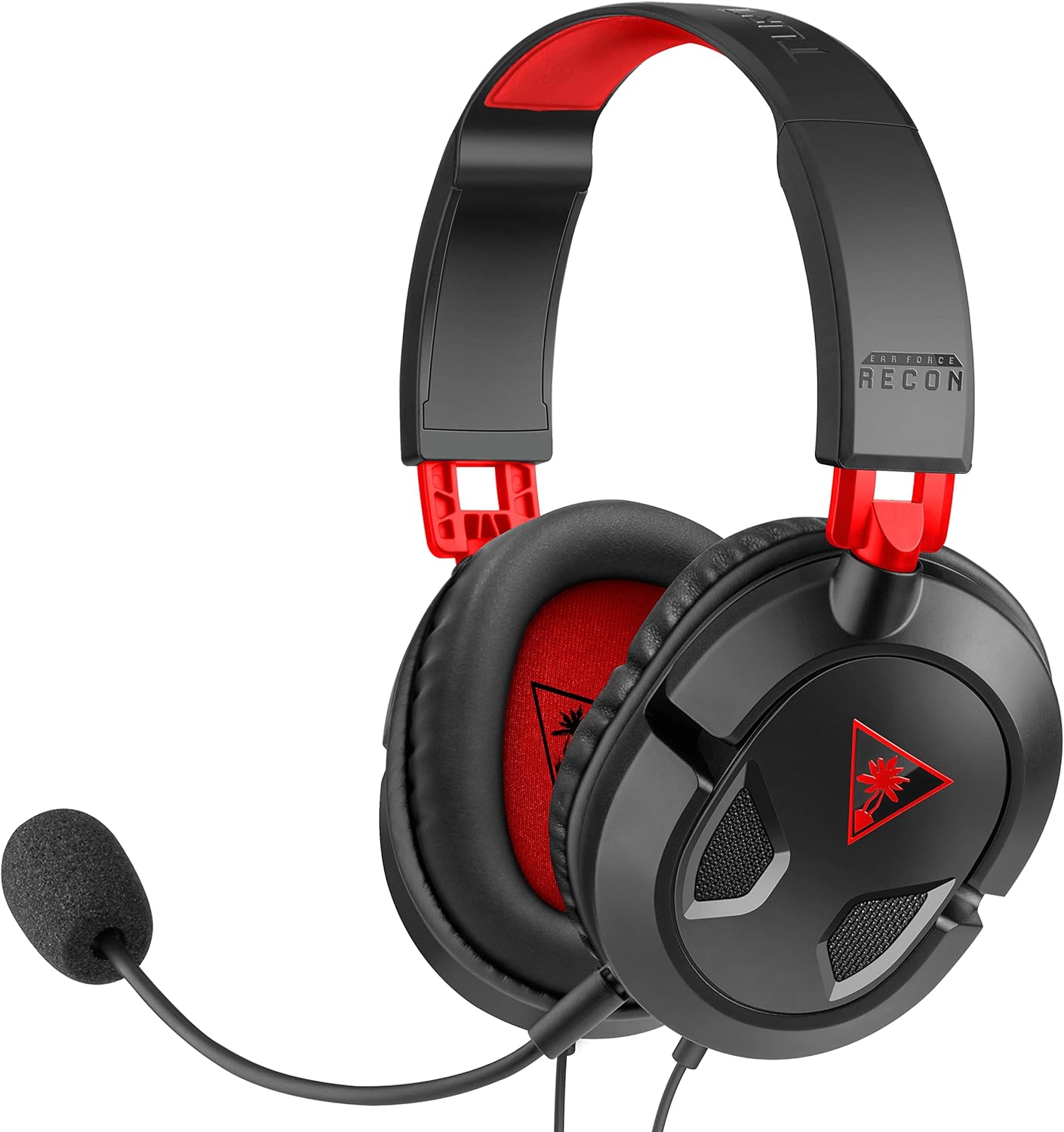
Quick answer: For most newcomers, the best headsets for beginners is the Turtle Beach Recon 50 — our #1 rated choice for 2026. It’s simple to plug in, light enough for long sessions, and priced low enough that a first-timer isn’t risking much. See the full ranked comparison, alternatives, and buying advice below.
Pros
- 40mm over-ear drivers carry both treble detail and low-end rumble from a single 3.5mm analogue feed
- Removable boom microphone lifts out entirely when you switch from team chat to music or film
- In-line module on the cable carries master volume and mic mute, so no software layer is involved
- Included splitter cable breaks the combined jack into separate headphone and microphone plugs for older towers
- Synthetic leather cushions fold flat so the set lies in a desk drawer rather than propped on the desk
Cons
- Wired only, so a single cable length dictates how far you can sit from the console
- Leatherette cushions seal well but warm the ears faster than fabric-wrapped pads over long sessions
- No surround processing, EQ presets, companion app or firmware - output is plain analogue stereo
Two 40mm over-ear drivers carry the whole signal here, fed by a single 3.5mm analogue connection rather than a USB sound card. That keeps latency low and means the headset draws no power of its own, but it also means whatever your controller or motherboard puts out is what you hear, with no onboard amplifier or surround processing in between.
- The boom microphone pulls out of the left cup when you move from team chat to music
- A high-sensitivity capsule aimed at voice pickup at normal speaking distance in a quiet room
- An in-line module on the cable carries master volume and a mic mute switch
Because the controls sit on the cable rather than in software, adjustments behave identically on a console, a laptop or a tablet. There is no companion app, no EQ profile and no firmware to keep current.
The single 3.5mm plug is the whole compatibility story. It drops straight into the headphone jack on a PS5 or PS4 controller, an Xbox Series X and S or Xbox One controller, a Nintendo Switch in handheld mode, a laptop, a Mac, a tablet or a phone.
- The included splitter cable separates the combined jack into discrete headphone and microphone plugs
- That splitter is what makes older desktop towers with two separate audio ports usable
- No drivers, pairing steps or dongles are involved on any of those platforms
Two limits are worth knowing before you commit. Machines with only a USB-C audio path need an adapter you supply yourself, and there is no wireless mode at all, so cable length sets your seating distance from the console or tower.
The frame is built light rather than heavy, which is the main reason it stays tolerable through a long evening. Full-size ear cushions wrapped in synthetic leather sit around the ear rather than pressing on it, and the headband slides to fit a range of head sizes.
- Cups fold flat, so the set stores in a drawer or a bag instead of taking desk space
- Leatherette seals well against outside noise but warms up faster than fabric pads
- Clamping force is moderate, which suits glasses wearers better than a tight competitive clamp
If you game in a warm room for four or five hours at a stretch, expect to lift the cups occasionally. For two-hour sessions, homework, calls and film watching with the microphone removed, the fit stays comfortable throughout.

Pros
- TriForce 50mm drivers split tuning across highs, mids, and lows instead of one full-range driver handling the whole spectrum
- At 240g, it's light enough for long sessions, with thicker headband padding and memory foam ear cushions
- Bendable HyperClear cardioid mic can be shaped to sit close to the mouth for clearer pickup
- Closed earcups provide passive noise isolation without needing a battery or active noise-cancelling circuitry
- 3.5mm jack works across PC, Mac, PS4, PS5, Switch, and mobile devices without pairing or drivers
Cons
- 7.1 surround sound only activates on Windows 10 64-bit through Razer's software, so consoles and Mac get stereo output instead
- Xbox One requires a separate stereo adapter that isn't included in the box
- Wired-only 3.5mm connection means no standalone Bluetooth mode for phone calls away from a console or PC
The headset is built around TriForce 50mm drivers, a design that splits the driver into three sections tuned separately for highs, mids, and lows, aiming for clearer detail across the frequency range than a single full-range driver typically delivers.
- 50mm TriForce drivers with separated high/mid/low tuning
- 7.1 surround sound available on Windows 10 64-bit only
- Closed-back earcups for passive noise isolation
On platforms outside Windows 10 64-bit, including consoles and Mac, the headset still outputs full stereo audio through the 3.5mm jack; it's specifically the virtual 7.1 surround processing that's tied to the Windows software.
A bendable HyperClear cardioid mic tapers its pickup pattern toward the back and sides, aiming to capture voice clearly while cutting background noise, and its flexible arm lets you position the sweet spot close to your mouth.
- Bendable cardioid mic with directional pickup
- 3.5mm connection works with PC, Mac, PS4, PS5, Switch, and mobile
- Xbox One requires a separate stereo adapter, sold separately
Because the connection is a standard 3.5mm jack rather than USB or Bluetooth, there's no pairing step or driver install needed on most devices - plug in and it's ready, aside from the Xbox One adapter exception.
At 240 grams, the BlackShark V2 X is built to stay comfortable through long sessions, with a padded headband and leatherette-wrapped memory foam ear cushions that spread pressure across the head rather than concentrating it at the top.
- 240g total weight
- Memory foam ear cushions with leatherette covering
- Thicker headband padding versus lighter esports-focused headsets
The closed earcups that provide passive noise isolation also trap more heat during long sessions than open-back designs, which is the usual trade-off for the added sound isolation they deliver.

Pros
- Hear Every Detail with Immersive Virtual 7.1 Audio - Experience clear
- Clear Team Communication with Directional Noise-Reducing Microphone -
- Designed for Long Gaming Sessions with Memory Foam Comfort - Premium
- Wired Universal Compatibility with Tangle-Resistant Cable - Connect
- S, Xbox One, Nintendo Switch, PC, Mac, and compatible mobile devices
Cons
- Requires checking placement surface dimensions before setup
- Requires routine care to keep exterior housing dust-free
- Initial setup requires checking operating instructions carefully
The BENGOO Gaming Headset for Xbox Series X S Xbox One PS5 offers reliable functional utility tailored for modern home and workplace environments. Designed to enhance daily productivity, this unit integrates Hear Every Detail with Immersive Virtual 7.1 Audio - Experience clear alongside Clear Team Communication with Directional Noise-Reducing Microphone -. Users will find the intuitive design straightforward to operate across various room configurations and daily routines. The versatile construction adapts easily to personal workspaces, providing consistent practical value and streamlined usability. Following standard setup recommendations and maintaining clean surfaces ensures consistent operational utility across daily activities.
Built using resilient structural components, this unit features a sturdy outer housing engineered to resist operational wear. Precision manufacturing ensures that all joints and surface connections remain firmly aligned during regular daily activity. Designed for Long Gaming Sessions with Memory Foam Comfort - Premium reinforces overall physical stability over extended service periods. Structural integrity remains firm throughout regular usage, giving owners peace of mind. Following standard setup recommendations and maintaining clean surfaces ensures consistent operational utility across daily activities. This functional equipment provides steady performance and practical convenience when properly integrated into your workspace.
Initial setup requires placing the unit on a flat, stable surface with adequate clearance around all sides for proper operation. Ensure all power or connection cables are routed neatly without sharp bends to prevent wire strain. Regular care involves wiping exterior housing surfaces with a soft cloth to remove dust buildup. Inspecting mechanical connections periodically preserves operational efficiency and maintains cosmetic appearance over time. Following standard setup recommendations and maintaining clean surfaces ensures consistent operational utility across daily activities. This functional equipment provides steady performance and practical convenience when properly integrated into your workspace.

Pros
- 2.4GHz wireless connection keeps latency at or below 20ms, close to a wired connection's responsiveness
- Tuned 50mm drivers cover footsteps, dialogue, and effects with 7.1 virtual surround processing
- Three connection modes (2.4GHz USB dongle, Bluetooth 6.0, 3.5mm cable) cover console, PC, and mobile use in one headset
- Detachable noise-canceling microphone can be removed entirely for solo play or music listening
- Rated for up to 45 hours of battery life per charge
Cons
- PS5 and PS4 do not support Bluetooth audio with this headset - those platforms need the 2.4GHz USB dongle instead
- Xbox consoles only work through the 3.5mm cable, not the wireless dongle or Bluetooth
- Closed over-ear design traps more heat during long sessions than open-back alternatives
This headset pairs 50mm drivers with 7.1 virtual surround processing, tuned to separate footsteps, reloads, and dialogue clearly during fast-paced play. The 2.4GHz wireless connection is built for latency at or below 20ms, keeping audio synced closely with on-screen action rather than trailing behind it.
- Driver size: 50mm
- Surround: 7.1 virtual
- Wireless latency: 20ms or less over 2.4GHz
The closed, over-ear design also blocks outside noise, which helps in a shared room but does trap more heat against the ears than an open-back design during extended sessions.
Three connection options are built in: a low-latency 2.4GHz USB dongle, Bluetooth 6.0, and a 3.5mm audio cable. Coverage varies by platform, so it's worth matching the connection method to the device before assuming full wireless support everywhere.
- PS5 / PS4: 2.4GHz USB dongle only, no Bluetooth audio support
- Xbox: 3.5mm cable only
- PC, Mac, Switch, mobile: 2.4GHz dongle or Bluetooth
This split matters for multi-console households - a PS5 and Xbox owner, for example, will be switching between the dongle and the cable depending on which console is in use.
The detachable, omni-directional noise-canceling microphone can be adjusted to different angles or removed completely when playing solo campaigns or listening to music. Battery life is rated at up to 45 hours per charge across the headset's wireless modes.
- Microphone: detachable, omni-directional, noise-canceling
- Battery life: up to 45 hours
- Mic removes fully for non-voice use
For clear voice pickup, the mic needs to be inserted firmly with mute switched off and selected as the input device in system settings - a step worth checking the first time it's set up on a new platform.

Pros
- Hi-Fi Stereo Sound This gaming headset delivers professionally tuned
- Clear Sound Transmission Mic Featuring a cardioid (unidirectional)
- Ergonomic Key Layout The mute button and volume wheel of this gaming
- Design Fit for Long Wear Our over-ear gaming headset s earcups last
- Anti-Tangling Braided Cable This gaming headphones feature a braided
Cons
- Requires checking placement surface dimensions before setup
- Requires routine care to keep exterior housing dust-free
- Initial setup requires checking operating instructions carefully
The NUBWO HG04L Gaming Headset for PS5 PS4 Xbox Series X S offers reliable functional utility tailored for modern home and workplace environments. Designed to enhance daily productivity, this unit integrates Hi-Fi Stereo Sound This gaming headset delivers professionally tuned alongside Clear Sound Transmission Mic Featuring a cardioid (unidirectional). Users will find the intuitive design straightforward to operate across various room configurations and daily routines. The versatile construction adapts easily to personal workspaces, providing consistent practical value and streamlined usability. Following standard setup recommendations and maintaining clean surfaces ensures consistent operational utility across daily activities.
Built using resilient structural components, this unit features a sturdy outer housing engineered to resist operational wear. Precision manufacturing ensures that all joints and surface connections remain firmly aligned during regular daily activity. Ergonomic Key Layout The mute button and volume wheel of this gaming reinforces overall physical stability over extended service periods. Structural integrity remains firm throughout regular usage, giving owners peace of mind. Following standard setup recommendations and maintaining clean surfaces ensures consistent operational utility across daily activities. This functional equipment provides steady performance and practical convenience when properly integrated into your workspace.
Initial setup requires placing the unit on a flat, stable surface with adequate clearance around all sides for proper operation. Ensure all power or connection cables are routed neatly without sharp bends to prevent wire strain. Regular care involves wiping exterior housing surfaces with a soft cloth to remove dust buildup. Inspecting mechanical connections periodically preserves operational efficiency and maintains cosmetic appearance over time. Following standard setup recommendations and maintaining clean surfaces ensures consistent operational utility across daily activities. This functional equipment provides steady performance and practical convenience when properly integrated into your workspace.
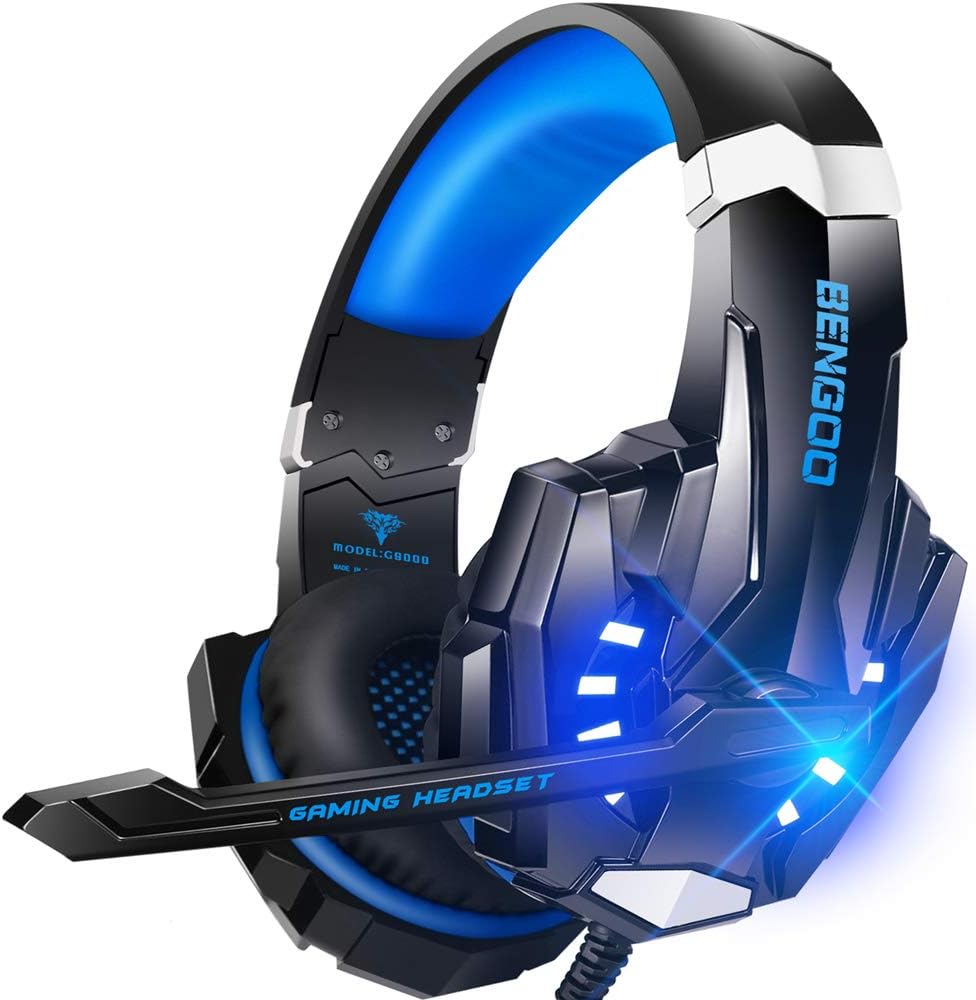
Pros
- 40mm magnetic neodymium drivers in sealed closed-back cups for clear footstep direction in shooters
- Single 3.5mm plug covers PS5, PS4, Xbox Series X and S, Switch, PC, tablets and phones
- Omnidirectional boom mic on a bendable arm you can angle toward the mouth
- Protein leather earmuffs over a multi-point headbeam that spreads clamp force across the crown
- Inline volume dial and mic mute sit at collar height on the cable
Cons
- Older Xbox One controllers without a headphone jack need a Microsoft stereo adapter that is not supplied
- The 7.1 label describes positional processing done by the console or PC, not seven discrete drivers
- Leatherette cups trap heat and break their seal slightly around glasses arms
Each cup houses a 40mm neodymium driver, a cone area large enough to register explosions and engine noise without a separate bass unit. The 7.1 label refers to positional processing handled by the console or PC, so what reaches your ears is stereo widened by the host system rather than seven separate speakers. Directional cues still read clearly, which is what most players actually need from a headset.
- 40mm magnetic neodymium drivers in a closed-back shell
- Omnidirectional boom mic on a bendable arm you can point at your mouth
- Isolation comes from the sealed over-ear cups rather than active circuitry
- Inline controls put volume and mic mute at collar height
The headset terminates in a 3.5mm connector that plugs straight into a PS5 or PS4 controller, an Xbox Series X or S pad, a Switch, a laptop or a tablet. Older Xbox One controllers without a built-in headphone jack need a Microsoft stereo adapter, which is not supplied. On desktop towers with separate microphone and headphone sockets you use the bundled splitter to break the single plug into two.
- One 3.5mm plug covers consoles, handhelds, laptops and phones
- The USB lead powers the LED lighting only and carries no audio
- No wireless mode, so the cable runs to the controller or PC at all times
The earcups use protein leather over foam, which seals against the head better than fabric and blocks more room noise, though it also traps heat during summer marathons. A multi-point headbeam spreads clamp force across the crown instead of one narrow strip, and the glowing side panels are decorative rather than functional. Anyone wearing glasses should expect the seal to break slightly at the temple arms, a trait shared by every leatherette closed-back design.
- Protein leather earmuffs with soft foam fill for extended wear
- Sliding headband and rotating cups adjust to head width
- LED lighting draws from the USB lead and can be left unplugged

Pros
- Plug-and-play USB-A connection works without installing any software
- Rotating noise-canceling boom mic tucks out of the way when not on a call
- In-line cable controls adjust volume and mute without reaching for the computer
- 6.23 ft (1.9 m) USB cable gives room to stand and stretch during long calls
- Certified to work with Chromebook as well as standard Windows and Mac systems
Cons
- Wired USB-A connection only, with no Bluetooth or wireless option for cordless use
- Leatherette ear cushions can feel warm during extended multi-hour sessions
- Fixed cable length means desk position is constrained by how far 6.23 ft reaches
This headset is built around clear voice calls first, with music and media as a secondary use.
- Fine-tuned 30mm audio drivers deliver digital stereo sound for calls, meetings and music
- A rotating noise-canceling microphone reduces background noise so voices come through clearly
- The boom mic can be tucked out of the way when not actively on a call
- In-line controls on the cable allow quick volume adjustment and mute without touching the computer
Because the mic is fixed to the left side of the headband, positioning is less flexible than headsets with fully adjustable dual-side booms, though the rotating design still covers most desk setups.
Getting started requires nothing beyond a free USB-A port.
- USB-A plug-and-play connection needs no drivers or software installation
- Certified to work with Chromebook in addition to Windows and Mac systems
- A 6.23 ft (1.9 m) cable gives freedom to move without unplugging
- No Bluetooth or 2.4GHz wireless option is offered, so the headset stays tethered to the connected device
Because the connection is wired only, this headset suits a fixed desk setup better than situations calling for cordless movement around a room.
Comfort features focus on keeping the headset wearable through a full workday of calls.
- An adjustable headband accommodates different head sizes
- Swivel-mounted leatherette ear cushions are designed for hours of continuous wear
- Cushions are easy to clean, useful for shared office equipment
- Packaging uses FSC-certified paper as part of Logitech's sustainability practices
Because the cushions are leatherette rather than fabric mesh, expect less breathability than mesh-covered headsets during long back-to-back meetings in a warm room. Wiping the cushions down between shifts helps keep them fresh when the headset is shared among several people in an office setting.

Pros
- Superb 7.1 Surround Sound This gaming headset delivering stereo
- Cool style gaming experience Colorful RGB lights create a gorgeous
- Great Humanized Design Comfortable and breathable permeability protein
- Sensitivity Noise-Cancelling Microphone 360 omnidirectionally rotatable
- Gaming Platform Compatibility This gaming headphone support for PC,
Cons
- Requires checking placement surface dimensions before setup
- Requires routine care to keep exterior housing dust-free
- Initial setup requires checking operating instructions carefully
The Ozeino Gaming Headset for PC Ps4 Ps5 Xbox Headset with offers reliable functional utility tailored for modern home and workplace environments. Designed to enhance daily productivity, this unit integrates Superb 7.1 Surround Sound This gaming headset delivering stereo alongside Cool style gaming experience Colorful RGB lights create a gorgeous. Users will find the intuitive design straightforward to operate across various room configurations and daily routines. The versatile construction adapts easily to personal workspaces, providing consistent practical value and streamlined usability. Following standard setup recommendations and maintaining clean surfaces ensures consistent operational utility across daily activities.
Built using resilient structural components, this unit features a sturdy outer housing engineered to resist operational wear. Precision manufacturing ensures that all joints and surface connections remain firmly aligned during regular daily activity. Great Humanized Design Comfortable and breathable permeability protein reinforces overall physical stability over extended service periods. Structural integrity remains firm throughout regular usage, giving owners peace of mind. Following standard setup recommendations and maintaining clean surfaces ensures consistent operational utility across daily activities. This functional equipment provides steady performance and practical convenience when properly integrated into your workspace.
Initial setup requires placing the unit on a flat, stable surface with adequate clearance around all sides for proper operation. Ensure all power or connection cables are routed neatly without sharp bends to prevent wire strain. Regular care involves wiping exterior housing surfaces with a soft cloth to remove dust buildup. Inspecting mechanical connections periodically preserves operational efficiency and maintains cosmetic appearance over time. Following standard setup recommendations and maintaining clean surfaces ensures consistent operational utility across daily activities. This functional equipment provides steady performance and practical convenience when properly integrated into your workspace.
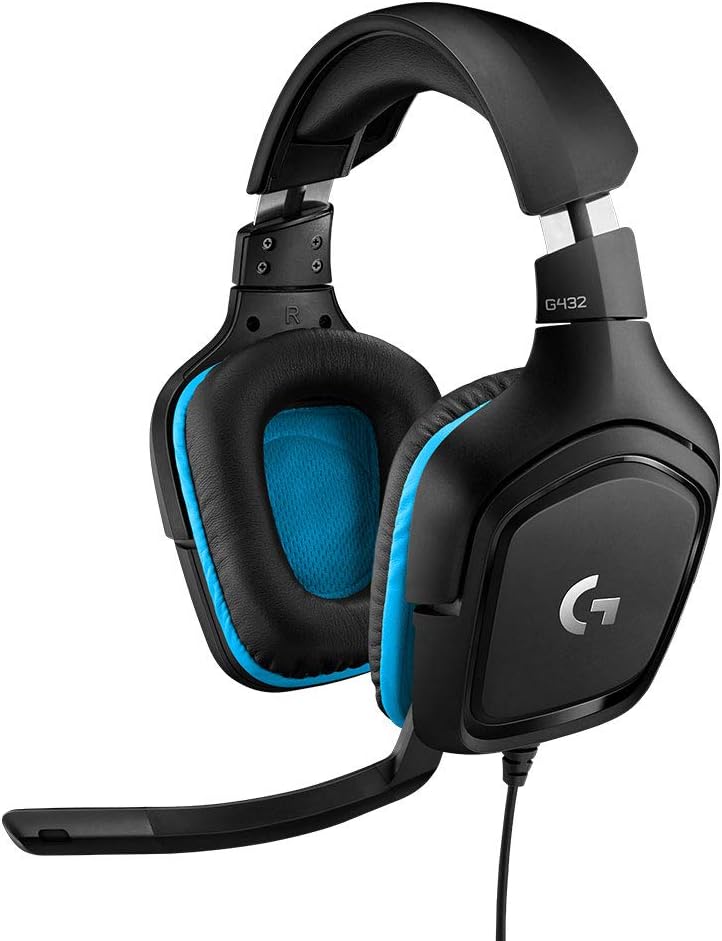
Pros
- 50 mm drivers paired with DTS Headphone:X 2.0 positional processing through the bundled USB sound card
- A 6 mm boom mic mutes itself when flipped up, so there is no inline switch to hunt for mid-round
- Both a USB adapter and a 3.5 mm cable are included, covering PC, Mac, Switch and PlayStation from one set
- Ear cups rotate 90 degrees to lie flat on a desk or sit against the collarbone between matches
- Leatherette pads and headband keep clamping pressure off the ear itself
Cons
- DTS Headphone:X 2.0 needs the G HUB software on Windows or macOS; over 3.5 mm on console it is plain stereo
- Wired only, with no wireless variant, so the cable stays tethered to the machine
- Leatherette pads seal well but trap heat, which mesh or velour alternatives avoid over long sessions
Each cup carries a 50 mm driver, larger than the 40 mm units common in this class, which helps with low-frequency weight for explosions and engine noise. Surround comes from DTS Headphone:X 2.0, a software layer applied by the USB sound card rather than by extra physical drivers.
- Virtual channels go beyond a fixed 7.1 layout to place height cues
- Processing runs only when the USB connection and software are in use
- The analogue 3.5 mm path stays plain stereo
Positional audio is most useful in competitive shooters where footstep direction matters. In music and film, many listeners switch the effect off and run stereo, since the processing widens the stage at the expense of centre focus. Both modes are a toggle away in software, so it is worth testing per game.
Two connection routes ship in the box. The USB sound card handles surround processing on PC and Mac, while the 3.5 mm cable covers everything with a headphone jack.
- PC and Mac: USB for full surround plus mic controls, or 3.5 mm for stereo
- PlayStation 5 and 4: 3.5 mm into the controller for stereo game and chat audio
- Nintendo Switch: 3.5 mm on the handheld jack, or into a docked controller
- Phones and tablets: 3.5 mm, subject to the device having a jack or a dongle
The practical catch is that surround and any equaliser settings live in software on a computer. Moving the headset to a console strips those back to whatever the console mixes natively, so treat the surround feature as a PC benefit rather than a universal one.
The frame is lightweight plastic with a padded headband and leatherette-covered memory foam on the cups. Cups swivel through 90 degrees, which lets them lie flat when the headset hangs around the neck and helps the pads sit level against different head shapes.
- Flip-to-mute boom with a 6 mm capsule
- Inline volume wheel on the cable
- Pads are replaceable when they eventually flake
Leatherette gives a better seal than fabric, which improves bass and passive isolation, but it does not breathe. Sessions past a couple of hours in a warm room will get sweaty, and that is the honest trade for the isolation. The flip-up mute is the standout ergonomic touch, since the mic position itself tells you the state at a glance.

Pros
- 2.4GHz USB and Type-C wireless connection keeps latency under 30ms for real-time in-game audio cues
- 50mm drivers paired with 2.4G lossless wireless deliver detailed bass and directional accuracy for footsteps and gunfire
- Quick charge feature adds about 100 minutes of use from just 10 minutes of charging when battery runs low
- Dual wireless modes cover both a 2.4GHz USB dongle for PC and consoles plus Bluetooth for phones, laptops, and Switch
- Backup 3.5mm wired mode keeps the headset usable for music and calls even when the battery is depleted
Cons
- Bluetooth mode does not work directly with PS5, PS4, or PC, requiring a separate USB Bluetooth adapter that is not included
- 3.5mm wired mode only supports music and calls, not full gaming audio functionality
- USB transmitter and 3.5mm cable are not compatible with Xbox Series S, limiting console coverage
This headset pairs 50mm drivers with a 2.4G lossless wireless connection, keeping latency under 30ms for real-time audio cues in fast-paced games across titles like Fortnite, Call of Duty, and The Legend of Zelda.
- 2.4GHz USB and Type-C connection is built for low-latency, lag-free wireless audio
- Flip-up microphone design allows quick muting without digging through menus
- Multi-function buttons control volume, mute, and call answering directly on the headset
The combination targets competitive gaming scenarios where hearing footsteps or reloads a fraction of a second sooner matters.
The headset runs on a rechargeable battery with a quick-charge feature that adds roughly 100 minutes of playtime from just 10 minutes of charging when the battery runs low mid-session.
- 2.4GHz USB dongle mode is the primary recommended connection for PS5, PS4, and PC
- Bluetooth mode works with phones, laptops, and Switch, but does not connect directly to PS5, PS4, or PC without an additional USB Bluetooth adapter
- 3.5mm wired backup mode supports music and calls when battery is depleted
Because Bluetooth does not cover consoles or PC directly, the 2.4GHz dongle remains the primary connection method for those devices.
Soft memory foam ear cushions and an adjustable headband are built for extended gaming sessions, while wide device compatibility spans PC, PS5, PS4, Switch, laptops, and mobile devices.
- Intuitive button layout for volume, mute, and playback control without removing the headset
- USB transmitter and included 3.5mm cable are not compatible with Xbox Series S
- Multiple connection modes give flexibility across gaming and everyday listening use
It suits gamers who move between a PC or console setup and mobile or laptop listening throughout the day.
What to Look for in the Best Headsets for Beginners
Before you compare specs, it helps to know which features actually matter when you’re just starting out. A few basics separate a headset you’ll enjoy from one that ends up in a drawer after a week.
Comfort Comes Before Sound Quality
If a headset pinches your ears or feels heavy after twenty minutes, you won’t wear it long enough to enjoy anything else about it. Look for memory foam earcups and an adjustable headband. Beginners especially benefit from lighter builds, since you haven’t built up a tolerance for hours-long sessions yet.
Wired vs. Wireless When You’re Starting Out
Wired headsets are the easiest entry point. You plug in a 3.5mm jack or USB dongle and you’re done — no charging, no pairing menus, no dropouts. Wireless models add convenience and freedom of movement, but they also add battery management and, usually, a higher price. If this is your first headset, starting wired keeps things simple while you learn what you actually want from your gear.
Microphone Quality Matters More Than You Think
New players often focus on sound going in and forget about sound going out. A muddy or overly sensitive mic makes teammates mute you in Discord fast. Look for a flip-to-mute switch or an in-line mute button, plus some form of background noise reduction, so you’re not broadcasting your keyboard clicks to the whole lobby.
Do You Need Surround Sound Right Away?
Virtual 7.1 surround sound can help you hear footsteps in shooters, but it’s not essential on day one. Many beginners find stereo sound perfectly usable while they’re still learning a game’s mechanics. Treat surround sound as a nice bonus rather than a must-have requirement for your first purchase.
Best Headsets for Beginners by Situation
Not every new gamer has the same needs. Here’s how to match a headset to your specific setup and budget.
Best Overall Pick for New Gamers
The Turtle Beach Recon 50 earns the top spot because it does the fundamentals well without overcomplicating anything. At $25.99 with a 4.4-star rating across more than 100,000 reviews, it’s a low-risk way to see if gaming headsets are worth the investment for you. The removable mic and in-line volume controls make it easy to use across PC, PlayStation, and Xbox without extra cables or software.
Best Budget Option Under $20
If you want to spend as little as possible while you figure out your preferences, the BENGOO G9000 comes in at $19.96 and still includes 7.1 surround sound and memory foam earmuffs. It won’t compete with premium audio brands, but for a first headset that gets the job done, it’s hard to argue with the price. Just know the build feels lighter-duty, so treat it gently.
Best Wireless Pick for Beginners
If cables bother you from the start, the AOC Wireless Headset offers Bluetooth 6.0 connectivity and a claimed 45-hour battery life for $39.99. That long runtime means less time worrying about charging and more time actually playing, which matters when you’re still learning the ropes of wireless gear.
Best for Console Gaming
Console players who want a straightforward plug-and-play option should look at the BENGOO Gaming Headset. It works across Xbox, PlayStation, Switch, and PC without needing extra adapters in most cases, and the RGB lighting is a nice touch if you stream to friends over video chat.
Best for PC and Discord Chat
PC-first players who care most about clear voice chat should consider the Logitech G432. It supports DTS Headphone:X 2.0 surround and offers both USB and 3.5mm connections, so it adapts as your setup changes. The flip-to-mute mic is a small detail that makes a real difference during long Discord sessions.
Comparing Wired, Wireless, and Budget Trade-Offs
Every headset on this list makes a trade somewhere. The wired pick from our overall rankings skips battery worries but tethers you to your device, which is fine at a desk but less convenient on a couch. For more flexible options across both connection types, our best wired headsets guide and best wireless headsets roundup go deeper into which style fits different play styles once you’ve settled on a preference.
Budget picks trade premium materials for a lower price, which is often the right call for a first headset. Once you know what you like, you can decide whether it’s worth stepping up. If you’re mainly gaming on a desktop with a decent sound card, the Razer BlackShark V2 X is worth a look too — it leans lighter and simpler than some of Razer’s higher-end lines, which suits someone still getting oriented.
It also helps to think about where you’ll actually be playing. A cramped desk setup favors a lightweight wired option you can leave plugged in permanently. A shared living room, on the other hand, often works better with wireless freedom so you’re not tripping over a cable every time you stand up.
How Much Should a Beginner Spend on a Headset?
Most first-time buyers land somewhere between $20 and $50, and that range covers every headset in this guide. Spending less than $20 usually means thinner padding and a less durable mic boom, while anything above $50 starts adding features — like advanced surround processing or premium drivers — that beginners rarely notice right away.
A reasonable approach is to buy toward the lower end of that range for your first headset, then reassess after a month or two of regular use. By then you’ll know whether you value comfort, mic clarity, or wireless freedom most, and you can put your next purchase toward whichever feature actually matters to your play style. This keeps the initial cost low while still giving you a headset that performs well from day one.
Common Mistakes Beginners Make When Buying a Headset
A few missteps show up again and again with first-time buyers, and they’re easy to avoid once you know about them.
- Buying based on RGB lighting alone instead of fit and mic quality.
- Assuming wireless is always better — it adds cost and charging habits you may not want yet.
- Skipping the return window without testing the headset for at least a few real sessions.
- Ignoring headset weight, which matters far more after two hours than it does in the first five minutes.
- Overpaying for surround sound features you won’t use until you’re deeper into competitive games.
None of these mistakes are dealbreakers, but avoiding them saves you money and frustration on your first purchase.
Getting the Most Out of Your New Headset
Once your headset arrives, spend a few minutes adjusting the headband and earcup angle before your first long session — comfort settings are easy to overlook. Check your device’s audio settings to confirm the headset is set as both the input and output device, since new players often miss this step and wonder why teammates can’t hear them.
If your headset includes companion software, like some Logitech or Razer models, take a few minutes to explore the EQ presets. A small adjustment can noticeably improve dialogue clarity in games or voice chat. For anyone building out a broader setup, our best headsets with microphone picks covers mic-focused options if voice clarity becomes your top priority later on.
Who Should Consider Upgrading Later
If you find yourself gaming for several hours most days, or you start streaming and need cleaner audio for viewers, it’s worth revisiting your options after a few months. Our best headsets for gaming guide covers higher-tier picks once you’ve outgrown an entry-level setup. There’s no rush — plenty of players stick with a beginner-friendly headset for years without issue.
Frequently Asked Questions
Do beginners need an expensive headset?
No. A $20–$40 headset covers comfort, decent sound, and a usable mic, which is all most new players need. You can always upgrade once you know your preferences.
Is wired or wireless better for a first headset?
Wired is usually simpler for beginners since there’s no charging or pairing to manage. Wireless adds convenience but also a small learning curve around battery habits.
Will any headset work with both PC and console?
Many do, especially wired models with a 3.5mm jack, but always check compatibility notes first. Some wireless headsets need specific dongles for console use.
How long should a beginner headset last?
With normal care, a budget-to-midrange headset should last one to two years of regular use. Memory foam earcups tend to wear out before the internal electronics do.
What’s the biggest mistake first-time buyers make?
Choosing based on looks or lighting instead of fit and mic quality. Comfort and clear voice chat matter far more day-to-day than RGB effects.